'/%3e%3cellipse%20opacity='0.34'%20cx='327.5'%20cy='339'%20rx='264.5'%20ry='264'%20fill='url(%23paint1_linear_12724_35442)'/%3e%3cdefs%3e%3clinearGradient%20id='paint0_linear_12724_35442'%20x1='327'%20y1='-2.524e-06'%20x2='327'%20y2='389.286'%20gradientUnits='userSpaceOnUse'%3e%3cstop%20stop-color='%2327D9E5'/%3e%3cstop%20offset='0.927406'%20stop-color='%23004047'%20stop-opacity='0'/%3e%3c/linearGradient%3e%3clinearGradient%20id='paint1_linear_12724_35442'%20x1='328.02'%20y1='74.7771'%20x2='328.02'%20y2='395.312'%20gradientUnits='userSpaceOnUse'%3e%3cstop%20stop-color='%2327D9E5'/%3e%3cstop%20offset='0.927406'%20stop-color='%23004047'%20stop-opacity='0'/%3e%3c/linearGradient%3e%3c/defs%3e%3c/svg%3e)
How to Unblock Crunchyroll: 2026 Guide
WebsitesCrunchyroll unblocked: access international anime content seamlessly using residential proxies in our simple, beginner-friendly guide.


Milena Popova
Crunchyroll is one of many streaming services available in the never-ending and all-reaching depths of the internet. What makes it different is somewhat of a niche focus – the site’s library is composed entirely of anime (an ever-growing form of entertainment, originating from Japan).
Unfortunately, just like other similar services, Crunchyroll may not be accessible in every part of the world. However, you can access all of Crunchyroll’s content using proxies.
Why Could the Crunchyroll Website Be Blocked?
The road to unblocking Crunchyroll starts with understanding why the Crunchyroll website was blocked in the first place. There are many factors to consider here, starting from licensing to government censorship.
To gain a deeper understanding, let’s start with licensing. The platform’s library is not identical worldwide. A show may be available on the Crunchyroll website, but won’t play or won’t appear in your country because the streaming rights are licensed to specific regions.
In some countries, the service itself is listed as “not available” (not just one show). For example, Crunchyroll explicitly says it’s not available in Japan. This, again, is caused by licensing issues, despite Japan being the literal capital of anime, and accessing Crunchyroll there should be as easy as possible.
Besides licensing issues, some countries block or throttle foreign sites and apps via national filtering (the “Great Firewall” model). In those places, Crunchyroll may be unreachable even if the site itself isn’t specifically named. This is because the broad categories of foreign services are filtered.
Finally, work/school networks, parental controls, some ISPs, aggressive ad blockers, or certain DNS settings can prevent Crunchyroll from loading or streaming properly (and may appear as a region block).
If you fall into any of these categories or are unsure why you are unable to access this service, here’s a quick and easy way to get Crunchyroll unblocked using residential proxies .
Step-by-Step Guide to Unblock Crunchyroll
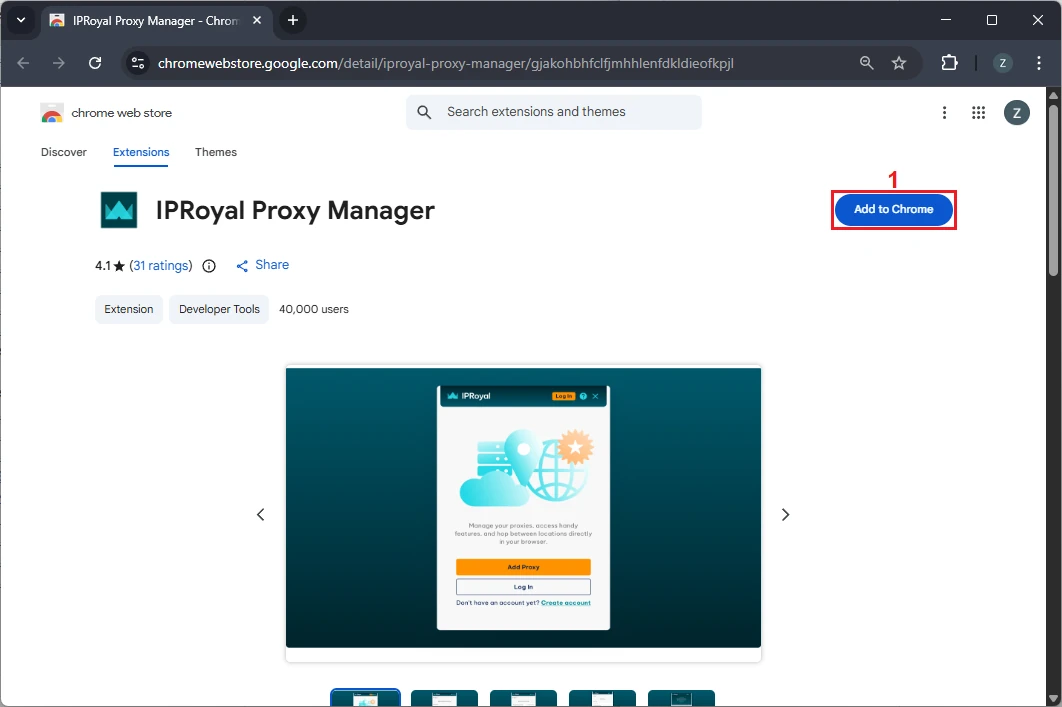
The first step to get Crunchyroll unblocked is installing the IPRoyal Proxy Manager in your browser. It is available for Google Chrome and Mozilla Firefox browsers. We’ll use the Chrome version for this tutorial.
1. Install the IPRoyal Proxy Manager
Follow the link above and click ‘Add to Chrome’ (1) to install the extension.
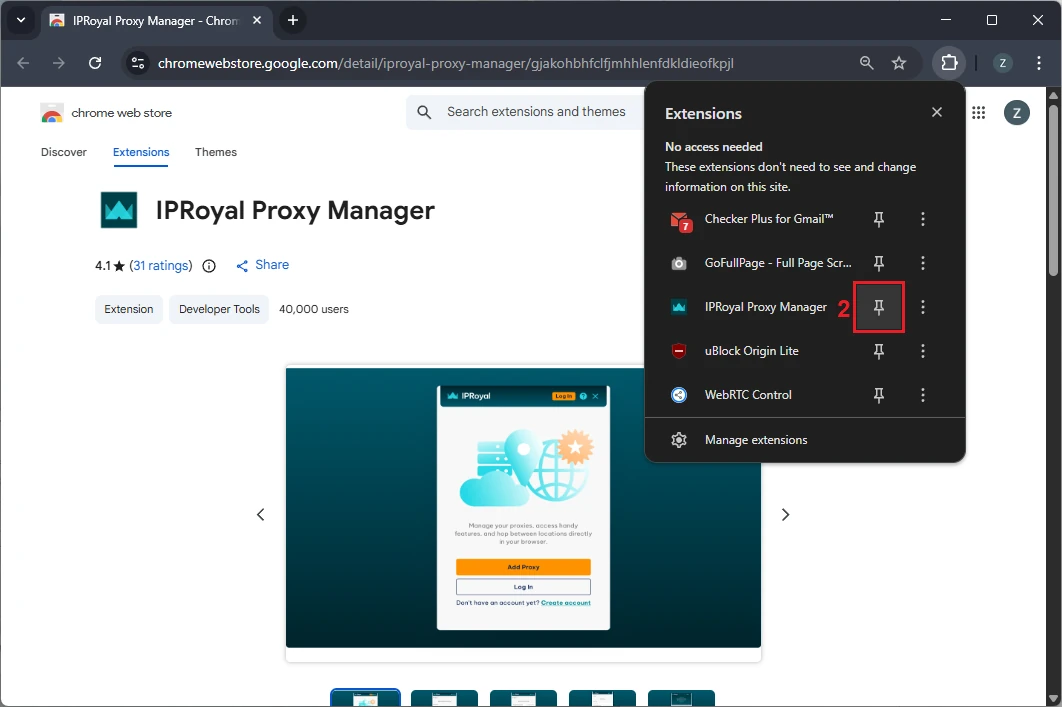
Once it’s installed, pin it (2) so it’s easily accessible.
2. Sign Up or Log In to IPRoyal
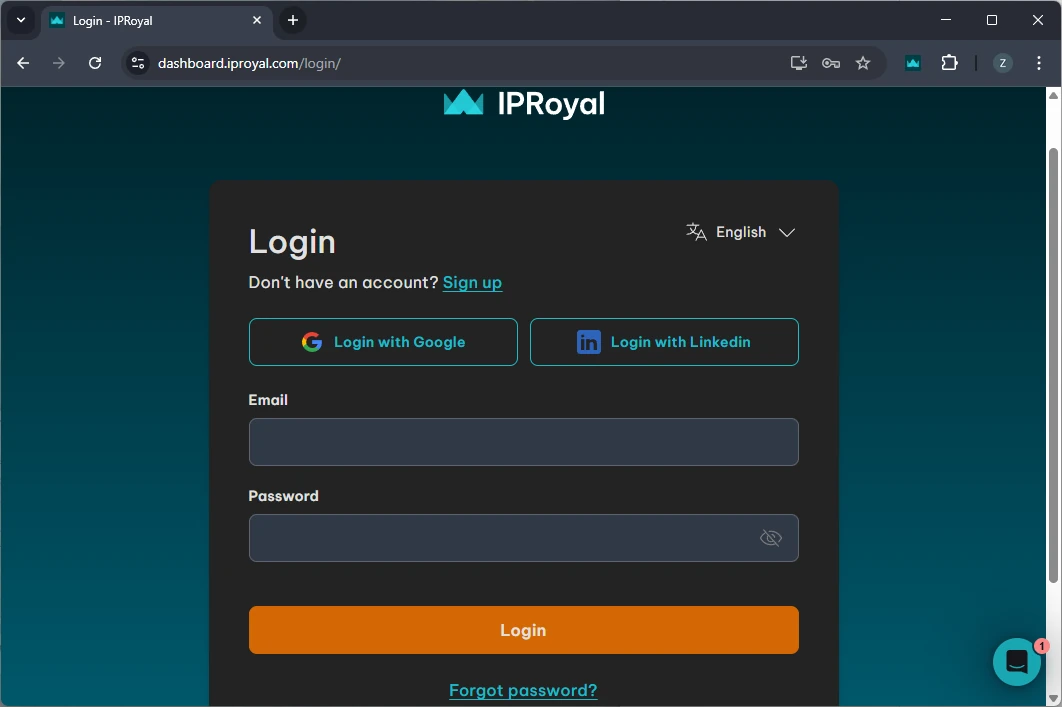
After installing the extension, sign up for an IPRoyal account or log in if you already have one.
3. Configure Your Proxies
The proxy type you choose is entirely up to you, just make sure it is not located in a country where Crunchyroll is blocked. We’ll go with high-end (3) Residential Proxies from Washington, United States (4) with sticky sessions (5) that last 12 hours (6).
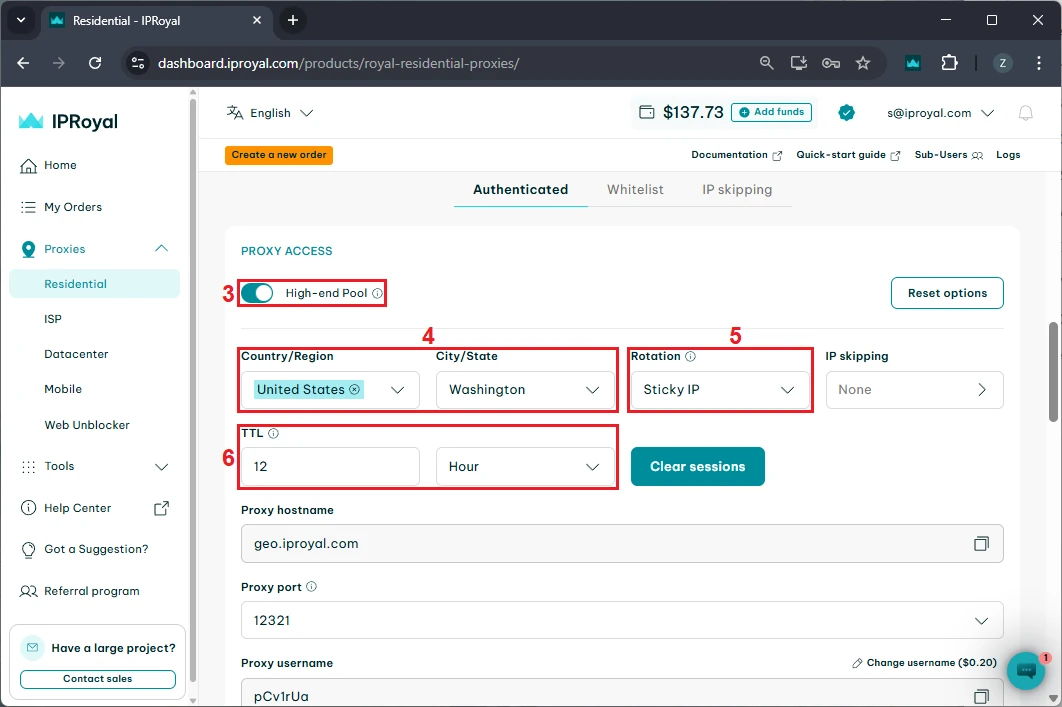
4. Retrieve Your Proxy Credentials
Scroll down to the ‘Formatted Proxy List’ section. Each line in this window is a unique string of proxy credentials in HOST:PORT:USER:PASS format. Select one and copy (7) it to your clipboard.
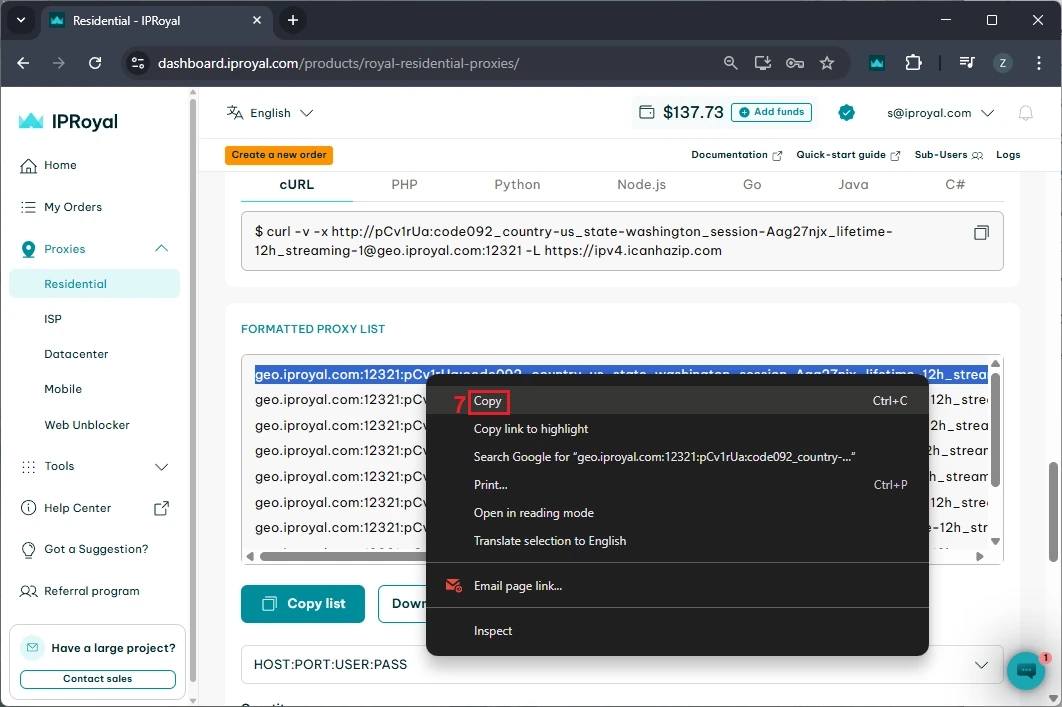
5. Add the Proxy to the IPRoyal Proxy Manager
Click the IPRoyal Proxy Manager extension icon (8) and select ‘Add Proxy’ (9).
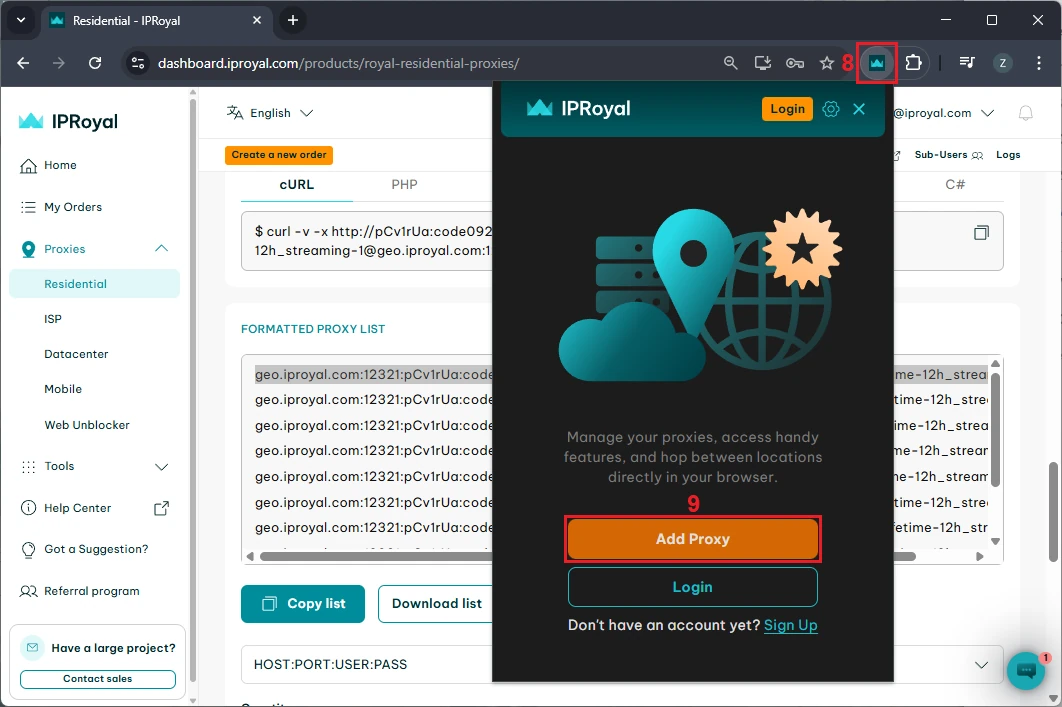
Choose ‘Manual Proxy’ (10).
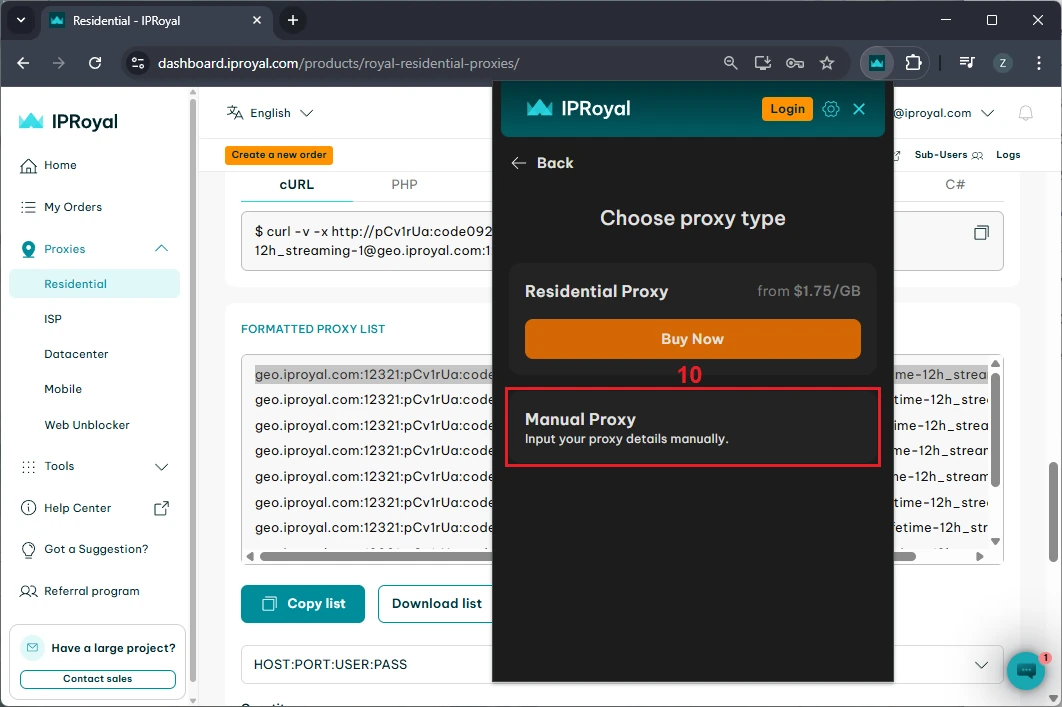
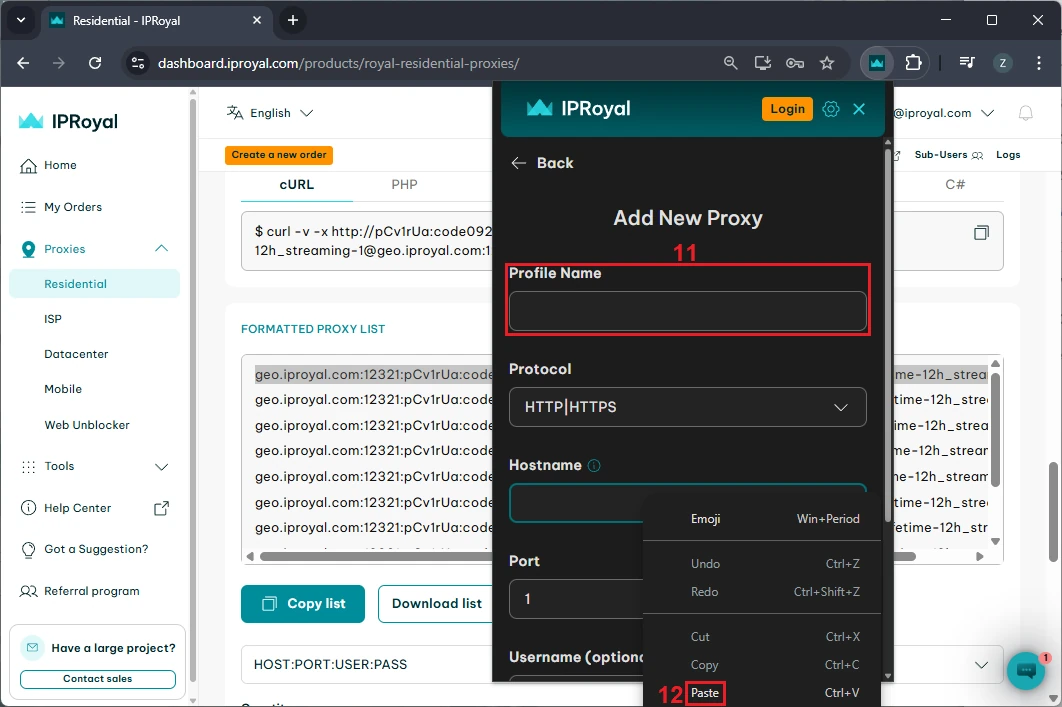
Give your profile a name (11) and paste (12) your credentials in the ‘Hostname’ field. The extension will automatically distribute your hostname, port, username, and password to their appropriate fields.
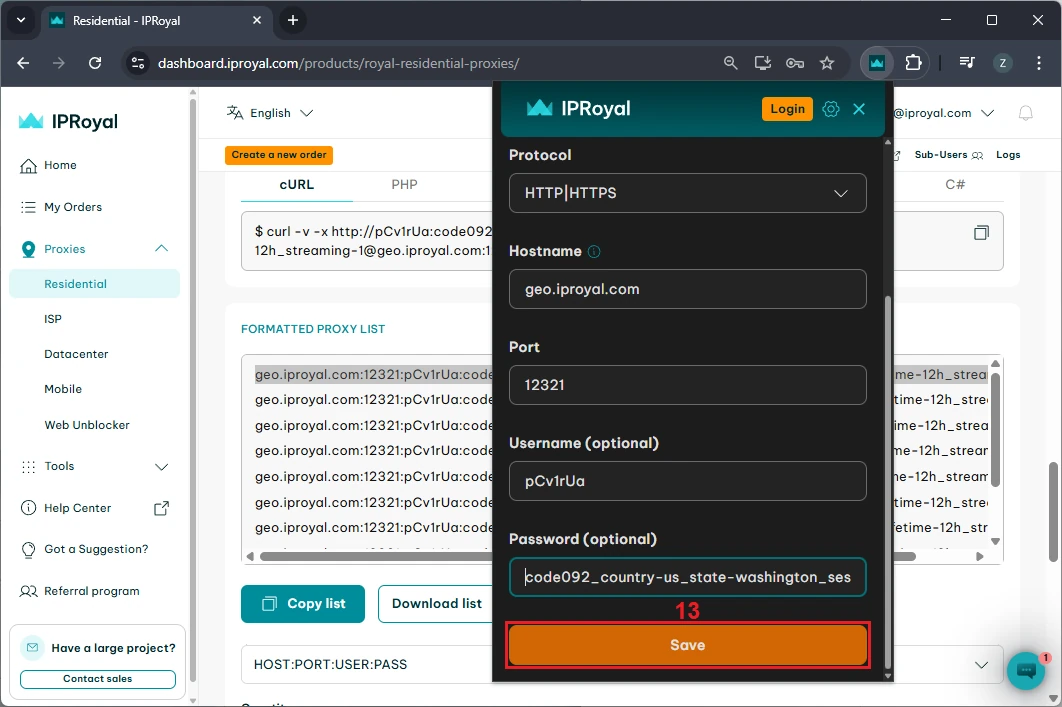
Once you’re done, click the ‘Save’ (13) button.
6. Enable the Proxy
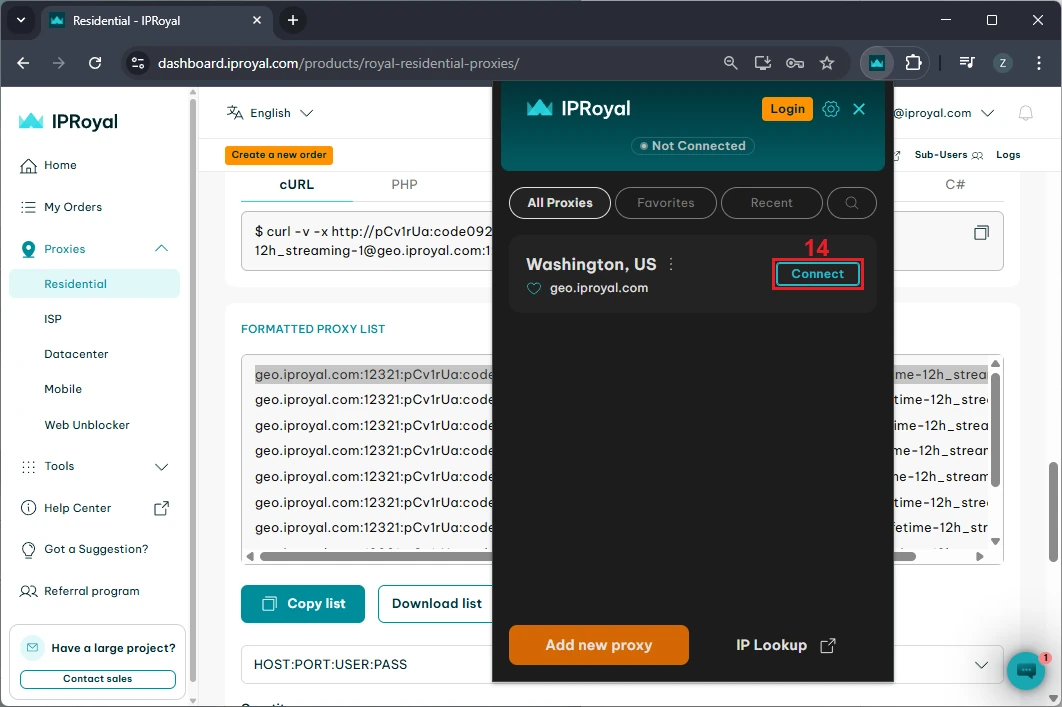
Once the proxy is added, open the IPRoyal Proxy Manager extension and click the ‘Connect’ (14) button next to your saved proxy. This will change your IP address to the one used by the proxy server.
7. Visit Crunchyroll.com to Verify Access
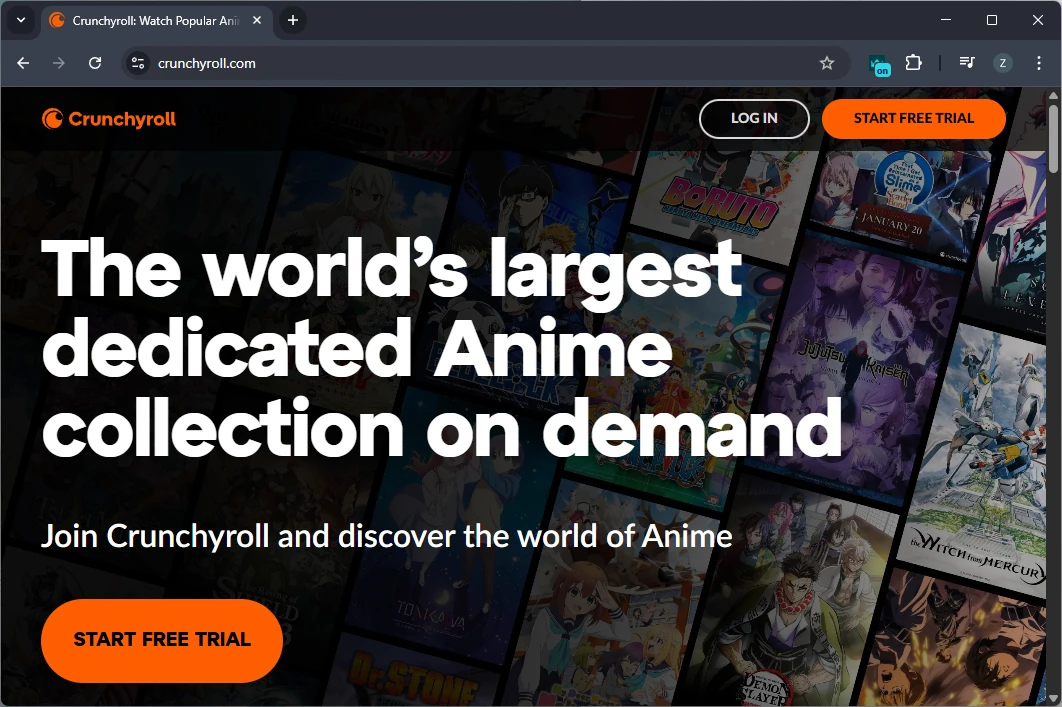
Finally, visit the Crunchyroll website to see if it loads correctly and is finally unblocked. This will give you access to all Crunchyroll content.
Once you’re done, disconnect the proxy server to revert to your real IP address.
Conclusion
Accessing Crunchyroll is easy with the right tools. In this case, proxies and an easy-to-use extension are your best choices.
With just a few clicks, you can get Crunchyroll unblocked and enjoy all the anime content on demand in no time! If you are on the fence about buying proxies, check out some free proxies and see that the method works without spending a single penny.
FAQ
Is this better than using a VPN?
Yes. In most cases, using a proxy rather than a VPN is a better solution. Although proxies do not provide encryption as VPNs do, they are less likely to be marked as proxies (especially residential, ISP, and mobile proxies), thus giving you more reliable access. Most websites easily recognize VPNs and quickly block access to their IP addresses.
Will streaming speed be affected?
No. The effect on streaming speed should be minimal or barely noticeable. Choosing the right proxy server locations that are not too far from your actual location should guarantee a flawless streaming experience without any annoying buffering.
Does this work on mobile?
Is using a proxy legal for streaming?
Yes. Using a proxy is perfectly legal in most jurisdictions. However, it’s always a good idea to read the Terms of Service before accessing a service, just to be sure.
Can I really unblock Crunchyroll using this method?
Yes. Proxies have been around for decades, and one of their use cases is unblocking websites and services that are inaccessible in certain parts of the world.
Will I get access to the full Crunchyroll library with this method?
Yes. Since Crunchyroll’s library is not the same all around the world, you should check out which country has the biggest library of content and use a proxy server located in that particular region.