'/%3e%3cellipse%20opacity='0.34'%20cx='327.5'%20cy='339'%20rx='264.5'%20ry='264'%20fill='url(%23paint1_linear_12724_35442)'/%3e%3cdefs%3e%3clinearGradient%20id='paint0_linear_12724_35442'%20x1='327'%20y1='-2.524e-06'%20x2='327'%20y2='389.286'%20gradientUnits='userSpaceOnUse'%3e%3cstop%20stop-color='%2327D9E5'/%3e%3cstop%20offset='0.927406'%20stop-color='%23004047'%20stop-opacity='0'/%3e%3c/linearGradient%3e%3clinearGradient%20id='paint1_linear_12724_35442'%20x1='328.02'%20y1='74.7771'%20x2='328.02'%20y2='395.312'%20gradientUnits='userSpaceOnUse'%3e%3cstop%20stop-color='%2327D9E5'/%3e%3cstop%20offset='0.927406'%20stop-color='%23004047'%20stop-opacity='0'/%3e%3c/linearGradient%3e%3c/defs%3e%3c/svg%3e)
'%20fill-rule='evenodd'%20clip-rule='evenodd'%3e%3cpath%20d='M21.9952%2012.2202c-.0019-.6851-.108-1.3688-.2269-2.0439h-9.6238v3.8768h5.4928c-.1125.6103-.3507%201.1919-.6999%201.7094-.3492.5175-.8022.9601-1.3315%201.3009v2.5105h3.3479c1.005-.9487%201.7951-2.0936%202.3191-3.3605.524-1.2668.7701-2.6273.7223-3.9932Z'%20fill='%234285F4'/%3e%3cpath%20d='M12.1415%2021.9954c2.5027.0755%204.9397-.7912%206.8092-2.4216l-3.3025-2.5105c-1.031.6482-2.2362.9808-3.4613.9553-1.266-.0247-2.49275-.4349-3.50967-1.1735-1.01691-.7385-1.81874-1.8128-2.20993-2.9916l-3.4048.0439v2.5438c.84005%201.6575%202.13352%203.0542%203.73642%204.0348%201.60291.9806%203.45238%201.5066%205.34258%201.5194Z'%20fill='%2334A853'/%3e%3cpath%20d='M6.46884%2013.8531c-.42382-1.2324-.42382-2.4897%200-3.7221V7.55469H3.06422C2.36423%208.93568%202%2010.4564%202%2011.998c0%201.5416.36423%203.0624%201.06422%204.4434l3.40462-2.5883Z'%20fill='%23FBBC05'/%3e%3cpath%20d='M12.1415%206.02167c1.4529-.02643%202.8572.46854%203.9039%201.45519l2.9053-2.87706c-1.8433-1.69203-4.2823-2.62308-6.8092-2.59936-1.8902.01282-3.73967.5388-5.34258%201.5194-1.6029.9806-2.89637%202.37735-3.73642%204.03478l3.40462%202.58828c.39118-1.17886%201.1478-2.20915%202.16472-2.94772%201.01691-.73857%202.24366-1.14874%203.50966-1.17351Z'%20fill='%23EA4335'/%3e%3c/g%3e%3c/svg%3e)
If you’ve ever tried to manage multiple online accounts, you’re aware of how fast browsers and sites recognize and limit your activity. That is what makes anti-detect browsers such as GenLogin special - the creation of fully isolated browser profiles with different fingerprints, cookies, and device identity.
Companies can use these independent environments to run multiple sessions from one computer without triggering bans or linking the organization's accounts. But to make these environments truly undetectable, you need to pair them with high-quality proxies as an effective intermediary layer.
In this article, we’ll explain how to integrate proxies with GenLogin step-by-step and highlight the best proxy types for GenLogin in 2025.
What Is GenLogin?
Genlogin is both an anti-detect browser and an automation platform designed to help enterprises manage multiple online identities efficiently and securely. It creates fully isolated browser profiles, each with its own digital fingerprint, cookies, and local storage.
This isolation ensures there is no connection between all the accounts, even when operated on the same device. As an automation platform, GenLogin supports integration with scripts and APIs, enabling businesses to automate web tasks with ease.
This makes it useful for marketing teams, developers, and businesses that handle many accounts or conduct large-scale data operations. The structure is designed for stability, enabling reliable performance on various devices and run environments.
The main purpose of GenLogin is to protect user privacy while enabling high-level automation and scalability. It eliminates the risks associated with browser fingerprinting, IP tracking, and session leaks.
By doing so, it provides a secure workspace for activities such as account management, testing, scraping, and advertisement monitoring. Here’s a breakdown of its most important features:
Isolated Multi-Profile Management
GenLogin creates and maintains multiple browser profiles that are entirely independent. This includes separate fingerprints, cookies, IPs, device data, and browser histories. You can group profiles by task or region, share profiles with permissions, and organize large operations efficiently.
Advanced Fingerprint & Device Emulation
The software customizes user agents, screen resolution, time zones, and geolocation. GenLogin’s Titan Core regenerates fingerprints using real-device datasets and adds noise to sensitive fingerprint components, such as WebGL, Canvas, and locale to reduce the risk of detection.
Flexible Proxy Integration
Each GenLogin profile can use its own proxy, including mobile, datacenter, and residential proxies, with support for HTTP, HTTPS, and SOCKS5 protocols. GenLogin proxy integration supports bulk proxy imports, labeling, and proxy verification tools help manage many proxies reliably.
Cloud Sync, Profile Sharing, and Team/Collaboration Tools
Users can sync GenLogin profiles via the cloud and access them from different devices. The roles and permissions are fully manageable, allowing administrators to share or oversee multiple profiles, and actions are shareable across profiles.
How to Integrate Proxies with GenLogin (Step-by-Step)
Configuring proxies in GenLogin takes a few minutes, and doing it right ensures each profile runs securely and independently. Here's how to go from installation to a thoroughly tested proxy setup.
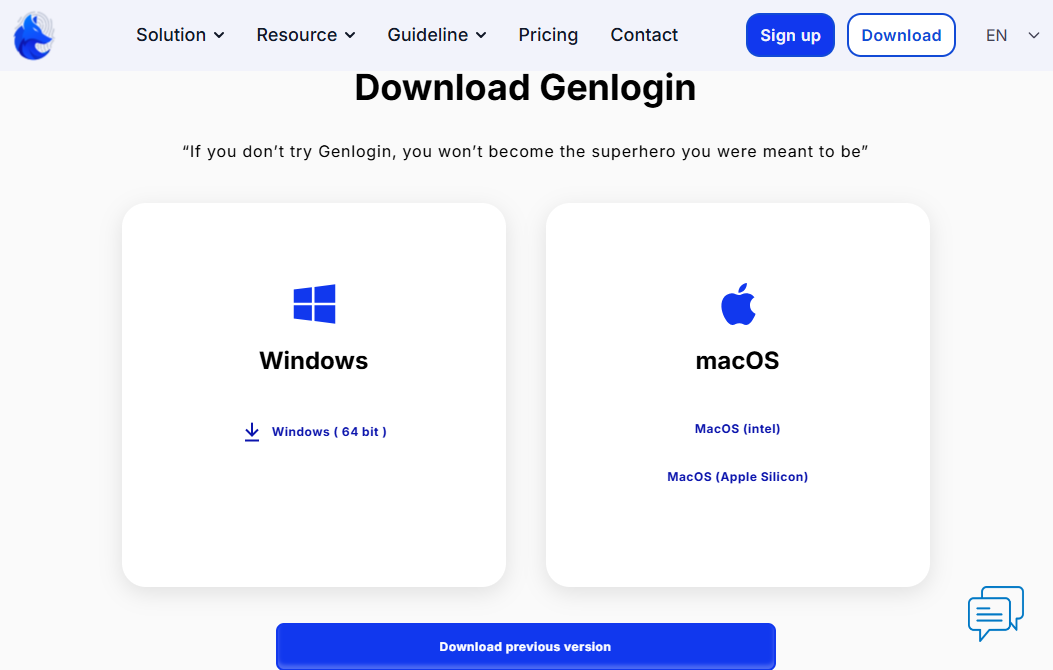
1. Download and install the GenLogin app from the official website.
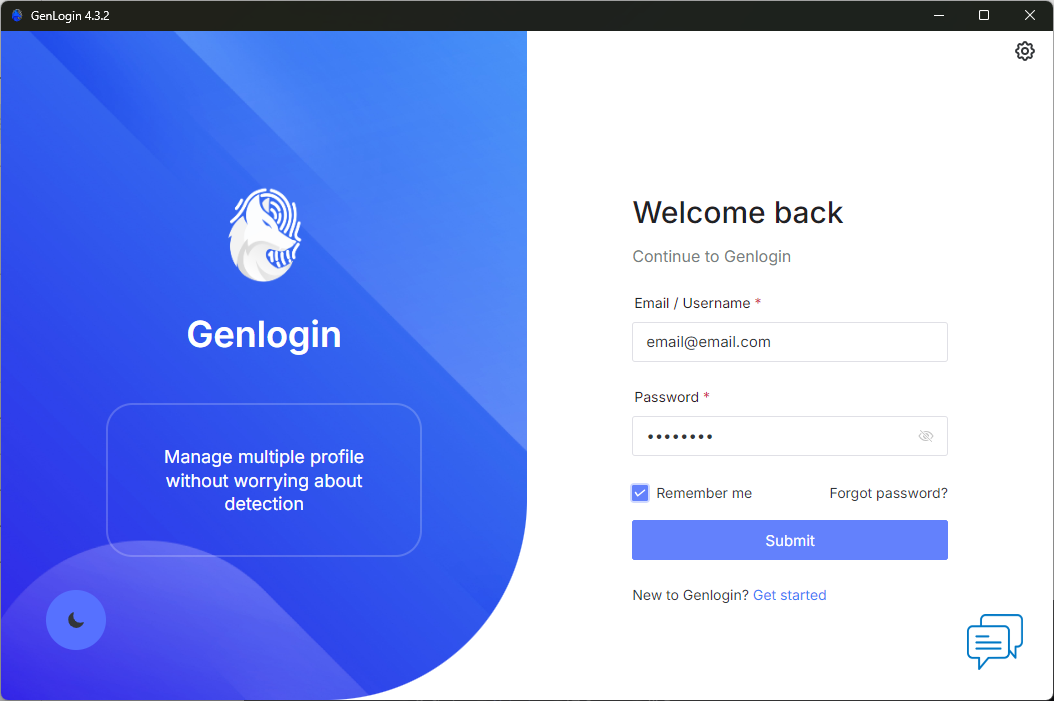
2. After installing, sign in and ensure you grant network permissions if prompted to allow GenLogin to route traffic through proxies later on.
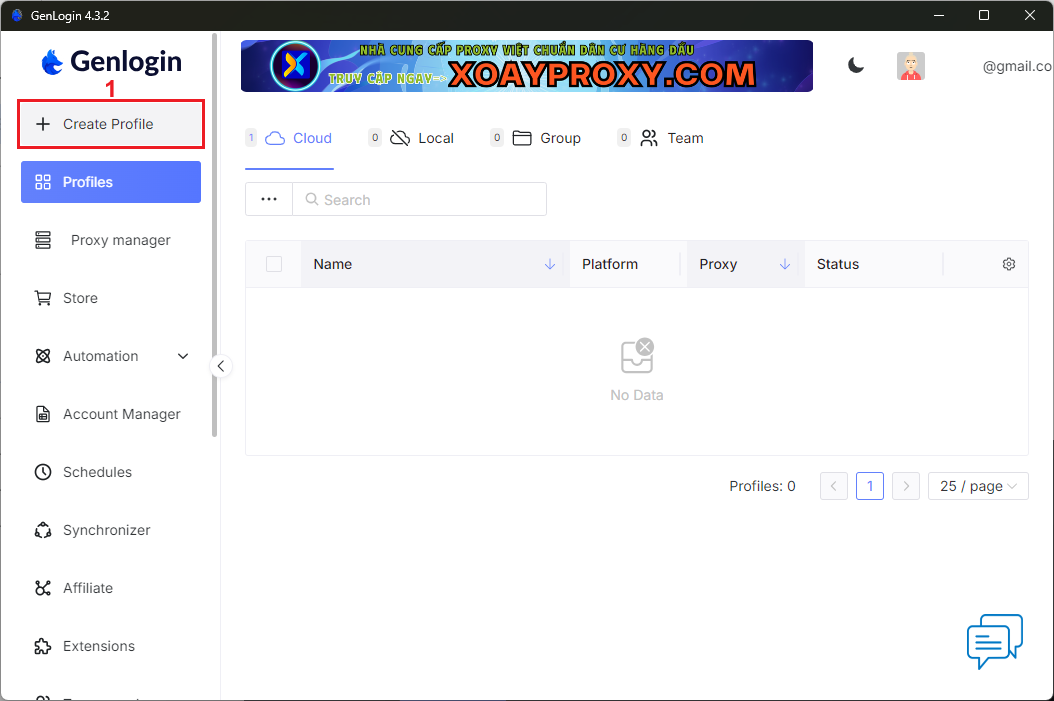
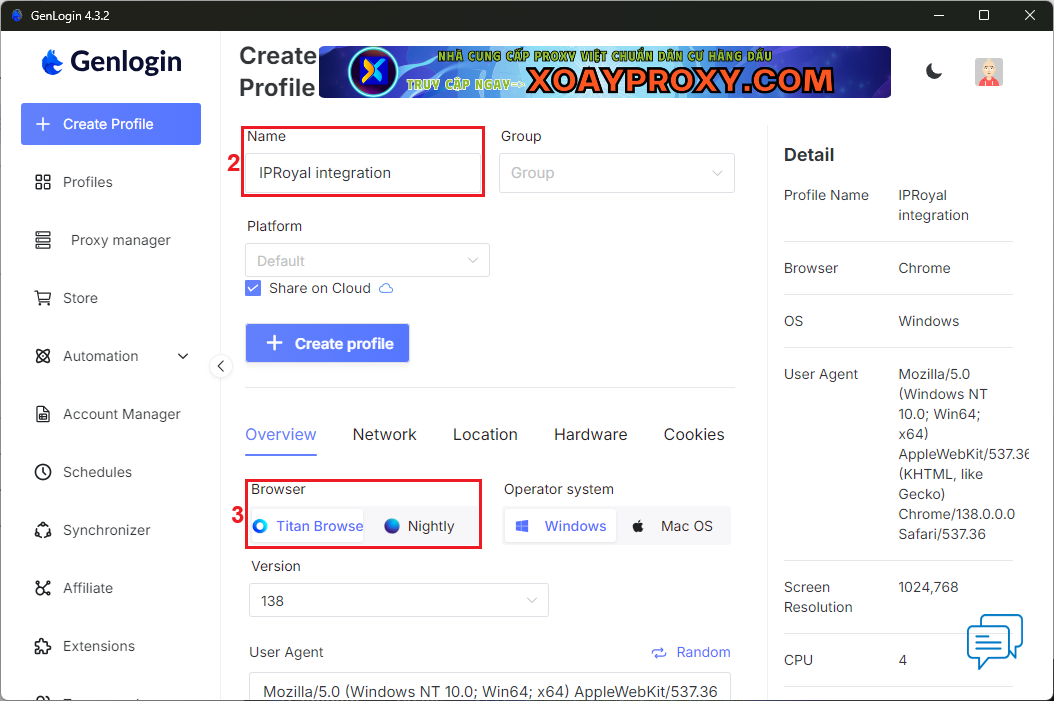
3. This action will take you directly to the dashboard. Click the ‘Create Profile’ (1) button.
4. Give your profile a descriptive name (2) and select your browser (3). The Titan Browser is the Chromium-based option, and the Nightly Browser uses the Firefox engine.
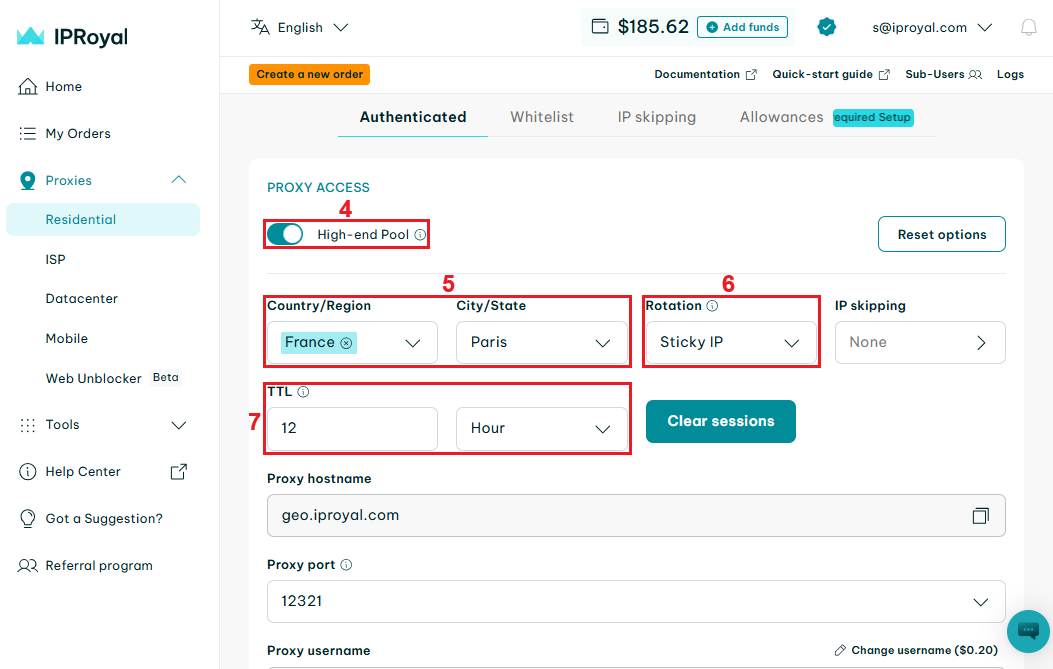
5. Visit the IPRoyal dashboard and configure your proxies. We’ll use high-end (4) residential proxies from Paris, France (5), with sticky sessions (6) that last 12 hours (7).
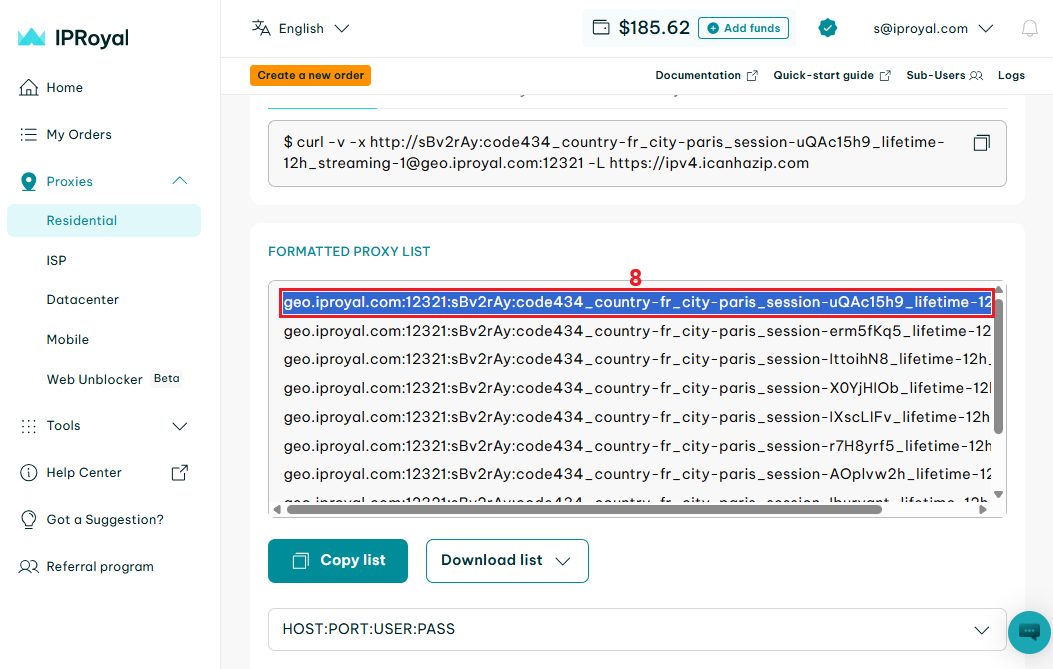
6. Scroll down to the ‘Formatted Proxy List’ section. Each line here is a unique set of credentials in a host:port:username:password format. Select one (8) and copy it to your clipboard.
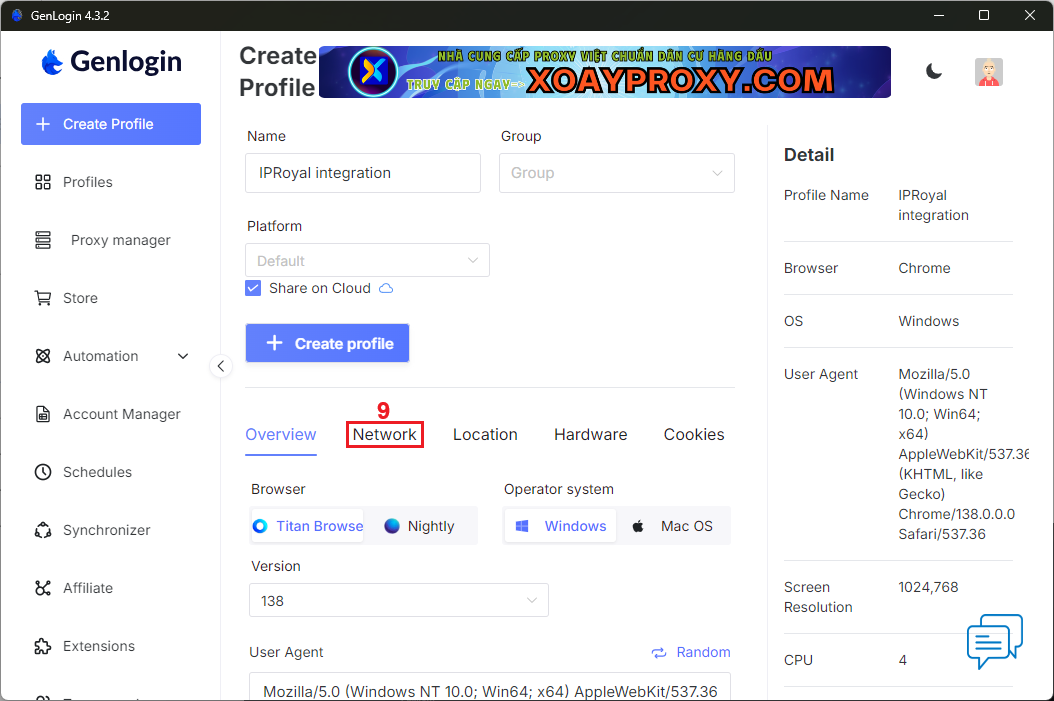
7. Go back to GenLogin and navigate to the ‘Network’ (9) tab to access the proxy settings.
8. Click on ‘Your Proxy’ (10).
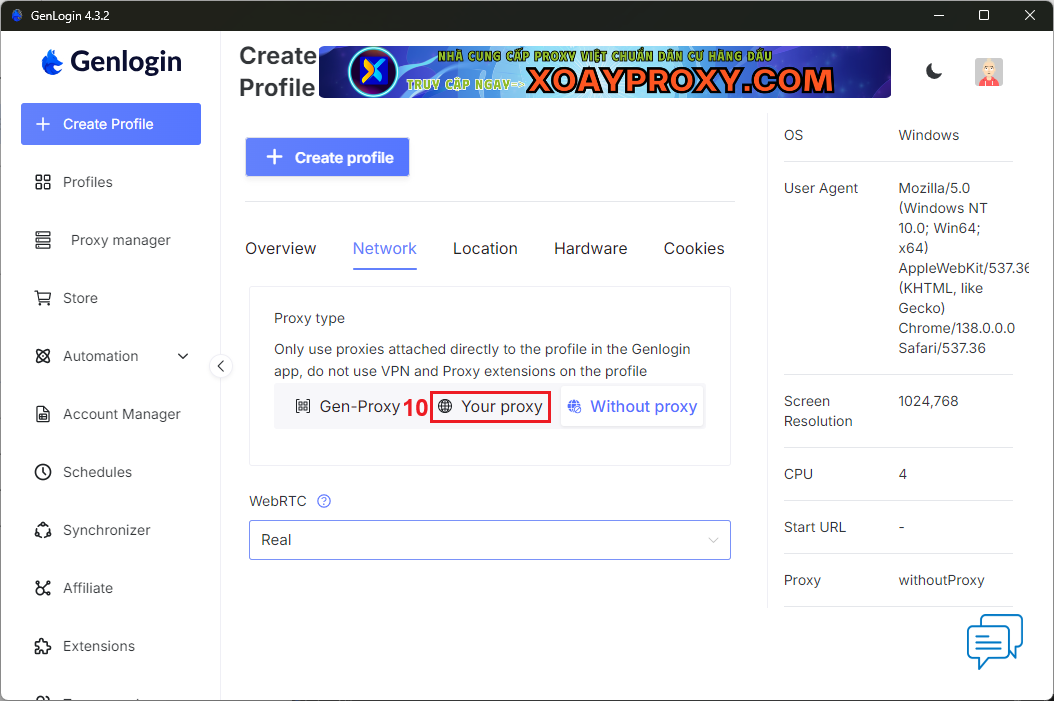
9. Choose the proxy type (11) and paste your credentials from the IPRoyal dashboard to the ‘Host’ (12) field. GenLogin will populate the remaining fields automatically.
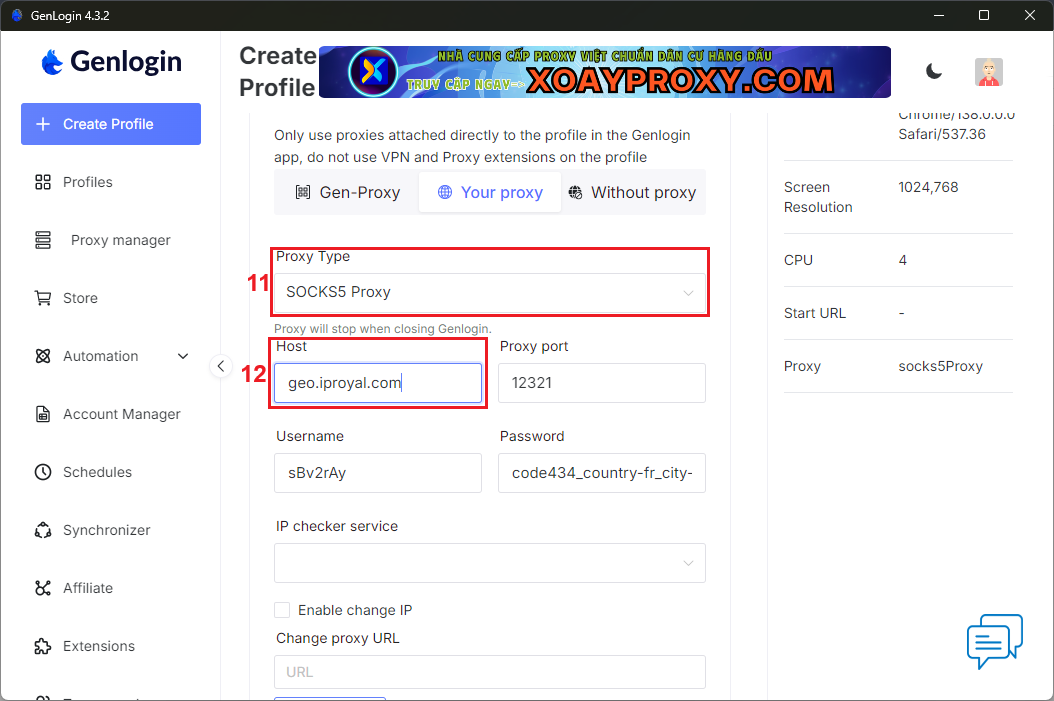
10. Scroll down and click the ‘Check proxy’ (13) button. GenLogin will test your proxy and provide additional information (14) about it.
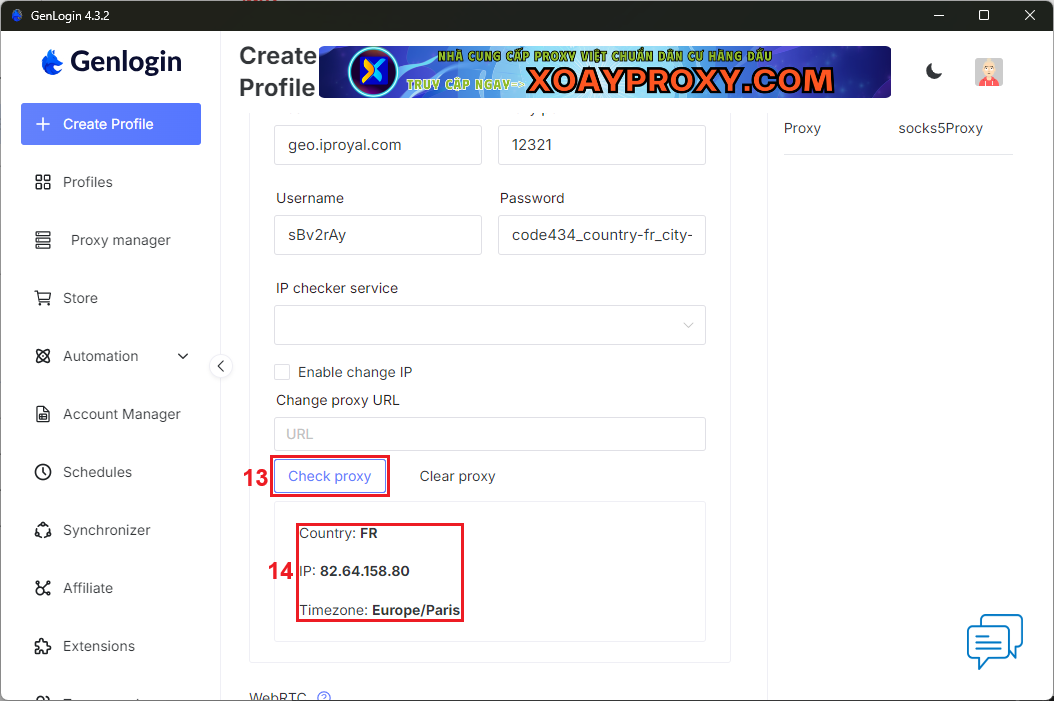
11. Once you’re done configuring proxies and your profile, click the ‘Create profile’ (15) button to save it.
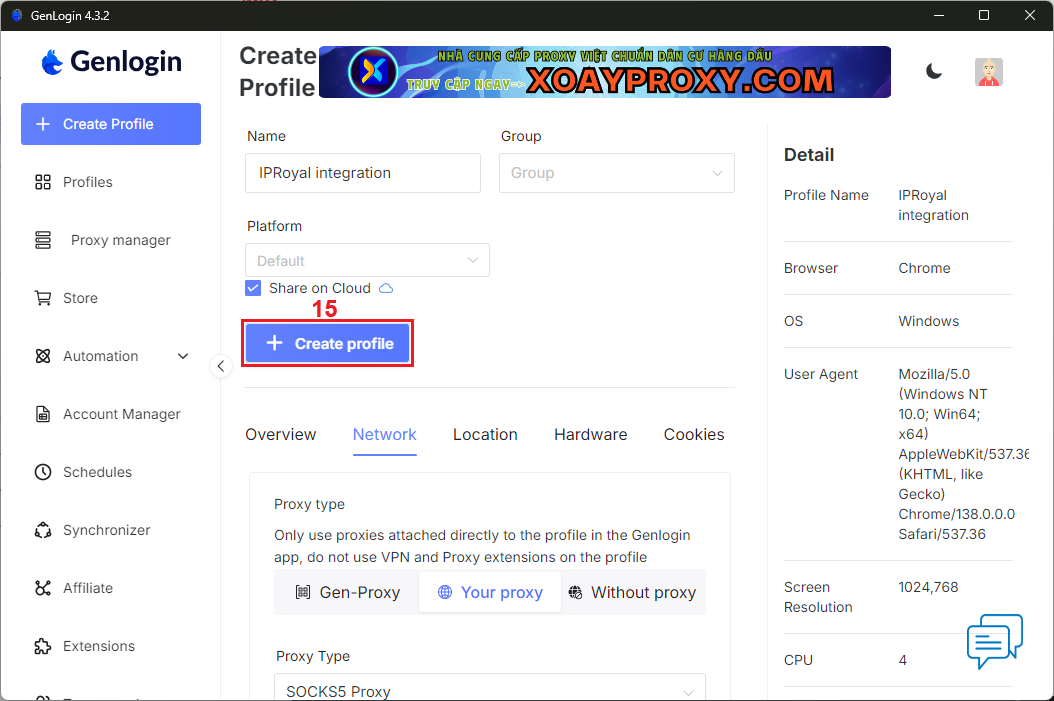
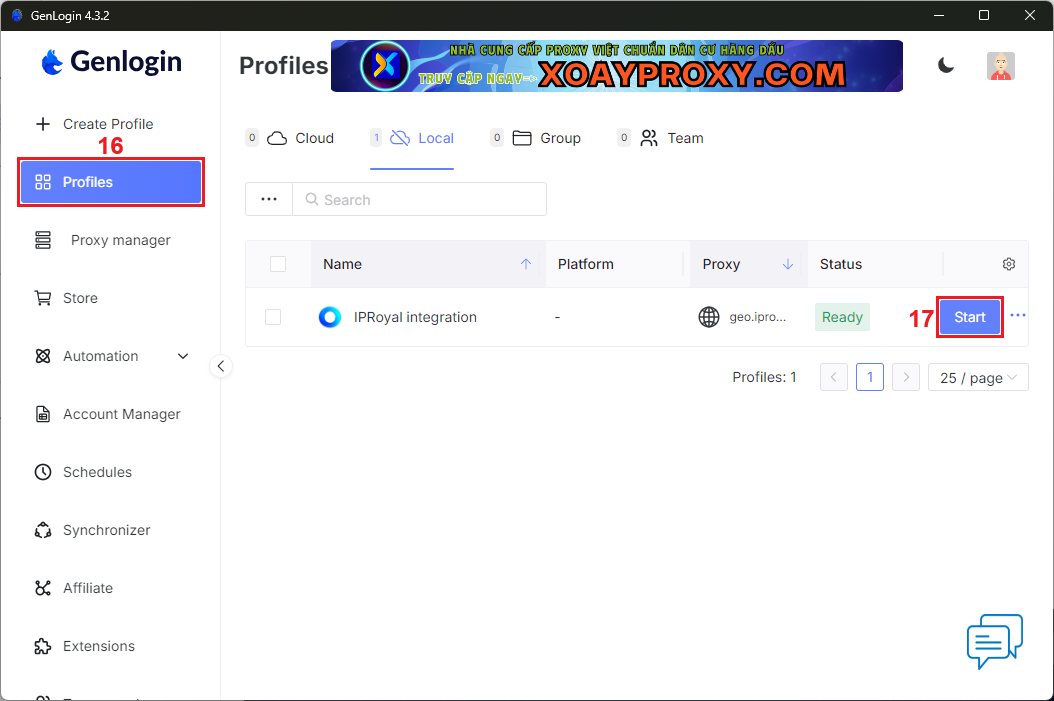
12. Click on ‘Profiles’ (16) to see your newly created profile. Launch it by clicking the ‘Start’ (17) button next to it.
13. Verify the authenticity of your profile using IPHey or a similar website.
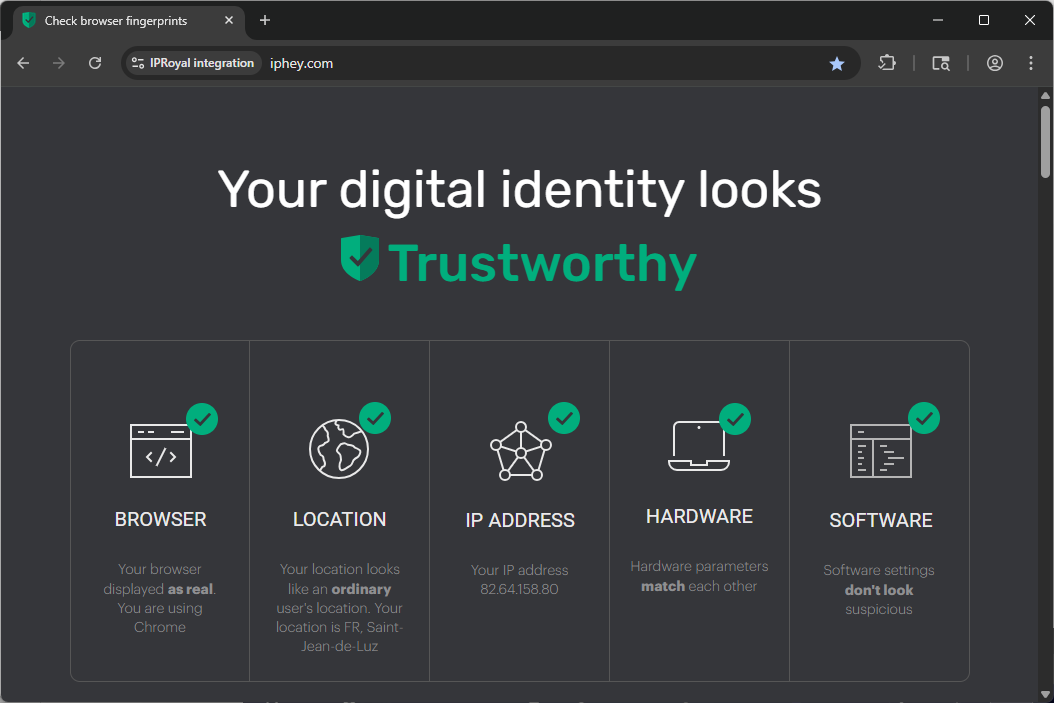
If your profile passes all checks, it’s ready for deployment.
Best Proxies for GenLogin in 2025
Integrating the right proxy servers with GenLogin can make the difference between smooth multi-accounting and constant verification headaches. Each proxy type offers unique advantages depending on your workflow, whether you’re automating marketing campaigns, managing eCommerce stores, or running data analysis.
In this section, we’ll explore the best anonymous proxies for GenLogin in 2025 and explain when to use them.
Residential Proxies
Residential proxies route traffic through real home networks, so they’re indistinguishable from legitimate user connections. This authenticity makes them nearly impossible to block or flag, even by advanced detection systems.
Although they are more expensive than datacenter proxies, they provide the credibility and reliability GenLogin users need to safely use multiple social media, advertisement, or e-commerce accounts.
Reliable residential IPs are the best option for social media marketers, ad verification experts, and account managers who need undetectable IPs.
Datacenter Proxies
Datacenter proxies are the most affordable and fastest proxy type. They are hosted in data centers, thus the IPs are not physically owned by real internet service providers (ISPs).
As a result, they offer massive speed and uptime but are easier to detect on websites that have strict anti-bot systems in place. They are best suited for those requiring high-scale automation or web scraping, where performance and responsiveness are more important than stealth.
ISP Proxies (Static Residential)
ISP proxies are a hybrid between datacenter and residential IPs. While they’re also hosted in data centers, they are tied to IP addresses sourced directly from ISPs, offering a great combination of raw performance and authenticity.
They are suitable for activities where session persistence is critical, such as long-term social media, e-commerce, and QA testing account management.
Mobile Proxies
Mobile proxies route connections through mobile carriers, giving your sessions real smartphone IPs. Since mobile IPs are shared among many users at a time, websites treat them with the highest trust, which makes them impossible to ban.
These proxies are the most costly option, but they’re irreplaceable for mobile app testing and automation, or managing multiple social media accounts in mobile-first environments.
Conclusion
Just like all anti-detect browsers, GenLogin requires reliable anonymous proxies to reach its full potential. As long as your proxy servers come from a reliable provider, you can rely on GenLogin to provide safe, seamless, and scalable operations.