'/%3e%3cellipse%20opacity='0.34'%20cx='327.5'%20cy='339'%20rx='264.5'%20ry='264'%20fill='url(%23paint1_linear_12724_35442)'/%3e%3cdefs%3e%3clinearGradient%20id='paint0_linear_12724_35442'%20x1='327'%20y1='-2.524e-06'%20x2='327'%20y2='389.286'%20gradientUnits='userSpaceOnUse'%3e%3cstop%20stop-color='%2327D9E5'/%3e%3cstop%20offset='0.927406'%20stop-color='%23004047'%20stop-opacity='0'/%3e%3c/linearGradient%3e%3clinearGradient%20id='paint1_linear_12724_35442'%20x1='328.02'%20y1='74.7771'%20x2='328.02'%20y2='395.312'%20gradientUnits='userSpaceOnUse'%3e%3cstop%20stop-color='%2327D9E5'/%3e%3cstop%20offset='0.927406'%20stop-color='%23004047'%20stop-opacity='0'/%3e%3c/linearGradient%3e%3c/defs%3e%3c/svg%3e)
'%20fill-rule='evenodd'%20clip-rule='evenodd'%3e%3cpath%20d='M21.9952%2012.2202c-.0019-.6851-.108-1.3688-.2269-2.0439h-9.6238v3.8768h5.4928c-.1125.6103-.3507%201.1919-.6999%201.7094-.3492.5175-.8022.9601-1.3315%201.3009v2.5105h3.3479c1.005-.9487%201.7951-2.0936%202.3191-3.3605.524-1.2668.7701-2.6273.7223-3.9932Z'%20fill='%234285F4'/%3e%3cpath%20d='M12.1415%2021.9954c2.5027.0755%204.9397-.7912%206.8092-2.4216l-3.3025-2.5105c-1.031.6482-2.2362.9808-3.4613.9553-1.266-.0247-2.49275-.4349-3.50967-1.1735-1.01691-.7385-1.81874-1.8128-2.20993-2.9916l-3.4048.0439v2.5438c.84005%201.6575%202.13352%203.0542%203.73642%204.0348%201.60291.9806%203.45238%201.5066%205.34258%201.5194Z'%20fill='%2334A853'/%3e%3cpath%20d='M6.46884%2013.8531c-.42382-1.2324-.42382-2.4897%200-3.7221V7.55469H3.06422C2.36423%208.93568%202%2010.4564%202%2011.998c0%201.5416.36423%203.0624%201.06422%204.4434l3.40462-2.5883Z'%20fill='%23FBBC05'/%3e%3cpath%20d='M12.1415%206.02167c1.4529-.02643%202.8572.46854%203.9039%201.45519l2.9053-2.87706c-1.8433-1.69203-4.2823-2.62308-6.8092-2.59936-1.8902.01282-3.73967.5388-5.34258%201.5194-1.6029.9806-2.89637%202.37735-3.73642%204.03478l3.40462%202.58828c.39118-1.17886%201.1478-2.20915%202.16472-2.94772%201.01691-.73857%202.24366-1.14874%203.50966-1.17351Z'%20fill='%23EA4335'/%3e%3c/g%3e%3c/svg%3e)
If you’re looking for a straightforward way to extract data from social platforms like Reddit, Twitter, or LinkedIn, TexAu can make the process easier.
It’s a growth and web automation platform that supports both no-code and scriptable workflows, allowing you to run a wide range of automation tasks with minimal setup.
The challenge, as with any large-scale scraping or automation effort, is avoiding detection and blocks. That’s where proxies for TexAu come in.
This guide will walk you through practical steps for TexAu proxy integration and show you how to maintain efficiency and stability throughout your operations.
What Is TexAu
TexAu is an automation platform that lets you streamline a wide range of tasks across multiple online platforms. You can use it to extract data, enrich information, or perform predefined actions at scale, all within a single visual workspace.
The supported platforms include:
- Twitter / X: profiles, tweets, threads, and exports
- Reddit: subreddits, comments, and user profiles
- YouTube: channels, videos, and comments
- Pinterest: boards, pins, and profiles
- Quora: profiles and posts
- Google: search results, Maps, and business listings
- Slack: channel member extraction and automated messaging
- Product Hunt: launches, makers, and profiles
- GitHub: users, repositories, and stargazers
Beyond scraping, TexAu supports several core capabilities that make it useful for growth and workflow automation:
- Scrape and export public data: Pull lists of profiles, posts, and search results from supported platforms for research or lead generation.
- Automate engagement: Perform actions such as sending connection requests or posting comments as part of your workflow.
- Bulk input and scheduling: Import data through CSV or Google Sheets and schedule workflows to run automatically at defined intervals.
- Integrations: Export results to Google Sheets or CSV, connect with CRMs, use webhooks, and chain workflows across different platforms.
- Workflow chaining: Combine multiple steps, including scraping, enrichment, export, and outreach, so your process runs continuously without manual intervention.
Why Use Proxies With TexAu
A proxy server acts as a middle layer between TexAu and the internet. When properly configured, it intercepts outgoing requests from TexAu and routes them through a network of different IP addresses. This rotation conceals your real IP address and spreads activity across multiple origins.
If you’re extracting data from Reddit or GitHub, for instance, you can assign a pool of proxy servers to distribute and rotate your scraping requests automatically.
Using proxies for TexAu is essential because none of the supported platforms openly welcome automated scraping or data extraction. Without them, repeated requests from a single IP address can trigger temporary bans or permanent restrictions.
Configuring TexAu with residential proxies or datacenter proxies helps you avoid that risk. Residential proxies rely on genuine consumer IPs, which make your traffic appear organic. In contrast, datacenter proxies offer faster speeds for bulk operations.
Step-By-Step Proxy Integration With TexAu
Setting up proxies with TexAu is relatively straightforward. Here is a step-by-step breakdown of what you should do:
- Step 1: Purchase your desired proxies
The first thing you should do is purchase your desired TexAu proxies, whether that’s residential proxies or datacenter proxies. Here’s how to order IPRoyal Residential Proxies and Datacenter Proxies.
- Step 2: Set up your TexAu account
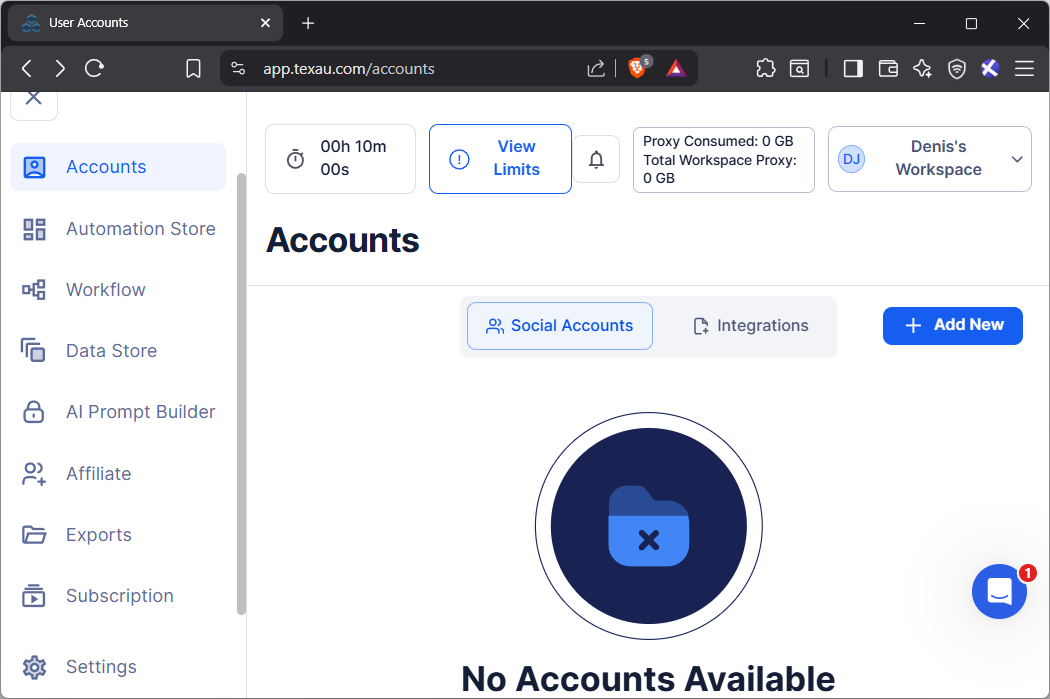
Next, set up your TexAu account and either purchase a subscription or proceed with the free trial. Once that’s done, you’ll get access to this dashboard, where you’ll begin your TexAu proxy integration process.
- Step 3: Open settings
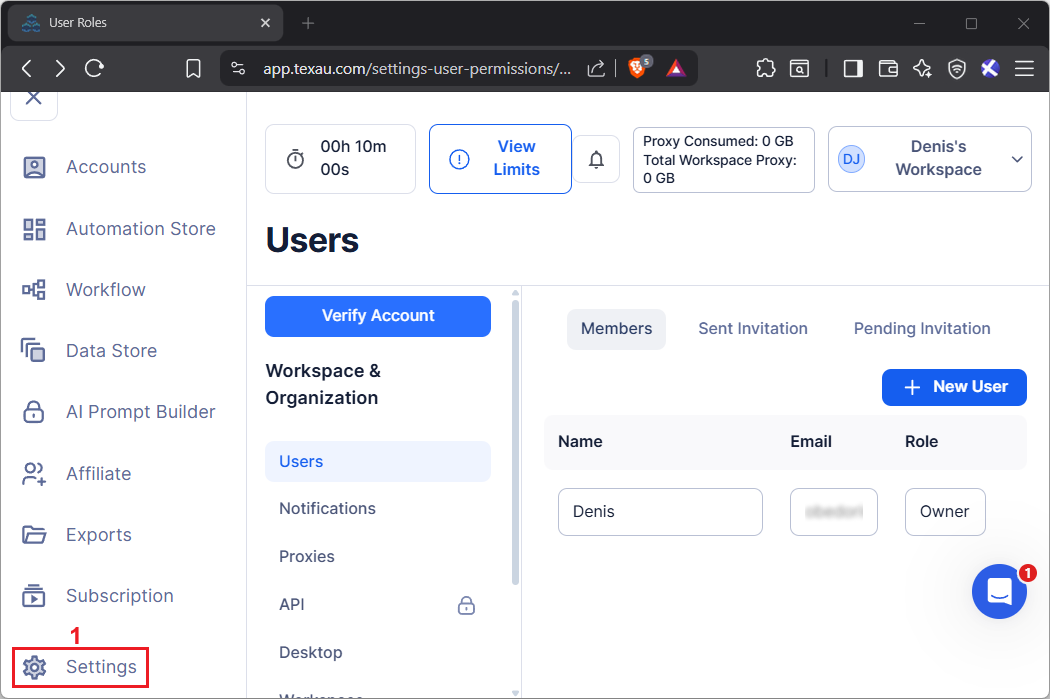
On the left sidebar menu, find the gear icon labeled 'Settings' (1) near the bottom and click it. You will be redirected to the 'Workspace & Organization' panel.
- Step 4: Open proxy settings
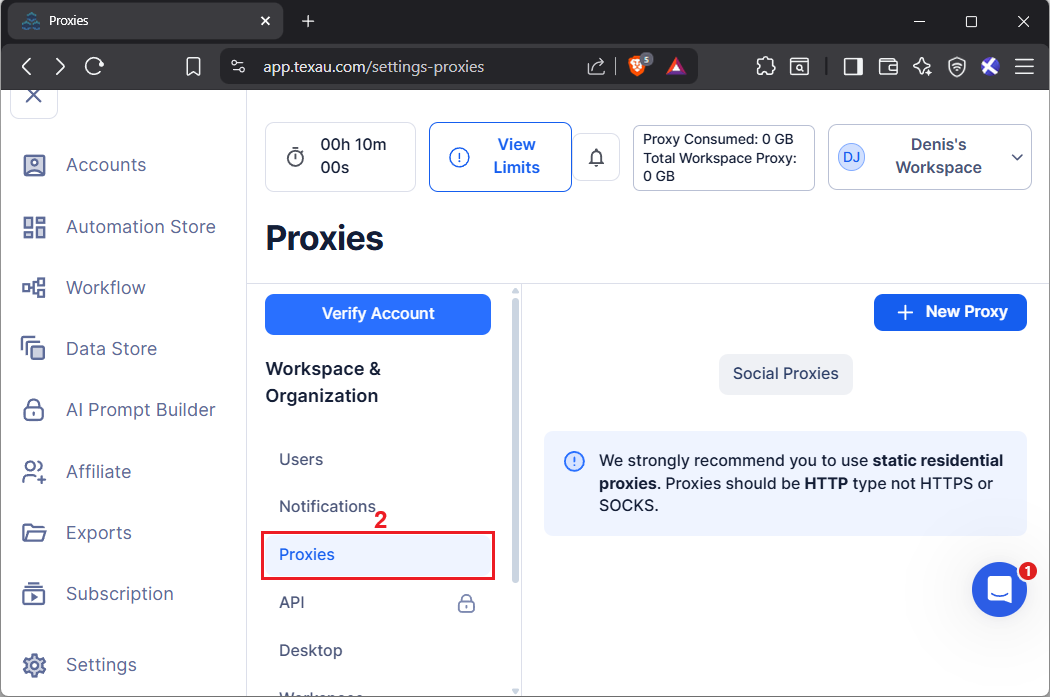
In the 'Workspace & Organization' panel, locate the 'Proxies' tab (2) and select it.
- Step 5: Click the new proxy button
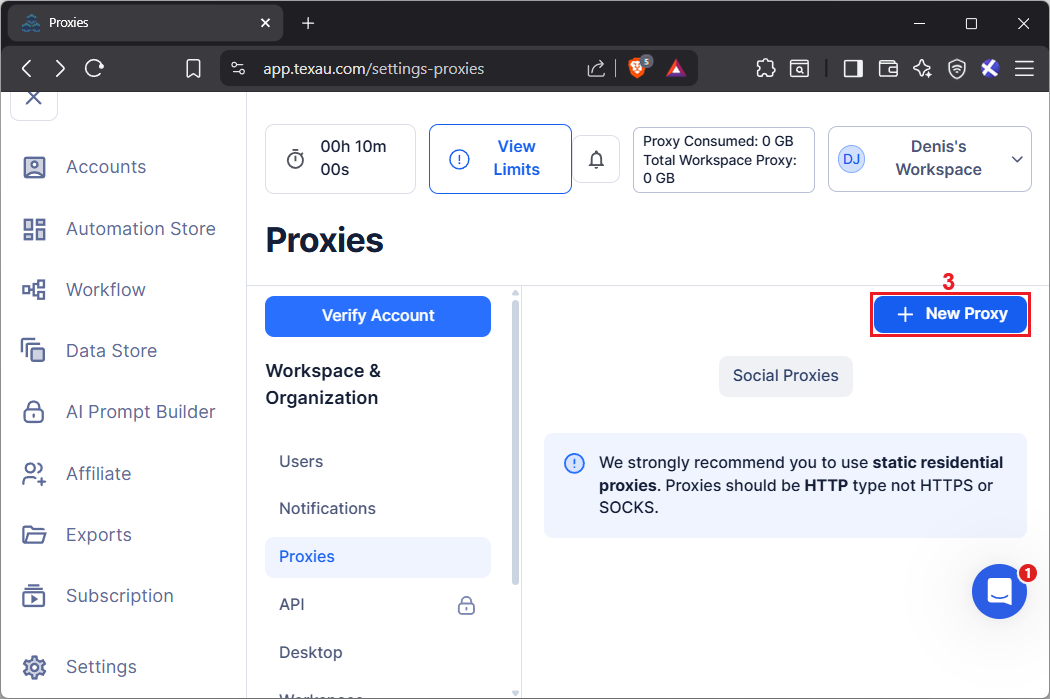
In the proxy dashboard, locate the blue 'New Proxy' (3) button in the top right corner and click it.
- Step 6: Configure your proxies
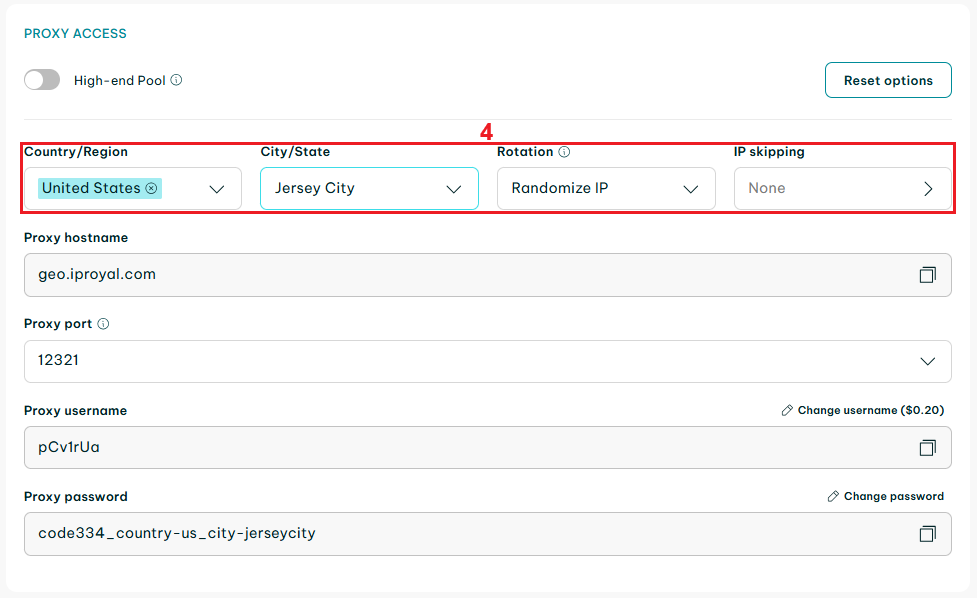
Visit the IPRoyal dashboard to configure your proxy location, rotation, and other options (4).
- Step 7: Copy your proxy credentials to TexAu
Once you’re done, you will need the following details from your IPRoyal dashboard:
- Proxy hostname
- Proxy port
- Proxy username
- Proxy password
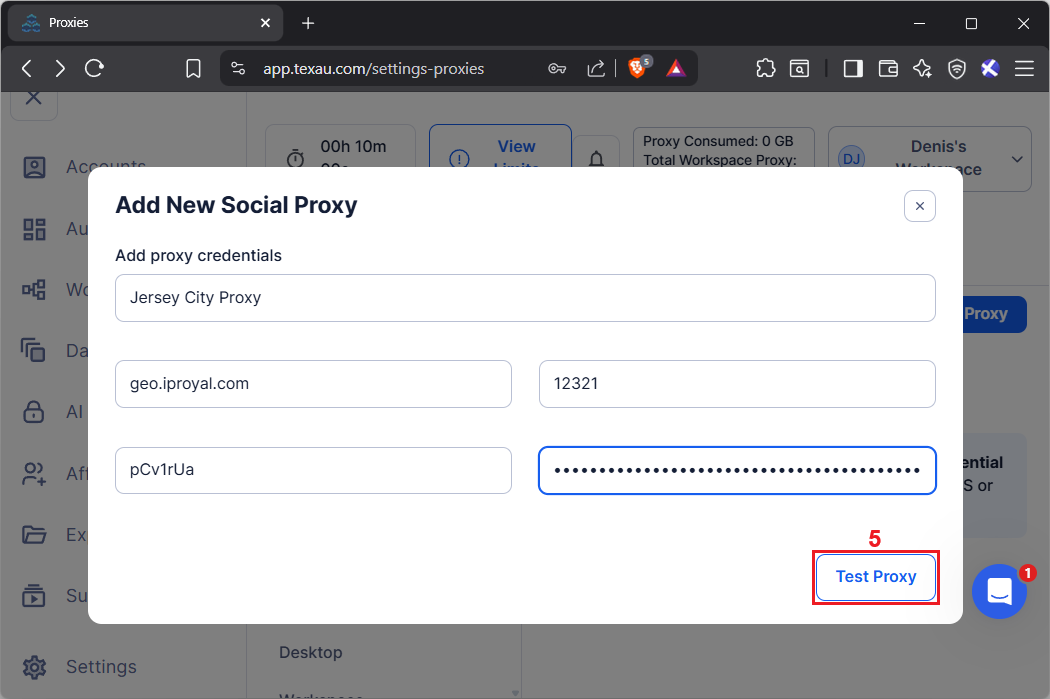
Enter these details in the proxy panel. Click the 'Test Proxy' (5) button to confirm that your proxy is working correctly. TexAu will verify the connection and display the detected proxy location.
- Step 8: Save your proxy settings
After confirming the correct location, click the 'Save Proxy' (6) button save your proxy settings to complete the configuration.
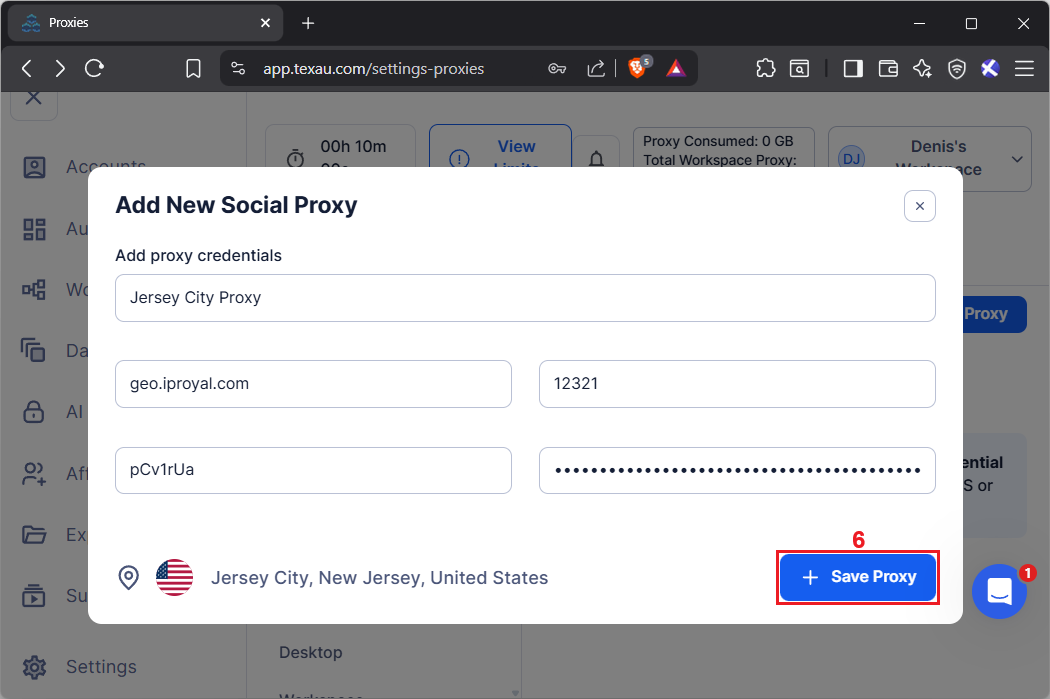
That's it! You successfully performed TexAu proxy integration.
Final Thoughts
TexAu can be an effective way to generate leads from platforms such as Reddit and LinkedIn, but success depends on using it carefully. Remember to stay within each platform’s terms of service to keep your workflows compliant.