'/%3e%3cellipse%20opacity='0.34'%20cx='327.5'%20cy='339'%20rx='264.5'%20ry='264'%20fill='url(%23paint1_linear_12724_35442)'/%3e%3cdefs%3e%3clinearGradient%20id='paint0_linear_12724_35442'%20x1='327'%20y1='-2.524e-06'%20x2='327'%20y2='389.286'%20gradientUnits='userSpaceOnUse'%3e%3cstop%20stop-color='%2327D9E5'/%3e%3cstop%20offset='0.927406'%20stop-color='%23004047'%20stop-opacity='0'/%3e%3c/linearGradient%3e%3clinearGradient%20id='paint1_linear_12724_35442'%20x1='328.02'%20y1='74.7771'%20x2='328.02'%20y2='395.312'%20gradientUnits='userSpaceOnUse'%3e%3cstop%20stop-color='%2327D9E5'/%3e%3cstop%20offset='0.927406'%20stop-color='%23004047'%20stop-opacity='0'/%3e%3c/linearGradient%3e%3c/defs%3e%3c/svg%3e)
'%20fill-rule='evenodd'%20clip-rule='evenodd'%3e%3cpath%20d='M21.9952%2012.2202c-.0019-.6851-.108-1.3688-.2269-2.0439h-9.6238v3.8768h5.4928c-.1125.6103-.3507%201.1919-.6999%201.7094-.3492.5175-.8022.9601-1.3315%201.3009v2.5105h3.3479c1.005-.9487%201.7951-2.0936%202.3191-3.3605.524-1.2668.7701-2.6273.7223-3.9932Z'%20fill='%234285F4'/%3e%3cpath%20d='M12.1415%2021.9954c2.5027.0755%204.9397-.7912%206.8092-2.4216l-3.3025-2.5105c-1.031.6482-2.2362.9808-3.4613.9553-1.266-.0247-2.49275-.4349-3.50967-1.1735-1.01691-.7385-1.81874-1.8128-2.20993-2.9916l-3.4048.0439v2.5438c.84005%201.6575%202.13352%203.0542%203.73642%204.0348%201.60291.9806%203.45238%201.5066%205.34258%201.5194Z'%20fill='%2334A853'/%3e%3cpath%20d='M6.46884%2013.8531c-.42382-1.2324-.42382-2.4897%200-3.7221V7.55469H3.06422C2.36423%208.93568%202%2010.4564%202%2011.998c0%201.5416.36423%203.0624%201.06422%204.4434l3.40462-2.5883Z'%20fill='%23FBBC05'/%3e%3cpath%20d='M12.1415%206.02167c1.4529-.02643%202.8572.46854%203.9039%201.45519l2.9053-2.87706c-1.8433-1.69203-4.2823-2.62308-6.8092-2.59936-1.8902.01282-3.73967.5388-5.34258%201.5194-1.6029.9806-2.89637%202.37735-3.73642%204.03478l3.40462%202.58828c.39118-1.17886%201.1478-2.20915%202.16472-2.94772%201.01691-.73857%202.24366-1.14874%203.50966-1.17351Z'%20fill='%23EA4335'/%3e%3c/g%3e%3c/svg%3e)
Web scraping is essentially everything in today’s fast-moving world, and it heavily relies on proxies. Do you need to quickly gather prices? Engage in web scraping with proxies. Need to check SEO scores and other relevant SERP information? Again, not possible without proxies.
However, in some cases, using proxies requires some coding knowledge, which can be a burden to your projects. Thankfully, there are solutions to this issue, and one of them is WebHarvy – a codeless web scraping software that anyone can use.
But how do you set up your proxies there and use them efficiently? We are here to guide you on how to perform WebHarvy proxy integration the right way.
What Is WebHarvy?
WebHarvy is a no-code web scraper. With it, you can scrape nearly any data that you need: be it images, text, HTML code, URLs, emails, profiles, or something else. Whatever you pick, WebHarvy can get it.
The main notable feature of WebHarvy is the fact that it requires no coding. This is the opposite of many web scraping solutions that require at least a basic understanding of a coding language, such as Python.
Why Use WebHarvy?
As noted, the key point of using WebHarvy for proxy integration is the no-code approach. Run it, input some setup details, and you are good to go. There is no need to think about Python libraries and other technical aspects with this web scraping software - it’s an easy solution for all your projects.
Key Features of WebHarvy
- Easy web scraping: WebHarvy provides an intuitive point-and-click interface that makes your web scraping effortless.
- Database support: All your scraped data can be easily exported to multiple database formats, including XML, CSV, and JSON.
- Pagination handling: Oftentimes, web scraping faces the issue of pagination. WebHarvy resolves this issue with its internal system, distributing all your data across different pages.
- Image scraping support: Need to scrape images? This web scraping software has built-in support of image scraping - no extra setup steps needed.
How to Install WebHarvy?
- Download WebHarvy from the official website.
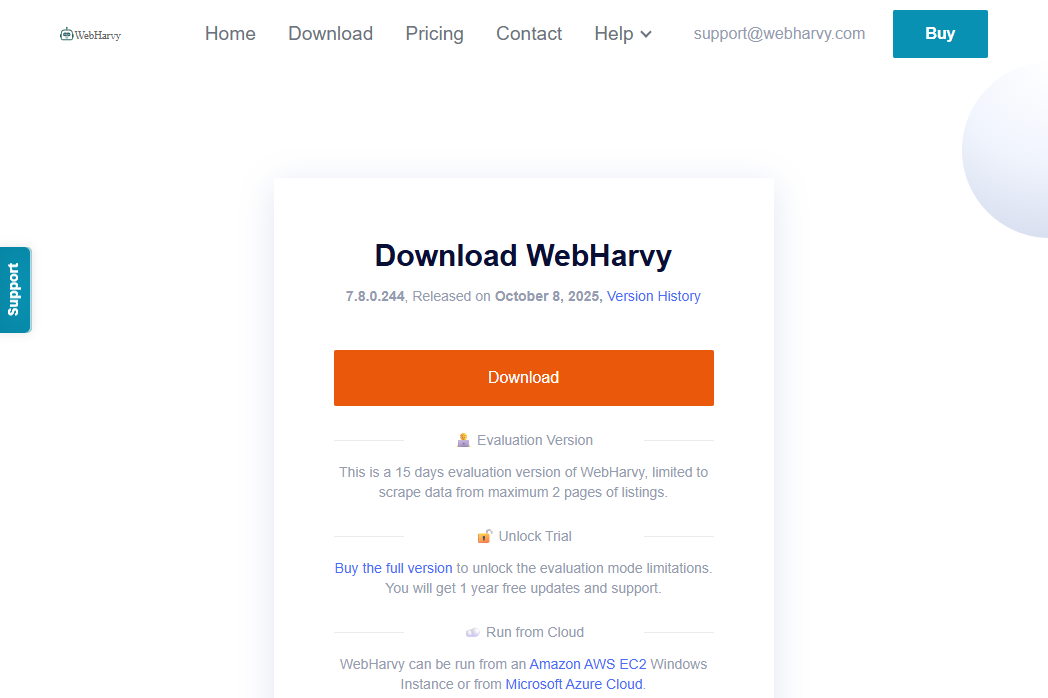
2. Once the download is complete, run the installation file. WebHarvy will launch automatically once the installation process ends.
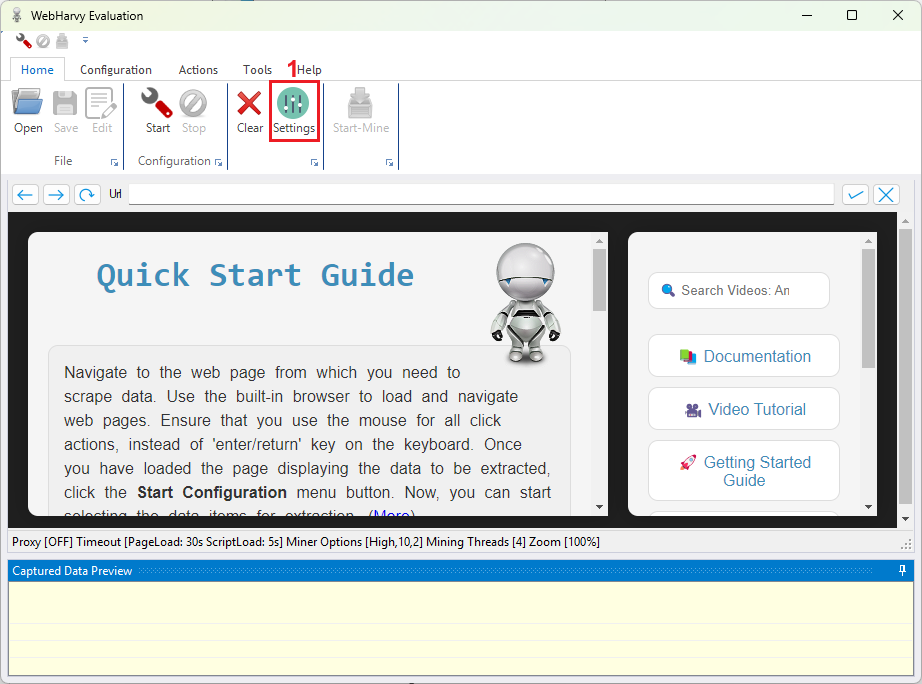
3. Click on ‘Settings’ (1) in the ‘Home’ tab.
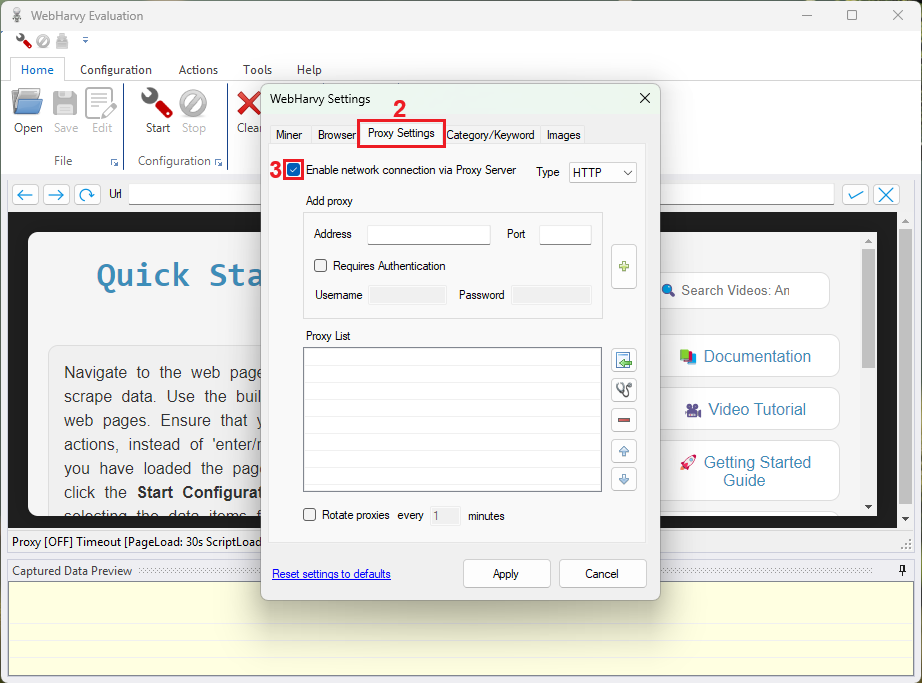
4. In the ‘Settings’ window, navigate to the ‘Proxy Settings’ (2) tab. Tick the ‘Enable network connection via Proxy Server’ (3) box to unlock the settings.
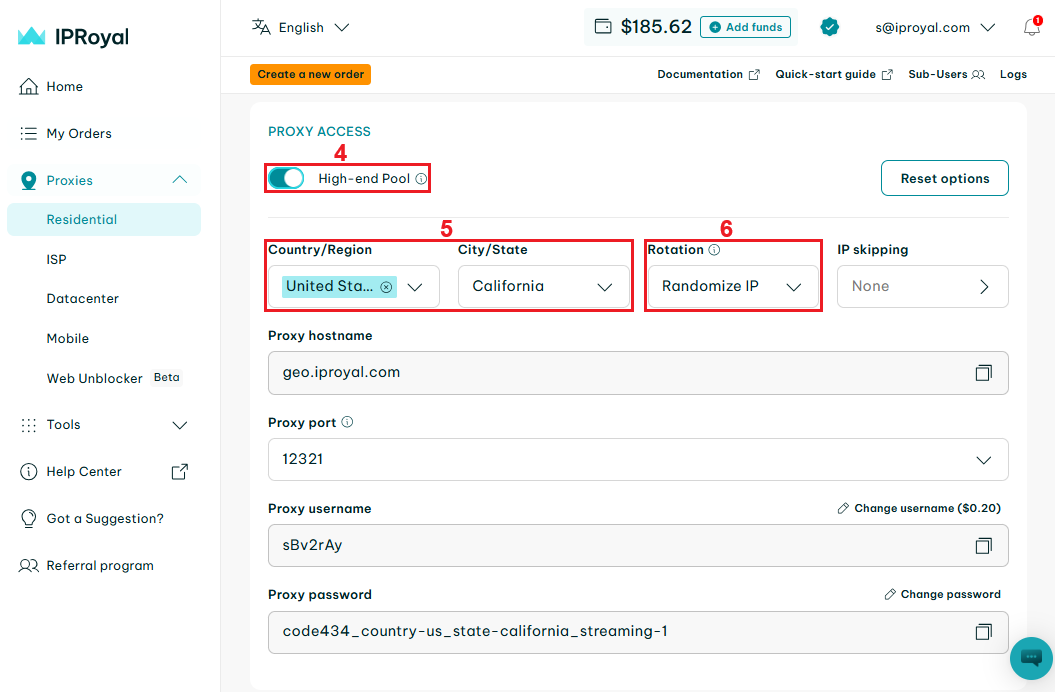
5. Navigate to your IPRoyal dashboard and configure your proxies. We’ll use high-end (4) residential proxies from California, United States (5), with randomized IP rotation (6).
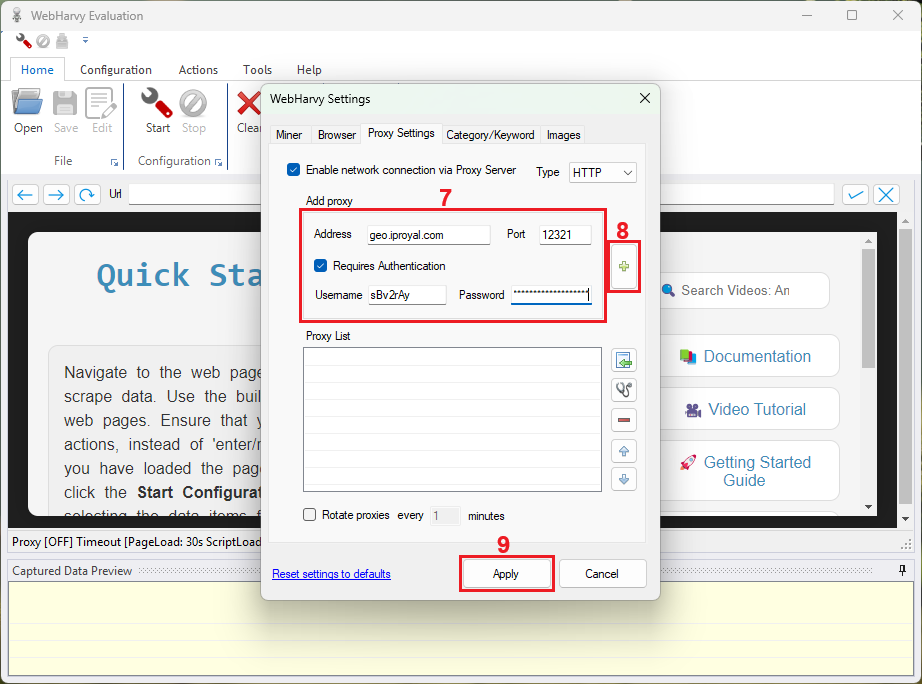
6. Copy your proxy credentials from the IPRoyal dashboard over to WebHarvy settings (7) and press the ‘Plus’ (8) button to add them. Once you’re done, click the ‘Apply’ (9) button to save your settings.
7. In the main window of WebHarvy, insert the URL (10) you wish to use for scraping.
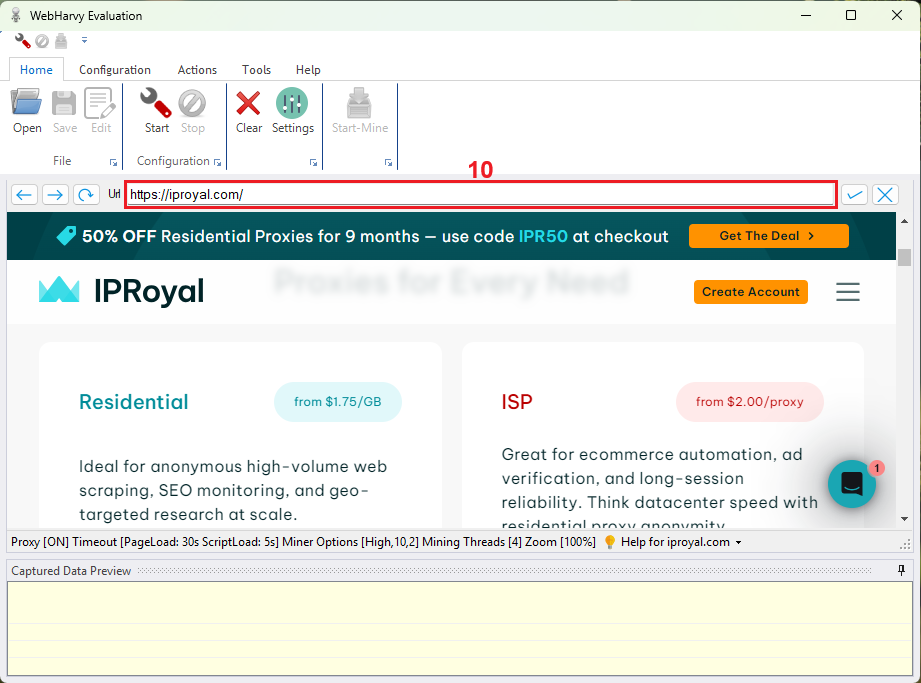
8. Click the ‘Start’ (11) button above the ‘Configuration’ tab to start picking out the elements that you wish to scrape.
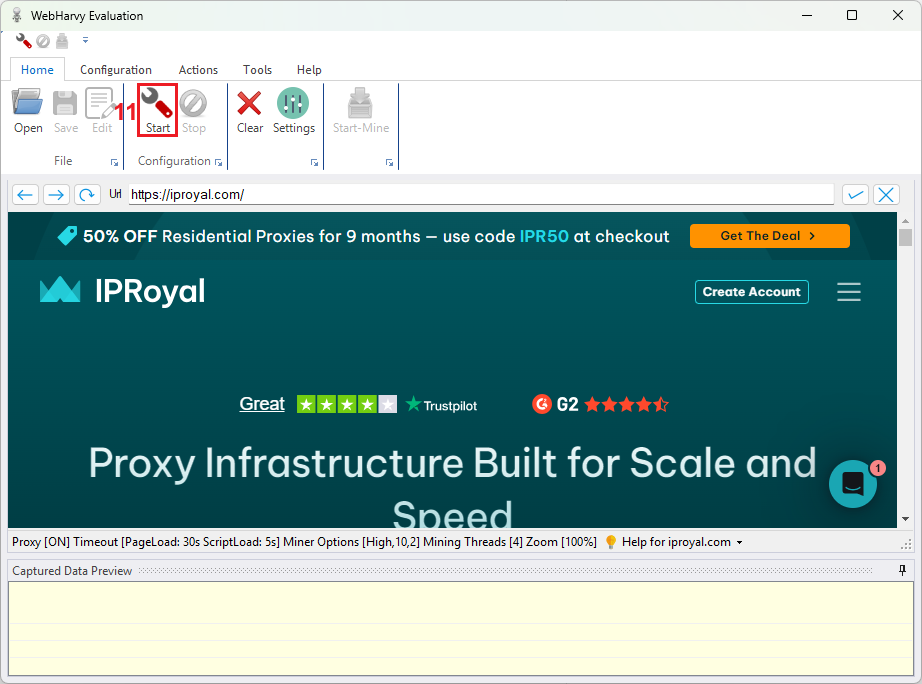
9. Click on any element on the page that you wish to scrape, and WebHarvy web scraper will do it for you. The elements highlighted in yellow are the ones that will be scraped.
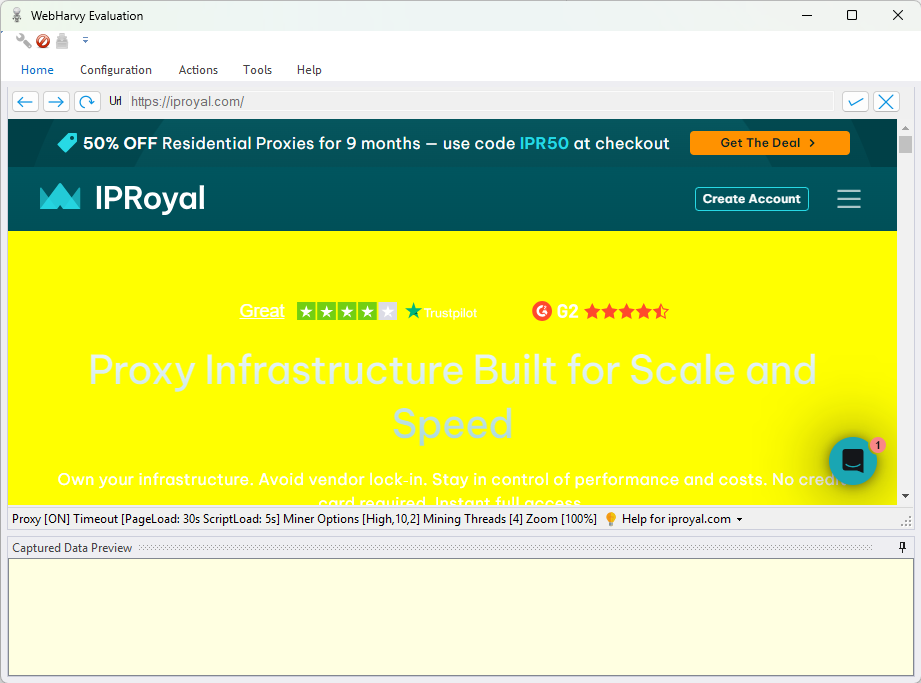
10. After clicking on a particular element, a window will appear asking you what exactly you would like to scrape. Make your choice in this window.
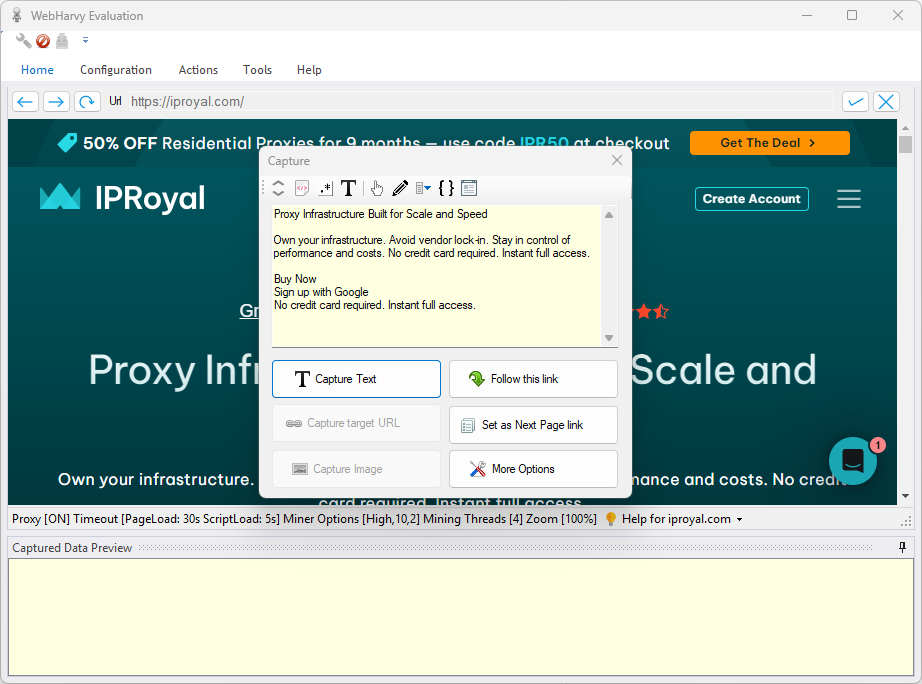
11. Not what you are looking for? Press the ‘More Options’ (12) button to see what else you can scrape from the captured element and select the suitable option.
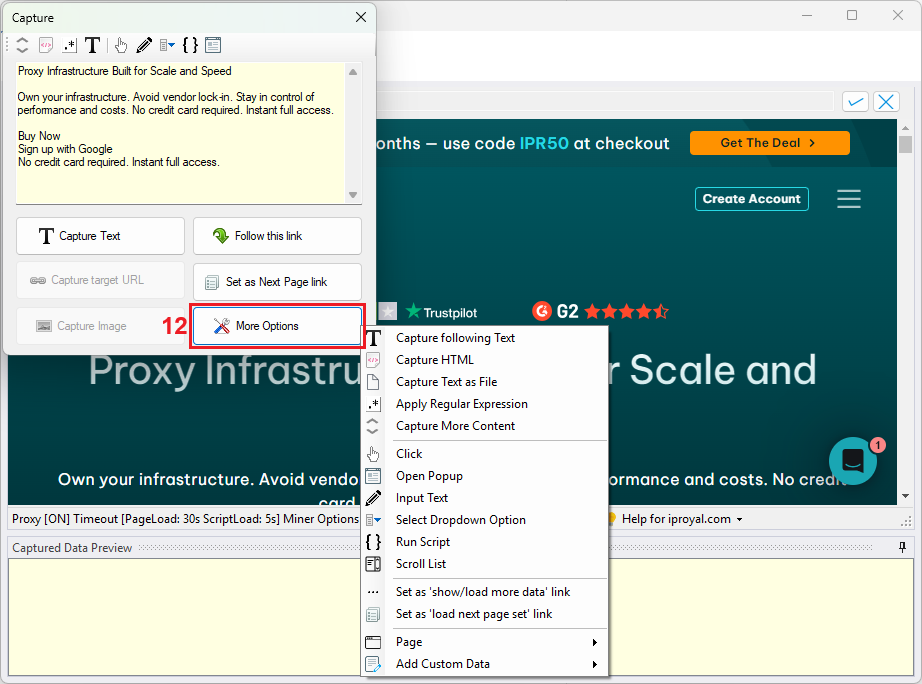
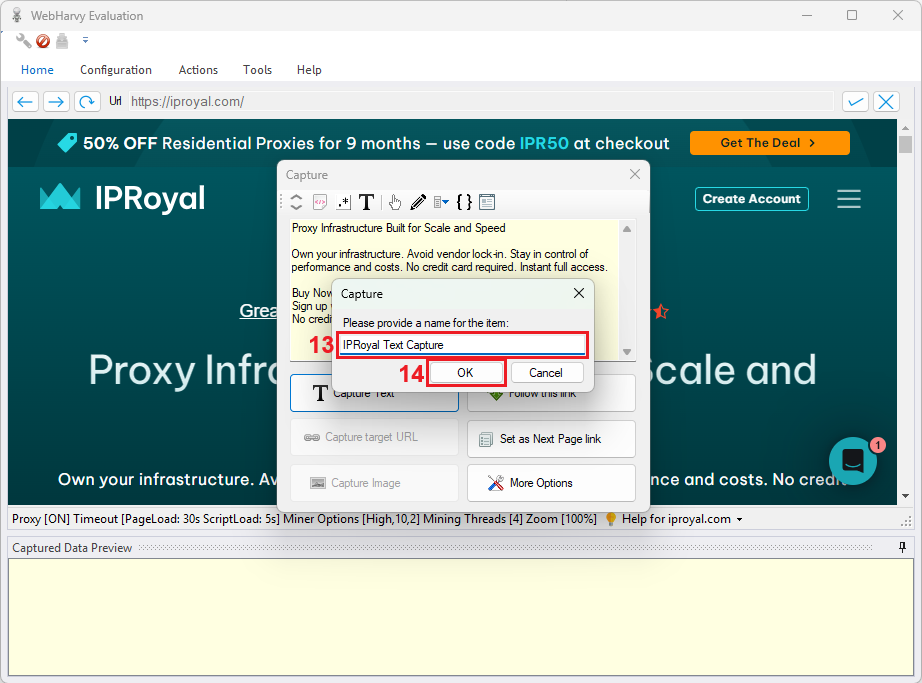
12. Once you decide on what to scrape from the website, pick a name (13) for your web scraping configuration and click ‘OK’ (14).
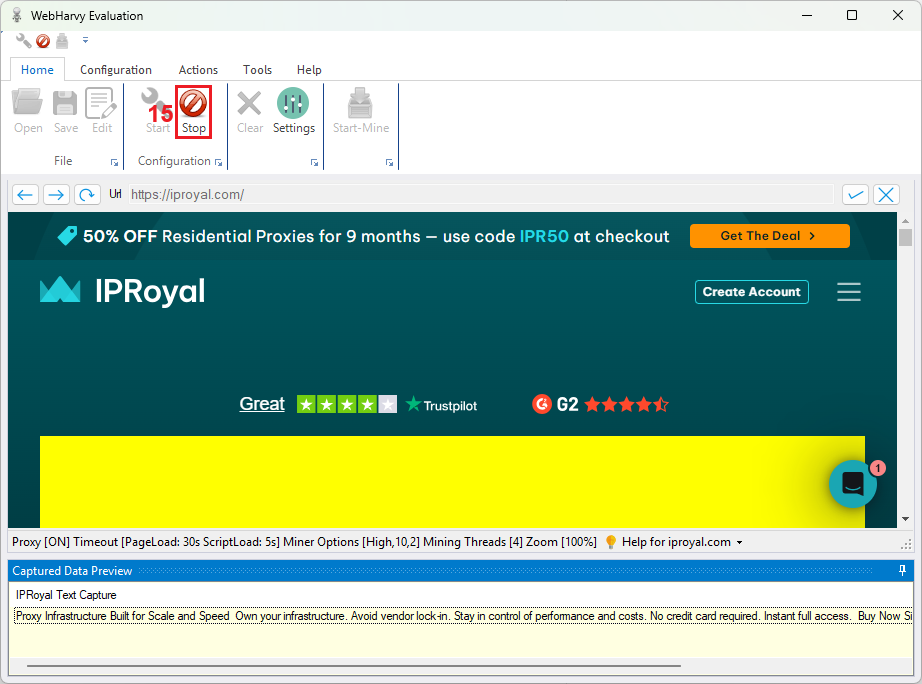
13. Once you’re done with selecting the website elements, click the ‘Stop’ (15) button. You’re ready to start scraping.
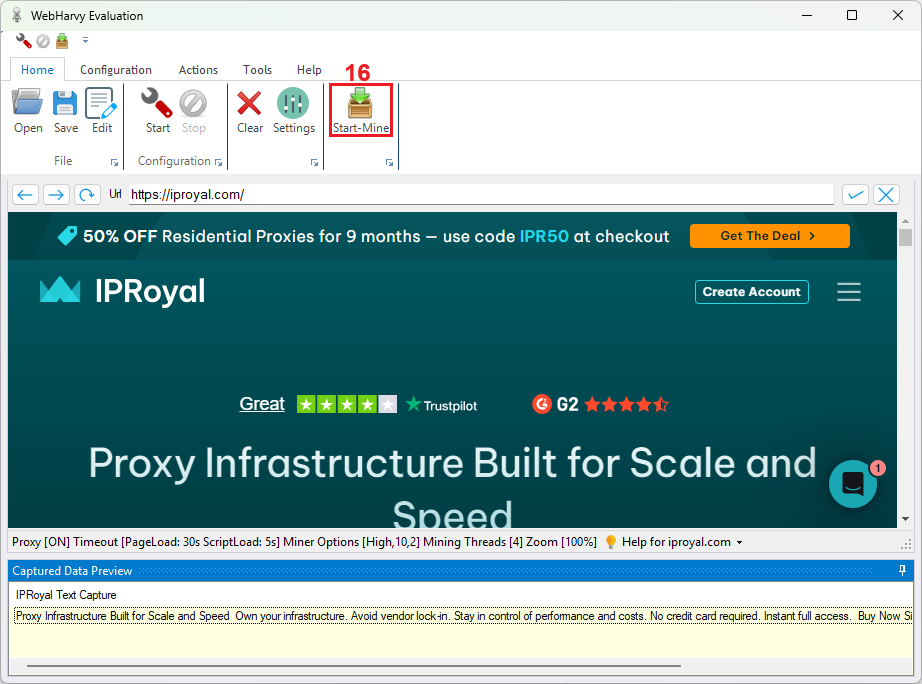
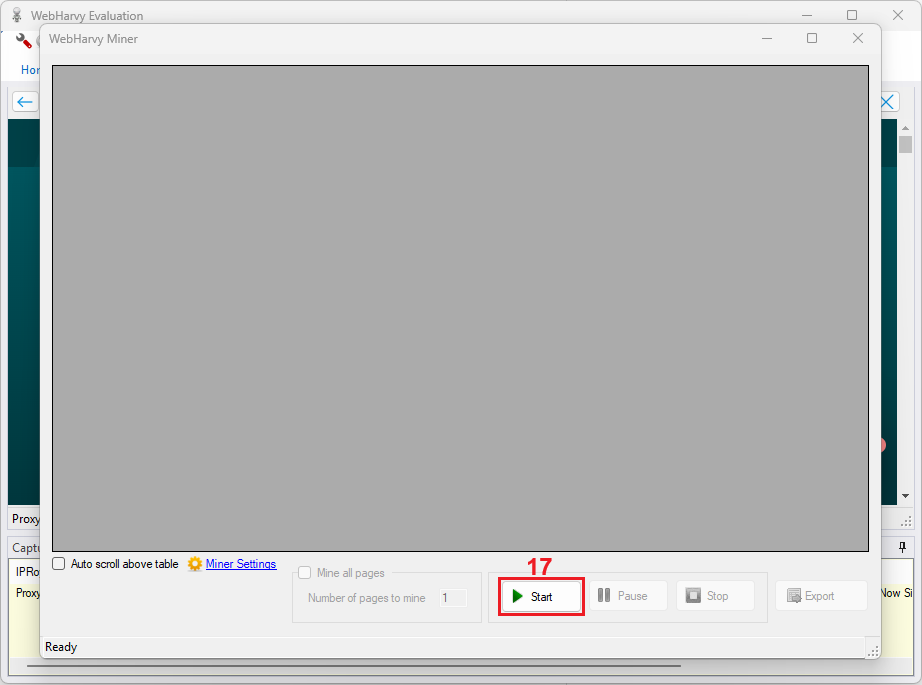
14. Within WebHarvy, web scraping is called mining. Press the ‘Start-Mine’ (16) button to open the scraping interface.
14. Press the ‘Start’ (17) button to start scraping.
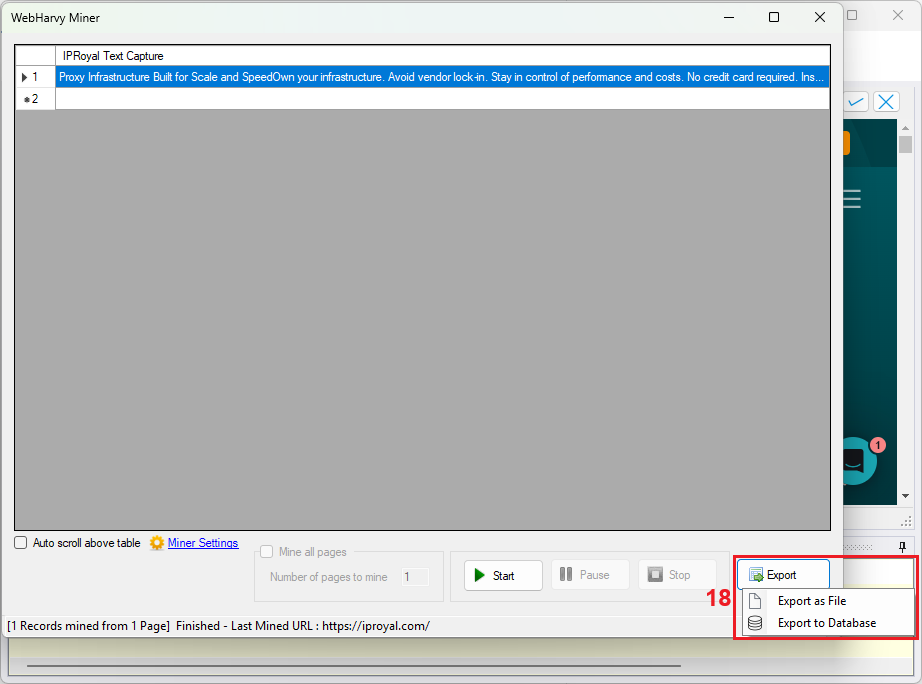
15. Once the scraping process is complete, press the ‘Export’ (18) button and choose the export option you want to use.
Best Practices for Scraping with WebHarvy and Proxies
- Rotate IP addresses regularly
Use multiple proxies and rotate them to prevent any single IP from sending too many requests. WebHarvy even features a ‘Rotate proxies’ function to cycle through a list of proxies automatically. Changing your IP frequently (either via a rotating proxy service or a proxy list) helps avoid detection and blocking by target websites.
- Choose proxy types based on the target site
Pick the right kind of proxy for the website you’re scraping. If the site has minimal anti-scraping defenses, fast and inexpensive datacenter proxies might work fine. For heavily protected sites (like major e-commerce or social platforms), consider residential or mobile proxies, which are harder for websites to detect and block.
- Match proxy location to your target market
Use proxy servers in the same region or country as the website’s users. This approach ensures you see region-specific content and reduces the chance of being flagged for unusual activity. For example, if you need to scrape a website focused on an Australian audience, use an Australian proxy so your requests appear local.
- Avoid free or unsafe proxies
It’s tempting to grab free proxy addresses, but they often cause more trouble than they’re worth. Free proxies tend to be slow, unreliable, and insecure, which can result in missing data or an early termination of your scraping session. It’s safer to invest in reputable paid proxies for consistent performance and privacy.
- Set reasonable scraping intervals
Don’t bombard websites with continuous requests. Incorporate delays or throttle your scraping rate so that each proxy only sends a moderate number of requests per minute. Spacing out your requests (and combining this with IP rotation) helps you stay under the radar of anti-scraping systems.
Best Proxies for WebHarvy in 2025
WebHarvy supports all major proxy types. Here’s a quick overview of the best proxy categories you can use with WebHarvy, along with their strengths, weaknesses, and ideal use cases:
- Residential proxies
Residential proxies use IP addresses assigned to real home users by ISPs. This makes them harder for sites to detect or ban, as the traffic appears to come from regular internet users. The trade-off is they’re usually slower and more expensive than datacenter proxies.
Use residential proxies for more sensitive websites (e.g. popular e-commerce sites or social networks) where you need a higher success rate and can’t afford to get blocked.
- Datacenter proxies
Datacenter proxies use IPs provided by data centers rather than ISPs. They are very fast and cost-effective. However, because their IP ranges are known, websites can easily detect and block them if you scrape at large scale.
Use datacenter proxies for targets with light anti-bot protection or when you need high speed and low cost more than high anonymity.
- ISP proxies (static residential)
ISP proxies are a hybrid of datacenter and residential proxies. They are IP addresses provided by ISPs but hosted on stable servers in data centers. This means they offer high stability and speed like datacenter proxies, while still appearing as legitimate ISP-issued addresses (so they’re less likely to be blocked).
ISP proxies do cost more, but they’re ideal for scraping tasks that require long sessions or logins.
- Mobile proxies
Mobile proxies route your scraping through IP addresses from mobile carriers (3G/4G/5G networks). These IPs are very trustworthy and difficult to block, as they’re shared among many real smartphone users. Mobile proxies are the most expensive option and often slower due to limited bandwidth.
Use mobile proxies only for the most challenging targets, such as sites with extremely strict anti-scraping measures, or when you absolutely require maximum IP trustworthiness. In most cases, residential or ISP proxies will suffice, but mobile proxies are used as a last resort for scraping highly protected web content.
Conclusion
As you can see, WebHarvy web scraper is indeed an easy-to-use tool for both large and small projects. Coupled with IPRoyal’s residential proxies, it is a piece of cake to run, configure, and start scraping! Now it’s time to take scraping into your own hands without any coding.