'/%3e%3cellipse%20opacity='0.34'%20cx='327.5'%20cy='339'%20rx='264.5'%20ry='264'%20fill='url(%23paint1_linear_12724_35442)'/%3e%3cdefs%3e%3clinearGradient%20id='paint0_linear_12724_35442'%20x1='327'%20y1='-2.524e-06'%20x2='327'%20y2='389.286'%20gradientUnits='userSpaceOnUse'%3e%3cstop%20stop-color='%2327D9E5'/%3e%3cstop%20offset='0.927406'%20stop-color='%23004047'%20stop-opacity='0'/%3e%3c/linearGradient%3e%3clinearGradient%20id='paint1_linear_12724_35442'%20x1='328.02'%20y1='74.7771'%20x2='328.02'%20y2='395.312'%20gradientUnits='userSpaceOnUse'%3e%3cstop%20stop-color='%2327D9E5'/%3e%3cstop%20offset='0.927406'%20stop-color='%23004047'%20stop-opacity='0'/%3e%3c/linearGradient%3e%3c/defs%3e%3c/svg%3e)
Best Price Tracking Tools (2026): Apps, Extensions, and a DIY Python Tracker
Tutorials

Eugenijus Denisov
Key Takeaways
-
Choosing the right price-tracking tool depends on your use case and the retailers you target.
-
CamelCamelCamel, Honey, Keepa, and DIY Python price scrapers are among the best price-tracking tools.
-
Price tracking brings different benefits for retailers and consumers.
With the rise of dynamic pricing in e-commerce, consumers and competitors face unprecedented informational asymmetry. Old ways of tracking and comparing prices no longer work, as prices can change on a whim. Those with time, knowledge, and, most importantly, the right price-tracking tools can restore the balance.
Price monitoring software and browser extensions are used to monitor, track, record, and compare prices. Most can track prices across multiple stores, while others are specialized for certain online retailers. In some cases, you might need to build your own tool to track product prices (it’s easier than it sounds).
How to Choose a Price Tracking Tool
Whether you compare prices for personal shopping or track competitor prices as a business, there’s a simple rule on how to decide on a price tracking tool. Match the solution you’re using to your use case and the online retailers targeted. It’s much easier to apply in practice with a few key criteria in mind.
- Store coverage. Single-store tools, such as various Amazon price trackers, focus on one online retailer. Multi-store price-monitoring solutions offer additional features, notably price comparison, but may lack reliability.
- Alert types. Most basic alerts come in the form of emails, while more advanced price tracking software can send push notifications for dynamic pricing changes. It’s also important to consider whether you need customizable thresholds or related adjustments.
- Price history depth. It’s almost standard to be able to check price history for at least half a year. The data should also be presented in an understandable format, such as detailed charts and diagrams.
- Update frequency. Dynamic pricing can cause prices to fluctuate daily or even hourly, so your price-tracking tool must keep up. Faster updates matter for flash sales and high-volatility products, but retaining accuracy while price changes is also important.
- Account requirements and privacy. Some tools work out of the box without an account, while others will require you to sign up. Read the privacy policies, as some tools, especially browser extensions, can see a lot of what you’re doing online.
- Regional availability. You might need region-specific price trackers with IPs in relevant countries to check price changes. Double-check whether your needed countries are supported or if there’s a possibility to use third-party tools, such as proxies, to bypass geo-restrictions.
- Common limitations. Some online retailers block some data on their sites or the access of scrapers altogether. Mistakes of incomplete product prices with many variables (sizes, colors, etc.) might be more common in some tools than in others.
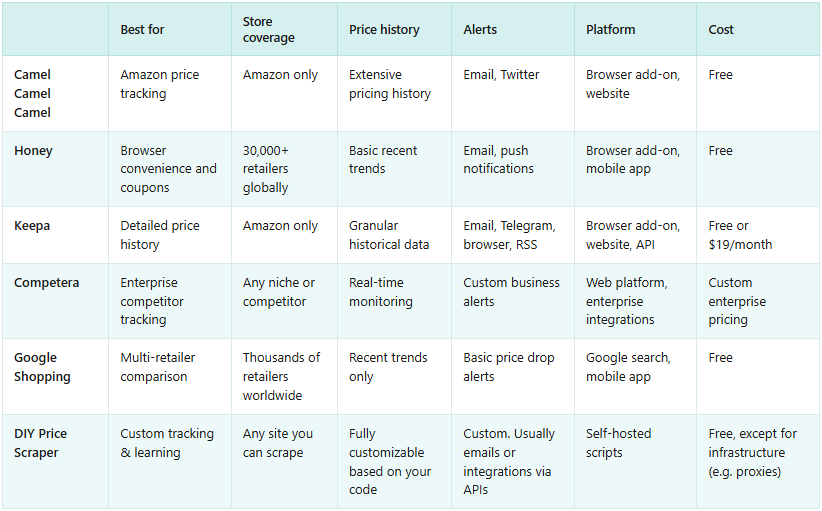
Top 5 Best Price Tracking Tools
All price trackers are built upon data collection methods and differ in convenience or supported retailers. The most popular shop is Amazon, and users need a decently sized price history with real-time alerts to make purchasing or pricing decisions easier. That’s what our top picks for price tracking tools focused on.
CamelCamelCamel - Best for Amazon Price Tracking
CamelCamelCamel is one of the oldest and best-known free Amazon price trackers. They monitor prices for millions of products in major Amazon stores. You can access years of price history with a convenient search on their website or using the Camelizer extension for Chrome, Firefox, and Safari.
Key features:
- Price history charts
- Customizable availability and price drop alerts
- Price watchlists with various filters
Pros:
- Completely free with no account required
- Straightforward interface with no ads
- Accurate Amazon data
Cons:
- Only works for Amazon
- Possible delays and affiliate link bias
Pricing: Free. Funded by Amazon affiliate commissions for certain products.
Store coverage: Amazon US, UK, Canada, Germany, France, Italy, Spain, and Australia.
Verdict: Widely recognized as the gold standard for free Amazon price tracking and history, but there are some biased concerns due to the affiliate financing model.
Honey - Best Browser Extension
Honey is a popular shopping platform and browser extension owned by PayPal. It automatically applies coupon codes at checkout and tracks prices across thousands of retailers. Honey faced some backlash for its unfair revenue share with digital creators. Yet it works almost seamlessly for users, offering cashback and rewards through its gold loyalty program.
Key features:
- Automatic coupon application
- Earn points for purchases
- Price history graphs and drop alerts
Pros:
- PayPal rewards
- Works in the background to save time and money
- User-friendly interface
Cons:
- Collects lots of your browsing data
- Lacks accuracy for dynamic pricing tracking
Pricing: Free. PayPal makes money through affiliate commissions and monetizing your data.
Store coverage: Over 40,000 retailers, including special deals at all major brands, like Amazon, Walmart, Target, and others.
Verdict: Honey is a tool that lets casual shoppers save money with little effort in exchange for their private data.
Keepa - Best for Price History
Keepa is a price tracking tool for those who need the most detailed pricing history and advanced analytics from Amazon. The basic free version is a bit less powerful than CamelCamelCamel. The premium subscription improves on the website, and the extension gives seller statistics, buy box data, and API access.
Key features:
- Availability and price drop alerts via email, Telegram, browser notification, or RSS
- Detailed price history graphs with various customizations
- Mobile app and browser add-on
Pros:
- Adjusted for professional needs
- Fast updates and highly accurate data
- Actively monitoring over six billion product prices
Cons:
- Limited free version
- Overwhelming interface for casual use
Pricing: Limited free version and premium with monthly ($19/month) or yearly (€189/year) subscriptions.
Store coverage: Amazon US, UK, Germany, France, Italy, Spain, Canada, Mexico, Brazil, India, Japan.
Verdict: Probably the most powerful Amazon price tracker for shopping or pricing decisions, but might be too complicated for casual use.
Competera - Best for Competitor Price Tracking
Competera is an AI-powered pricing intelligence platform for retailers and other businesses. Machine learning algorithms and AI models are used to monitor competitor prices across markets to fuel dynamic pricing decisions. This B2B platform aims to help increase profit margins with real-time pricing data.
Key features:
- Real-time price monitoring in online and offline channels
- AI-powered dynamic pricing recommendations and analysis
- Integration with existing e-commerce platforms
Pros:
- Sophisticated AI algorithms
- Comprehensive product price catalogs
- Optimized to increase Return on Investment (ROI)
Cons:
- Inaccessible for small businesses or personal users
- Requires significant investment in setup and training
Pricing: Custom enterprise pricing (typically, in tens of thousands per year).
Store coverage: Monitors any competitors or industries you specify when subscribing to an enterprise plan.
Verdict: A powerful competitor price tracking tool for companies, but too expensive for small businesses that are better off building their own price scraper.
Google Shopping - Best for Comparing Prices
Google Shopping is a product search engine that aggregates listings from retailers across the web. You can compare prices, read reviews, and find deals in a different tab of the best search engine on the internet. It’s a simple and straightforward way to search for the best prices and compare prices in real time.
Key features:
- Side-by-side price comparisons
- Price tracking alerts for selected items
- Brand, feature, condition, shipping, and many other filtering options
Pros:
- Almost every major online store is available
- No setup, fees, or separate registration required
- Combines powerful search with pricing comparisons in one place
Cons:
- Only shows recent price trends
- Lacks customization compared to dedicated price trackers
Pricing: Free.
Store coverage: Thousands of retailers, but full Google Shopping features work only in select countries (currently, Australia, Canada, India, Japan, and the US).
Verdict: While Google Shopping is one of the most comprehensive price comparison tools, it’s oriented to small one-time purchases and lacks analysis and customization depth.
What Are the Benefits of Tracking Prices?
The benefits of tracking prices differ whether you’re a casual shopper or looking for data analyze prices in-depth. That’s why there’s such a large variety of tools for price tracking. Generally, they all help users to capture the best prices, which leads to better purchasing or better pricing decisions, depending on whether you’re a buyer or a retailer.
For buyers:
- Avoiding fake discounts. Checking how the price changes helps determine whether the original discounted price was inflated or not.
- Budget planning. Price alerts help you to set targets that fit your budget and not buy things when they are too expensive.
- Comparison shopping. Comparing prices with a tool is much faster and more accurate than making your own sheets manually.
- Catching pricing errors. A retailer might make a mistake in pricing, which, in cases of underpricing, might help you get outstanding deals.
For retailers:
- Competitor monitoring. A large part of researching your competitors and the general market is knowing the exact prices of products in near real-time.
- Dynamic pricing optimization. Companies can optimize pricing to increase profit margins with accurate pricing data.
- Inventory management. Price drops might signal overstock at competitors or supply and demand shifts in the market.
- Market positioning. It’s imperative for online retailers to know where their pricing stands in the general market niches of different products.
How to Build a Simple Price Tracker in Python (Works for Most Stores)
If none of the pre-built price monitoring software works for your needs, consider building a price scraper yourself. The complexity of your project depends on the target and the needed price tracking accuracy. To keep the example realistic, we’ll guide you through tracking a Best Buy product page.
Note that each online retailer has different terms of service regarding automated data collection and imposes varying rate limits. Be sure to read them before starting to collect data.
We’ll be using the newest version of Python to create our price tracking tool and collect historical data. It’s a relatively accessible programming language that has a lot of libraries to make web scraping easier.
Start by opening your IDE and installing all of the libraries we’ll be using with the following commands, run one by one.
pip install curl_cffi
pip install beautifulsoup4
pip install pandas
pip install schedule
Proceed to creating a new project in your preferred IDE, such as VS Code . Let’s start with creating a process that’ll visit a Best Buy URL and download the HTML file:
from curl_cffi import requests
from bs4 import BeautifulSoup
import re

def get_price(url):
    response = requests.get(url, impersonate="chrome", timeout=15)
    response.raise_for_status()
    soup = BeautifulSoup(response.content, 'html.parser')


    for sel in [{"data-testid": "customer-price"}, {"class": "priceView-hero-price priceView-customer-price"}]:
        tag = soup.find("div", sel)
        if tag:
            span = tag.find("span")
            if span:
                return float(span.get_text().replace("$", "").replace(",", ""))


    match = re.search(r'\$[\d,]+\.\d{2}', soup.get_text())
    if match:
        return float(match.group().replace("$", "").replace(",", ""))

    raise ValueError("Price not found")

print(get_price('https://www.bestbuy.com/product/samsung-43-class-u8000f-series-crystal-uhd-4k-smart-tizen-tv-2025/J3ZYG2VW3F'))
Our code starts by using a cURL_cffi-specific function that impersonates a regular Chrome browser. All other popular methods (playwright, requests, etc) run into various issues that make scraping more difficult.
We then store the HTML content of our URL in a response object. It is then searched by using BeautifulSoup4 methods to find the price tag in the HTML and to get the text of the price. We then return a float value.
We’ve picked a random item from Best Buy, but you can implement such price tracking for almost any store and product. Each online store uses different CSS class attributes, and even the same ones change from time to time.
Here, we used "priceView-hero-price priceView-customer-price" for the Best Buy product class attribute value. If your target isn't Best Buy or the Best Buy online store changed the values (they frequently do), you'll have to inspect the target for current class attributes manually.
- Open your target store page in Google Chrome (other popular browsers also work).
- Right-click on an element and choose Inspect.
- Use the element selector to hover over the price elements.
- Note their class and ID attributes.
To debug the process, run a print function to see if everything’s working as intended.
However, for users outside the US, you’ll need Best Buy proxies to change your location to one within the US. Otherwise, Best Buy could block you by default.
Storing the Data Internally
We now need to store the data, as it’s currently only saved in memory (and the standard output, if you used print). Pandas is perfect for data storage, so we’ll be using that to move our data to a CSV file:
import pandas as pd
from datetime import datetime

def save_to_csv(price, url):
    data = {
        'Date': [datetime.now()],
        'Price': [price],
        'URL': [url]
    }
    df = pd.DataFrame(data)
    df.to_csv('best_buy_prices.csv', mode='a', header=False, index=False)
While we’re showing pieces of code, make sure your imports are at the top of the file, and the definitions come after that. Don’t mix up pieces of code in the sequence that’s written in this blog post.
Our current function will take two arguments: the price (which we can retrieve by calling get_price()) and the URL, which we set ourselves. Then it’ll log the current time, the price, and the URL, turn it into a dataframe object, and export it to a CSV file.
Your current code block should look something like this:
from curl_cffi import requests
from bs4 import BeautifulSoup
from datetime import datetime
import pandas as pd
import re

def get_price(url):
    response = requests.get(url, impersonate="chrome", timeout=15)
    response.raise_for_status()
    soup = BeautifulSoup(response.content, 'html.parser')


    for sel in [{"data-testid": "customer-price"}, {"class": "priceView-hero-price priceView-customer-price"}]:
        tag = soup.find("div", sel)
        if tag:
            span = tag.find("span")
            if span:
                return float(span.get_text().replace("$", "").replace(",", ""))


    match = re.search(r'\$[\d,]+\.\d{2}', soup.get_text())
    if match:
        return float(match.group().replace("$", "").replace(",", ""))

    raise ValueError("Price not found")

def save_to_csv(price, url):
    data = {
        'Date': [datetime.now()],
        'Price': [price],
        'URL': [url]
    }
    df = pd.DataFrame(data)
    df.to_csv('best_buy_prices.csv', mode='a', header=False, index=False)

save_to_csv(get_price('https://www.bestbuy.com/product/samsung-43-class-u8000f-series-crystal-uhd-4k-smart-tizen-tv-2025/J3ZYG2VW3F'), "https://www.bestbuy.com/product/samsung-43-class-u8000f-series-crystal-uhd-4k-smart-tizen-tv-2025/J3ZYG2VW3F")
Setting up Email Alerts
For our next step, we’ll need to set up a burner account on Gmail that’ll be responsible for sending alerts. Once an account is registered, set up 2FA and then head over to your account page .
There, set up an app password to log in to your account and use it in the following code:
import smtplib

def send_email(price, url, threshold):
    if price <= threshold:
        server = smtplib.SMTP('smtp.gmail.com', 587)
        server.starttls()
        server.login("[email protected]", "your_app_password")
        message = f"Subject: Price Alert!\n\nThe price of the item has dropped to ${price}.\nCheck it out here: {url}"
        server.sendmail("[email protected]", "[email protected]", message)
        server.quit()
While the code is largely self-explanatory, there’s an important caveat – if you intend to actually use such a price tracking tool, make sure to use dotenv to load your credentials instead of storing them directly in your code. We only provide such code for tutorial purposes – leaving sensitive information directly in code is a huge cybersecurity risk.
We’ll need to call the function and have it running permanently to be able to send you an email. That’ll be our next step.
Scheduling Jobs
Price tracking tools work best when deployed on a constant basis instead of running them manually each time. The schedule library is perfect for our task:
import schedule
import time

url = "https://www.bestbuy.com/product/samsung-43-class-u8000f-series-crystal-uhd-4k-smart-tizen-tv-2025/J3ZYG2VW3F"
threshold = 299.99  # Set your desired price threshold

def job():
    price = get_price(url)
    save_to_csv(price, url)
    send_email(price, url, threshold)

# Schedule to run daily
schedule.every().day.at("09:00").do(job)

while True:
    schedule.run_pending()
    time.sleep(60)
Since we now have a function called “job” that includes all of the previous ones within it, we no longer need to call each function separately. Additionally, the “while True” loop will run constantly every minute, checking whether there are any jobs to run.
A bit above that, we do have a scheduled job that’s set to run every day at 9 AM.
Your full block of code should now look something like this:
from curl_cffi import requests
from bs4 import BeautifulSoup
import pandas as pd
from datetime import datetime
import smtplib
import schedule
import time
import re

# Set your Best Buy product URL and desired price threshold
url = "https://www.bestbuy.com/product/samsung-43-class-u8000f-series-crystal-uhd-4k-smart-tizen-tv-2025/J3ZYG2VW3F"
threshold = 299.99  # Set your desired price threshold


def get_price(url):
    response = requests.get(url, impersonate="chrome", timeout=15)
    response.raise_for_status()
    soup = BeautifulSoup(response.content, 'html.parser')

    for sel in [{"data-testid": "customer-price"}, {"class": "priceView-hero-price priceView-customer-price"}]:
        tag = soup.find("div", sel)
        if tag:
            span = tag.find("span")
            if span:
                price = float(span.get_text().replace("$", "").replace(",", ""))
                print(f"Price found: ${price}")
                return price

    match = re.search(r'\$[\d,]+\.\d{2}', soup.get_text())
    if match:
        price = float(match.group().replace("$", "").replace(",", ""))
        print(f"Price found (fallback): ${price}")
        return price

    raise ValueError("Price not found")


def save_to_csv(price, url):
    data = {
        'Date': [datetime.now()],
        'Price': [price],
        'URL': [url]
    }
    df = pd.DataFrame(data)
    df.to_csv('best_buy_prices.csv', mode='a', header=False, index=False)


def send_email(price, url, threshold):
    if price <= threshold:
        server = smtplib.SMTP('smtp.gmail.com', 587)
        server.starttls()
        server.login("[email protected]", "your_app_password")
        message = f"Subject: Price Alert!\n\nThe price of the item has dropped to ${price}.\nCheck it out here: {url}"
        server.sendmail("[email protected]", "[email protected]", message)
        server.quit()
        print(f"Email sent! The price dropped to ${price}")


def job():
    try:
        price = get_price(url)
        save_to_csv(price, url)
        send_email(price, url, threshold)
    except Exception as e:
        print(f"Error: {e}")


# Schedule the tracker to run daily at a specified time
schedule.every().day.at("09:00").do(job)

while True:
    schedule.run_pending()
    time.sleep(60)
Note that if you want to test the entire block of code, you’ll have to set up an email account and either wait until 9 AM or simply call the job() function on your own.
That’s all that you need to do to get started. To track more than one product, you can create a list of URLs and iterate over it whenever a job runs to keep extracting information. Depending on your use case, you may also need to set different thresholds for each.
Final Thoughts
Whether coded with Python or pre-built, price tracking tools help everyone, consumers and retailers, to introduce much-needed pricing transparency. There are a lot of options, each with its own benefits and drawbacks. The range of possible price tracking solutions should be clear by now.
FAQ
What is the best price tracking tool?
Which price tracking tool is best for you depends on your needs. CamelCamelCamel is a great Amazon price tracker, Honey offers a superior browser extension, while Competera excels at competitor price tracking in business environments. Most tools offer free trials, price drop notifications, and detailed pricing history.
Do price trackers work in every store?
No. While some are highly effective in multiple online retailers, most focus on a few major retailers, like Amazon or Best Buy. Coverage and quality depend on the tool and specific price monitoring features you need. Smaller regional stores often aren't supported, so you might need to build a custom scraper to track prices.
Are price trackers accurate?
Price trackers are generally accurate when it comes to price drop alerts and short historical data, but they aren't perfect. There are some occasional delays, missed flash sales, product variations, and other details. The accuracy depends on how well the particular retailer is supported. Often, small or regional retailers aren't supported at all.
How often should price checks run?
For personal shopping purposes, comparing prices daily or setting automatic price alerts works best. More volatile products or urgent use cases might require tracking prices several times per day or hourly. In very competitive markets, price tracking might even require real-time price monitoring.
Are browser extensions safe?
All reputable browser extensions undergo security reviews and originate from developers verified in respective extension stores. However, extensions that monitor prices have a lot of access to your browsing data and can compromise your privacy or steer you to certain pricing decisions. Void poorly reviewed price tracking extensions or use your own tools.
Is web scraping allowed for price tracking?
Yes, although web scraping legality for price tracking varies by jurisdiction. Collecting publicly available data, such as publicly displayed prices, is generally considered legal. Yet, websites limit how it's accessed, and web scraping is often a reason for account suspensions, IP bans, and other restrictions.