'/%3e%3cellipse%20opacity='0.34'%20cx='327.5'%20cy='339'%20rx='264.5'%20ry='264'%20fill='url(%23paint1_linear_12724_35442)'/%3e%3cdefs%3e%3clinearGradient%20id='paint0_linear_12724_35442'%20x1='327'%20y1='-2.524e-06'%20x2='327'%20y2='389.286'%20gradientUnits='userSpaceOnUse'%3e%3cstop%20stop-color='%2327D9E5'/%3e%3cstop%20offset='0.927406'%20stop-color='%23004047'%20stop-opacity='0'/%3e%3c/linearGradient%3e%3clinearGradient%20id='paint1_linear_12724_35442'%20x1='328.02'%20y1='74.7771'%20x2='328.02'%20y2='395.312'%20gradientUnits='userSpaceOnUse'%3e%3cstop%20stop-color='%2327D9E5'/%3e%3cstop%20offset='0.927406'%20stop-color='%23004047'%20stop-opacity='0'/%3e%3c/linearGradient%3e%3c/defs%3e%3c/svg%3e)
Top 9 Free Web Crawling Tools for 2026
News

Arevika Ambarcumian
Key Takeaways
-
A free website crawler helps find SEO mistakes without spending money.
-
You can pick between easy no-code tools and complex coding frameworks.
-
Most free plans have limits on how many pages you can check each month.
Finding information online is essential for businesses and casual internet users. Currently, there are over 200 million active websites , so categorizing them is not easy. Website owners use web crawlers to identify technical issues and find broken links to rank as high as possible on Google SERP.
At the same time, search engines crawl sites to identify duplicates and check internal and external links, placing them accordingly in search results. In this article, we’ve gathered a list of the top 9 free web crawlers to help your website grow.
What Is a Web Crawler?
A web crawler, also called a spider, spiderbot, or search engine bot, is a software tool designed to analyze and index websites. It’s easy to compare it to a librarian who goes over thousands of books and categorizes them by name, genre, content, etc.
Similarly, a web crawler discovers and maps all the pages on a site, checking page titles, HTTP status codes, and other structured data to inform search engines what the site is all about. Website crawlers can generate an XML sitemap for your site with a single click.
Using them can improve a website’s search presence by providing detailed technical reports and identifying issues such as missing alt tags, broken links, and duplicates. Many web crawlers can also schedule regular crawls, ensuring that website data is always up to date.
A free web crawler enables website owners to check for SEO issues, fix them, and gain more organic traffic, which is especially important for emerging websites with limited budgets that can’t rely on paid ads.
Web Crawling vs. Web Scraping
Although technologically similar, web scraping and crawling serve different purposes. In short, web scraping is the extraction of data from one or more websites, and it’s widely used for business intelligence gathering.
Scrapers extract specific fields like product prices, company names, and reviews. For example, if you want to pull all the product prices from a competitor’s site, you need a scraper.
Meanwhile, search engines use website crawlers to index millions of websites. Instead of gathering specific data, they analyze the entire website to understand what it’s all about, then rank it accordingly.
Simultaneously, web crawlers can find dead backlinks, SEO gaps, duplicate content, and similar issues that could hurt website ranking.
Is Web Crawling Legal
Yes, web crawling is legal. Otherwise, Google or Bing could not accurately rank millions of websites. However, we must note that there are significant legal issues regarding web crawling and web scraping. For example, hiQ Labs got into a very lengthy lawsuit after scraping publicly available data from LinkedIn (Microsoft).
It’s essential to follow the national and worldwide information security, online privacy, and ethics rules. In Europe, the General Data Protection Regulation provides clear guidelines for online data collection and storage.
Similarly, in the US, the Computer Security Act must be followed. Generally, scraping public web pages is allowed, while gathering personally identifiable data is prohibited without contractual and safety agreements.
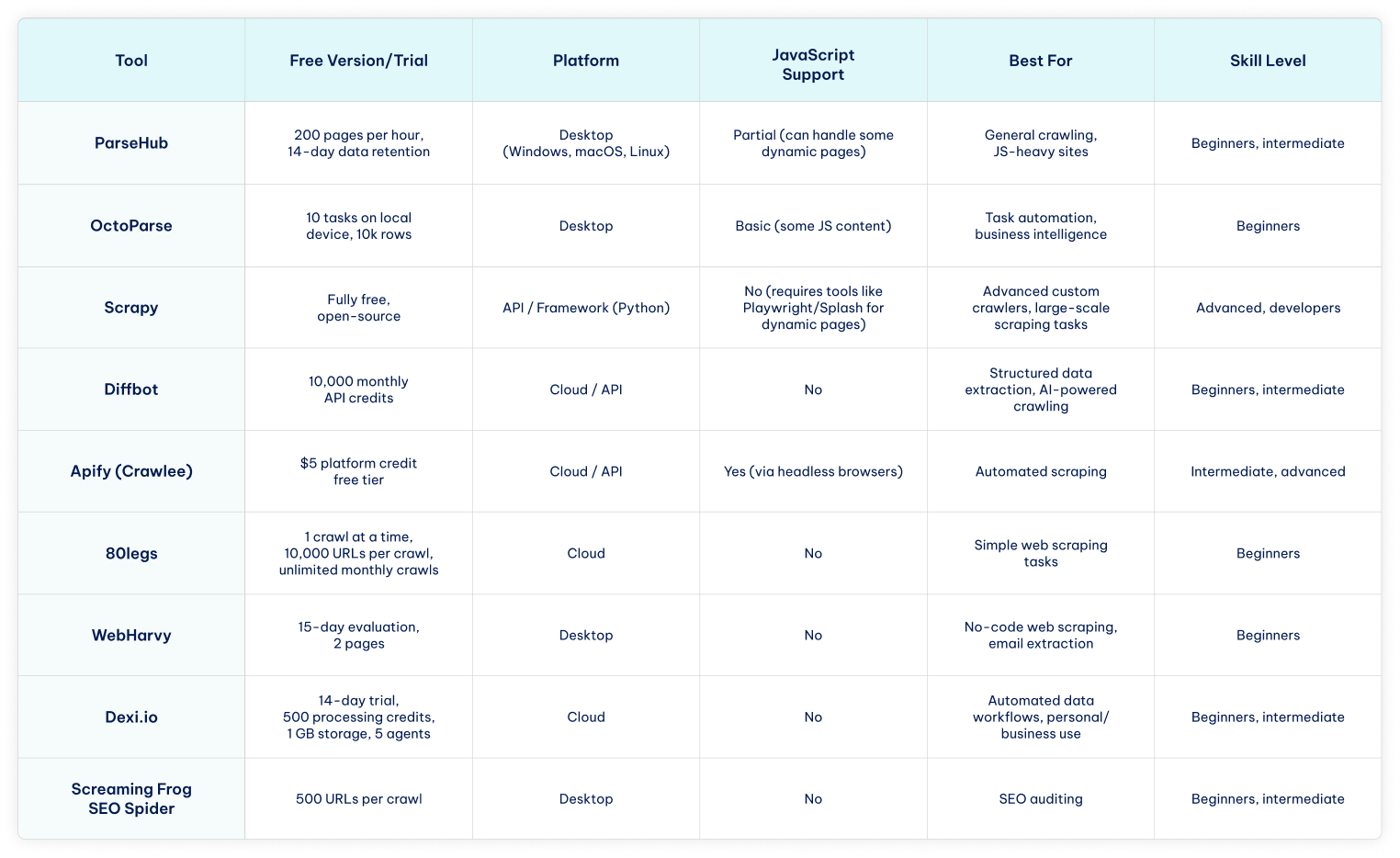
Before we dive into the details of each website crawler, here’s a quick comparison table to see the main features and differences at a glance.
Top 9 Free Web Crawling Tools
Free web crawlers are available as desktop applications, developer frameworks, and cloud-based services. They benefit website owners who want to rank higher on search engines without spending extra on ads or other paid channels.
Simultaneously, more and more businesses launch proprietary search engines that do not collect as much data as Google or offer different customization options.
In both cases, a free website crawler can give an early advantage. We have analyzed nine web crawling services regarding their simplicity, scalability, additional features, pricing, and more.
Here are our top nine free web crawling tools for 2026.
1. ParseHub
Best for: non-technical users and handling JS-heavy sites.
Among the best free web crawlers is ParseHub, which is fully compatible with proxies for projects of any size. ParseHub operates as a desktop application on Windows, macOS, and Linux.
- Free version
ParseHub is an excellent free web crawler. Its free version lets you get 200 pages of web data within an hour and allows 14-day data retention. The free plan has outstanding speed, and paid options provide good scalability according to your needs.
- Features
The Standard plan lets you crawl 10,000 pages per run, and the cap is removed on the Professional and ParseHub Plus tier. Paid plans also include IP rotation and extend data retention up to 30 days.
It’s also worth noting that this service works perfectly on macOS, so if you perform your data-gathering operations using Apple’s ecosystem products, this might be your best choice.
2. OctoParse
Best for: non-technical users and task automation.
Octoparse is a free web crawler designed for non-coders that uses AI to help gather web data. The visual workflow design allows users to set up data extraction easily with pre-built templates for popular sites.
- Free version
The free OctoParse version lets you run 10 tasks, but only on local devices. However, it does not limit pages per single run, enables you to crawl on any device, and exports up to 10k data rows of scraped data.
Like most web scrapers, upgrading to a paid plan unlocks advanced features, which you can try out using a 14-day free trial.
- Features
This web crawler is perfect for task automation and offers CAPTCHA solving, preset task templates, scheduling, and API access. It is fully compatible with proxies to target multiple websites simultaneously or gather business intelligence privately.
The Professional plan includes advanced API calls for fast data sharing and automatic cloud-based data backup for security.
3. Scrapy
Best for: developers and advanced crawling.
Scrapy is an open-source Python framework that efficiently handles thousands of concurrent requests.
It’s run from the command line, giving developers precise control over crawl behavior and data export formats. Users comfortable with the command line can automate complex crawling and scraping workflows.
- Free version
Scrapy is a free crawling framework coded in Python and released in late 2023. It provides built-in functions for data retrieval, offers good scalability for larger projects, and efficiently uses the device’s CPU and memory.
Software developers or development enthusiasts can contribute to its open-sourced code to improve the tool or optimize it for their needs.
- Features
This tool is suited for advanced crawling specialists and also offers quality-of-life features, such as customizable selectors for data extraction. Scrapy automatically optimizes the crawling speed and exports scraped data in JSON, CSV, and XML formats.
Lastly, it is built around spiders and supports Windows, Linux, macOS, and even BSD devices. We must say that the installation process is slightly complex and differs per operating system.
4. Diffbot
Best for: AI-powered structured data extraction and small-to-medium projects.
Diffbot Crawlbot uses AI to classify pages and extract structured data into JSON.
- Free version
Diffbot offers a free-forever plan with 10,000 monthly credits that can be used across its APIs. This free web crawler version is suitable for small-to-medium crawling or data extraction projects, testing, and prototyping.
- Features
Diffbots extracts data using datacenter or third-party proxies and supports bulk extracts for massive data scraping tasks. It can make 25 calls per second and offers API access. We particularly like Diffbot’s ability to target unstructured data and convert it into formats applicable for further analysis.
Its crawlbot is beginner-friendly and also customizable for advanced use. There’s also a Diffbot Knowledge Graph API to streamline information search on articles, which is especially easy to use.
5. Apify
Best for: intermediate to advanced users building automated scraping workflows.
Use one of Apify’s tools to build reliable web scrapers, like its Crawlee open-source library.
- Free version
Apify is a cloud-based platform for building or using automated data extraction tools, such as Crawlee. It has a free pricing tier with a $5 platform credit, which is enough to try a few services out. Here, we will use Crawlee as an example.
We recommend switching to the Apify paid version whenever you feel ready to scale your operations, as this platform has more than a few tools to assist with various online data scraping tasks.
- Features
Crawlee is a flexible open-source library for building and customizing crawlers, supporting HTTP requests, headless browsers (Playwright/Puppeteer), CAPTCHA solving, and more. It works great with proxies and improves them by rotating unique fingerprints for online privacy.
There is an active Discord community that you can join, even with a free Apify pricing tier. Additionally, Crawlee allows switching to headless browsers, automatically discards timed-out proxies, and runs on Node.js, which powers millions of websites.
6. 80legs
Best for: beginners doing simple crawling tasks.
This large platform has a free plan and an affordable intro version to extract data without spending much.
- Free version
80legs uses a straightforward pricing model with a sufficient free version. Although it supports only one crawl at a time, it lets you target 10,000 URLs per crawl, which is more than enough for most free-of-charge tasks.
Furthermore, it doesn’t limit the number of monthly crawls, so you get a genuinely free web crawler if you stick to only one crawl at a time.
- Features
We recommend 80legs for beginners looking for a service that’s easy to understand and deploy. More expensive pricing plans only increase the number of crawls and URLs per single crawl, so everybody gets the same benefits.
80legs claims they can crawl over 15 million European and US domains, which might not be enough for massive business projects, but is sufficient for simple scraping tasks.
7. WebHarvy
Best for: non-technical users and no-code data extraction.
This feature-rich, no-code web scraper has one of the best customer support teams to assist with any issues promptly.
- Free version
Although WebHarvy does not offer an unlimited free version, it provides a 15-day evaluation version to try the service out. It lets you scrape data from up to 2 pages and gives free updates and support.
However, the WebHarvy evaluation version is somewhat limited compared to others on the list, offering only a short trial with restrictions on the pages it can scrape.
- Features
This web scraper has an intuitive GUI that lets you scrape HTML, text, images, emails, and URLs from target websites without coding. In fact, its email scraping is fast and accurate, making it one of the best tools for email marketing managers.
The tool is beginner-friendly with affordable paid plans, and you can expect second-to-none customer support regarding any problems. The only downside is the limited free version, so pick WebHarvy only when you’re ready to focus entirely on web scraping tasks.
8. Dexi.io
Best for: non-technical users or intermediate users building automated data workflows.
Crawling and data extraction platform focused on capturing structured data from websites and transforming it into usable datasets for analytics and automation.
- Free version
Dexi.io offers a 14-day free trial that lets you test the platform’s main features. The trial includes 1 user account, 500 processing credits, 5 agents, 1 GB of storage, and 1 concurrent job. This provides enough capacity to explore the tool’s data extraction and automation capabilities before upgrading to a paid plan.
- Features
With high customization options and comprehensive self-help resources on the website, Dexi.io is suitable for both personal and business use. The platform acts as a powerful web crawler and web scraper, capable of building automated data extraction workflows.
The Pilot plan offers 1 user, 5,000 processing credits, 10 agents, 10 GB of storage, and 1 concurrent job per month, while the Enterprise plan supports multiple users with custom processing credits, agents, storage, and concurrent large-scale data collection projects.
9. Screaming Frog
Best for: SEO specialists and technical website audits.
An excellent spiderbot oriented at SEO auditing to improve website ranking. While it can also extract metadata, analyze site architecture, and check redirects, Screaming Frog SEO Spider is primarily used for technical SEO audits and can crawl up to 500 URLs in the free version.
- Free version
Screaming Frog SEO Spider is best for identifying broken links and missing meta tags in SEO audits. It’s one of the best choices for SEO specialists and has an outstanding free version with advanced features.
Free plan users can find broken links, discover duplicates, analyze titles and metadata, and generate XML sitemaps with a 500 URL crawl limit, making it one of the best free web crawlers. However, task automation features require upgrading to a paid version, which removes the URL limit.
- Features
Screaming Frog’s paid version lets you schedule tasks, do a spelling and grammar check, and integrate with Google Analytics.
Furthermore, it can find near-duplicate content, compare crawls, and provide page speed insights, live metrics integration, and Looker Studio Crawl Reports. In other words, the paid version is best for website owners ready to scale their operations.
Use Cases by Audience
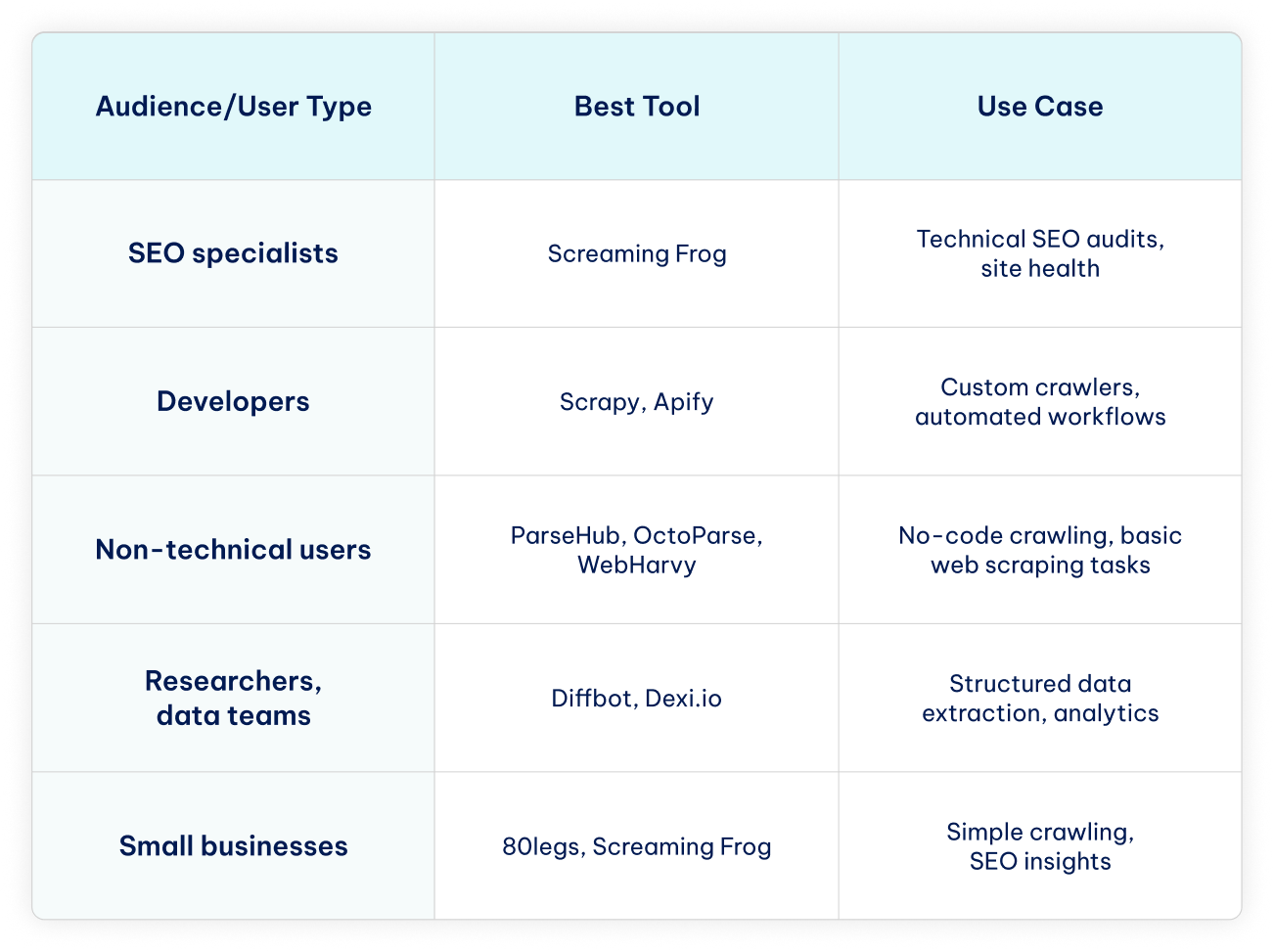
Different users have different needs when it comes to crawling and scraping. Here’s a quick guide to help you choose the best website crawler for your specific use case or project.
Conclusion
Having a website is essential to remain competitive in the current technology-driven market. It is just as important for numerous personal hobbies or projects. That’s why we compiled this list of the nine best free web crawlers to assist with the early stages of website growth.
While some platforms offer advanced features through paid subscriptions or require high-quality residential proxies for large-scale operations, every tool on this list offers a robust free version or trial. Whether you’re looking for a beginner-friendly web crawler or an advanced solution for automated data scraping tasks, these tools can help you get started and make the most of your website.
FAQ
Is web crawling legal for commercial use?
Crawling public web pages is generally legal for commercial use, as long as you respect the website’s terms of service, copyright laws, and privacy regulations.
However, scraping or collecting personally identifiable information without permission may violate laws such as the GDPR in Europe or the Computer Fraud and Abuse Act in the US. Always review a website’s terms and comply with local regulations when using web crawlers for business purposes.
What’s the difference between crawling and scraping?
Crawling involves visiting websites to analyze and index their content, often for search engines. Web scraping, on the other hand, focuses on extracting specific data from websites for research, business intelligence, or other purposes.
Website crawlers usually process entire sites, while scrapers target particular web data. In short, crawling maps and monitors websites, whereas scraping collects the data you need.
Which free crawler is best for beginners?
The best free website crawlers for beginners are ParseHub, OctoParse, WebHarvy, and Dexi.io. They have intuitive, no-code interfaces and free versions that let you start crawling websites, fixing SEO issues, or extracting basic data without any programming skills.
Do free crawlers support JavaScript-heavy sites?
Most free web crawlers offer only limited support for websites with dynamic, JavaScript-generated content. From the tools on our list, ParseHub is the most capable of handling JS-heavy sites, as it can simulate a browser to extract data from some dynamic content, though the free plan has restrictions on pages and speed.
Octoparse can also work with basic JavaScript content using its desktop app, but advanced dynamic sites may require a paid plan.
Can crawling hurt a website’s performance?
Crawling can impact a website’s performance if it’s done excessively or too aggressively. High-frequency crawls or requests from multiple bots at once can slow down page loading, increase server load, and even trigger rate limits or temporary blocks.
Responsible crawling, or respecting robots.txt, limiting request rates, and spreading out crawl activity, helps prevent any negative effects on a site’s performance.