HTTPX vs AIOHTTP vs Requests: Which to Choose?
Proxy fundamentals

Arevika Ambarcumian
Key Takeaways
-
Requests is a beginner-friendly option that will fit most projects without complicating your code.
-
HTTPX is the best option when you need both synchronous and asynchronous requests built into your project.
-
The aiohttp HTTP client is best for maximum concurrency when you are comfortable enough with async-first design.
Python has three well-known libraries for sending HTTP (Hypertext Transfer Protocol) requests: HTTPX, aiohttp, and Requests. When choosing a solution for your project, you must consider differences in scope, performance, learning curve, and support for concurrent requests.
Generally, you’ll want to use Requests for making HTTP requests in simple synchronous scripts, HTTPX to mix both asynchronous and synchronous requests, and aiohttp when you need asynchronous requests only. A more in-depth comparison is helpful when deciding.
Requests Library
Requests is among the most popular Python libraries. The built-in urllib3 and other request libraries are quite complicated and challenging to parse, so Requests was made to simplify the process of using them.
You can install the library through pip:
python -m pip install requests
Once it's installed, you'll need to import the library. You can send various HTTP requests by adding a method named after the request (e.g., GET, POST, DELETE).
import requests
response = requests.get("https://httpbin.org")
print(response.text)
Simplicity is the main selling point here, especially when comparing Requests vs urllib3 . Most of the methods and functions are highly intuitive, designed around the motto HTTP for Humans, and suitable for beginners. If you’re just getting started with Requests, our beginner-friendly tutorial on using headers with Python Requests shows how to set custom headers like authorization tokens and user agents step by step.
It's also often used in Python web development in combination with various browser automation tools such as Selenium. We covered how to use it for such a use case in our complete Python Requests library guide .
Requests vs Other Libraries Rundown
While Requests is convenient, beginner-friendly, and will work for most projects, some might require features that Requests lacks. Consider whether adding additional code complexity with other HTTP clients is worth it for mitigating its drawbacks.
- No async support. Requests is intended for synchronous programming only. While you can work around the issue, it's often better to pick HTTPX or aiohttp for the job.
- No HTTP/2 support. Requests uses HTTP/1.1, which is a slower version of the protocol. When comparing Requests vs HTTPX or AIOHTTP, it'll always be the slower library.
- Built upon urllib3. Requests inherits all of the benefits and drawbacks of urllib3 since it's built upon it. There's less room for improvement over time, even if the library does have massive community support.
HTTPX Library
HTTPX is a library inspired by Requests that attempts to fix all of the issues associated with it. As such, HTTPX provides both async compatibility and HTTP/2 support.
These are major improvements that make HTTPX popular among developers already familiar with Requests. Making the switch isn't that difficult since most of the methods and functions are identical.
python -m pip install httpx
Once you have the library installed, import it. Most of the methods are identical – every request is a method associated with its name.
import httpx
response = httpx.get("https://httpbin.org")
print(response.text)
Async compatibility follows a fairly standard structure for making HTTP requests.
import httpx
import asyncio

async def fetch(url):
    async with httpx.AsyncClient() as client:
        response = await client.get(url)
        return response.status_code, response.text

async def main():
    url = "https://www.example.com"
    status_code, content = await fetch(url)
    print(f"Status Code: {status_code}")
    print(f"Content: {content[:100]}...")

if __name__ == "__main__":
    asyncio.run(main())
Technically, you can use asyncio with Requests as well, but it would involve making a synchronous call in an asynchronous wrapper. It’s less efficient than using a library, such as HTTPX, designed for asynchronous I/O from the ground up.
HTTPX vs Other Libraries Rundown
HTTPX compensates for the lack of asynchronous operations and other Requests drawbacks, but it isn't without flaws itself. A few essential disadvantages compared to other web scraping libraries must be considered before committing to HTTPX for a project.
- Relatively new. HTTPX is a little newer library compared to Requests and aiohttp. While it's been getting more stable and more supported, the library still lacks community support and has some room for improvement.
- Higher dependencies. Due to its layered design, HTTPX has more dependencies than Requests. It may become problematic in environments where it's important to minimize them due to security, stability, or maintenance.
- Learning curve. HTTPX has a lot of functionalities as it combines synchronous and asynchronous operations. Both aiohttp and Requests focus only on one, making them somewhat easier to learn.
aiohttp Library
If you need a library for asynchronous programming only, consider aiohttp. It's built on the asyncio framework, so sending asynchronous requests is implemented from the ground up. Unlike HTTPX and Requests, it's not just an HTTP client library, but also a server framework for Python.
As such, it's somewhat more complicated to use, as sending a single HTTP request requires a few lines of code. There's even a dedicated page to explain why developing with aiohttp is so verbose.
Installing the aiohttp library isn't the tricky part, as you can do it with a pip command:
python -m pip install AIOHTTP
Setting up the entire process is a bit more complicated and requires some explanation.
import aiohttp
import asyncio

async def fetch(url):
    async with aiohttp.ClientSession() as session:
        async with session.get(url) as response:
            print(f"Status: {response.status}")
            content = await response.text()
            print(f"Body: {content[:100]}...")

async def main():
    url = "https://httpbin.org"
    await fetch(url)


if __name__ == "__main__":
    asyncio.run(main())
After importing the libraries, we'll have to define a few functions to use aiohttp. The “fetch” function is the one where we'll be sending out a GET HTTP request. Unlike regular Python functions, we have to include “async def” to make it an asynchronous function.
First, create a session object, which allows us to send numerous HTTP requests with the same parameters. Then, “Async with” closes the session after the block is exited, even if an exception occurs. This is to increase the performance and protection from leaks.
The “Async with” block does the same in the following line, but we do need to use the session object to send a GET HTTP request.
Printing outputs is relatively self-explanatory. The content object, however, has one main difference – “await”, which freezes that instance of the “fetch” function. While that call is frozen, other instances of “fetch” (or other asynchronous functions in general) can be run in parallel.
As such, the benefits of using aiohttp instead of Requests (in some cases, HTTPX) should be clear. With aiohttp, you can run several HTTP requests at the same time instead of sending them one after another.
aiohttp vs Other Libraries Rundown
As with other libraries, aiohttp has a few major drawbacks that must be considered before choosing it over Requests or HTTPX. The choice is critical with aiohttp, since it commits you to an asynchronous architecture from the start.
- No synchronous support. aiohttp is not a library built for synchronous requests, so when choosing between Requests and aiohttp, you must commit to one or the other. If you need a middle ground, go with HTTPX.
- Learning curve and complexity. Out of all three, aiohttp is the most complicated HTTP client library to learn. Defining functions, session objects, and generally getting into asynchronous programming is more difficult.
- Debugging difficulties. Solving async bugs, especially in large code bases. It's much more difficult. This is a significant point for programming productivity when choosing between aiohttp and simpler libraries such as Requests.
Comparing HTTPX vs aiohttp vs Requests
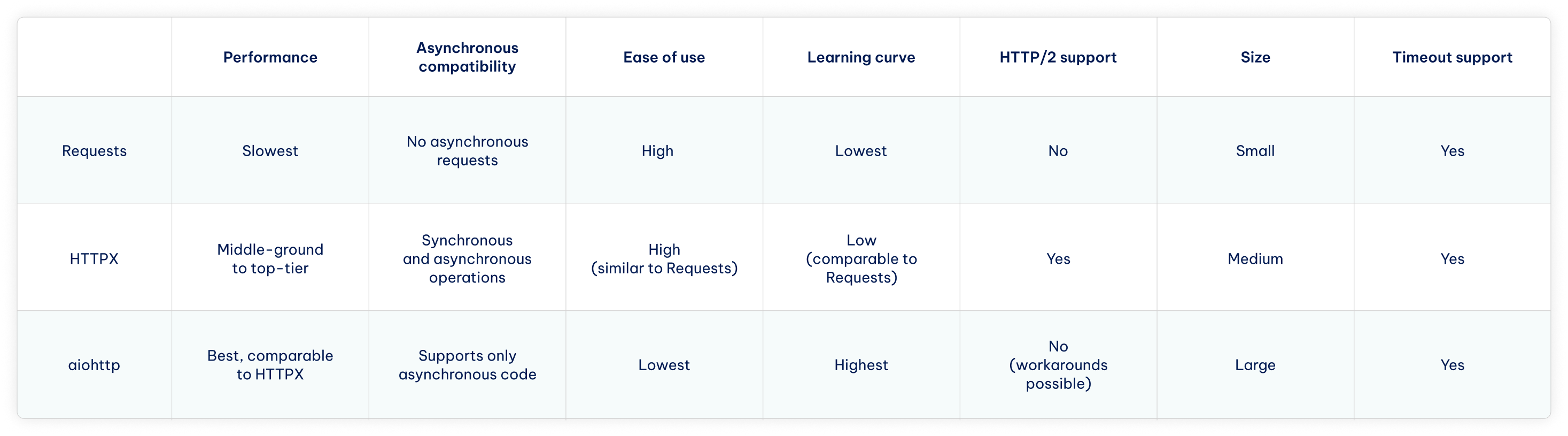
When picking between all three major HTTP request libraries, you should first decide whether you need synchronous or asynchronous compatibility. Either one will remove one of the libraries, leaving you with either Requests vs HTTPX or HTTPX vs AIOHTTP.
If you need to send a few HTTP requests for web scraping using our Residential Proxies or any other means, the simpler libraries will serve you much better, leaving HTTPX vs Requests to choose from. If you need to send asynchronous HTTP requests on a major code base, aiohttp is the only option.
Finally, optimization also plays a part in your choice between HTTPX, Requests, and aiohttp. If networking speeds and performance play a part in your project, HTTPX and aiohttp are the two to choose from.
How to Choose The Right Library
The decision largely rests on your experience with Python and whether your project requires concurrent requests. In most cases, the Requests library is enough as it prioritizes development speed and convenience while having enough features for making HTTP requests.
The Requests library also has the lowest barrier to entry for beginners, the best documentation, and the largest community. It's best for getting simple projects done quickly without the asynchronous code complexity, but sometimes you cannot do without it.
When building a project with many asynchronous operations, such as large-scale data collection, the choice comes to how much HTTP client flexibility you need.
- HTTPX is the most flexible, as you can start with synchronous code and migrate to async later. Coupled with HTTP/2 support and similarities with requests, it's excellent for exploring implementations of concurrent requests without necessarily committing fully.
- aiohttp is best for fully asynchronous applications, such as real-time services or high-concurrency web scrapers. This HTTP client is async-only and has client and server functionality. However, it has a steep learning curve and requires fully committing to async architecture.
Conclusion
Now that you know the basics of how each HTTP client library works and compares to others, you only need to define your own priorities. In short, Requests is best for simplicity, HTTPX for flexibility, and aiohttp for fully committing to asynchronous request architecture.
FAQ
Which Python library is best for web scraping?
No single library is considered the best for data collection tasks with Python . The choice depends on your task, the HTTP clients and parsing tools you use. Requests and BeautifulSoup are often the recommended choice for beginners. More advanced or large-scale projects tend to use Selenium, Scrapy, Playwright, or other tools and libraries.
Why use HTTPX instead of Requests?
HTTPX is chosen instead of requests when you need async support in your project, because Requests work with synchronous code only. HTTPX also supports HTTP/2 out of the box, which improves performance. At the same time, HTTPX is intentionally similar to using Requests, so switching isn't tricky.
What is the difference between aiohttp and Requests in Python?
*aiohttp *allows efficient handling of concurrent requests, but makes you fully committed to a complex async-only architecture. The Requests library uses only synchronous operations, but it's much simpler and straightforward to use. Most projects use Requests by default and rely on aiohttp only when async performance is needed exclusively.
What is the difference between xhttp and aiohttp?
HTTPX (sometimes misspelled as xhttp) is exclusively an HTTP client library focused on making synchronous and asynchronous requests. aiohttp is both an HTTP client and a web server framework, which allows it to complete async requests. However, aiohttp is async-only and has a steeper learning curve compared to HTTPX, similar to requests.