How to Manage Multiple E-Commerce Stores: The 2026 Strategy for Scaling
TutorialsManage multiple e-commerce operations safely with browser profiles and residential proxies. Learn multi-account best practices to reduce suspension risks.


Milena Popova
“I run several Amazon stores. Can I manage them on the same computer without getting banned?” If you have ever searched Reddit for multi-store management, you have probably seen questions like this.
Sellers often worry about account linkage, browser fingerprints, and sudden suspensions. Many try switching browsers or using incognito mode, only to realize that platforms track much more than that.
So how do experienced sellers safely manage multiple e-commerce operations?
This guide offers a clear, tested way to grow your online store. It shows how to keep each store separate, use safe login settings, and set everything up step by step with the right tools. Keep reading to learn how to grow multiple stores without risking your accounts.
Why Manage Multiple Stores?
Managing multiple e-commerce stores helps businesses expand their reach across different platforms and customer segments. By operating multiple storefronts simultaneously, organizations can diversify revenue streams and reduce dependency on a single sales channel.
Operating multiple stores helps test different products, pricing models, and marketing strategies across different environments in parallel. The resulting data provides valuable insights into customer behavior and market trends, enabling smarter decisions and faster growth.
For e-commerce sellers, effective multi-store management strengthens brand visibility and competitive positioning. It enables teams to target niche markets, expand globally, and optimize revenue without overloading a single store.
The Three Core Pillars of Successful Multi-Store Management
Effective multi-store management relies on strong security, a clear operational structure, and the right tools to manage multiple storefronts safely and efficiently.
- Store isolation and secure access
Each store must be completely separated to prevent login conflicts, bans, and cross-account issues. Proper isolation protects operations and ensures reliable performance.
Using unique browser profiles and secure proxy connections keeps accounts independent. This approach supports safe multi-store growth and prepares sellers to leverage advanced tools, such as anti-detect browsers.
- Workflow efficiency and automation
Streamlining processes such as product uploads, inventory updates, and order management reduces manual workload while minimizing operational errors. Automation plays a critical role in enabling businesses to manage multiple storefronts efficiently and at scale.
With optimized workflows in place, teams can oversee a larger number of stores simultaneously while maintaining accuracy and control. This increases overall productivity and ensures consistent operations across all e-commerce channels.
- Data-driven monitoring
Monitoring sales, traffic, and customer behavior across storefronts is essential for informed decision-making. Data-driven insights identify top-performing products and strategies that drive growth.
Analyzing performance helps prioritize resources, optimize marketing campaigns, and manage inventory efficiently. This approach ensures each store remains profitable while supporting advanced multi-store management tools.
Following these core principles ensures safe, efficient, and scalable multi-store management.
Professional Method: Using AdsPower and IPRoyal for Multi-Store Management
AdsPower (Anti-Detect Browser)
AdsPower is an anti-detect browser designed to help users manage multiple online accounts securely by creating separate browser fingerprints and independent profiles.
Independent Browser Fingerprint Profiles
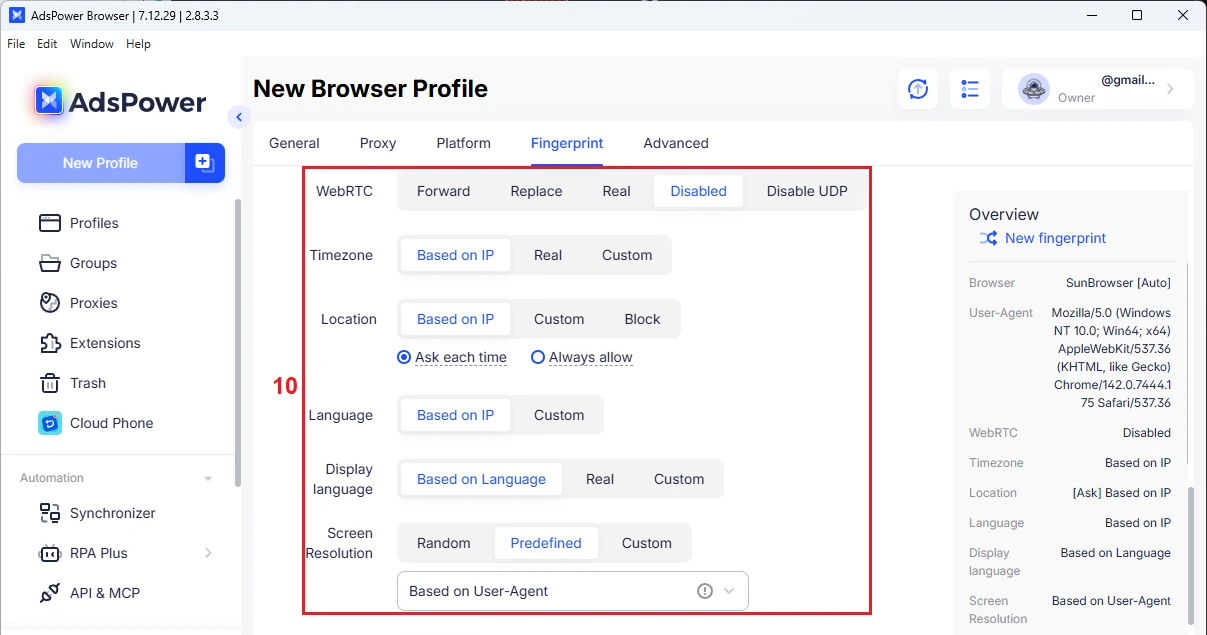
With AdsPower, users can create multiple browser profiles, each with a unique digital fingerprint . These fingerprints include parameters such as time zone, location, language, screen resolution, and WebGL configuration. If you’re unsure how to configure these parameters, it’s recommended to keep the default settings.
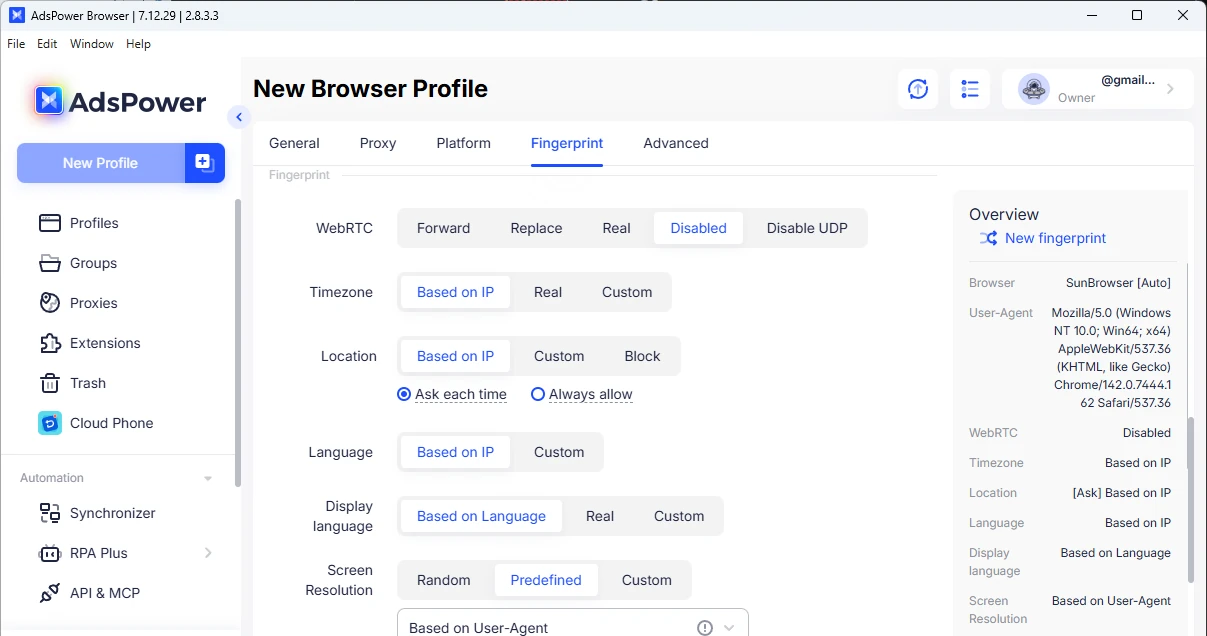
For multi-store management, this means each e-commerce account appears to be accessed from a different device and environment. This separation significantly reduces the risk of account association and improves overall account safety.
Automation Features
Built-in automation tools, RPA and RPA Plus , let users automate browser tasks. Users can record actions such as opening profiles, clicking buttons, navigating pages, or switching tabs, and then let the system repeat these actions automatically.
This automation helps sellers streamline repetitive tasks, reduce manual effort, and maintain consistent operations across multiple accounts.
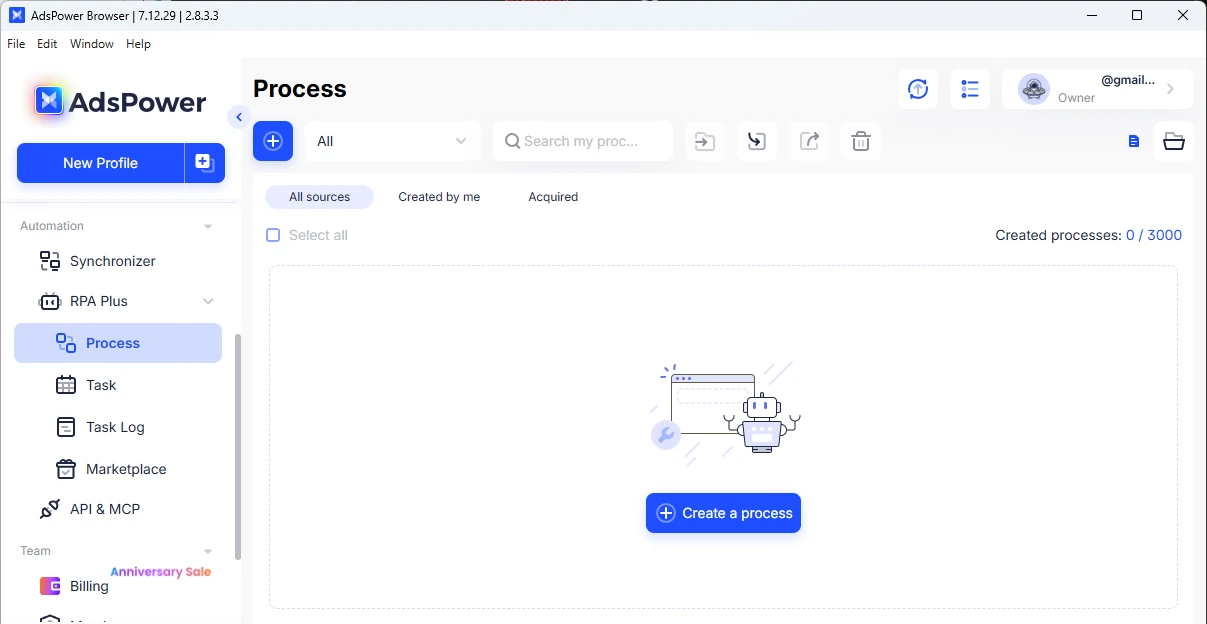
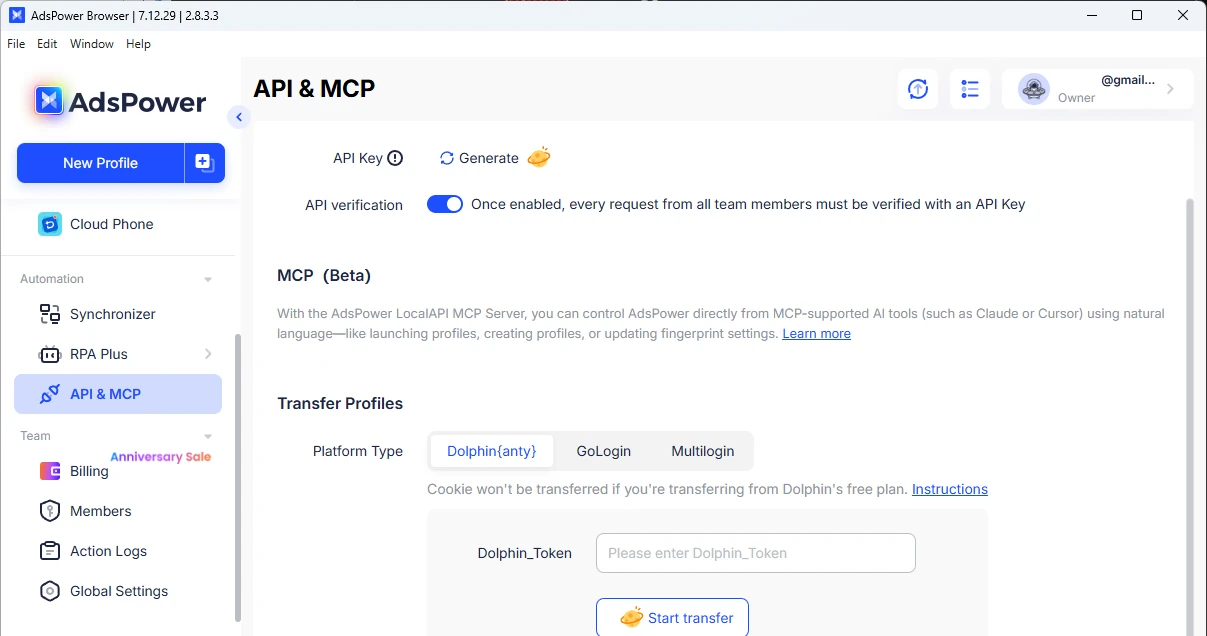
Additionally, a Local API integrates with automation tools such as Selenium and Playwright. This allows advanced users to control browser profiles programmatically and build custom automation workflows.
Team Collaboration and Permission Control
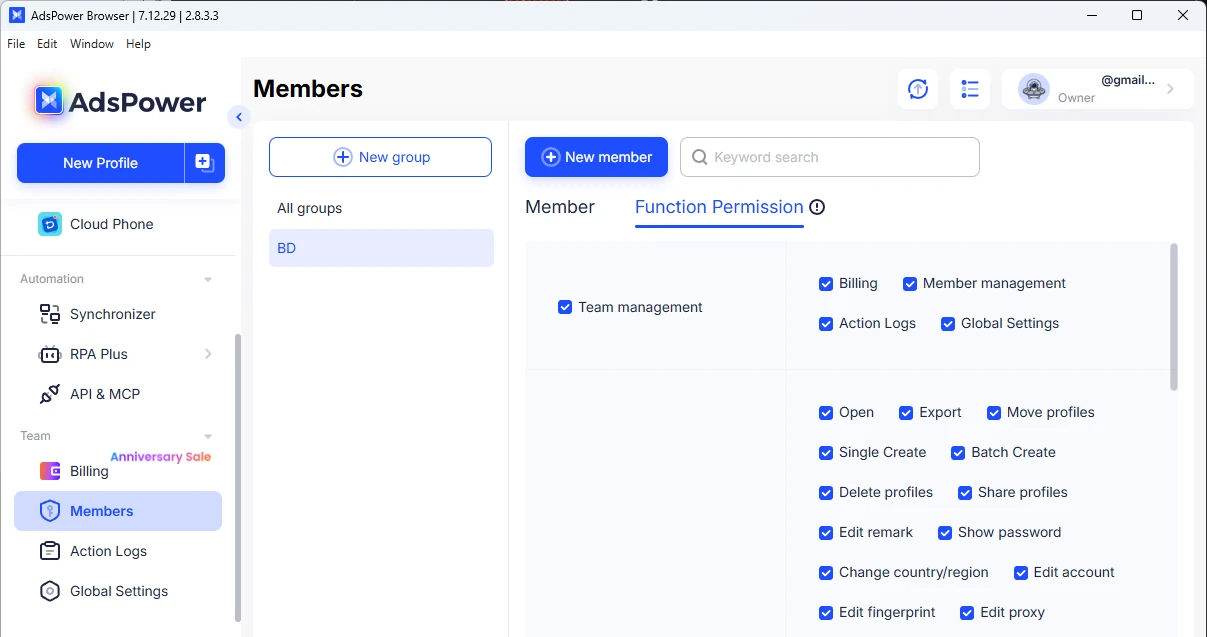
Role-based access control allows administrators to assign precise permissions to team members for each browser profile. For example, a team member can manage product listings for store A while being restricted from viewing login credentials or modifying store B.
Proxy Integration Support
AdsPower allows assigning SSH, HTTP, HTTPS, or SOCKS5 proxies to each browser profile individually.
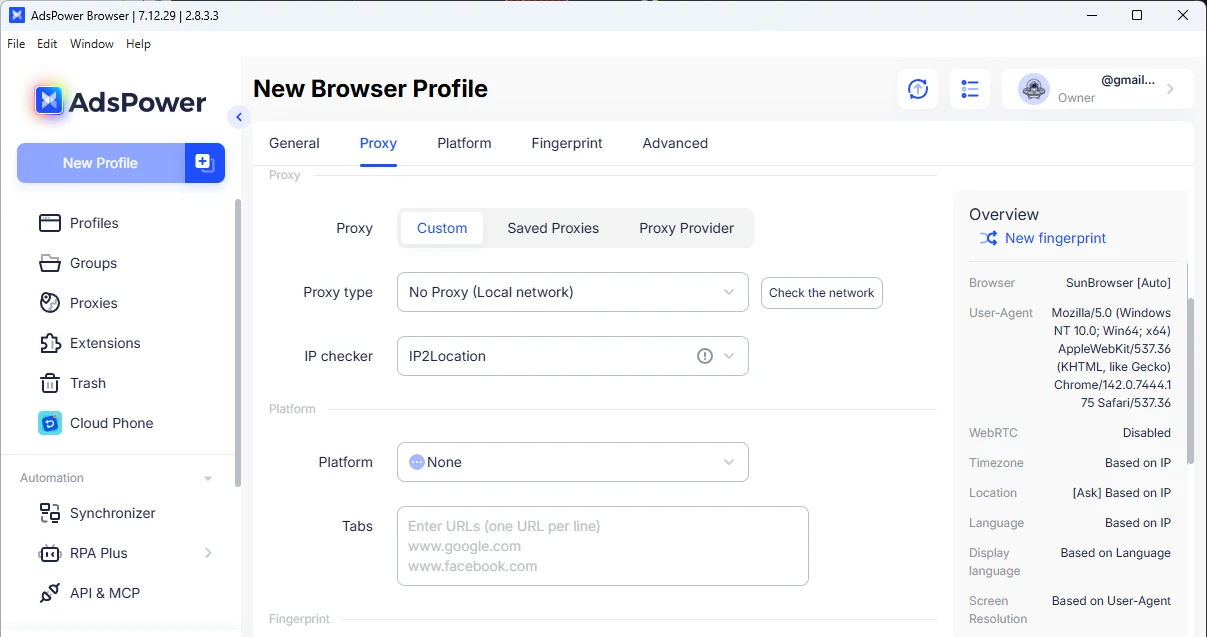
By assigning a unique proxy to each profile, businesses can ensure that each store operates from a different IP address. This prevents platforms from detecting multiple accounts using the same network and helps each store appear as if it is managed from a separate location.
IPRoyal (Residential Proxies)
IPRoyal offers five proxy types: residential, datacenter, ISP, mobile, and enterprise. Each option serves different use cases depending on the level of anonymity, stability, and performance required.
For multi-store management, Residential Proxies are the most common choice. These proxies use IP addresses assigned to real household internet users, making the traffic appear as regular home internet activity. As a result, online platforms are far less likely to flag or associate accounts accessed via these connections.
A residential proxy from IPRoyal routes your connection through a real household IP address. In other words, when logging in to Amazon or Shopify, the platform treats the activity as originating from a standard home network. Assigning different residential IPs to separate online stores helps reduce the risk of account association.
IPRoyal offers access to a large residential IP pool across many countries with precise geo-targeting at no extra cost. This approach helps sellers choose locations that match their target markets, helping maintain geographic consistency.
The service offers two IP rotation options. Rotating sessions automatically assign a new IP address on each request. Sticky sessions, on the other hand, maintain the same IP for a defined period (from one second to seven days).
The Synergy
When using AdsPower together with IPRoyal’s Residential Proxies, each store operates within its own isolated environment. AdsPower provides a unique browser fingerprint for every profile you create, while the proxy assigns a unique IP address.
This combination allows each store to appear as if it’s accessed from a different device and location. It minimizes the risk of account association, supporting stable and reliable daily store management.
How to Manage Multiple E-Commerce Stores Step-by-Step
The following workflow shows how to manage multiple Amazon stores safely with AdsPower and IPRoyal.
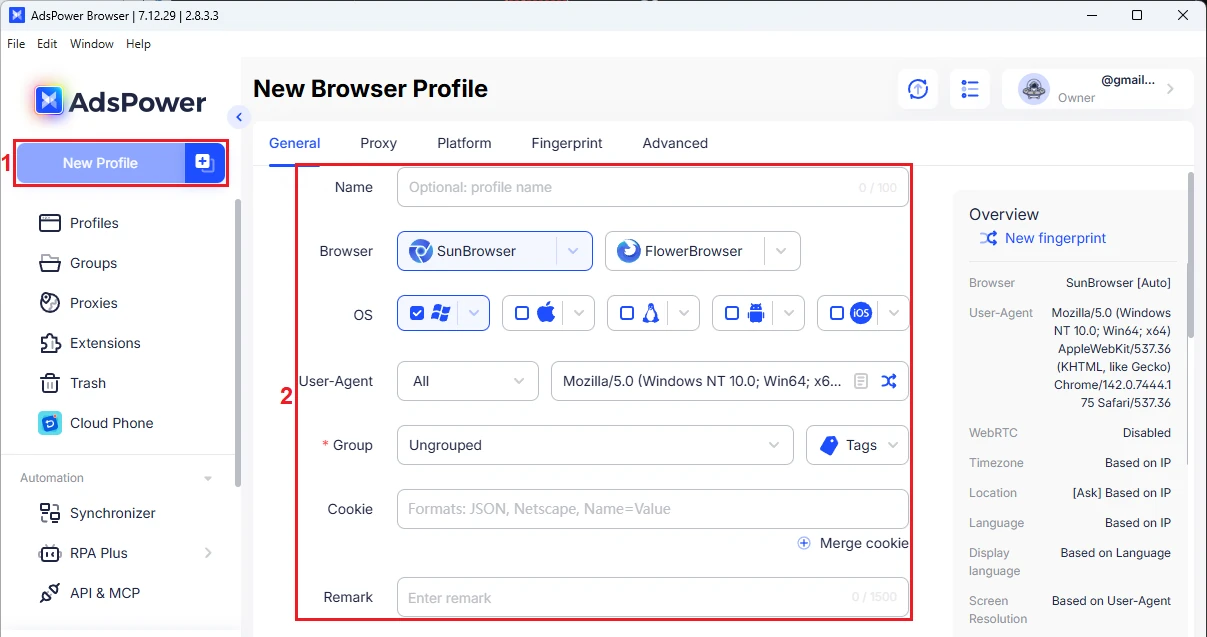
Step 1: Open AdsPower and click ‘New Profile’ (1). Enter the profile name, browser type, operating system, user-agent, and other required settings (2).
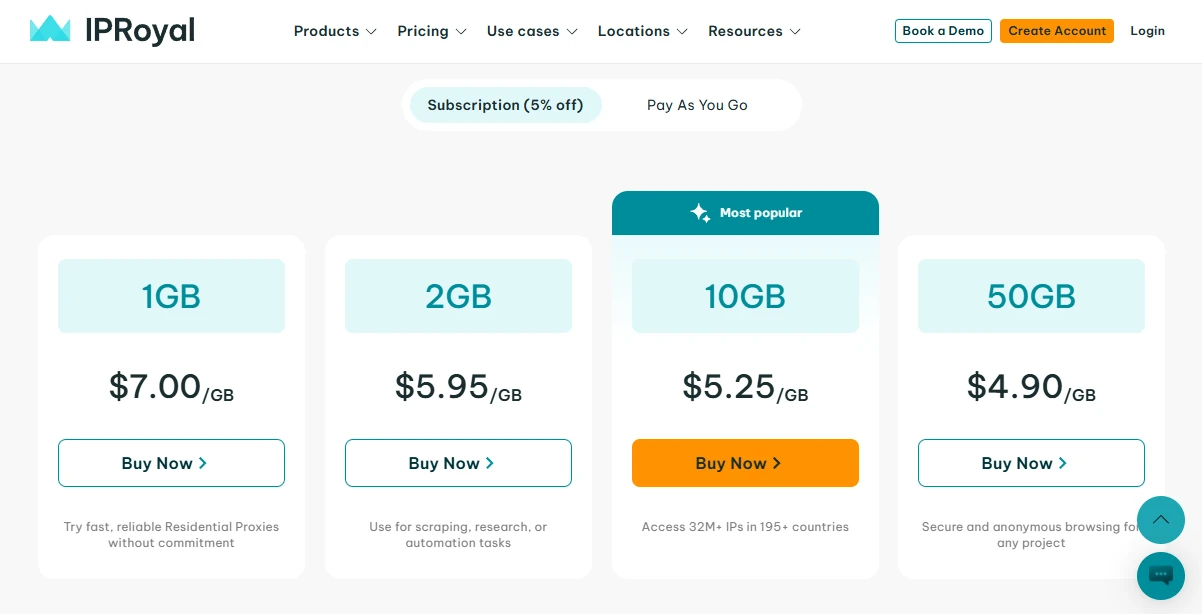
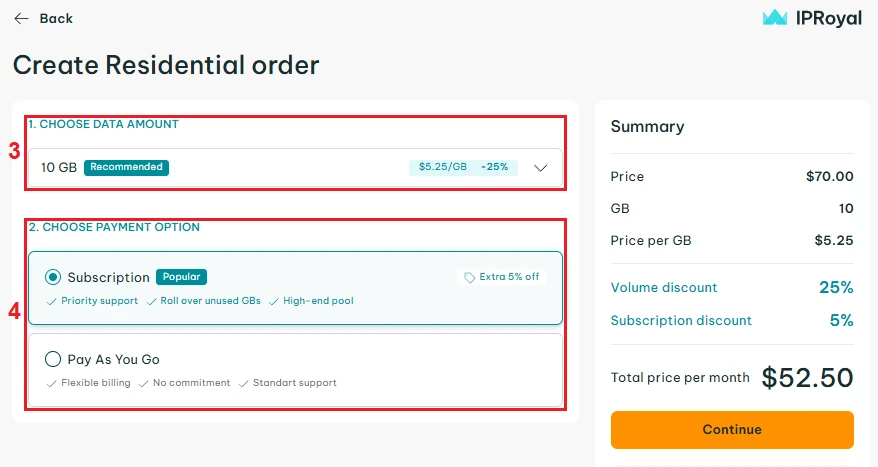
Step 2: Visit IPRoyal and create a Residential Proxies order. Choose data amount (3) and payment option (4) according to your needs.
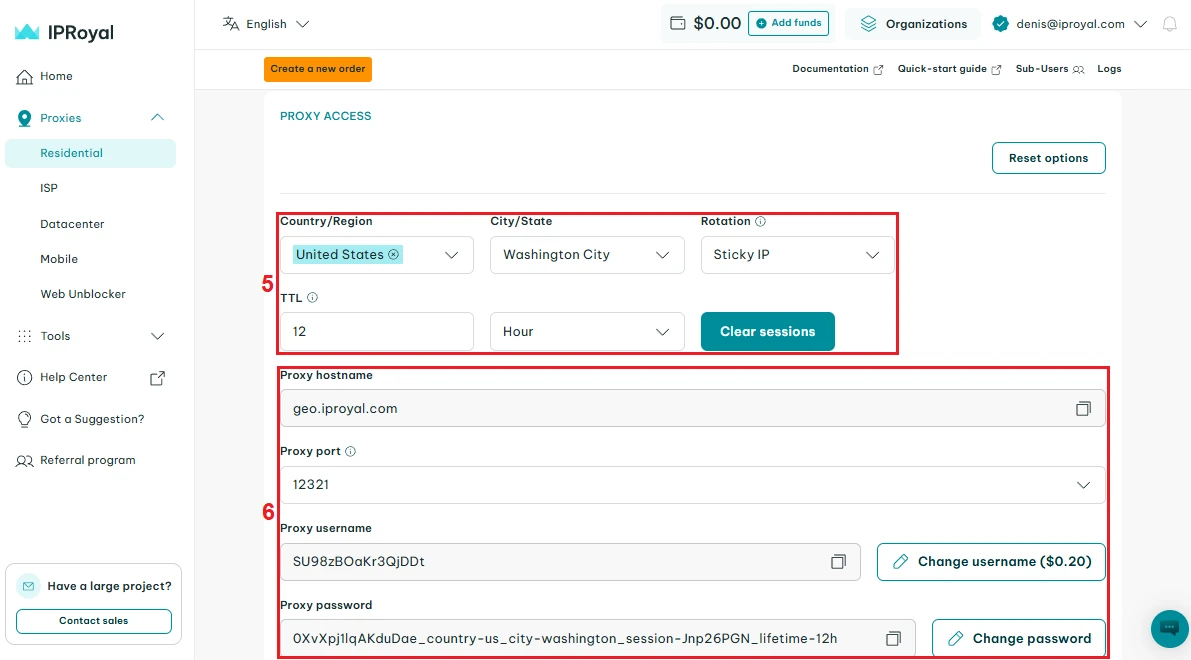
Step 3: Configure your proxy in the IPRoyal dashboard. Choose the country, state/city, rotation type, and session duration (5). Get your proxy credentials (6) and copy them to AdsPower.
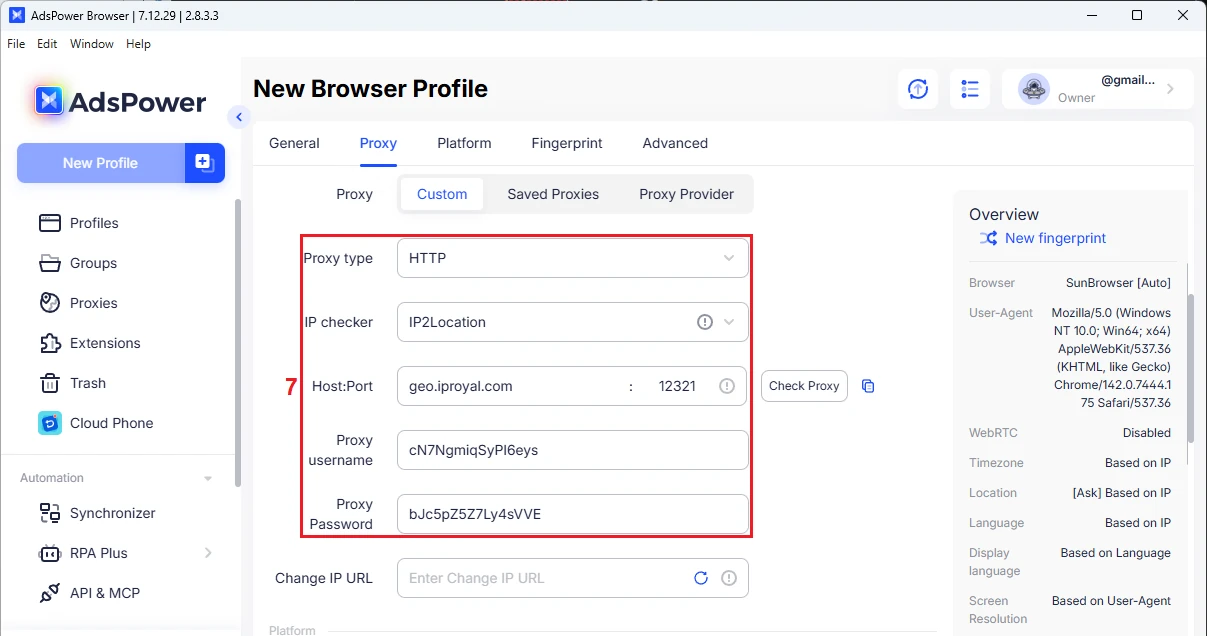
Step 4: Assign (7) the proxy purchased from IPRoyal to this AdsPower profile. The recommended setup is one profile per Amazon account with one dedicated proxy server.
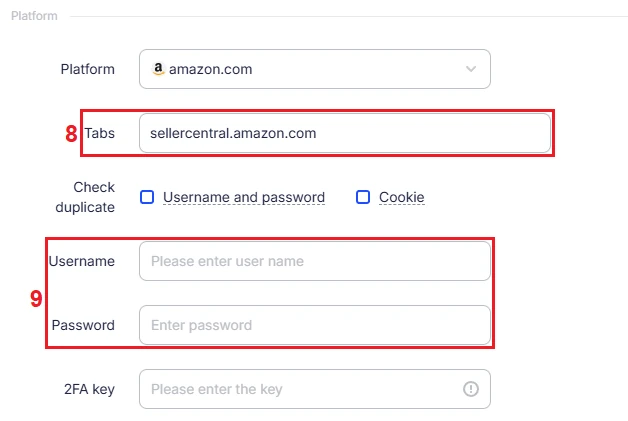
Step 5: Add the Amazon Seller Central login link under the ‘Tabs’ (8) section. Then enter your username and password (9). AdsPower will save this information and automatically fill the fields the next time you open the profile.
Step 6: Configure the browser fingerprint settings (10) according to your needs (25 fingerprint options and over 50 parameters). If you are unsure how to configure them, it is recommended to keep the default settings.
Step 7: Launch the browser profile. The system will automatically navigate to the Amazon seller account. Complete any required verification steps. Once logged in, the profile functions as a separate device environment. Manage product listings, inventory, and orders only within this profile.
Step 8: Create additional profiles for other Amazon stores as needed. Assign a different proxy to each profile and log in with another seller account. Each profile stores its own cookies, login sessions, and browsing data.
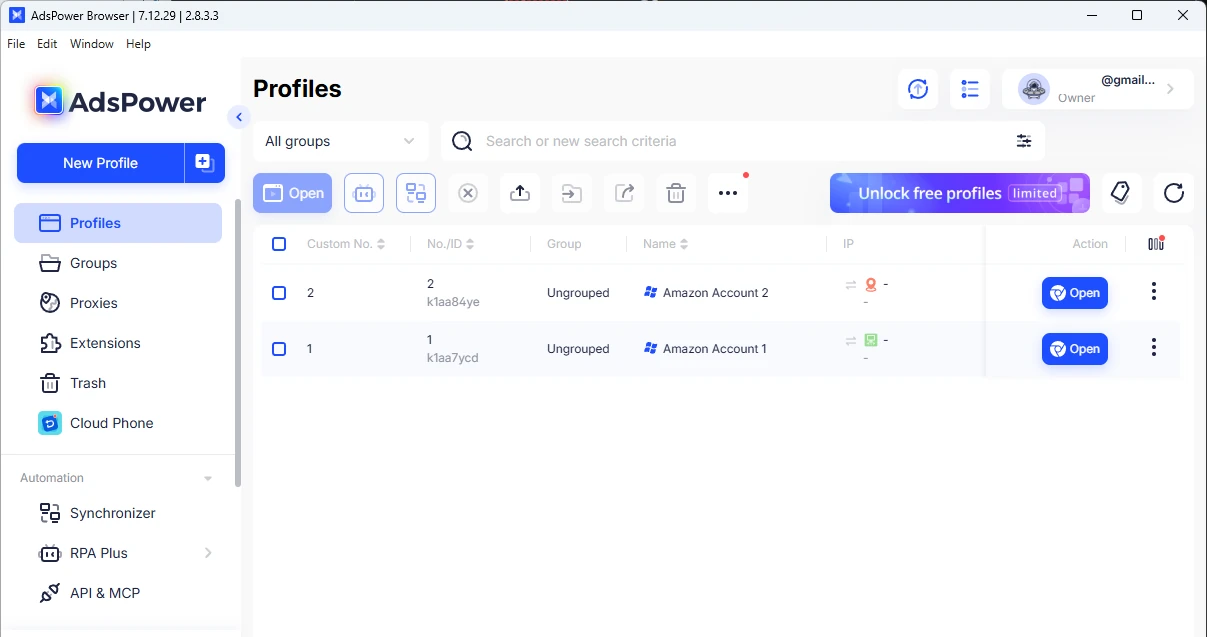
You can apply the same process when managing multiple accounts on other platforms, such as Shopify or Walmart Marketplace.
Common Pitfalls in Multiple Ecommerce Operations (And How to Avoid Them)
Running multiple e-commerce stores can increase revenue opportunities, but it also introduces operational risks. Below are five common mistakes and practical ways to avoid them.
- Using the same browser profile or IP address for multiple stores
Platforms may associate accounts if they detect the same browser environment or IP address. Create one dedicated browser profile and assign a unique IP for each store.
- Mixing store data within a single profile
Managing multiple accounts in the same browser profile mixes cookies and login sessions. Always isolate each store within its own browser profile.
- Unstable login behavior and location changes
Frequently switching IP address locations or logging in at irregular times may trigger platform security checks. Maintain a consistent IP location and follow regular login patterns during daily operations.
- Poor access control and password sharing
Sharing master account credentials with multiple team members increases the risk of errors and security breaches. Use role-based permissions so each team member only accesses the stores they manage.
- Ignoring store performance metrics and platform warnings
Failing to monitor order defects, late shipment rates, or policy alerts can lead to account restrictions or suspensions. Review each store’s dashboard regularly and address issues as soon as they appear.
Final Thoughts
Managing multiple online stores can significantly expand your revenue potential, but it also requires careful operational management. E-commerce platforms monitor factors such as browser fingerprints, IP addresses, and login activity. If multiple stores appear to originate from the same device or network, platforms may link the accounts and trigger warnings or account suspensions.
This guide outlines a practical approach to managing multiple e-commerce stores securely. By isolating browser environments, using dedicated IP addresses, maintaining consistent login behavior, and monitoring store performance, sellers can reduce risks and increase efficiency.
Tools such as AdsPower and IPRoyal support this process by providing isolated browser profiles and reliable IP connections for each store. Implementing these best practices can help sellers protect their accounts and support long-term, sustainable multi-store growth.
FAQ
Can I manage multiple e-commerce stores on the same device?
Yes. You can operate multiple online stores from a single device as long as each store runs in an isolated browser environment and uses a unique IP address. This prevents e-commerce platforms from linking accounts through shared browser fingerprints or network connections.
What is the biggest challenge in multi-store management?
The main challenge is maintaining proper separation between accounts. If multiple stores appear to be accessed from the same environment, the accounts can be flagged, restricted, or suspended.
Can I manage stores on different platforms with the same setup?
Yes. You can use the same setup for multiple marketplaces - Amazon, Shopify, Walmart Marketplace, and others. Each account should still run in its own unique browser profile with a unique proxy.
Is automation safe for managing multiple stores?
Yes, when used responsibly. Tasks such as product updates, page navigation, or routine checks can be automated to save time. However, all actions should still follow normal user behavior to avoid triggering platform security systems.