'%20fill-rule='evenodd'%20clip-rule='evenodd'%3e%3cpath%20d='M21.9952%2012.2202c-.0019-.6851-.108-1.3688-.2269-2.0439h-9.6238v3.8768h5.4928c-.1125.6103-.3507%201.1919-.6999%201.7094-.3492.5175-.8022.9601-1.3315%201.3009v2.5105h3.3479c1.005-.9487%201.7951-2.0936%202.3191-3.3605.524-1.2668.7701-2.6273.7223-3.9932Z'%20fill='%234285F4'/%3e%3cpath%20d='M12.1415%2021.9954c2.5027.0755%204.9397-.7912%206.8092-2.4216l-3.3025-2.5105c-1.031.6482-2.2362.9808-3.4613.9553-1.266-.0247-2.49275-.4349-3.50967-1.1735-1.01691-.7385-1.81874-1.8128-2.20993-2.9916l-3.4048.0439v2.5438c.84005%201.6575%202.13352%203.0542%203.73642%204.0348%201.60291.9806%203.45238%201.5066%205.34258%201.5194Z'%20fill='%2334A853'/%3e%3cpath%20d='M6.46884%2013.8531c-.42382-1.2324-.42382-2.4897%200-3.7221V7.55469H3.06422C2.36423%208.93568%202%2010.4564%202%2011.998c0%201.5416.36423%203.0624%201.06422%204.4434l3.40462-2.5883Z'%20fill='%23FBBC05'/%3e%3cpath%20d='M12.1415%206.02167c1.4529-.02643%202.8572.46854%203.9039%201.45519l2.9053-2.87706c-1.8433-1.69203-4.2823-2.62308-6.8092-2.59936-1.8902.01282-3.73967.5388-5.34258%201.5194-1.6029.9806-2.89637%202.37735-3.73642%204.03478l3.40462%202.58828c.39118-1.17886%201.1478-2.20915%202.16472-2.94772%201.01691-.73857%202.24366-1.14874%203.50966-1.17351Z'%20fill='%23EA4335'/%3e%3c/g%3e%3c/svg%3e)

Gmail is one of the most popular and widely used email services worldwide. Yet, it's lacking in terms of privacy, security, and scalability of email management. For users seeking to improve it, integrating proxies for Gmail is essential.
An email proxy allows you to use the potential of Gmail fully by providing added control and anonymity. Whether for marketing, data extraction, or privacy protection, it's worth setting up Gmail proxies.
What Are Gmail Proxies?
To understand Gmail and Google proxies in general, you first need to know what proxies are. A proxy is an intermediary server between you and the websites or services you access. It carries its own IP address, keeping your actual IP hidden from the destination server.
Just like standard or email proxies, proxy servers for Gmail connect you to the email service via their own IP address. They let you access and use the service anonymously from anywhere in the world.
Email proxies should not be confused with a proxy email. When you create a proxy email address, it forwards incoming emails to the user's primary inbox. While in a sense it's also an intermediary, it won't route your traffic or change IP to unblock Gmail.
However, not all email proxies are compatible with Gmail. Google has a strict anti-spam system that can quickly detect proxies, and since it considers proxy users deceptive, it blocks them immediately. For that reason, Gmail proxies are proxy servers that can be used for Gmail without being noticed and blocked.
They are highly anonymous proxies that don't identify themselves as a Gmail proxy server. IPRoyal's are ideal for this job. They are highly trustworthy because they use IP addresses associated with real residential users. This makes them less likely to be detected and banned.
You can also change proxy settings to target a wide geographic range of IPs (195 locations with country, city, and state-level targeting), which can be valuable for various use cases, including bypassing geo-restrictions and performing geographically targeted tasks.
Why Use Proxies for Gmail
There are many reasons why someone would use proxies for Gmail. After all, they enhance your privacy, security, and functionality when accessing the email service. Here are some of the most common reasons individuals and businesses use our Gmail proxies:
- Anonymity and privacy
Gmail uses cookies to track your online activity so it can profit by selling it to ad companies and agencies. It's how you see all those targeted ads from Google. By routing your Gmail traffic through a proxy server, you can make it more difficult for Gmail to trace your online activities back to you. In other words, you're keeping your online behavior to yourself.
- Unrestricted access from Gmail-banned countries
Some regions or countries, like China, Cuba, and North Korea, block access to Gmail. If you want to create a Gmail account and use the service from any of these locations or regain access to your existing account when traveling to these countries, IPRoyal's proxies can help. Using a proxy in a supported country can help you access Gmail as if you're in a different region.
- Unrestricted access from locations where Gmail is banned
Some networks can have restrictions or blocks in place that limit access to Gmail. This can happen at certain workplaces, schools, or other institutions. Proxies will help you circumvent these location-based restrictions and access your Gmail account without getting detected, monitored, or penalized.
- Mass-creating Gmail accounts
Creating numerous Gmail addresses in a short time can get you flagged for suspicious activity. So, if you're using an automation bot for this job, you must use proxies. This way, your bot will create all those accounts via different IP addresses, keeping itself under Gmail's radar and avoiding detection and bans.
- Efficient email verification and marketing
Email marketers often use proxies to verify email lists or send marketing emails. Proxies help create and manage multiple Gmail accounts or send bulk emails without triggering security measures or encountering restrictions.
- Efficient data scraping and automation
Proxies are often used for web scraping and automation of email-related tasks. They enable users to extract data from Gmail or interact with Gmail accounts in an automated manner without revealing their real IP addresses.
- Enhanced security
By routing your Gmail traffic through a proxy, you can make it more challenging for unauthorized users to access your accounts. This can help protect them against hacking attempts and unauthorized access.
Gmail Proxy vs VPN for Privacy
A Virtual Private Network (VPN) achieves many of the benefits of an email proxy service, as all of your internet traffic, including Gmail, is secured. The best Gmail proxies will provide a more flexible privacy solution with different types of IP addresses and a way to use multiple IPs.
In the end, the decision depends on your use case. For multi-account management, automation, or avoiding blocks, a Gmail proxy server is a better option, while VPNs are more suited for regular use.
Pros
Cons
Use Cases
Pricing Model
Integration
Encryption
IP Control
Speed Impact
Allows multiple IPs, accurate geo targeting, supports automation
No encryption by default, manual IP management
Multi-accounting, bulk automation, avoiding IP bans
Pay per IP or bandwidth
Flexible IP assignment, can be integrated with third-party software
No encryption by default
High, unique IPs
Minimal
Encrypts traffic, hides IP, bypasses geo-blocks
Shared IPs may be blocked, less suited for automation, might be slower
Secure and private Gmail access, bypass censorship
Subscription-based
Easy setup, integrated in an app
Uses encryption
Limited, usually shared IP pools
Moderate
How to Use IPRoyal Proxies With Gmail
For visual learners, watch this video:
The correct way to set up proxies for Gmail depends on how you plan to access the platform. Since there are no Gmail proxy server settings built in, you will have to take care of it on your end. There are three different approaches to implement or unblock Gmail proxy settings:
- Application level
In this scenario, you would configure your proxy settings in your browser, automation software, email client, or any other application you want to use with Gmail. All other traffic would not go through a proxy.
- System level
In this case, you do manual proxy setup in the operating system. A proxy would handle all incoming and outgoing traffic on the device, not just your communication with Gmail.
- Provider level settings
Finally, you can whitelist your IP address in your provider's proxy settings so all traffic made from a specific IP address goes through a proxy. This option is useful in case your device or application does not support any advanced options.
IPRoyal's residential proxies are highly customizable and support all these approaches. You can choose your proxy server's location, protocol (HTTP/HTTPS or SOCKS5), session duration, generate multiple sessions, and more.
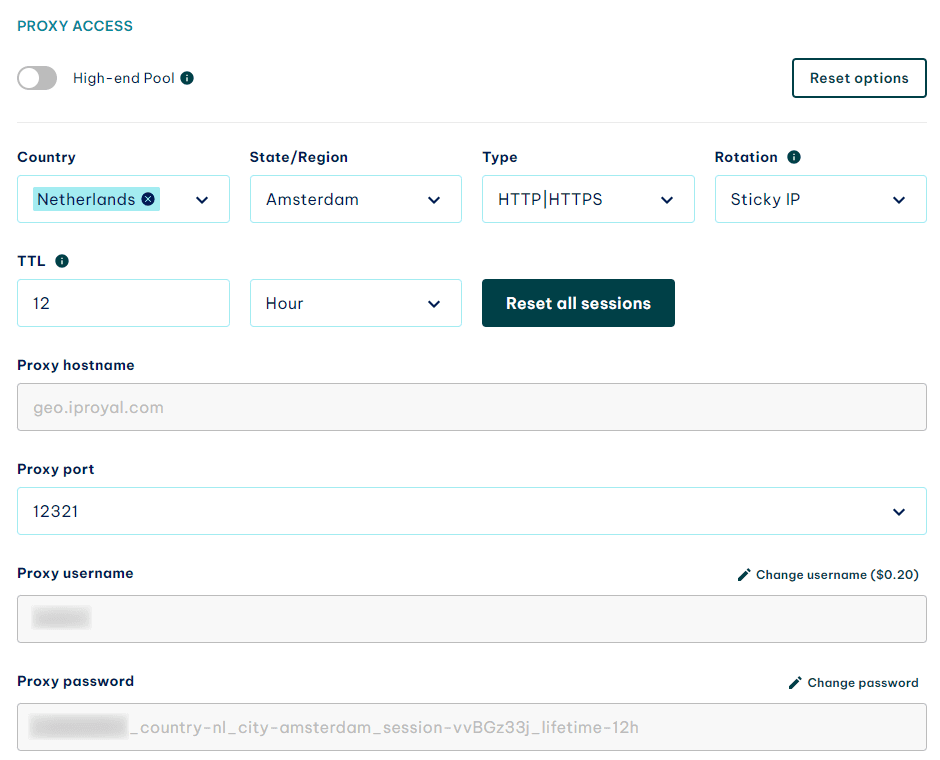
To start, visit the IPRoyal dashboard and configure your proxy settings. We'll use proxies from Amsterdam, Netherlands, with HTTP/HTTPS and sticky sessions that last 12 hours.
Application-level Configuration
Using proxies with a specific application is the most efficient way to access Gmail with proxies. As an example, we'll use a browser and our Proxy Manager extension (available for Google Chrome and Mozilla Firefox).
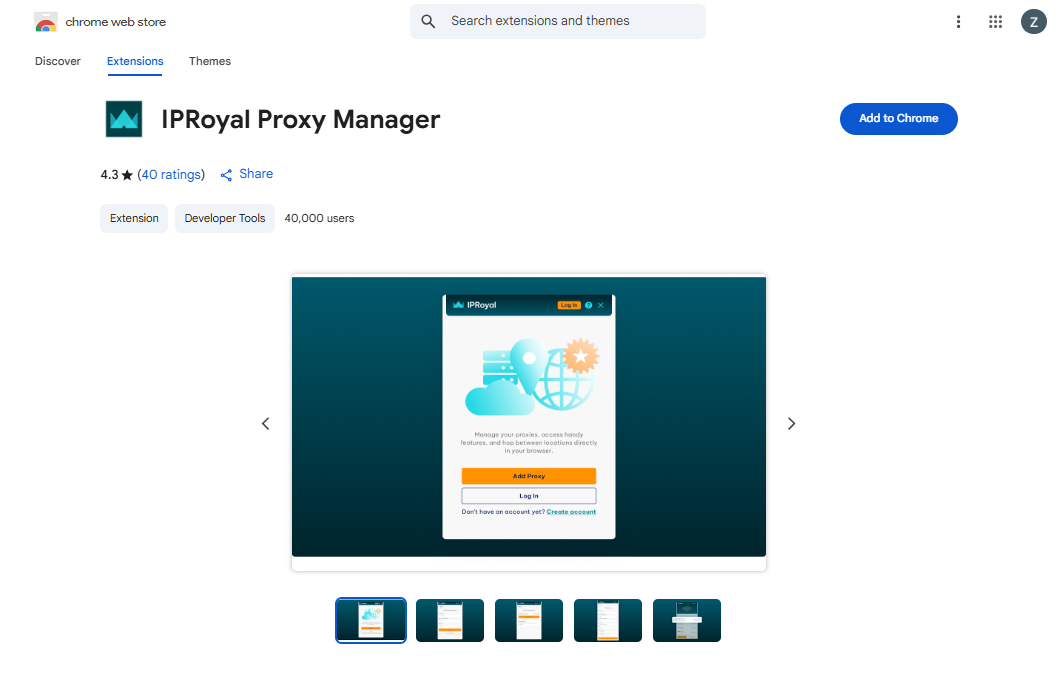
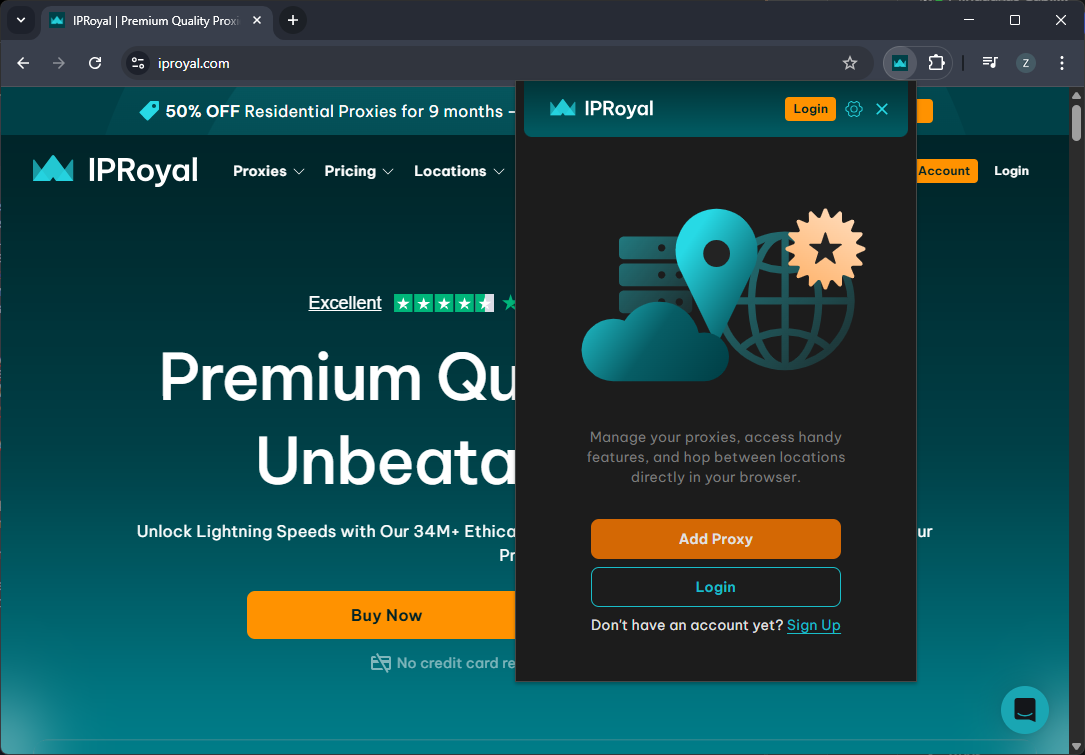
Once you download the extension for your browser, open the configuration page and click the ‘Add Proxy’ button.
Name your profile and copy the credentials (hostname, port, username, and password) from IPRoyal. Click the ‘Save’ button.
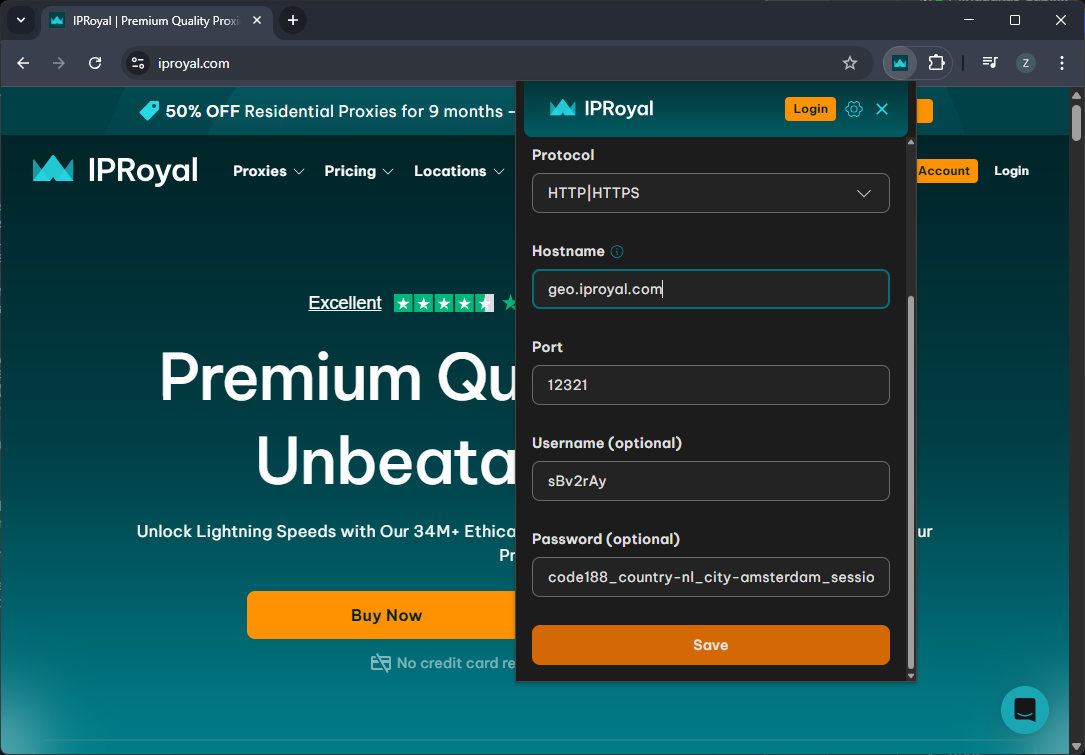
To start using your proxies for Gmail, click the extension icon and select the ‘Connect’ button next to your newly created proxy profile.
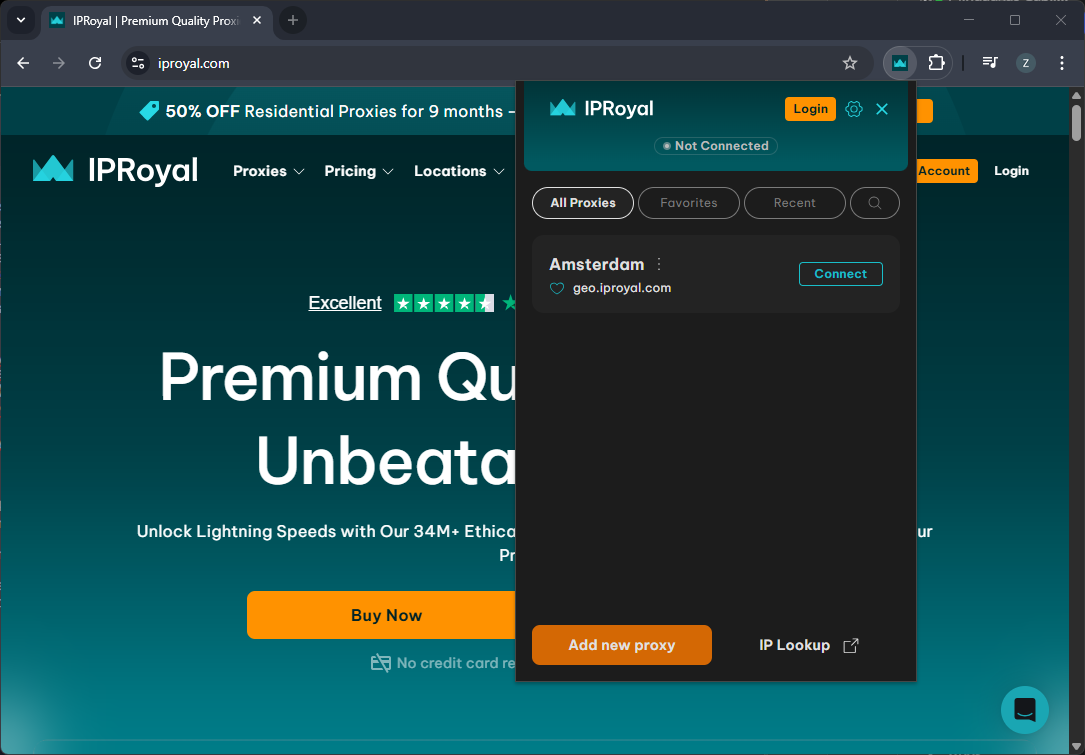
As long as your profile is active, the proxy will handle all traffic for this browser.
System-level Configuration
Configuring your proxy on the device level (or operating system level) depends on the device.
In Windows 11:
- Search for “proxy” in the search bar
- Click on Change proxy settings in the search results
- Turn off automatic settings detection
- Scroll down to Manual proxy setup
- Click the Set up button to the right of the Use a proxy server option
- Type in your proxy's IP address and port
- Set up any exceptions as needed
- Click the Save button.
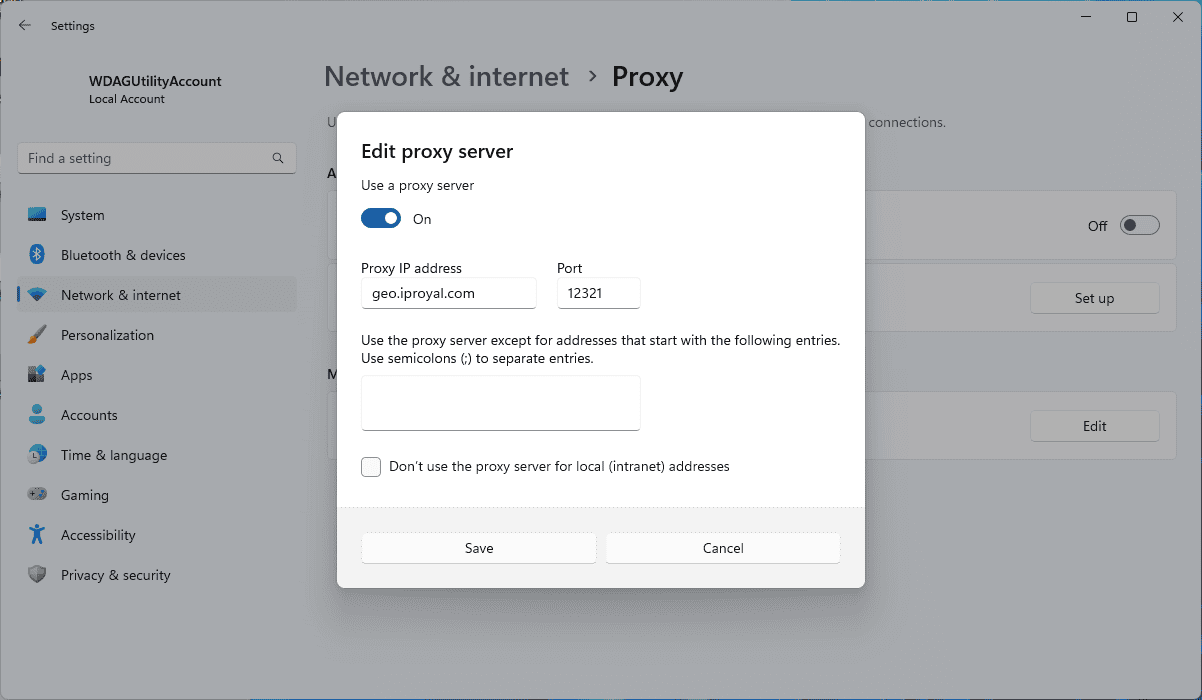
The procedure is very similar for Android and iOS devices, as you only need to find proxy settings and insert the IP address and port.
Note: This option will only work if you use proxies that don't require authentication (username and password) or if you configure IP whitelisting.
Provider-level Configuration
Finally, if your configuration options are limited, you can use IP whitelisting. It creates a list of authorized IPs to ensure that all traffic requests from these IPs go through a proxy.
This approach restricts access to authorized users and devices without the need to share usernames and passwords. Every IP on the list will be able to connect to your proxy for Gmail on the system or application level without needing to configure complicated proxy settings.
Is It Safe to Use a Proxy for Gmail?
Most risks come from using a free proxy with Gmail. Such proxies might monitor traffic, sell your data, or, in worst cases, infest your device with malware. Using a trustworthy Google proxy server provider, such as IPRoyal, removes these risks.
The only worry is a small chance of your account getting flagged as stolen, as Google may get confused if your IP changes too frequently. It can be prevented by using dedicated IPs and staying consistent with proxy settings and the region where you create a proxy email address.
Other risks associated with proxies have more to do with your usage of Gmail. If your behavior mimics spam, bulk creation of accounts, or automated actions, it might violate Gmail’s terms of service. Be sure to familiarize yourself with them and use all the necessary precautions - quality proxies, cleared cookies, fresh browser fingerprints, and others.
Final Thoughts
Whether you're interested in automated account creation or just want to unblock Gmail while abroad, proxy email solutions are worth a look. Manual proxy setup isn't that difficult, but to avoid bans, blocks, and other limitations, make sure you're using authentic proxies from a reliable provider.