'/%3e%3cellipse%20opacity='0.34'%20cx='327.5'%20cy='339'%20rx='264.5'%20ry='264'%20fill='url(%23paint1_linear_12724_35442)'/%3e%3cdefs%3e%3clinearGradient%20id='paint0_linear_12724_35442'%20x1='327'%20y1='-2.524e-06'%20x2='327'%20y2='389.286'%20gradientUnits='userSpaceOnUse'%3e%3cstop%20stop-color='%2327D9E5'/%3e%3cstop%20offset='0.927406'%20stop-color='%23004047'%20stop-opacity='0'/%3e%3c/linearGradient%3e%3clinearGradient%20id='paint1_linear_12724_35442'%20x1='328.02'%20y1='74.7771'%20x2='328.02'%20y2='395.312'%20gradientUnits='userSpaceOnUse'%3e%3cstop%20stop-color='%2327D9E5'/%3e%3cstop%20offset='0.927406'%20stop-color='%23004047'%20stop-opacity='0'/%3e%3c/linearGradient%3e%3c/defs%3e%3c/svg%3e)
'%20fill-rule='evenodd'%20clip-rule='evenodd'%3e%3cpath%20d='M21.9952%2012.2202c-.0019-.6851-.108-1.3688-.2269-2.0439h-9.6238v3.8768h5.4928c-.1125.6103-.3507%201.1919-.6999%201.7094-.3492.5175-.8022.9601-1.3315%201.3009v2.5105h3.3479c1.005-.9487%201.7951-2.0936%202.3191-3.3605.524-1.2668.7701-2.6273.7223-3.9932Z'%20fill='%234285F4'/%3e%3cpath%20d='M12.1415%2021.9954c2.5027.0755%204.9397-.7912%206.8092-2.4216l-3.3025-2.5105c-1.031.6482-2.2362.9808-3.4613.9553-1.266-.0247-2.49275-.4349-3.50967-1.1735-1.01691-.7385-1.81874-1.8128-2.20993-2.9916l-3.4048.0439v2.5438c.84005%201.6575%202.13352%203.0542%203.73642%204.0348%201.60291.9806%203.45238%201.5066%205.34258%201.5194Z'%20fill='%2334A853'/%3e%3cpath%20d='M6.46884%2013.8531c-.42382-1.2324-.42382-2.4897%200-3.7221V7.55469H3.06422C2.36423%208.93568%202%2010.4564%202%2011.998c0%201.5416.36423%203.0624%201.06422%204.4434l3.40462-2.5883Z'%20fill='%23FBBC05'/%3e%3cpath%20d='M12.1415%206.02167c1.4529-.02643%202.8572.46854%203.9039%201.45519l2.9053-2.87706c-1.8433-1.69203-4.2823-2.62308-6.8092-2.59936-1.8902.01282-3.73967.5388-5.34258%201.5194-1.6029.9806-2.89637%202.37735-3.73642%204.03478l3.40462%202.58828c.39118-1.17886%201.1478-2.20915%202.16472-2.94772%201.01691-.73857%202.24366-1.14874%203.50966-1.17351Z'%20fill='%23EA4335'/%3e%3c/g%3e%3c/svg%3e)
How to Set Up Proxies with Multilogin AntiDetect Browser
Managing multiple online accounts without raising suspicion requires sophisticated tools that go beyond basic browser profiles. When combined with reliable proxies, Multilogin offers enterprise-grade browser fingerprint management, making it an excellent solution for professionals managing multiple digital identities.
This guide demonstrates Multilogin proxy integration with IPRoyal, ensuring each browser profile operates with a unique, isolated identity that replicates legitimate user behavior.
What Is Multilogin?
Multilogin is an antidetect browser platform designed explicitly for secure multi-account management across various online services. The platform creates virtual browser environments rather than standard browser profiles, with completely isolated fingerprints. This approach makes each profile appear as a distinct user to tracking systems.
The platform generates unique browser fingerprints for each profile, including canvas fingerprints, WebGL parameters, fonts, time zones, and hardware specifications. When combined with dedicated proxy connections, these profiles effectively mimic independent physical devices, ensuring complete separation and anonymity.
Primary use cases include:
- Social media management
Seamlessly operate multiple brand accounts and client profiles on the same system without cross-contamination or evoking the platform's restrictions.
- E-commerce operations
Manage sellers' accounts across marketplaces while ensuring compliance with platform-specific policies.
- Affiliate marketing
Avoid detection patterns that trigger fraud systems while running campaigns for multiple accounts.
- Ticketing and retail automation
Access limited inventory through multiple sessions without triggering anti-bot measures.
- Cryptocurrency trading
Manage multiple exchange accounts and access region-restricted platforms.
- Marketing automation
Execute large-scale campaigns across countless accounts without triggering rate limits or security flags.
Multilogin ensures complete separation between identities, as each virtual profile maintains its own cookies, cache, local storage, and browsing history.
Which Multilogin Version Should You Choose?
Multilogin comes with two main versions, which provide distinct capabilities:
- Multilogin X
With improved fingerprint management, a modernized interface, and enhanced cloud synchronization, Multilogin X is the latest iteration. The X version is the primary focus of active development, receiving regular updates with new anti-detection features.
- Multilogin 6
The legacy version, Multilogin 6, is preferred by some users for its familiar interface and established stability. It still receives continuous security updates, but new features are primarily implemented in Multilogin X.
Compatibility Considerations
Both versions have similar core functionality and support the same proxy protocols, such as HTTP, HTTPS, and SOCKS5. However, Multilogin X provides more granular control over browsing fingerprint parameters and more versatile proxy settings. With new functionalities, such as improved automation, Multilogin X is the best version for teams managing a large number of profiles.
Although the core functionality and setup process are the same, the minor interface differences between versions may require some adjustment. For new implementations, Multilogin X is recommended unless specific legacy integrations require Multilogin 6 compatibility.
How to Set Up IPRoyal Proxies With Multilogin
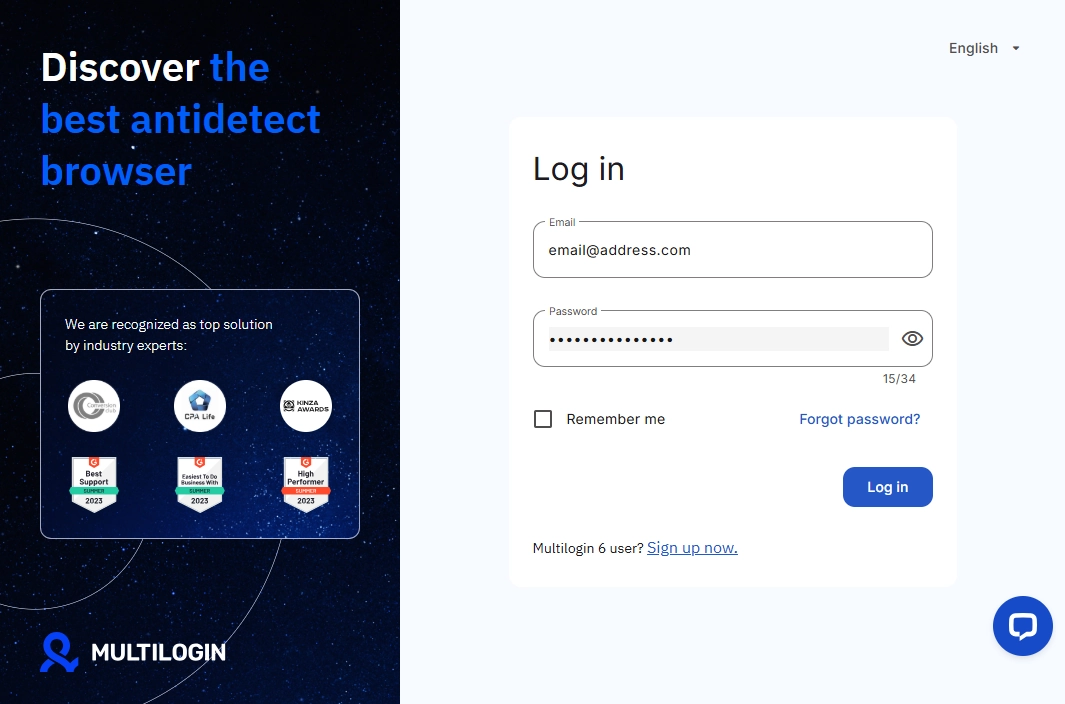
- First, launch Multilogin and enter your login credentials to access your dashboard.
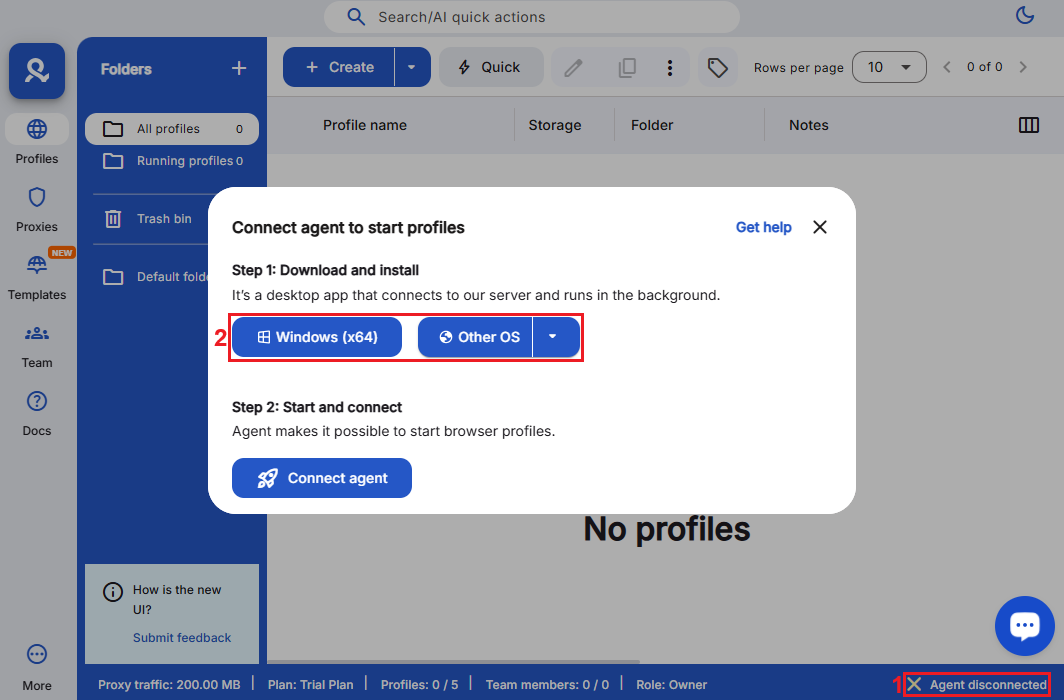
2. Once logged in, click the ‘Agent disconnected’ (1) button and download the agent for your platform (2).
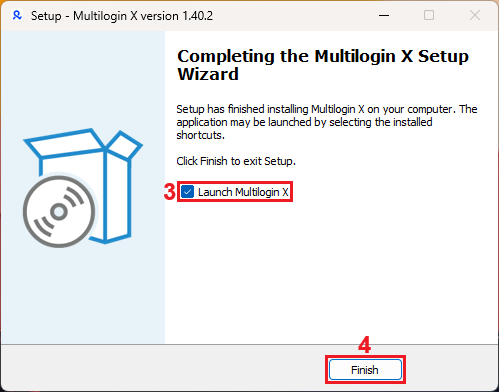
3. Launch the executable you downloaded and follow the installation prompts to complete the setup process. Tick the ‘Launch Multilogin X’ (3) option and click ‘Finish’ (4).
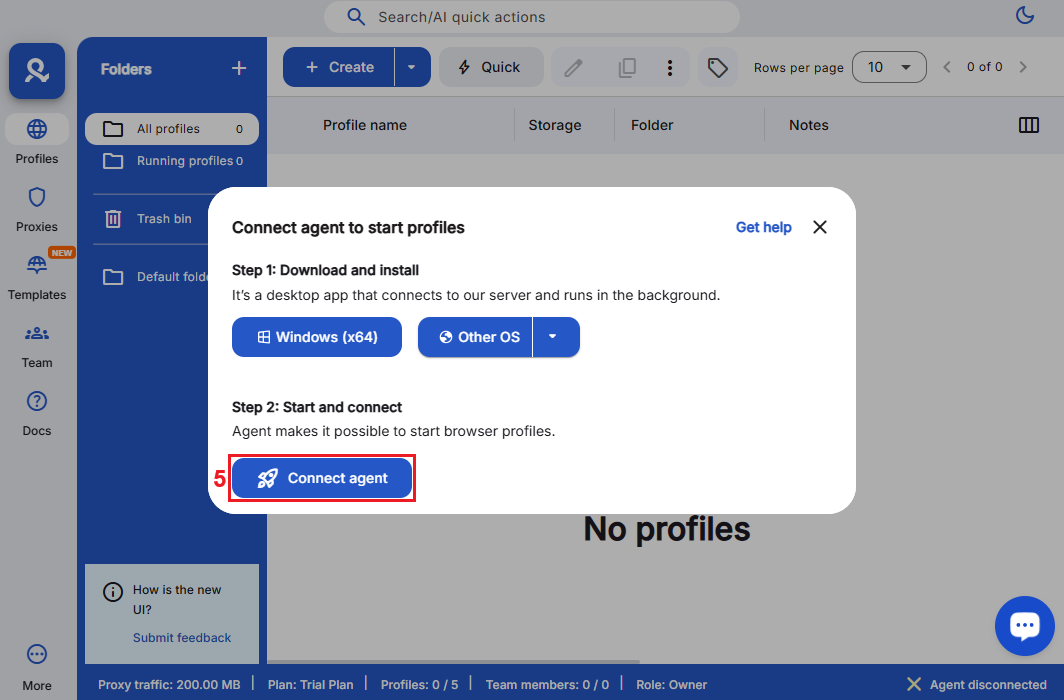
4. After installation, head back to the Multilogin dashboard and click on 'Connect Agent' (5) to establish a connection with Multilogin servers.
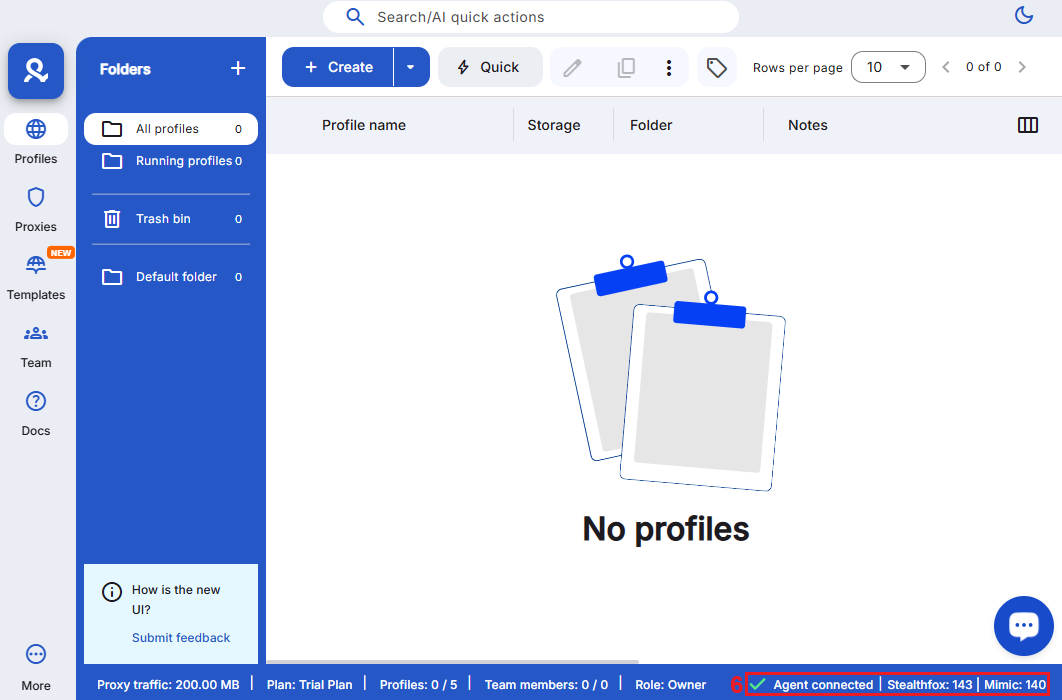
5. If connected, you'll see ‘Agent connected’ (6) in the right-hand corner of your dashboard.
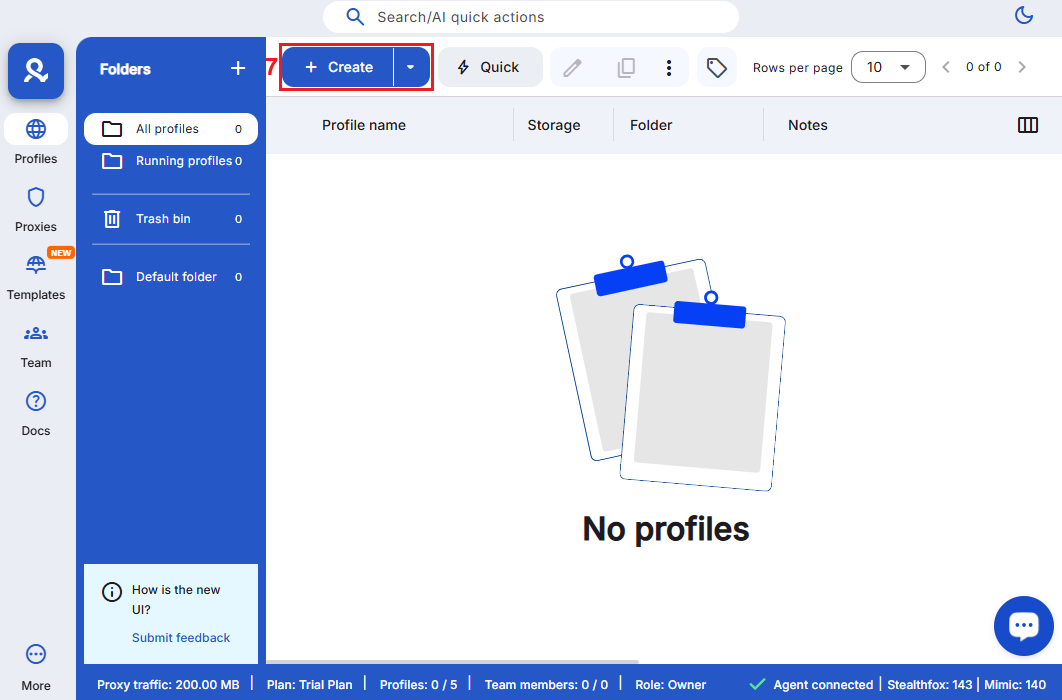
6. Create a new browser profile. From the main dashboard, click the '+ Create' (7) button to open the profile creation interface.
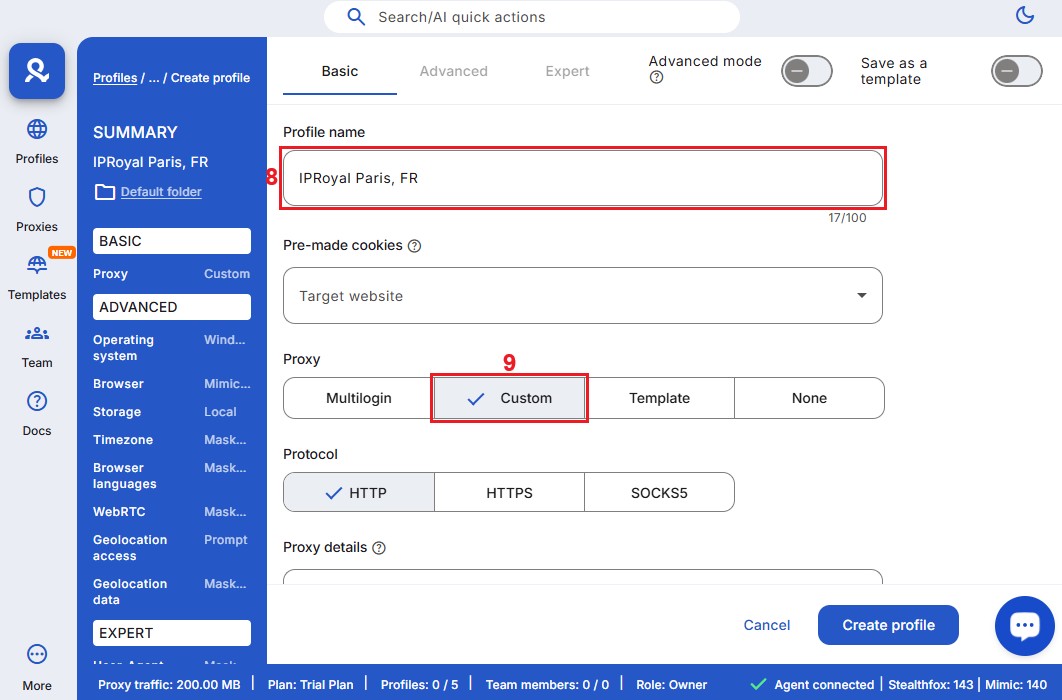
7. Enter a descriptive name in the 'Profile Name' (8) field. Scroll down to the proxy settings section and switch the proxy type to 'Custom' (9).
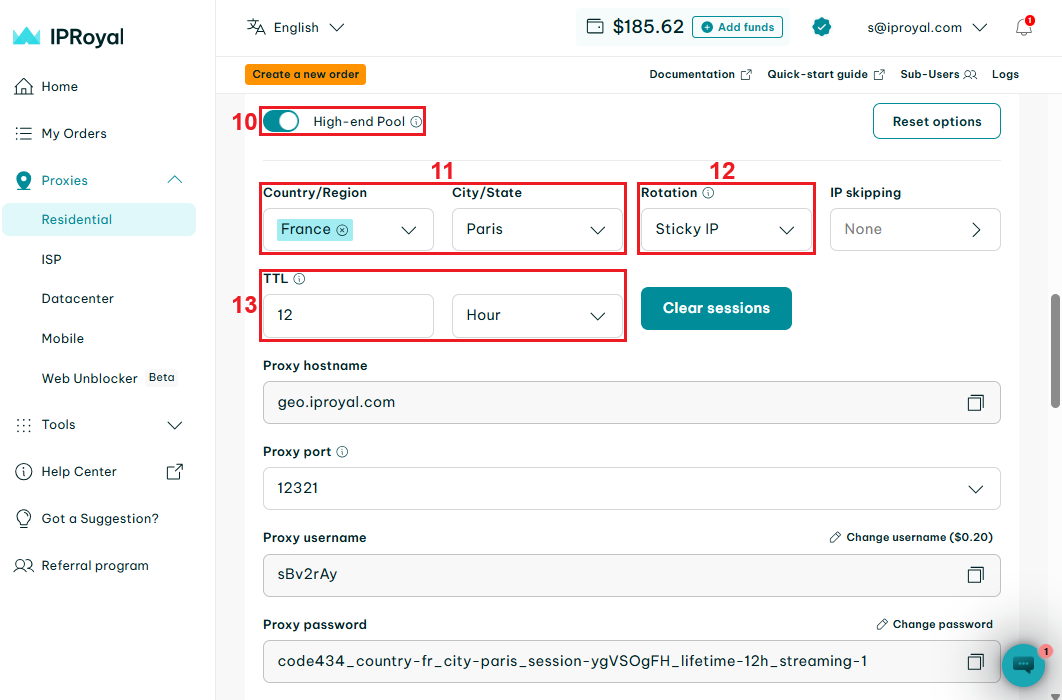
8. Log in to your IPRoyal dashboard and configure your proxies. We’ll use high-end (10) residential proxies from Paris, France (11), with sticky sessions (12) that last 12 hours (13).
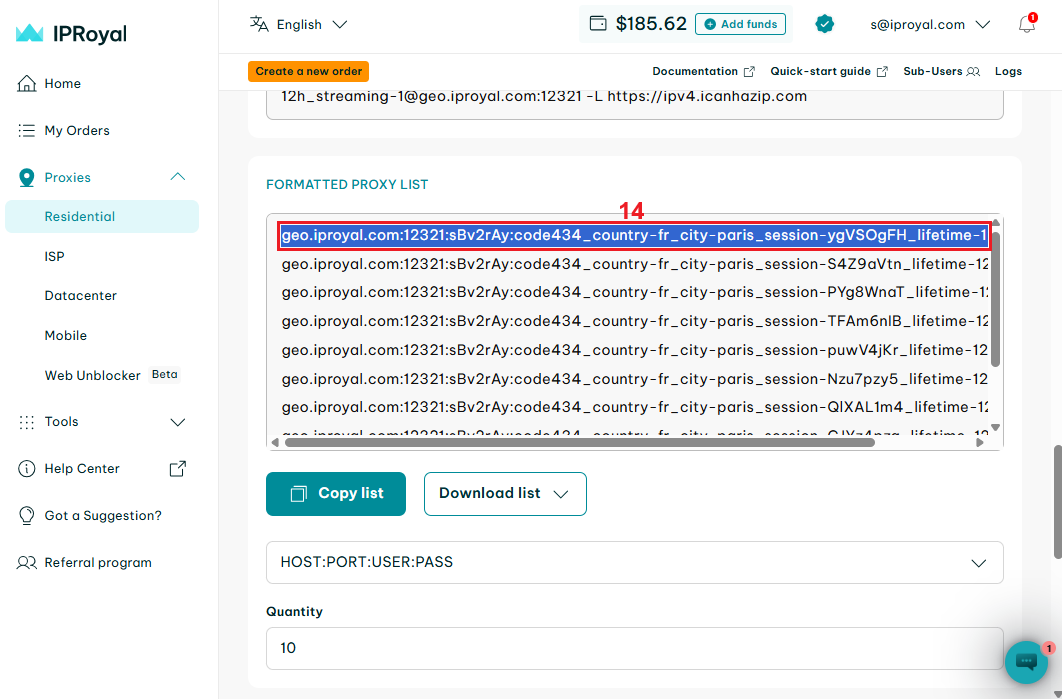
9- Scroll down to the formatted proxy list. Each line here is a unique set of credentials in the host:port:username:password format. Select one (14) and copy it to your clipboard.
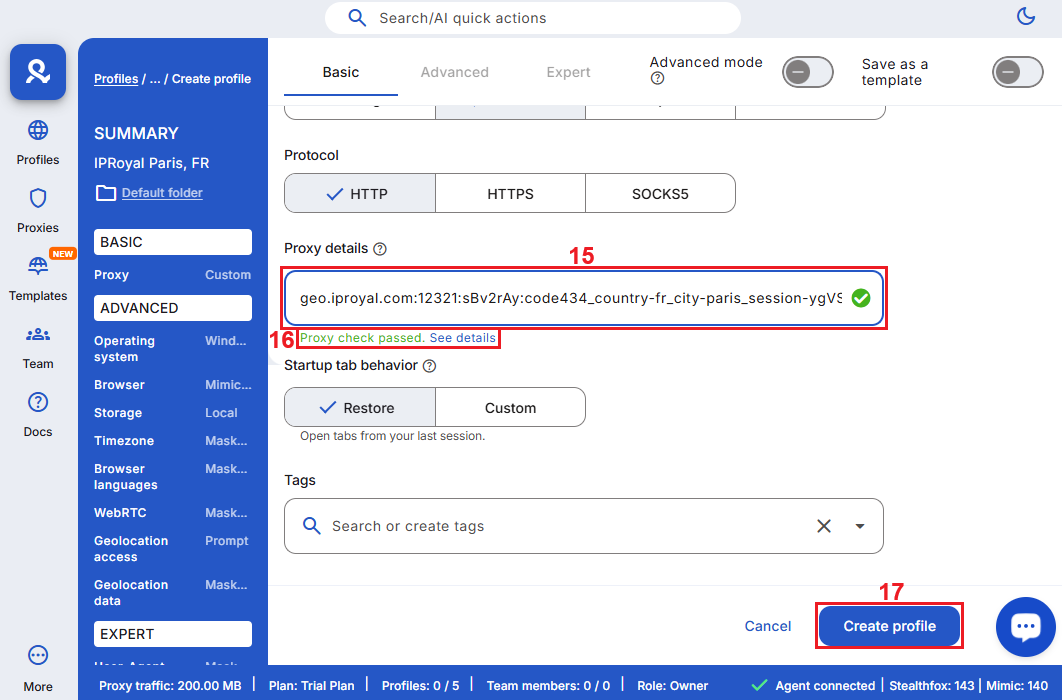
10. Go back to Multilogin and paste your credentials in the ‘Proxy details’ (15) field. Multilogin will automatically test your proxy and display a status response (16). When you’re done configuring your profile, click the ‘Create profile’ (17) button.
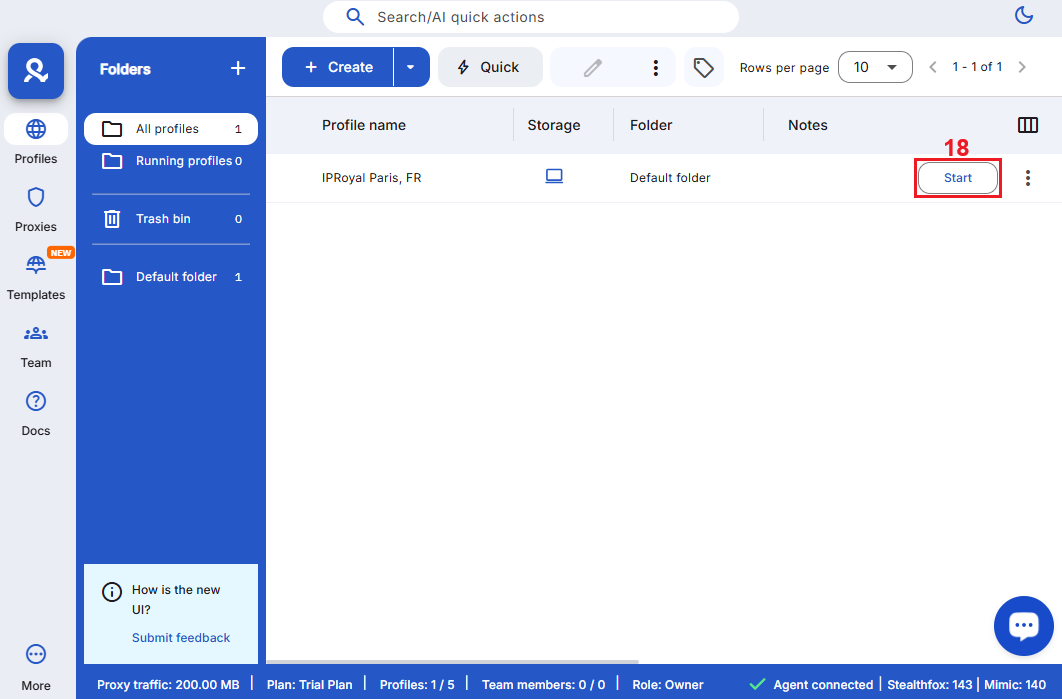
11. Click the ‘Start’ (18) button next to your profile to launch it.
12. Once the private browser window opens, you’ll see more information about your IP address and browser fingerprint.
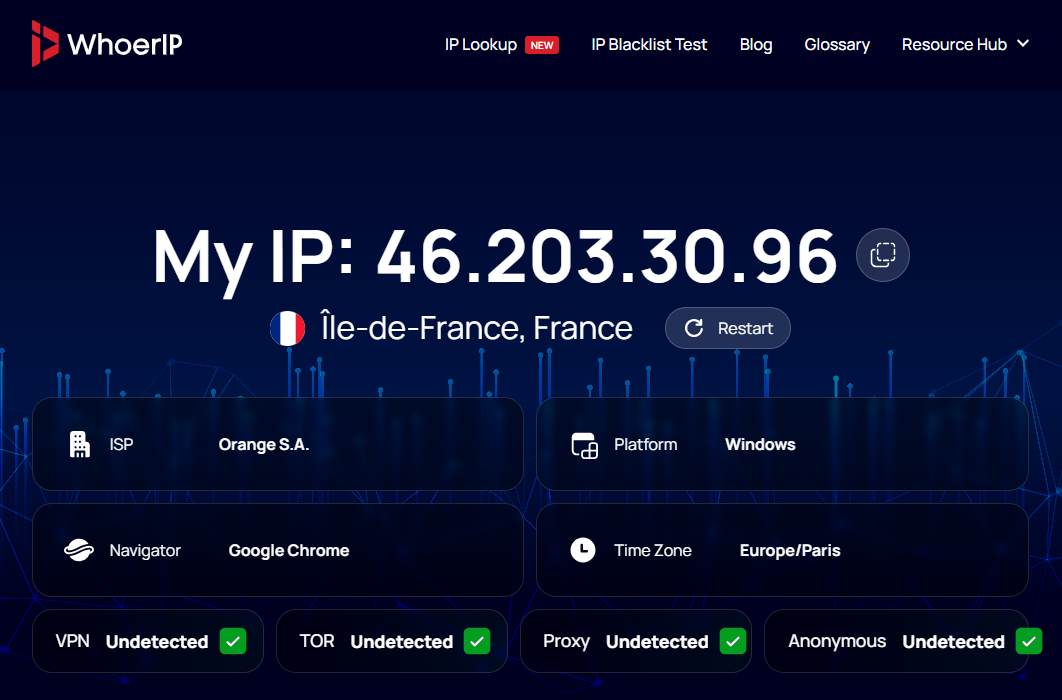
If everything is done correctly, https://whoerip.com/multilogin/ will open to show your new IP and all custom fingerprint information there on the tab.
(image)
Best Proxies for Multilogin in 2025
Multilogin supports multiple proxy types, each offering distinct advantages for different account management scenarios. Here are the most popular types and their common use cases:
Residential Proxies
These proxies route traffic through legitimate consumer connections assigned by ISPs, providing high legitimacy and the lowest detection risk for managing online accounts. They’re the go-to option for Multilogin proxy integration with platforms that have robust anti-bot measures and are effective for social media, e-commerce, and web scraping operations.
Datacenter Proxies
These proxies operate on data center infrastructure, providing consistent performance for multiple browser profiles thanks to their high-speed connections. Known for their centralized infrastructure, datacenter proxies are cost-effective and suitable for web scraping projects, automation, testing, and tasks where speed outweighs detection concerns.
ISP Proxies
These proxies combine data center infrastructure with residential IP addresses registered through Internet Service Providers (ISPs). This hybrid approach delivers static IPs with data center performance and residential legitimacy. They’re the ideal option for long-term account management, cryptocurrency trading, and similar workflows.
Mobile Proxies
Mobile proxies route traffic through IP addresses assigned by mobile carrier networks (4G/5G). These IPs carry the highest trust level among all proxy types because they're indistinguishable from genuine mobile devices, making them extremely effective for mobile-first platforms like Instagram and TikTok.
To sum up, ISP and residential proxies are best for comprehensive account management as they offer the optimal balance between performance and detection avoidance.
Conclusion
Integrating IPRoyal’s services with Multilogin antidetect browser creates a robust infrastructure for secure account management. Professionals can operate multiple online accounts while maintaining complete isolation and avoiding detection patterns by combining Multilogin’s advanced browser features with IPRoyal's diverse proxy network.