'%20fill-rule='evenodd'%20clip-rule='evenodd'%3e%3cpath%20d='M21.9952%2012.2202c-.0019-.6851-.108-1.3688-.2269-2.0439h-9.6238v3.8768h5.4928c-.1125.6103-.3507%201.1919-.6999%201.7094-.3492.5175-.8022.9601-1.3315%201.3009v2.5105h3.3479c1.005-.9487%201.7951-2.0936%202.3191-3.3605.524-1.2668.7701-2.6273.7223-3.9932Z'%20fill='%234285F4'/%3e%3cpath%20d='M12.1415%2021.9954c2.5027.0755%204.9397-.7912%206.8092-2.4216l-3.3025-2.5105c-1.031.6482-2.2362.9808-3.4613.9553-1.266-.0247-2.49275-.4349-3.50967-1.1735-1.01691-.7385-1.81874-1.8128-2.20993-2.9916l-3.4048.0439v2.5438c.84005%201.6575%202.13352%203.0542%203.73642%204.0348%201.60291.9806%203.45238%201.5066%205.34258%201.5194Z'%20fill='%2334A853'/%3e%3cpath%20d='M6.46884%2013.8531c-.42382-1.2324-.42382-2.4897%200-3.7221V7.55469H3.06422C2.36423%208.93568%202%2010.4564%202%2011.998c0%201.5416.36423%203.0624%201.06422%204.4434l3.40462-2.5883Z'%20fill='%23FBBC05'/%3e%3cpath%20d='M12.1415%206.02167c1.4529-.02643%202.8572.46854%203.9039%201.45519l2.9053-2.87706c-1.8433-1.69203-4.2823-2.62308-6.8092-2.59936-1.8902.01282-3.73967.5388-5.34258%201.5194-1.6029.9806-2.89637%202.37735-3.73642%204.03478l3.40462%202.58828c.39118-1.17886%201.1478-2.20915%202.16472-2.94772%201.01691-.73857%202.24366-1.14874%203.50966-1.17351Z'%20fill='%23EA4335'/%3e%3c/g%3e%3c/svg%3e)
Managing multiple online accounts requires tools that go beyond basic browser profiles. Multilogin's cloud phones and browser profiles, combined with reliable proxies, help manage multiple digital identities.
This guide demonstrates Multilogin proxy integration with IPRoyal, giving each cloud phone profile its own IP and device setup.
What Is Multilogin?
Multilogin is a cloud phone platform for social media marketers, built for people and AI agents, designed for multi-account management across platforms like TikTok, Instagram, Facebook, Reddit, YouTube, WhatsApp, X, and LinkedIn. Each profile appears as a distinct user to tracking systems.
Each profile runs with its own device settings. Combined with a dedicated proxy connection, this keeps every profile separate from the others.
Primary use cases include:
- Social media management
Operate multiple brand accounts and client profiles on the same system, each one cleanly separated from the others.
- E-commerce operations
Manage sellers' accounts across marketplaces while ensuring compliance with platform-specific policies.
- Affiliate marketing
Run affiliate campaigns across multiple accounts, each with its own consistent identity.
Multilogin keeps every profile separate, with its own app data, sessions, and login history isolated from every other profile.
Choosing a Multilogin Plan
Multilogin's paid lineup now includes a Pro 20 plan, sitting between Pro 10 and Pro 50 as the new default entry point for anyone who outgrows 10 profiles but doesn't need 50. It runs $19/month, or $149/year (about $12.42/month equivalent), and includes 20 profiles, 2 team seats, a 2 GB/month proxy bonus, and 75 mobile minutes/month.
For proxy setup specifically, any paid plan includes the proxy integration covered below; the plan you choose mainly affects how many profiles and how much bonus proxy traffic you get each month. Check Multilogin's pricing page for the full current lineup.
How to Set Up IPRoyal Proxies with Multilogin
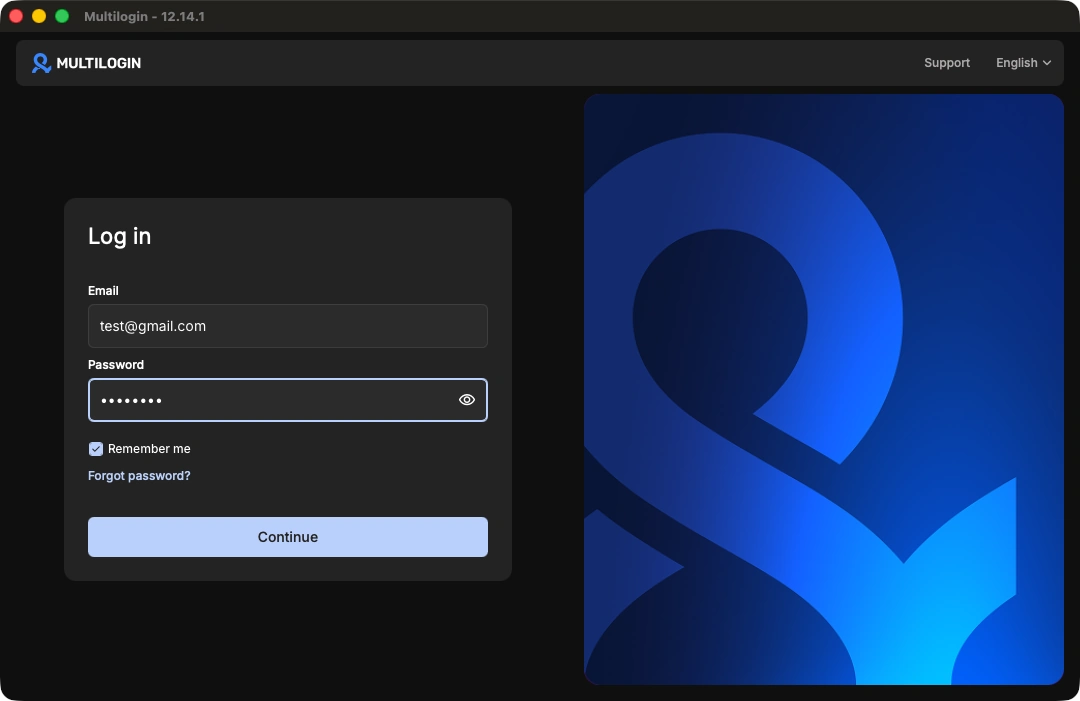
1. First, download and launch the Multilogin desktop app, then log in with your credentials.
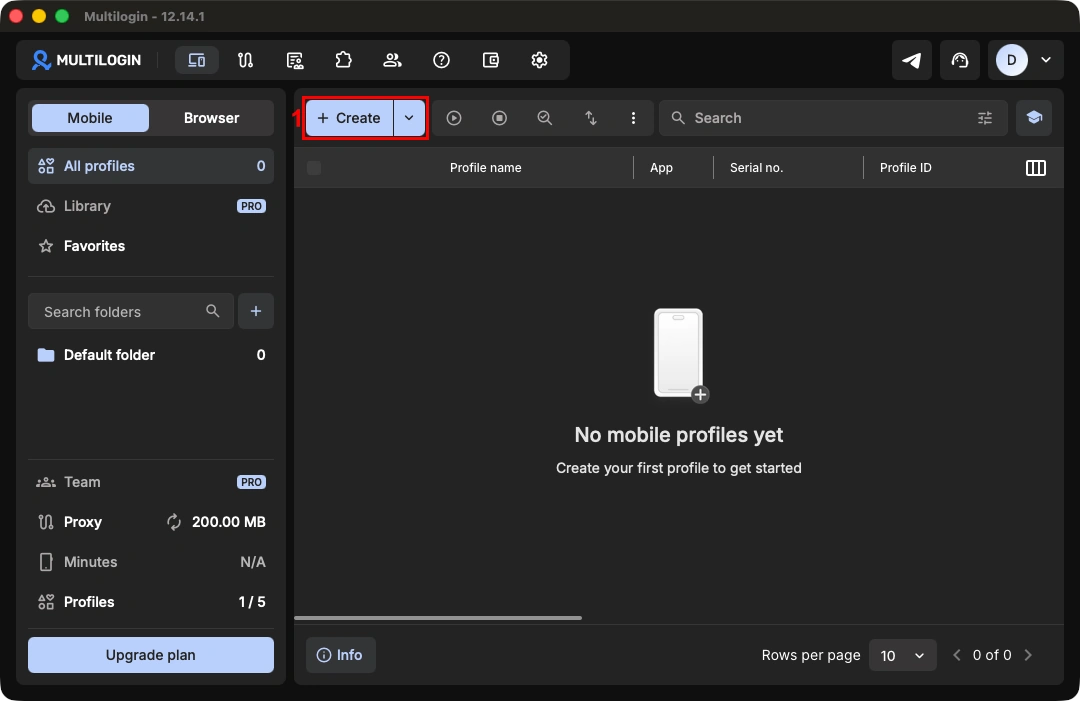
2. From the main dashboard, click the '+ Create' (1) button to create a new profile.
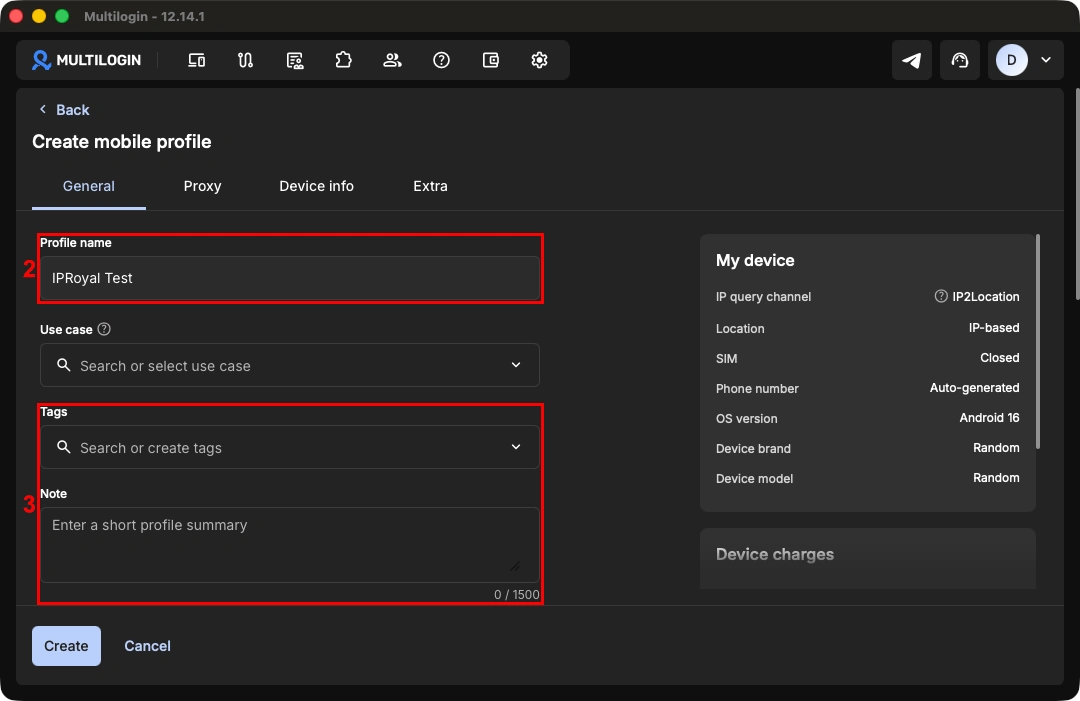
3. Give your profile a name (2) and add any tags or notes (3) so it's easy to tell apart from your other profiles.
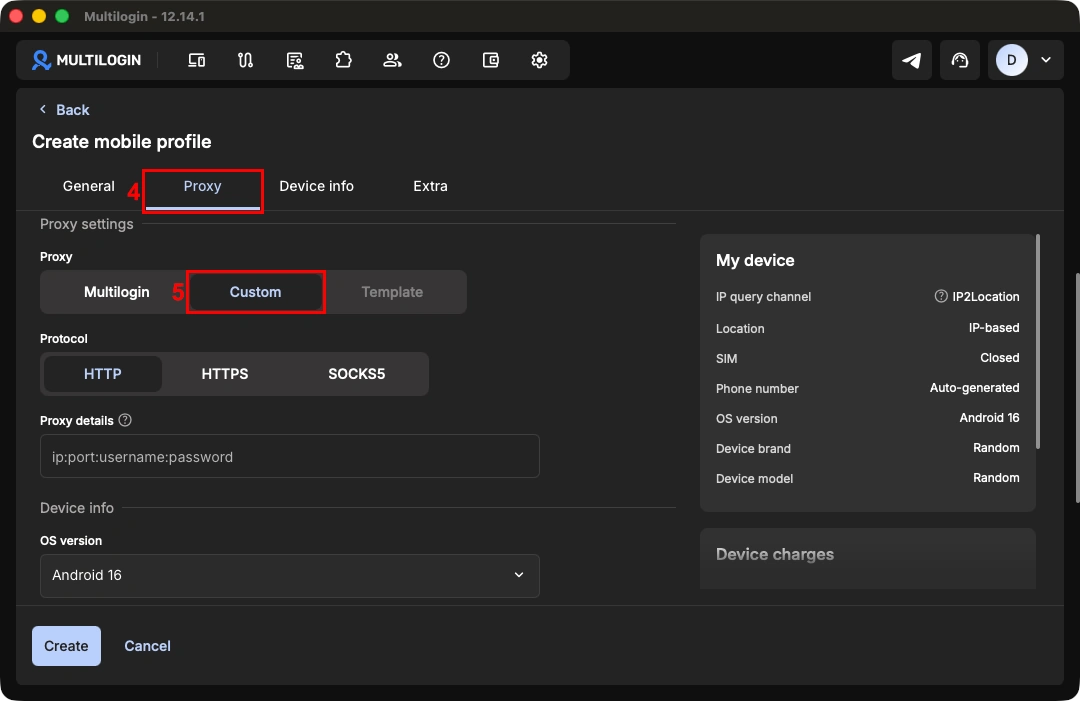
4. Click the ‘Proxy’ tab (4). Scroll down to the proxy settings section and switch the proxy type to 'Custom' (5).
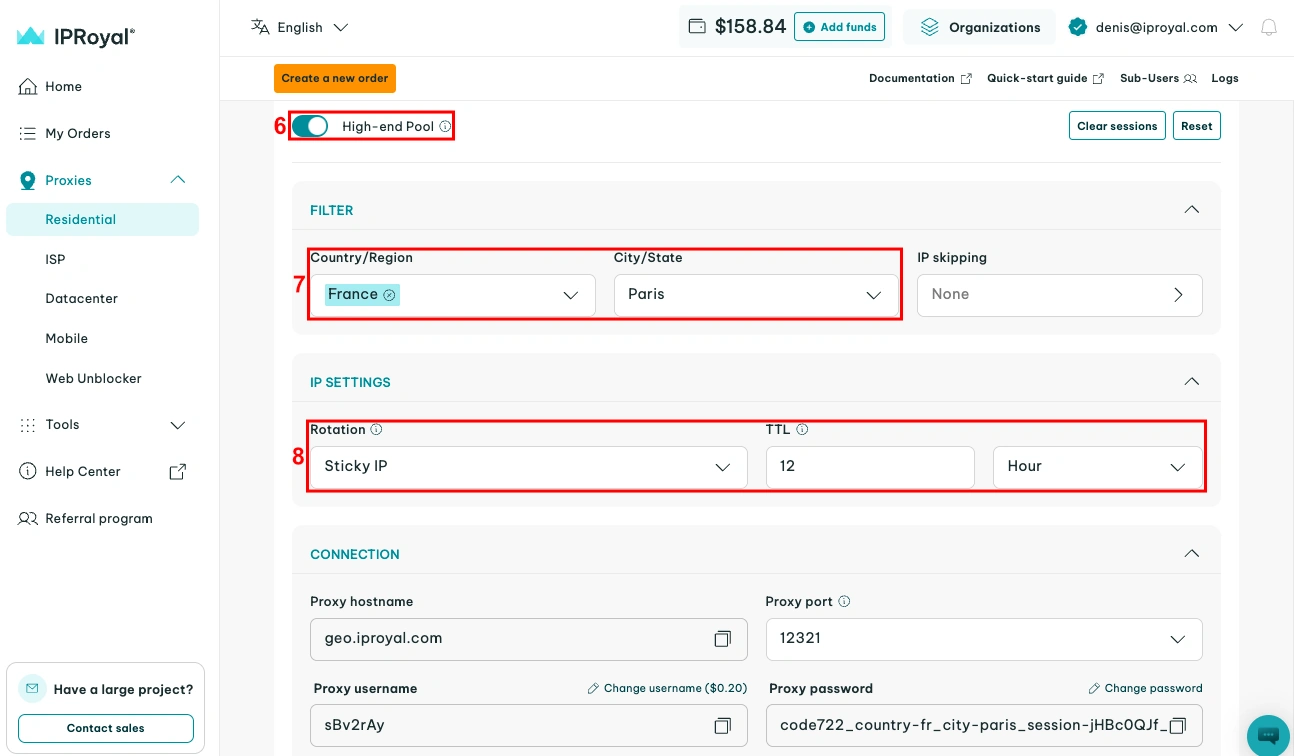
5. Log in to your IPRoyal dashboard and configure your proxies. We'll use high-end (6) residential proxies from Paris, France (7), with sticky sessions that last 12 hours (8).
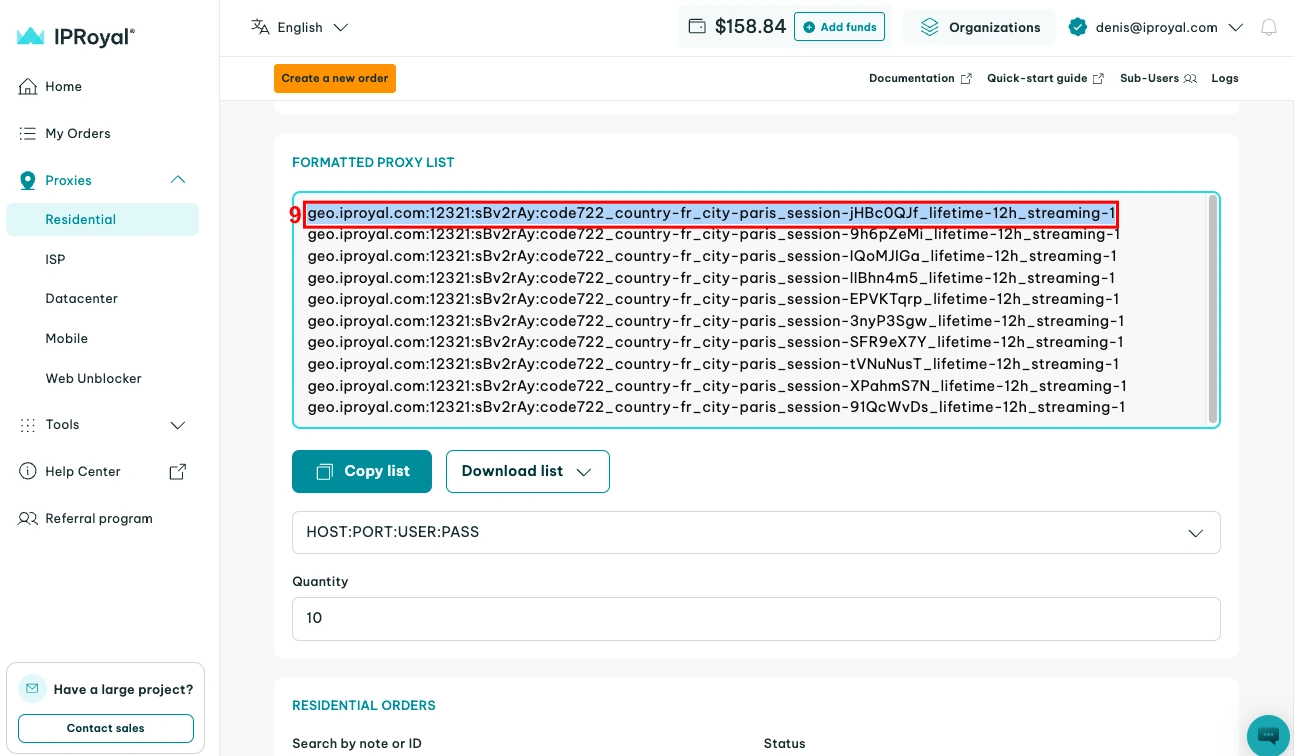
6. Scroll down to the formatted proxy list. Each line here is a unique set of credentials in the host:port:username:password format. Select one (9) and copy it to your clipboard.
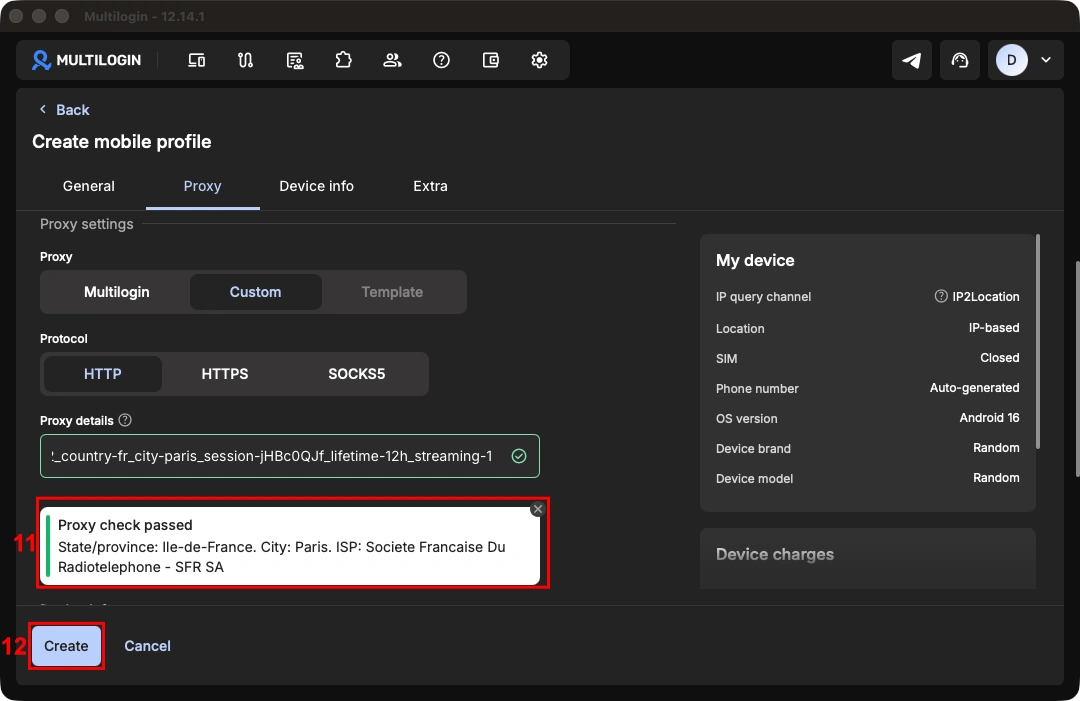
7. Go back to Multilogin and paste your credentials in the 'Proxy details' (10) field. Multilogin will automatically test your proxy and display a status response (11). When you're done configuring your profile, click the 'Create' (12) button.
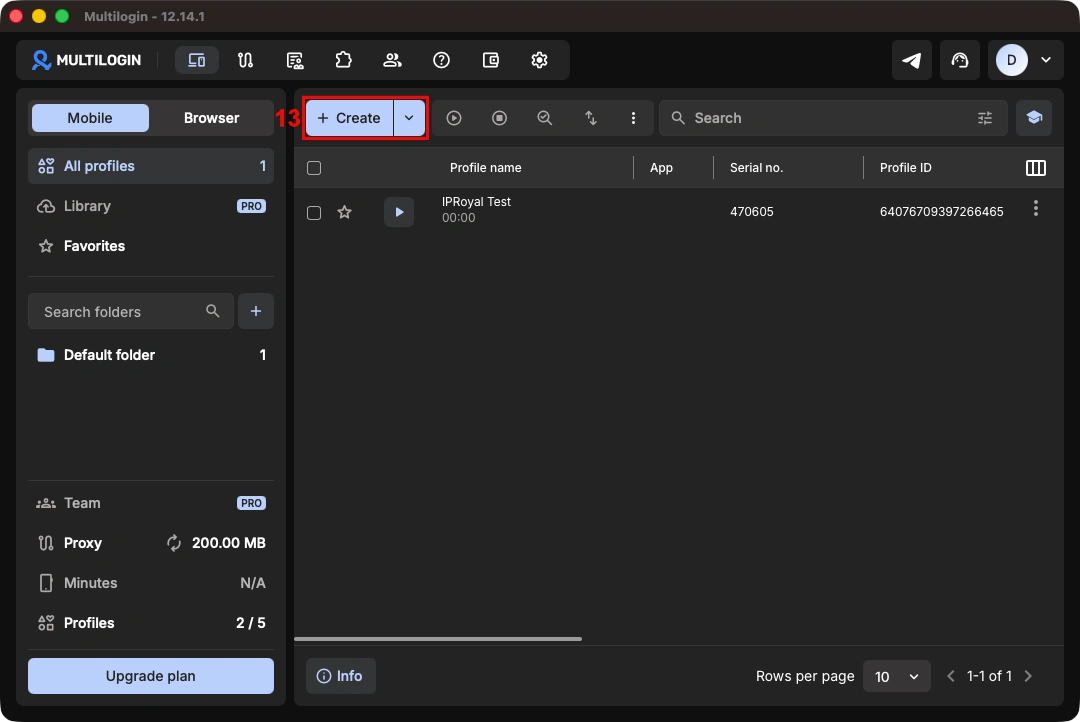
8. Click the 'Start' (13) button next to your profile to launch it.
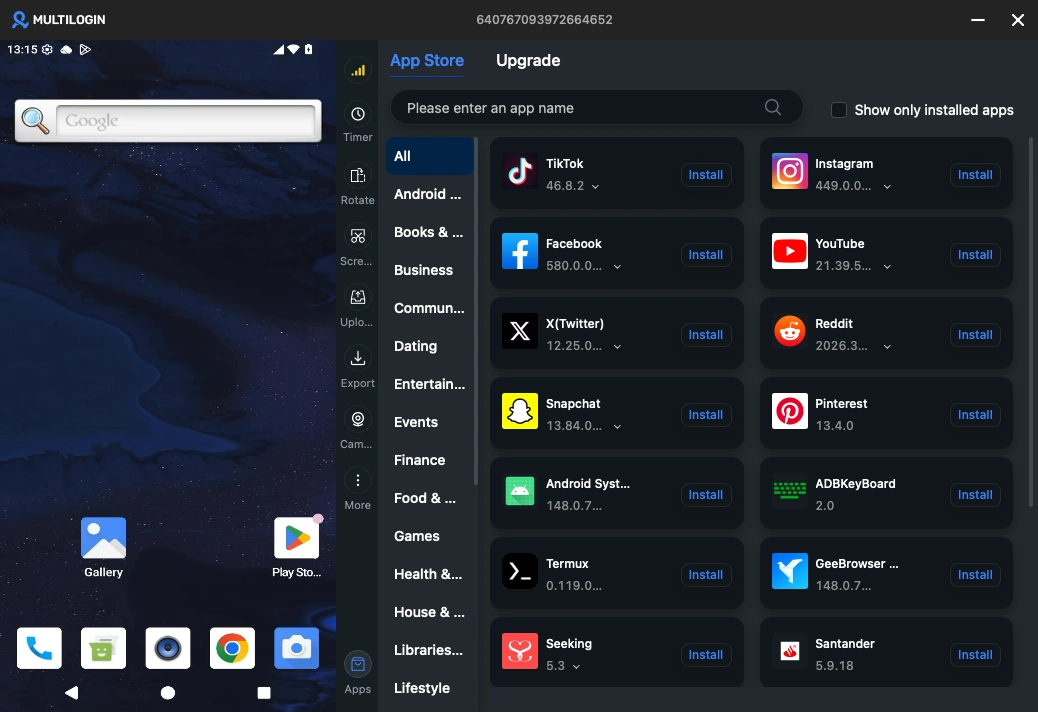
9. Once the cloud phone opens, open the built-in app store and install the app you need for that profile. You'll see more information about your IP address and profile setup available in the dashboard.
Best Proxies for Multilogin in 2026
Multilogin supports multiple proxy types, each offering distinct advantages for different account management scenarios. Here are the most popular types and their common use cases:
Residential Proxies
These proxies route traffic through legitimate consumer connections assigned by ISPs, providing high legitimacy for managing online accounts. They're the go-to option for Multilogin proxy integration and are effective for social media, e-commerce, and web scraping operations.
Datacenter Proxies
These proxies operate on data center infrastructure, providing consistent performance for multiple browser profiles thanks to their high-speed connections. Known for their centralized infrastructure, datacenter proxies are cost-effective and suitable for web scraping projects, automation, and testing.
ISP Proxies
These proxies combine data center infrastructure with residential IP addresses registered through Internet Service Providers (ISPs). This hybrid approach delivers static IPs with data center performance and residential legitimacy. They're the ideal option for long-term account management and similar workflows.
Mobile Proxies
Mobile proxies route traffic through IP addresses assigned by mobile carrier networks (4G/5G). These IPs carry the highest trust level among all proxy types because they're indistinguishable from genuine mobile devices, making them extremely effective for mobile-first platforms like Instagram and TikTok.
To sum up, ISP and residential proxies are best for comprehensive account management, offering a balance between performance and legitimacy.
Conclusion
Integrating IPRoyal's services with Multilogin creates a reliable infrastructure for account management. You can operate multiple online accounts, each with its own device and IP, by combining Multilogin's cloud phones and browser profiles with IPRoyal's proxy network.