'/%3e%3cellipse%20opacity='0.34'%20cx='327.5'%20cy='339'%20rx='264.5'%20ry='264'%20fill='url(%23paint1_linear_12724_35442)'/%3e%3cdefs%3e%3clinearGradient%20id='paint0_linear_12724_35442'%20x1='327'%20y1='-2.524e-06'%20x2='327'%20y2='389.286'%20gradientUnits='userSpaceOnUse'%3e%3cstop%20stop-color='%2327D9E5'/%3e%3cstop%20offset='0.927406'%20stop-color='%23004047'%20stop-opacity='0'/%3e%3c/linearGradient%3e%3clinearGradient%20id='paint1_linear_12724_35442'%20x1='328.02'%20y1='74.7771'%20x2='328.02'%20y2='395.312'%20gradientUnits='userSpaceOnUse'%3e%3cstop%20stop-color='%2327D9E5'/%3e%3cstop%20offset='0.927406'%20stop-color='%23004047'%20stop-opacity='0'/%3e%3c/linearGradient%3e%3c/defs%3e%3c/svg%3e)
Web Unblocker Quick-Start Guide

This quick-start guide shows you how to use IPRoyal Web Unblocker in your public data collection stack. Once you know how to get started and make the most of it, you can streamline critical operations such as large-scale web scraping, price intelligence, market research, and more.
IPRoyal Web Unblocker is an AI-powered proxy solution that automates handling common scraping obstacles, including CAPTCHAs, retries, IP/fingerprint rotation, and geo-restrictions. It uses IPRoyal’s global residential network of ethically sourced IPs in 195 locations and works with any programming language or HTTP-based tool.
With no extra setup required and advanced features, Web Unblocker can automate and simplify your workflows at scale.
In this guide, you’ll find step-by-step instructions to:
- Purchase and access Web Unblocker
- Use it with scrapers or other software
- Get the most from core features
- Integrate with popular tools and workflows
How to Purchase IPRoyal Web Unblocker
You can purchase Web Unblocker through your IPRoyal dashboard. Pricing is based on successful requests, so your costs can scale with real usage.
Follow these steps to place your order:
- Sign in or create a new IPRoyal account
- Select ‘Web Unblocker’ in the menu on the left and click ‘Create a new order’
- Select an option from the ‘Pricing and bundle discounts’ table or manually enter the number of requests in the ‘Number of requests’ field
- Click ‘Continue’
- Choose your preferred payment method, or use ‘Split Your Payment with Balance’ to combine your account balance with your preferred method
- If you have a coupon code, click ‘Have a coupon’ and apply the code
- Click ‘Complete order’
How to Configure IPRoyal Web Unblocker
IPRoyal Web Unblocker requires no manual configuration. Unlike traditional proxies, Web Unblocker automates the entire unblocking process, so you can focus on data extraction instead of infrastructure.
It automatically manages:
- CAPTCHA bypass & auto-retries - failed requests are retried with a different IP or browser fingerprint
- IP rotation & selection - each request uses an optimal residential IP from the IPRoyal pool for success
- Dynamic browser fingerprinting & smart headers - headers, cookies, and browser parameters are adjusted per request to mimic real users
- Geo-restriction bypass - automatically selects a suitable location, while still allowing manual targeting
With IPRoyal Web Unblocker, there’s no need to set up proxies, handle errors, or manage CAPTCHAs. Everything is automated, letting you focus on growing your core business while collecting data efficiently.
How to Use IPRoyal Web Unblocker
Once you access Web Unblocker, you can generate requests and add them directly to your scripts, tools, or automation workflows. There’s no need to set up rotation, retries, proxy lists, or CAPTCHA solvers - it handles it automatically.
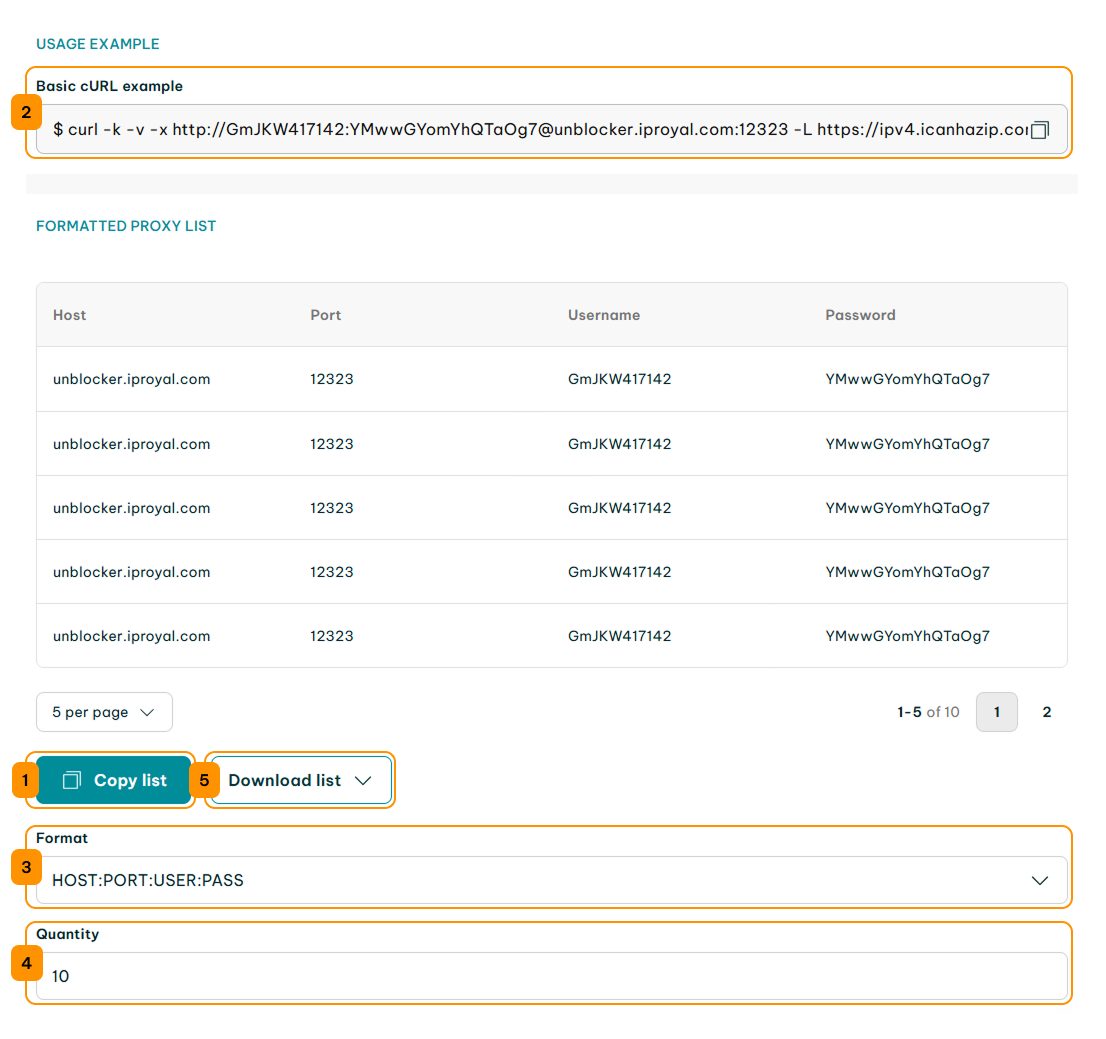
Simply copy the request using the ‘Copy’ (1) button, paste it into your script, scraper, or tool, and you’re ready to scrape. Web Unblocker will automatically rotate IPs, retry failures, and bypass blocks.
You can use the ‘Basic cURL example’ (2) in the dashboard for quick testing. The ‘Formatted Proxy List’ lets you customize the credentials format (3), choose the quantity (4) of requests, and export the list in .txt or .csv using the ‘Download list’ (5) button.
Note: Web Unblocker currently supports only GET requests for scraping traffic.
Specific IPRoyal Web Unblocker Features
IPRoyal Web Unblocker goes beyond a standard proxy solution. It offers advanced automation and AI-powered features to ensure uninterrupted, efficient, and undetectable web scraping.
CAPTCHA Bypass & Auto-Retry
Web Unblocker automatically solves CAPTCHAs and retries failed requests silently using new IPs or browser fingerprints.
Instead of setting up CAPTCHA solvers or IP rotation manually, you can simply add your generated requests to your script or tool, and the system’s built-in CAPTCHA bypass and intelligent automatic retries will take care of everything.
As a result, you can avoid anti-bot systems and extract public web data from protected websites more efficiently as you scale.
IP Rotation & Smart IP Selection
IPRoyal Web Unblocker automatically rotates IPs and selects the most suitable address from a global residential proxy pool for your workflow. With access to over 32M ethically sourced residential IPs across 195 locations, each request comes from a unique and reliable IP in the optimal location.
There’s no need to manually set up IP rotation or location to avoid geo-restrictions. It’s all done automatically, so you can run your scripts and access the localized data you need from anywhere.
For added control, you can still manually select the country, city, or state of your IPs to access your target website exactly where you need it.
Learn more about country, city, and state targeting with Web Unblocker in our Geo-location Targeting documentation.
Dynamic Browser Fingerprinting & Custom Headers
The dynamic browser fingerprinting feature allows you to mimic human-like behavior even during large-scale web scraping. It automatically adjusts headers, cookies, browser parameters, and proxies for each request, keeping your activity undetected.
Instead of relying on static fingerprints that can trigger anti-bot systems, Web Unblocker dynamically optimizes every request to appear organic. This allows you to bypass anti-bot protections, avoid blocks, and maintain continuous access to data at scale.
For more flexibility, you can also set custom HTTP headers to tailor requests for specific use cases. Explore our Custom Headers documentation for more information.
JavaScript Rendering
Web Unblocker can fully render pages that rely on JavaScript, ensuring dynamic content is accessible even when standard HTTP requests return placeholders. This lets you bypass JavaScript-based blocks and collect complete data from modern web apps.
Use rendering only when needed, as it may slightly increase response times. To learn how to use the render flag, visit our JavaScript Rendering documentation.
IPRoyal Web Unblocker Integrations
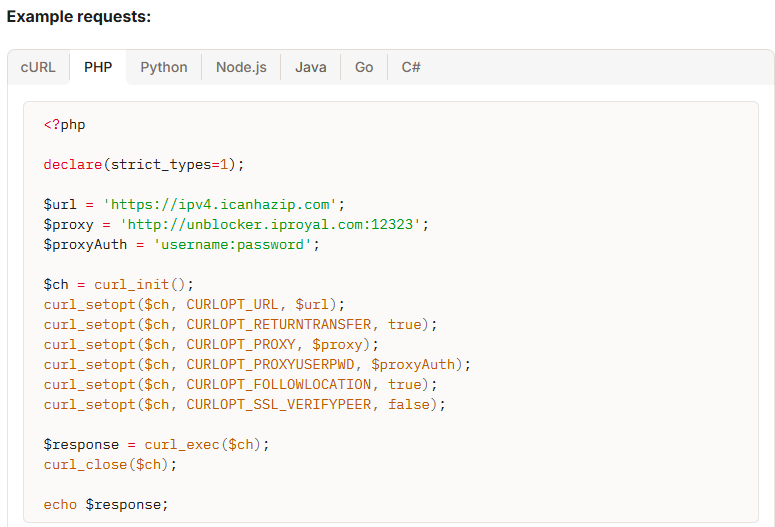
Web Unblocker functions as a standard backconnect proxy, so it’s easy to integrate it into your existing code or web scraping setups. All you have to do is replace your current proxy endpoint with the Web Unblocker endpoint, and you can start scraping.
Currently, Web Unblocker supports only GET requests. It works with any HTTP client or tool, including custom scripts in cURL, PHP, Python, Node.js, Java, Go, and C#.
Note: Web Unblocker uses an MITM unblocking mechanism, so it’s not recommended for browser-based use or tools like Playwright.
For more information, visit our Making a Request documentation.
You can also use it in API testing environments that support custom headers and proxy configurations, thanks to its bearer-token authentication and flexible setup. This makes it easy to test requests, validate responses, troubleshoot complex targets, or prototype scraping flows before moving them into production.
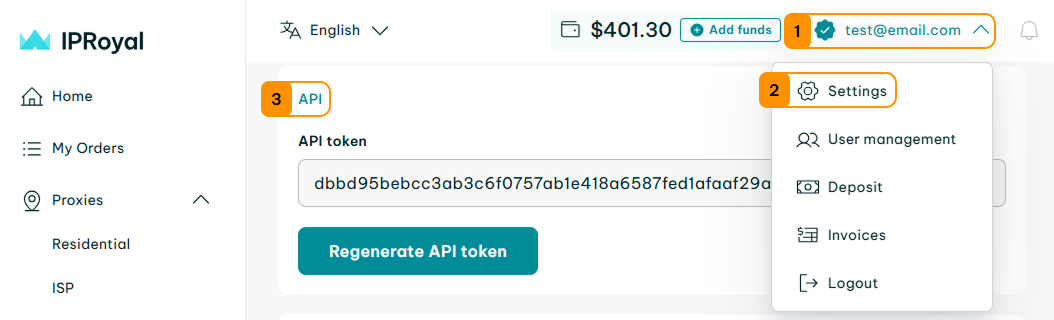
To get your API key, click on your email (1), select 'Settings' (2), and scroll down to the 'API' (3) section.
Learn more about authenticating API requests in our API documentation.