'%20fill-rule='evenodd'%20clip-rule='evenodd'%3e%3cpath%20d='M21.9952%2012.2202c-.0019-.6851-.108-1.3688-.2269-2.0439h-9.6238v3.8768h5.4928c-.1125.6103-.3507%201.1919-.6999%201.7094-.3492.5175-.8022.9601-1.3315%201.3009v2.5105h3.3479c1.005-.9487%201.7951-2.0936%202.3191-3.3605.524-1.2668.7701-2.6273.7223-3.9932Z'%20fill='%234285F4'/%3e%3cpath%20d='M12.1415%2021.9954c2.5027.0755%204.9397-.7912%206.8092-2.4216l-3.3025-2.5105c-1.031.6482-2.2362.9808-3.4613.9553-1.266-.0247-2.49275-.4349-3.50967-1.1735-1.01691-.7385-1.81874-1.8128-2.20993-2.9916l-3.4048.0439v2.5438c.84005%201.6575%202.13352%203.0542%203.73642%204.0348%201.60291.9806%203.45238%201.5066%205.34258%201.5194Z'%20fill='%2334A853'/%3e%3cpath%20d='M6.46884%2013.8531c-.42382-1.2324-.42382-2.4897%200-3.7221V7.55469H3.06422C2.36423%208.93568%202%2010.4564%202%2011.998c0%201.5416.36423%203.0624%201.06422%204.4434l3.40462-2.5883Z'%20fill='%23FBBC05'/%3e%3cpath%20d='M12.1415%206.02167c1.4529-.02643%202.8572.46854%203.9039%201.45519l2.9053-2.87706c-1.8433-1.69203-4.2823-2.62308-6.8092-2.59936-1.8902.01282-3.73967.5388-5.34258%201.5194-1.6029.9806-2.89637%202.37735-3.73642%204.03478l3.40462%202.58828c.39118-1.17886%201.1478-2.20915%202.16472-2.94772%201.01691-.73857%202.24366-1.14874%203.50966-1.17351Z'%20fill='%23EA4335'/%3e%3c/g%3e%3c/svg%3e)
The rapid expansion of 4G, fiber, and 5G networks opened the door for new and faster software solutions. HTTPX, a relatively new Python client library released in 2020, improves on older HTTP clients, especially in terms of speed. It supports the newer HTTP/2 protocol and asynchronous requests, eliminating thread blocking.
In this article, we demonstrate how to add proxies using Python HTTPX.
What Is HTTPX and When Do You Need Proxies?
HTTPX is an improved HTTP client library for Python developed to address the new challenges and opportunities of the modern internet. Asynchronous requests are its primary advantage, which you can think of as concurrent actions.
Synchronous application threads include an idle waiting state, typically regarding input/output tasks. Until specific conditions are met and the thread can finalize its task, it remains in an idle state and cannot perform other actions. In other words, the thread is paused.
In contrast, asynchronous applications do not block threads while waiting for input. The task is paused, and the thread is freed up for other activities until the circumstances are met to finish the previous task. When required input is received, the runtime resumes the paused task, but the pause does not halt other thread actions.
Let's take web scraping as an example. Using the requests library, you would scrape 100 websites one after another. If one website takes one second, you'd be done within two minutes. However, scraping complex websites with anti-bot protection takes much longer, so doing 100 in a row is highly inefficient.
In comparison, HTTPX can scrape multiple websites asynchronously and concurrently. Its easy proxy integration allows rotating IP addresses, which is now often handled by the proxy server provider.
Before going further, let's quickly review why proxies and web scraping go hand in hand.
- Proxy service providers offer millions of IPs to bypass anti-bot protection.
- You can use proxy lists to rotate proxies as needed.
- Connecting to a proxy in a different country bypasses geographical content blocks.
- Multiple IPs allow scraping multiple websites simultaneously, which is particularly important regarding HTTPX proxies.
Setting Up HTTPX and a Proxy in Python
Setting up an HTTPX proxy connection is relatively easy, but having at least basic Python knowledge is highly beneficial. Firstly, we recommend referring to the official HTTPX proxy documentation, and we'll provide easy-to-understand examples to get you started.
Install Python
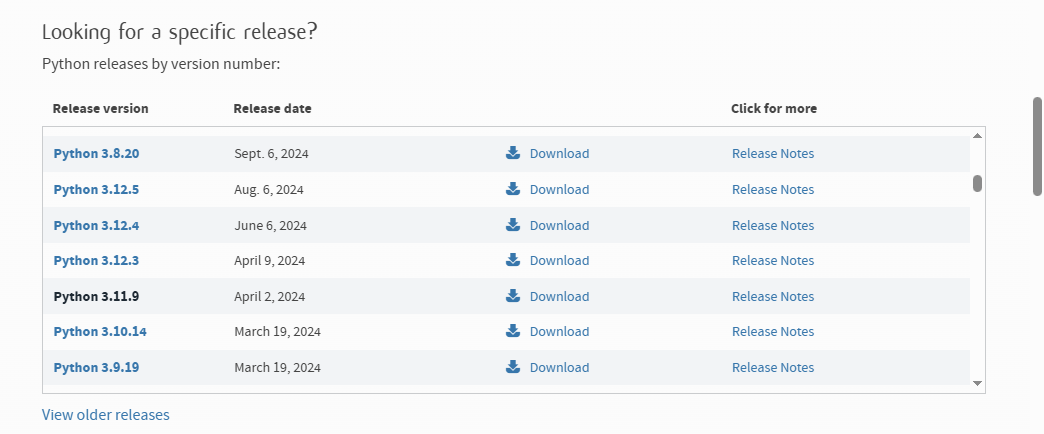
HTTPX is a modern library, so it requires a newer Python version, starting with 3.8 and and above. For this example, we will use the Python 3.11.9 version with the 0.23 HTTPX version, which we confirmed works with proxies. To get started, download the latest Python version from the website.
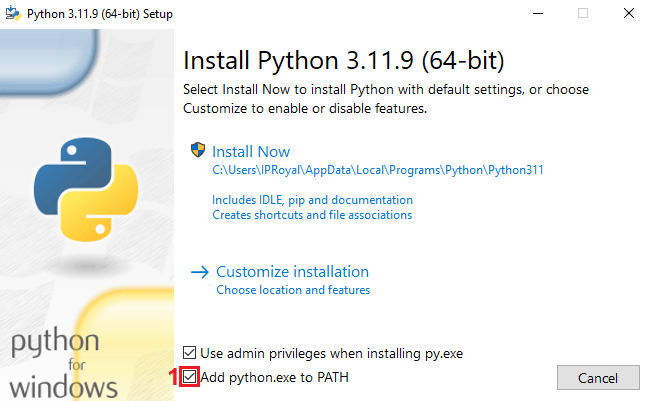
Launch the installer. It's best to leave the installation directory as outlined by Python. Also, don't forget to check the 'Add python.exe to PATH' (1) option, which allows you to run Python commands from Command Prompt or Terminal.
Install HTTPX
After installing Python, open the Windows Command Prompt or Terminal on macOS or Linux. Adding Python HTTPX requires only one line of code:
pip install httpx
It will take less than a minute, depending on your device, and the Command Prompt will display that HTTPX was installed successfully.
We also use an older version of HTTPX (0.23) that we tested with proxies, which you can install using this command:
python -m pip install httpx==0.23.0
Get Your IPRoyal Proxy Credentials
Before you add HTTPX proxies, you need their credentials. You must specify proxy protocol (HTTP, HTTPS, or SOCKS) and add proxy URL values. The accepted format is:
"protocol://username:password@host:port"
Let's see how it looks using our Residential Proxies. After logging in to our IPRoyal dashboard, we select Residential (1) on the left side of the screen. We will use a high-end (2) proxy in Denmark, Copenhagen (3), with sticky sessions (4) that last for one day (5).
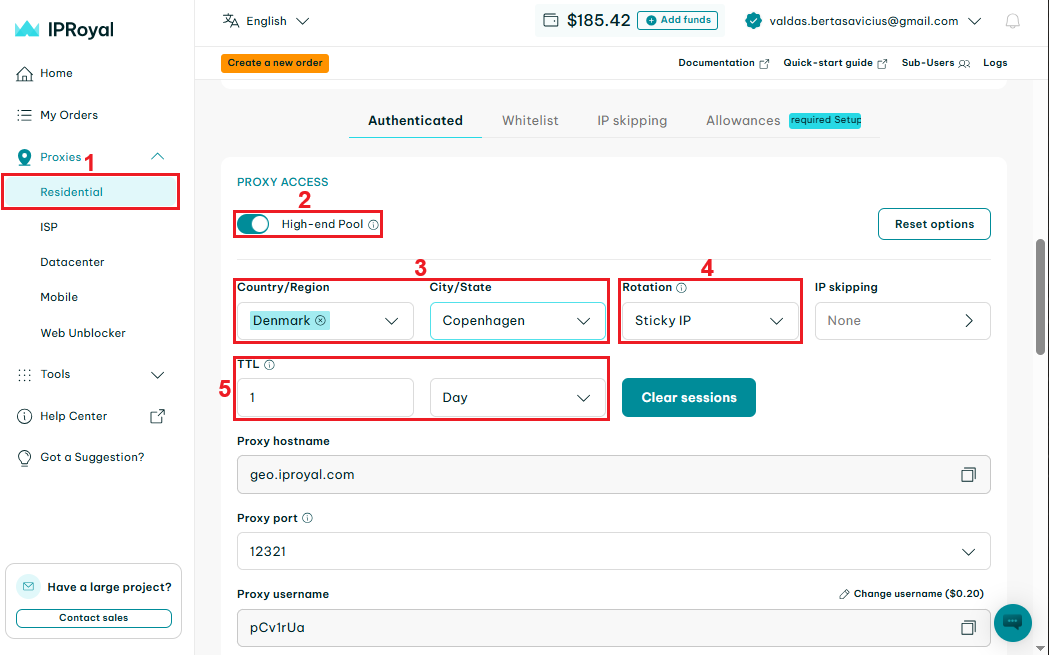
After configuring your proxy, scroll down until you see the 'Formatted proxy list' section. There, you can select the required proxy quantity (6). Copy one of our proxy credentials (7).
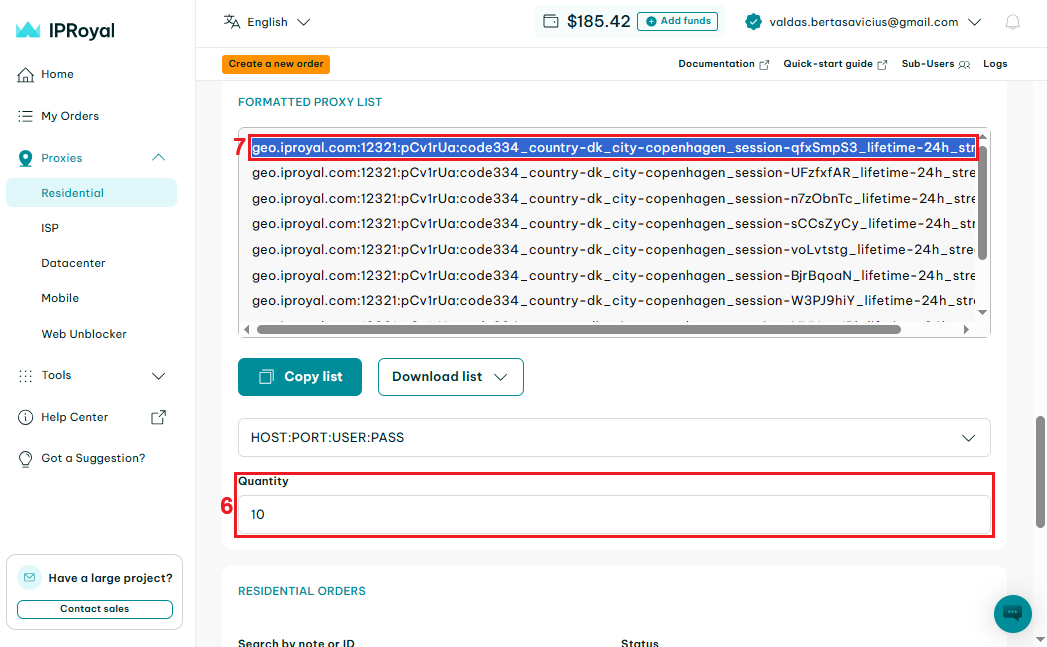
Let’s break it down.
geo.iproyal.com:12321:pCv1rUa:code334_country-dk_city-copenhagen_session-qfxSmpS3_lifetime-24h_streaming-1
Host
Port
Username
Password
geo.iproyal.com
12321
pCv1rUa
code334_country-dk_city-copenhagen_session-qfxSmpS3_lifetime-24h_streaming-1
But HTTPX requires 'protocol://username:password@host:port' proxy format, so let's make sure it’s formatted correctly.
http://pCv1rUa:code334_country-dk_city-copenhagen_session-qfxSmpS3_lifetime-24h_streaming-1@geo.iproyal\.com:12321
Keep in mind that this type includes proxy authentication, so you will need to provide an HTTPX proxy with authentication (proxy username and password), otherwise it won’t work.
You can also whitelist your IP address in your IPRoyal's dashboard and get proxy credentials in the ‘host:port’ format, which is somewhat more convenient. Still, since you may use an alternative proxy service provider without this feature, we will show how to add proxies with proxy authentication.
Configure a Proxy in Your HTTPX Client
Now, switch to your preferred Integrated Development Environment (IDE), where you will write Python code and execute it in the Command Prompt. The first step is to import HTTPX:
import httpx
Proceed with adding your proxy URL, and keep in mind that we will be using our selected proxy as an example. Our following code is:
PROXY_URL = "http://pCv1rUa:code334_country-dk_city-copenhagen_session-qfxSmpS3_lifetime-24h_streaming-1@geo.iproyal.com:12321"

proxies_config = {
    "http://": PROXY_URL,
    "https://": PROXY_URL,
}
Now, we will add the target website. Let's use https://httpbin.io/ip as an example that inspects and returns the client's IP address. Add the following line:
TARGET_URL = "https://httpbin.io/ip"
Next, you have to create an HTTPX client that uses the proxies_config dictionary. This part forces HTTPS requests to go through the proxy server:
with httpx.Client(proxies=proxies, timeout=15) as client:
    try:
        response = client.get(TARGET_URL)
        response.raise_for_status()
        data = response.json()
        print("\nRequest successful (Status 200)")
        print(f"Public IP Address (Proxy IP): {data.get('origin', 'IP not found')}")
    except httpx.RequestError as e:
        print("\nProxy request failed")
        print(f"Error details: {e}")
Executing these code blocks together visits the target URL. It verifies a successful proxy connection, returning a 200 status code and the proxy IP address. If the connection fails, it returns an error so that you can start troubleshooting.
After running the code in our Command Prompt, we got the following response:
Request successful (Status 200)
Public IP address (Proxy IP): 200.146.53.98
That means the connection was successful and the IP address belongs to a proxy. Also, if you get an unexpected keyword argument 'proxies' error in the IDE, you may have to downgrade to Python 3.11.x version with HTTPX version 0.23 instead of their latest releases.
Rotating Proxies with HTTPX
Our code uses a single proxy connection, but for web scraping, you need to rotate proxies to avoid IP bans.
Rotate Proxies From a List
Start by adding new code below the first 'import httpx' statement.
import random

PROXY_LIST = [

"http://pCv1rUa:code334_country-us_state-california_session-fcZNqa7X_lifetime-3h_streaming-1@geo.iproyal.com:12321",

"http://pCv1rUa:code334_country-us_state-california_session-G5tr3cB2_lifetime-3h_streaming-1@geo.iproyal.com:12321",

"http://pCv1rUa:code334_country-us_state-california_session-GejLG3yR_lifetime-3h_streaming-1@geo.iproyal.com:12321",
]

selected_proxy = random.choice(PROXY_LIST)
Then, modify the proxies_config dictionary to look like this:
proxies_config = {
    "http://": selected_proxy,
    "https://": selected_proxy,
}
This way, your Python HTTPX code uses a randomly selected proxy from your list, and you don't have to tweak any proxy settings elsewhere.
Async Proxy Requests
Making asynchronous requests is more complicated, but we'll show the code that is built upon the previous example:
import httpx
import random
import asyncio
import json

TARGET_URL = "https://httpbin.io/ip"

PROXY_LIST = [

"http://pCv1rUa:code334_country-us_state-california_session-fcZNqa7X_lifetime-3h_streaming-1@geo.iproyal.com:12321",

"http://pCv1rUa:code334_country-us_state-california_session-G5tr3cB2_lifetime-3h_streaming-1@geo.iproyal.com:12321",

"http://pCv1rUa:code334_country-us_state-california_session-GejLG3yR_lifetime-3h_streaming-1@geo.iproyal.com:12321",
]

async def fetch_ip_with_random_proxy():
    selected_proxy = random.choice(PROXY_LIST)

    proxies_config = {
        "http://": selected_proxy,
        "https://": selected_proxy,
    }

    print(f"Attempting to use proxy: {selected_proxy.split('@')[0]}@...")

    async with httpx.AsyncClient(proxies=proxies_config, timeout=15) as client:
        try:
            response = await client.get(TARGET_URL)
            response.raise_for_status()

            data = response.json()
            public_ip = data.get('origin', 'IP address not found')

            print("--- Success ---")
            print(f"Public IP reported by {TARGET_URL}: **{public_ip}**")
            print(f"Request status code: {response.status_code}")

        except httpx.RequestError as e:
            print("--- Request Error ---")
            print(f"An error occurred during the request: {e}")
        except httpx.HTTPStatusError as e:
            print("--- HTTP Status Error ---")
            print(f"Received a non-2xx response: {e.response.status_code} for URL: {e.request.url}")
        except json.JSONDecodeError:
            print("--- JSON Decode Error ---")
            print("Failed to decode response as JSON.")
            print(f"Response text start: {response.text[:100]}...")


if __name__ == "__main__":
    asyncio.run(fetch_ip_with_random_proxy())
As you can see, we now provide a proxy list and a targeted URL first, and wrap the rest in an async function. This way, it attempts to fetch the target URL via a random proxy asynchronously.
This is one of the simplest ways to import HTTPX and use the Python HTTPX library with proxies. You also learned how to switch proxies and make asynchronous requests, which significantly speeds up web scraping and minimizes IP detection and ban risks. If you want to learn more about various Python tools, check out our HTTPX vs AIOHTTP vs Requests guide.
Why Use IPRoyal Proxies With HTTPX?
As you can see, you require proxies to make the best out of the HTTPX Python library. Here are the key features of our proxies you can take advantage of with HTTPX:
- 64M+ genuine residential proxies in 195 locations
- Dual authentication (IP whitelisting and username: password)
- Non-expiring residential proxy traffic with discounts for bulk orders
- Support for HTTP, HTTPS and SOCKS5 protocols
Conclusion
If you followed our step-by-step guide, you noticed that setting up the Python HTTPX library is relatively easy. You don't have to change any proxy settings, and after you import HTTPX, you can start adding proxies to your code.