HTTP 401 Unauthorized: What It Means and How to Fix It
ErrorsWhat the HTTP 401 Unauthorized error means, what triggers it, and how to fix it as an end user, a developer, or an API owner, plus how it differs from 403 and 407.

Kazys Toleikis
Key Takeaways
-
HTTP 401 is the HTTP status code a server returns when a request lacks valid authentication, and the server must name the expected scheme in the WWW-Authenticate header.
-
401 HTTP status codes usually come from expired authentication tokens, a malformed Authorization header, or tokens that fail aud, iss, or signing key checks.
-
In scraping and automation, refresh the token once and retry once. If the retry also returns a 401 HTTP status code, stop instead of retrying in a loop.
An HTTP 401 Unauthorized status code means the server received your request but won’t serve it until the client proves who it is. The name itself is a bit misleading, since “Unauthorized” here means unauthenticated rather than Forbidden, which is why a 401 is often confused with the 403 HTTP status code.
The error affects users from both sides of the request. You can get a 401 Unauthorized error code in a browser, an app, or an API client, but web administrators must also know how to return it correctly from the server side.
What Is the HTTP 401 Unauthorized Error?
According to the standard that defines HTTP semantics, RFC 9110, the 401 HTTP status code means the request “lacks valid authentication credentials for the target resource.” In practice, what sets it apart from other 4xx error codes, such as 405 , 409 , 415 , or the non-standard 499 , is the authentication challenge it must carry.
The server must send WWW-Authenticate with at least one challenge that tells the client how to authenticate. It includes the authentication scheme the client should use, plus parameters such as a realm.
If the client request already carries credentials, the 401 means the server refused them, and the client can retry with a new Authorization header. Many servers send a 401 Unauthorized response without WWW-Authenticate at all, which is a server-side bug that administrators should look for when debugging.
Typically, the client first asks for the requested resource without credentials:
GET /api/orders HTTP/1.1
Host: api.example.com
The server rejects the client's first request and names the authentication scheme it expects in the challenge for later:
HTTP/1.1 401 Unauthorized
WWW-Authenticate: Bearer realm="api.example.com"
The client then repeats the request with an Authorization header that fits the scheme. In our example, this is a bearer token:
GET /api/orders HTTP/1.1
Host: api.example.com
Authorization: Bearer eyJhbGciOiJSUzI1NiIsInR5cCI6IkpXVCJ9...
If the token is valid, the server returns HTTP/1.1 200 OK with the requested resource. For Basic and Digest challenges, browsers show a built-in login prompt and resend the request for you. API clients and scripts don't, so you'll have to add the Authorization header in your code.
The format of the Authorization header depends on the authentication scheme the server asks for. Here are the main types.
| Header format | Where it's used | |
|---|---|---|
| Basic | Authorization: Basic <base64 of username:password> | Simple APIs, internal tools, and admin panels. The password is only encoded, not encrypted, so it needs HTTPS. |
| Bearer | Authorization: Bearer <token> | OAuth 2.0 APIs. Bearer tokens are usually short-lived access tokens, often JWTs. |
| Digest | Authorization: Digest username="...", realm="...", nonce="...", uri="...", response="..." | Legacy servers and some network devices. The client sends a hash of the password instead of the password. |
| API key | Set by the provider, for example X-API-Key: <key> | SaaS and data APIs. API keys aren't a standard HTTP scheme, so the provider's docs define the header name. |
401 vs. 403 vs. 407: What the Difference Is
A 401 error code means the server does not know who you are, and a 403 error means it knows who you are but refuses anyway. The 407 HTTP status code means a proxy in between wants credentials before it can forward anything.
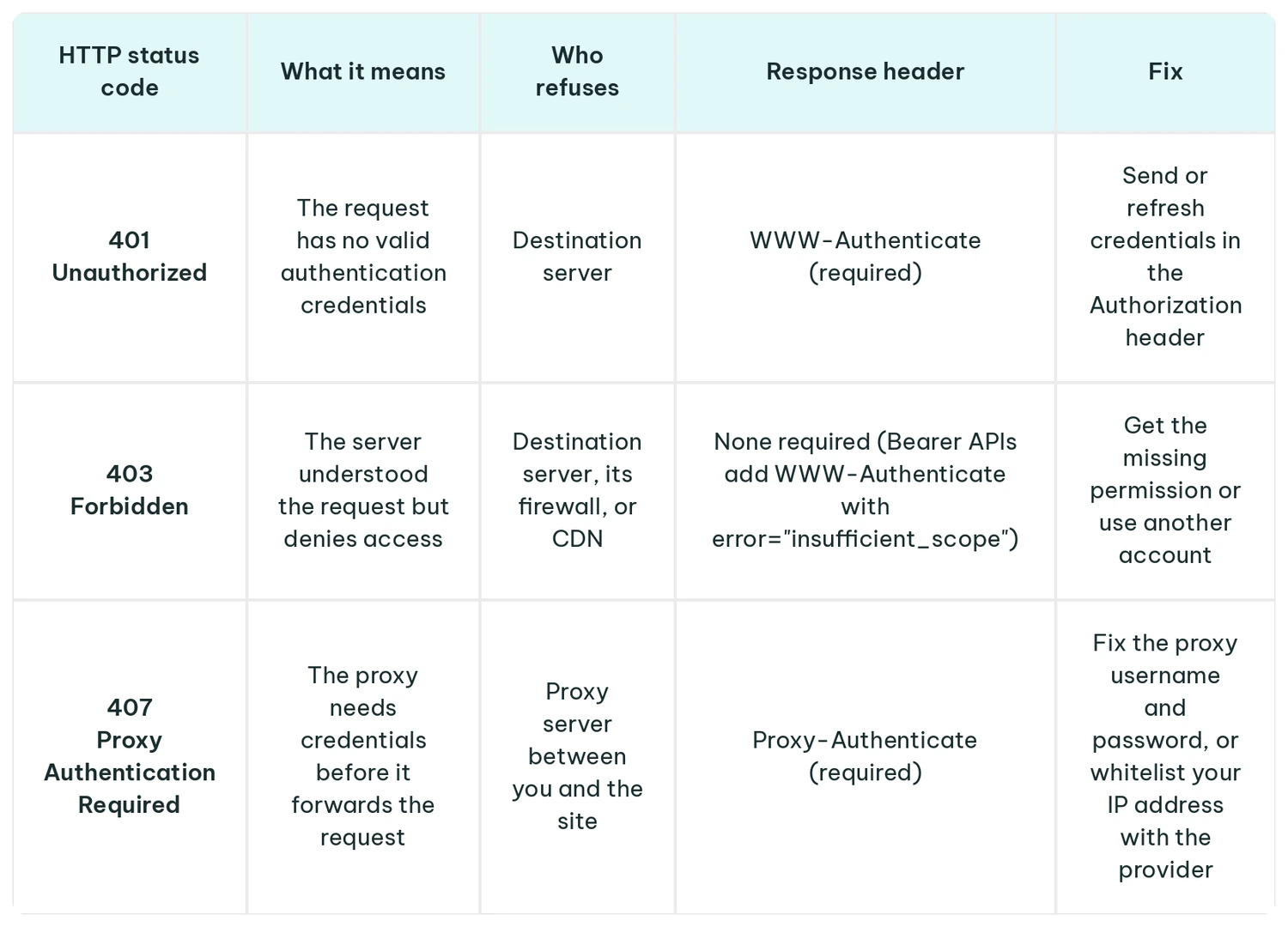
Developers who maintain APIs or servers return HTTP 401 when a request has no credentials or carries an invalid or expired access token. The 403 error code is commonly used when the credentials are valid, but access control rules don't give the account permission.
If you are a user receiving these HTTP status codes, start by reading the response headers.
- WWW-Authenticate means the destination server wants valid authentication credentials.
- Proxy-Authenticate means your own proxy rejected the request, so the site never saw it.
- A 403 Forbidden means sending the same credentials again won't help. Access control rules block the account, IP address, or region, so you need extra permissions or a different account.
Common Causes of a 401 Unauthorized Error
Most 401 errors come from one of four causes, and you can usually tell them apart by when the failures start and what the response says alongside the HTTP status code.
| Symptom | |
|---|---|
| Missing or malformed Authorization header | Every request fails from the start. Common causes are a typo in the header, such as a missing scheme name, or Basic credentials sent where the server expects Bearer. |
| Expired token | Requests worked, then fail after a fixed interval. Bearer APIs usually add error="invalid_token". |
| Wrong or revoked credentials | The first request fails with incorrect credentials, or, after an API key is regenerated, the old one stops working everywhere at once. |
| Token validation failure | A fresh token was issued for a different service (aud) or by a different login server (iss). It might also be signed with a key the server doesn't have yet (kid), or the server's clock is off, so the token looks expired. |
Some other cases of the 401 Unauthorized error happen due to platform-specific issues and need to be investigated as such:
- API keys rejected by a provider. The key might be revoked, belong to another environment, or sit in the wrong header.
- Works in Postman, but fails in cURL. Postman can add headers you didn't type, such as auth inherited from the collection or saved cookies. Open the Postman console to see the request it actually sent, then copy any missing headers into your cURL command.
- WordPress REST API. Some servers might not pass the Authorization header to WordPress.
- Container registry logins. Docker login fails when an account with two-factor authentication uses a password instead of a personal access token, or when using an expired token.
- SSO or session expiry. A browser app keeps calling its API after the session with the authentication provider has ended. Signing in again issues a valid token.
How to Fix a 401 Unauthorized Error
When You See a 401 in a Browser or App
- Sign in again. A new login with valid credentials replaces an expired session or authentication token.
- Check the URL. Make sure the address belongs to the account you're using, such as your company's workspace rather than the public site.
- Clear cookies and saved credentials. An outdated session cookie or password may keep sending invalid authentication credentials.
- Turn off extensions that change headers. Software that edits headers may add or replace the Authorization header. A private window without extensions is a quick test.
- Check for a corporate network or proxy. If the error appears only at work or on a VPN, a proxy or security gateway may be changing the request. If the proxy itself wants credentials, you'll get a 407 error code instead of a 401 status code.
When Using or Building an API
1. Find the WWW-Authenticate header. It names the expected scheme, and Bearer APIs usually add an error code to it.
curl -s -o /dev/null -D - https://api.example.com/orders \
  -H "Authorization: Bearer $TOKEN" | grep -i www-authenticate
If there is no error code, a missing Authorization header is the most likely culprit. If it shows error="invalid_token", the access token itself needs fixing.
2. Confirm the Authorization header leaves the client. A 401 can also mean the server never saw the header at all. With curl -v, every header curl sends appears on a line beginning with >, so an Authorization line should be there.
If it's there but your server logs have no record of it, the header was dropped on the way. Amazon CloudFront removes the Authorization header by default unless a cache policy or origin request policy includes it.
3. Decode the token. If it's a JWT, read its claims to check the expiry, audience, and issuer:
import base64, json, time

def decode_part(part):
    part += "=" * (-len(part) % 4)  # restore base64 padding
    return json.loads(base64.urlsafe_b64decode(part))

token = "eyJ..."  # paste the token you send
header = decode_part(token.split(".")[0])
claims = decode_part(token.split(".")[1])

print("kid:", header.get("kid"))
print("aud:", claims.get("aud"), "| iss:", claims.get("iss"))
print("expires in:", claims.get("exp", 0) - int(time.time()), "seconds")
The script above reads the claims without verifying the signature, so use it only for debugging.
A negative number means an expired token. An aud or iss that differs from what your API expects means the token was issued for another service or by another authentication provider.
4. Verify and refresh the signing key. Compare the kid with the keys the issuer publishes. If the issuer publishes that kid but your API still rejects the token, the API is most likely using an old cached key set, so refresh it.
5. Check clock drift. On the API server, run:
timedatectl status | grep -i synchronized
If the clock isn't synchronized, a fresh token can look expired or not yet valid. Turn on NTP time sync on that server.
401 Errors in Web Scraping and Automation
Browsers resend cookies and prompt you to sign in again, but scrapers and other API clients only do what you code. That's why they hit HTTP 401 status codes more often, usually for one of these reasons:
- Authentication tokens expire mid-use. A long job that never requests a new access token keeps sending the expired token.
- Credentials are dropped on redirect. cURL with -L and the Python Requests library remove the Authorization header when a redirect leads to another host.
- Concurrent workers share one session. OAuth servers may revoke the old refresh token when issuing a new one, so one worker's refresh breaks the others.
- Sessions are tied to an IP address. OWASP recommends binding sessions to the client's IP address, so rotating IP addresses mid-session can end the session.
A common way to handle an HTTP 401 is to detect it, refresh the token once, retry once, and stop if the retry fails. A second HTTP 401 means the credentials are wrong. Retrying in a loop can lock the account or get your IP address rate-limited.
In this function, get_new_token is your own code that returns a fresh access token:
import requests

def fetch(session, url, get_new_token):
    """Refresh the token once, retry once, then stop."""
    response = session.get(url, timeout=30)
    if response.status_code == 401:
        session.headers["Authorization"] = f"Bearer {get_new_token()}"
        response = session.get(url, timeout=30)
    if response.status_code == 401:
        raise PermissionError(f"Still 401 after a token refresh: {url}")
    return response
When fetch() raises an error, stop the task and check the credentials instead of retrying. If you run it again later, back off: double the wait before each new attempt rather than retrying in a loop. If many workers share a single token, let only one of them refresh it and have the others reuse the new token.
A proxy only changes the IP address the site sees. A 401 from the destination server is a credentials problem, so switching proxies won't fix it. A 407 Proxy Authentication Required comes from the proxy itself: check your proxy username and password or whitelisted IP address.
If a site ties your login to one IP address, IPRoyal Residential Proxies can retain the same IP for up to 7 days with sticky sessions.
Global Pool, Precise Targeting, Zero Contracts
Premium Residential Proxies
How to Prevent 401 Errors in Your API
Always send WWW-Authenticate. If the request carried a token, add the RFC 6750 error code for Bearer tokens. In the body, give error details that name the cause, such as a missing header, an expired token, or a wrong audience. When the token is valid but lacks permission, return a 403 code instead.
For Bearer tokens with too narrow a scope, RFC 6750 uses 403 with error="insufficient_scope". Returning 401 here tells clients to re-authenticate, which can't fix a permissions problem and can trap them in a refresh loop.
HTTP/1.1 401 Unauthorized
WWW-Authenticate: Bearer error="invalid_token", error_description="The access token expired"
Content-Type: application/problem+json

{"title": "Token expired", "status": 401, "detail": "Request a new access token and retry."}
Access tokens should last around 15 to 30 minutes, but that only works with a consistent refresh flow. Build your authorization flow so clients get a new token a little before the old one expires. If clients only refresh after a request fails, each expiry costs them a 401. With refresh token rotation, each refresh also returns a new refresh token and the old one stops working.
On the API side, check the aud claim on every token. It names the service the token was issued for. If that isn't your API, reject the token. The exp and nbf checks need some clock leeway too, around 30 seconds. Server clocks drift slightly, and without that margin a valid token can fail.
Some 401 status codes are normal, because tokens expire and people mistype passwords. What you should watch for is unusual increases in HTTP 401 rates.
A spike right after a deployment might mean a changed signing key or a rotated secret. Failed logins across many accounts from many IP addresses point to credential stuffing.
Alert when the 401 rate rises well above its usual baseline, or when a single client ID or a small set of IP addresses produces a burst of failures.
For each failure, log the time, endpoint, client ID, source IP, and reason. Never log passwords, access tokens, or the full Authorization header.
FAQ
What does HTTP 401 mean?
HTTP 401 Unauthorized is an HTTP status code that means the server needs valid authentication credentials before it returns the requested resource. Either the client request carried no credentials, or the server rejected them as invalid authentication credentials. The WWW-Authenticate response header names the scheme to use.
What is the difference between 401 and 403?
A 401 Unauthorized status code means the server can't identify you because the request had missing or invalid credentials. Sending valid credentials fixes it. A 403 HTTP status code means the server knows who you are, but access control rules keep your account from the requested resource.
How do I fix a 401 Unauthorized error in a REST API?
Most 401 Unauthorized errors in REST APIs come from expired authentication tokens, a revoked API key, or invalid credentials. Start with the WWW-Authenticate header, since its error code often names the cause. Then confirm whether the Authorization header reaches the server. If valid credentials still fail, look on the server side.
What is the difference between 401 and 407?
Both HTTP status codes ask for authentication credentials, but different servers send them. A 401 Unauthorized comes from the server that holds the requested resource and wants valid credentials in the Authorization header. A 407 comes from a proxy, which wants its own credentials in the Proxy-Authorization header before it forwards the request.
Does a 401 error mean the site is down?
No. A 401 Unauthorized response is a 4xx client error code, so the server has answered your request. A site that's down usually returns a 5xx HTTP status code such as 503 Service Unavailable. A 401 usually means expired authentication tokens or incorrect credentials. Signing in again with valid credentials fixes most cases.