Google Search URL Parameters: Examples and Use Cases
WebsitesLearn all you need to know about Google search parameters with popular examples, practical use cases, and common mistakes to avoid for SEO and web scraping.


Marijus Narbutas
Key Takeaways
-
Google Search URL parameters are a way to pass information about your search results via a URL, expressed as key-value pairs.
-
Some of the most frequently used parameters for SEO and scraping tasks are q, gl, hl, uule, tbm, tbs, start, and filter.
-
Google doesn’t officially maintain URL parameters, and you still need other location signals, such as IP addresses and browser fingerprints, to correctly set up niche use cases like localized scraping.
Every manual or automated Google search is packed with parameters. These extra values added to Google URLs help refine how results are filtered, displayed, or localized. In Search Engine Optimization (SEO) and scraping tasks, parameters are used to get faster keyword testing, competitor analysis, and overall better results.
It’s a key part of localizing your search results without manually clicking through Google’s interface each time. Most parameters aren’t officially documented, and Google can change them at any time, so it’s important to stay up to date through real-world examples and use cases.
What Are Google Search URL Parameters?
Google Search URL parameters are key-value pairs appended to a search URL that modify how results are displayed or requested. Each parameter tells the search engine to adjust a specific aspect of the search query or its presentation.
Request language, number of results, device type, and other parameters influence the results without changing the actual search interface. While Google search parameters cannot be used on other websites, they follow a similar pattern on many websites where similar functions are available.
The base endpoint https://www.google.com/search is followed by a question mark (?) that starts the parameter list, with values joined by an equals sign. Multiple parameters are separated by ampersands (&). A full URL with parameters might look as such:
https://www.google.com/search?q=proxies&num=20&hl=en
There's some confusion around URL parameters and Google Search operators, like site: and intitle:. Unlike parameters, search operators are written directly in the search query to filter results. Operators are a part of the query itself, while parameters are a part of the URL structure.
Most Useful Google Search URL Parameters
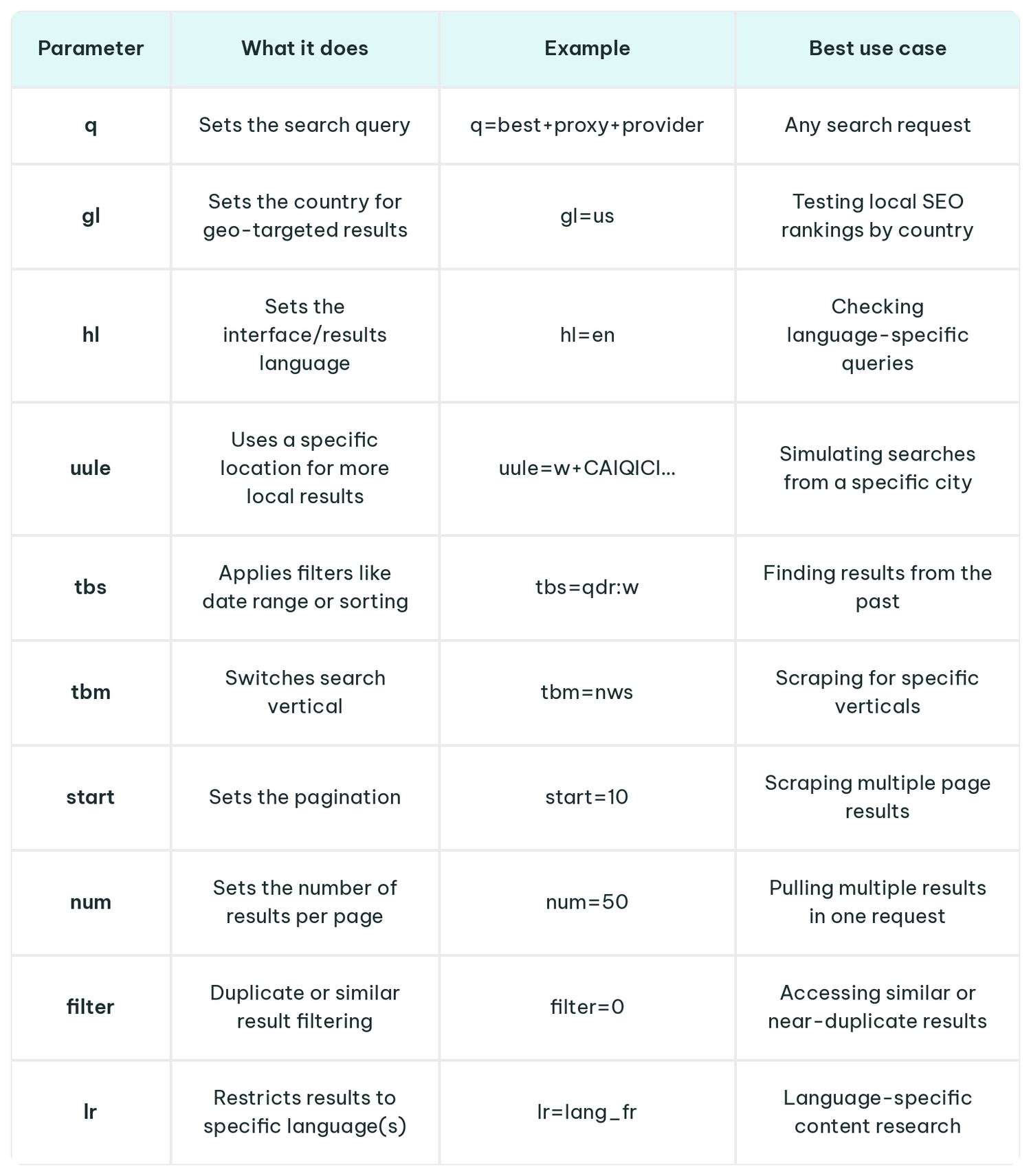
Core Google Search URL Parameters
q – Search Query
The q parameter defines the search query itself. The format is a pattern q=value, with the value consisting of the URL + or %20, which replaces spaces in the text.
google.com/search?q=best+proxy+provider
Every URL for a search on Google requires the query parameter because without it there's nothing for the search engine to process. It's the foundation all other parameters build on. In our example, the above query parameter searches for the best proxy provider.
hl – Interface Language
The hl parameter sets Google's interface language for labels, buttons, messages, and other elements. The format follows the structure hl=xx, where xx is a two-letter language code.
google.com/search?q=proxies&hl=de
It doesn't necessarily affect the results themselves, just Google's UI, allowing you to see how the page appears to, for example, German visitors. As such, it's best for testing search result pages and pairing with other location parameters when using automation.
gl – Country Context
The gl parameter tells Google which country's context to prioritize when ranking and displaying results. It's formatted as gl=xx, with two-letter country codes.
google.com/search?q=proxies&gl=jp
The example above uses gl=jp to display results biased toward Japan. It's one of the most commonly used query parameters for SEO tasks when specialists want to compare rankings across different locations. Note that other location signals, such as proxies, are also needed for best performance.
gl vs. hl
The gl and hl parameters are often confused, as both use two-letter country codes. The important difference to remember is that hl doesn't necessarily affect the results, while gl specifically changes the ranking bias.
However, when accessing search results programmatically, it's often recommended to use multiple query parameters, especially location parameters, to better avoid detection.
uule – Specific Location Targeting
The uule or user location parameter encodes an even more precise geolocation than gl. It's for targeting local results at the city level. The format consists of uule= followed by an encoded string with a fixed prefix, usually in base64.
https://www.google.com/search?q=kebabs&uule=w+CAIQICIGTG9uZG9u
The example above simulates a search from London. The uule parameter works best for search queries that are locally targeted, such as foods, services, or location names. Among other location signals, such as proxies, it's the go-to strategy for local rank tracking.
Filtering Google Search Results With URL Parameters
tbs – Time and Date Filters
The tbs parameter filters results by time and date ranges. Its format is tbs=qdr:x, where x can stand for an hour (h), day (d), week (w), month (m), or year (y).
google.com/search?q=proxies&tbs=qdr:d
Our example shows results from the past day (24 hours). The tbs parameter can be easily changed to access other timeframes, so it's great for tracking trends, newest content, or breaking news.
safe – SafeSearch Filtering
The safe parameter turns on Google's SafeSearch filter, which blocks explicit content from search results. The format consists of safe=active (filter on) or safe=off (filter off).
google.com/search?q=proxies&safe=active
This parameter applies regardless of account settings or other preferences, so it's useful for testing how results appear for users with safety settings other than yours.
filter – Duplicate and Omitted Results
The filter parameter controls whether Google hides near-duplicate content and omits similar results from the same site. It's written as either filter=0 (show all results) or filter=1 (default filtering on).
google.com/search?q=proxies&filter=0
With filter=0, our example reveals every result, including duplicates. SEO professionals and others use it for full index research and Search Engine Results Page (SERP) audits.
nfpr – No Auto-Correction
The nfpr parameter disables Google's autocorrect, forcing your searches to use the exact queries typed. The format uses either nfpr=1 (turn off correction) or nfpr=0 (allow it).
google.com/search?q=proxie&nfpr=1
The search term in our example might be a misspelled name, proxy, so you might want the autocorrect to be enabled with nfpr=0. In case you're looking for a Thai boy band named Proxie, you'll want to turn the autocorrect off with nfpr=1.
Search Verticals: Using the tbm Parameter
Search verticals are specialized categories that filter results by specific topic, industry, media type, or other parameters that might function differently from a standard web search. Instead of blending all content types together, verticals allow you to target needed formats directly.
The to-be-matched (tbm) parameter is used to switch between different verticals. Its format is tbm=xx, where xx stands for different values.
- tbm=isch – image search results
- tbm=nws – news articles and press results
- tbm=shop – shopping and product listings
- tbm=vid – video-specific results
- tbm=bks – book search results
Tbm values aren't officially documented, and some have stopped working in the past. Google has even introduced a newer parameter, udm, which is gradually replacing tbm. It additionally covers extra modes, like udm=14 for clean web results with no AI Overviews.
Pagination Parameters: start and num
start – Moving Through Result Pages
The start Google Search parameter makes the results move through Google's pages. Its format follows a formula: start=x, using multiples of 10 (0, 10, 20…) to return different search result pages.
google.com/search?q=proxies&start=10
Writing start=10 takes us straight to page two of Google, showing 11-20 results. It's a standard way to paginate through search results programmatically since num was disabled.
num – Why num=100 Is No Longer Reliable
Using num=100 was a popular way to pull large result sets with one request. However, due to undisclosed reasons, Google removed the num parameter in September 2025. Passing any value with the num parameter now returns the standard top 10 results.
We could speculate that Google is trying to fight bot traffic, clean up their measurement data, or push users to paid API access. In practice, pagination with the start parameter can replace num for large-scale or automated access.
Practical SEO Use Cases
| Use case | Useful parameters | Example |
|---|---|---|
| Local rankings for a specific city | uule, gl | google.com/search?q=plumber&uule=w+CAIQICINQ2hpY2Fnbw&gl=us |
| Monitor fresh brand news mentions | tbm=nws, tbs=qdr:d | google.com/search?q=IPRoyal+proxies&tbm=nws&tbs=qdr:w |
| Audit SERPs without AI Overviews | udm=14 | google.com/search?q=best+proxies&udm=14 |
| Research misspelled or long-tail keywords | nfpr=1 | google.com/search?q=residental+proxy&nfpr=1 |
| Test how results look for international users | hl, gl, lr | google.com/search?q=scraper&hl=fr&gl=fr&lr=lang_fr |
| Paginate through full result sets | start | google.com/search?q=proxies&start=20 |
| Check image-based competitor visibility | tbm=isch | google.com/search?q=IPRoyal+proxies&tbm=isch |
Why Your Google Results May Still Look Different
Even with identical URLs, two search queries can get different results because parameters are far from the only thing that influences Google. Many signals outside the URL are equally or even more important for consistently getting the needed results.
- IP location can override or affect gl and uule parameters, often functioning as the primary location trigger.
- Cookies store users' browser preferences and various past interactions that influence search results.
- Device type or its fingerprints signal whether mobile or desktop results are shown to users.
- Browser language settings override or combine with the hl parameter in the URL.
- Google account, when set up and active, sends a lot of user data, such as search history, location, saved media and preferences, to provide personalized results.
- The time of search influences results on news, trending topics, and freshness signals shift by the hour.
- SERP experiments and updates constantly change layouts, features, rankings, and other details, so two identical searches might differ.
Google search parameters should be treated only as one of the tools to control results. For more reliable performance, you must ensure that all other parameters are consistent across your searches. Strategies like clearing cookies, using incognito mode, and setting a device fingerprint are effective.
In many cases, using a consistent IP address is the most important strategy, and it often matters more than rules or gl alone. IPRoyal can ensure that you get the needed IP addresses for as long as you need with flexible sticky sessions.
Common Mistakes With Google Search URL Parameters
| Mistake | Better approach |
|---|---|
| Relying on num=100 for bulk scraping | Google removed num=100, so start parameter should be used to paginate in batches of 10 |
| Confusing gl (country) with hl (language) | Both should be set independently, as gl controls result ranking and hl interface language only |
| Copying full search URLs with tracking parameters | Strip unnecessary parameters and keep only what's needed, typically q= parameter with relevant filters are enough |
| Assuming parameters are officially documented and stable | Treat all parameters as unofficial and test them regularly. Google can change or remove them at any time |
| Using tbm values without checking if they still work | Verify current values before use. If needed ones are deprecated, consider udm for newer modes |
Google Search URL Parameters vs. Search Operators
Parameters are used when you need to control how a search query is executed or displayed, as they can cover date, search verticals, location, and pagination. Google Search operators, such as site:, intitle:, and filetype:, are used in the search query itself when you need to narrow what you're searching.
Operators help to restrict results to specific domains or file types even in casual everyday search use. For larger-scale SEO and web scraping use cases, operators and parameters are combined to get the most precise results possible.
- Reddit mentions of proxies from the past month.
google.com/search?q=site:reddit.com+proxies&tbs=qdr:m
- Shopping results with the word review in the title
google.com/search?q=intitle:review+running+shoes&tbm=shop
- PDF guides for the United Kingdom location
google.com/search?q=filetype:pdf+seo+guide&gl=uk
Conclusion
Google Search URL parameters are useful for SEO and some web scraping use cases, as they help control results. They won’t solve all problems, however. Parameters lack official documentation, can change without notice, and must be used with other tools. In most cases, you'll be better off prioritizing proxies and browser fingerprints.
FAQ
Are Google Search URL parameters officially documented?
While none of the query parameters are officially documented by Google, most of them are known through reverse-engineering and testing. You can get some guidance on Google search parameters from third-party guides and even Google's blog. However, keep in mind that query parameters might change at any time.
Should I copy all parameters from a Google Search URL?
Copying every parameter might carry unwanted context, for example, gl and hl parameters that bring location and language data. Unless you specifically need some context, keep only the necessary search query parameters (q=), while ignoring all tracking or session-specific parameters.
Can Google Search URL parameters guarantee accurate local results?
URL parameters are helpful for getting the desired local search results, but Google pairs various other personalization measures with location parameters. IP address, account settings, search history, and other factors determine local result accuracy. Accuracy isn’t guaranteed, because even with the same parameters, two queries might return different results.
What is the difference between Google Search URL parameters and website URL parameters?
Different parameters are set by each website to filter content, track sources, or manage page sessions. Since Google is such a prominent website, Google Search parameters (like q=, tbs=, num=) are documented by users. They help to influence how Google displays search results but don’t work on other sites.