What Is a Proxy Pool? Explained!
Proxy fundamentals

Justas Palekas
Key Takeaways
-
A proxy pool is a set of proxy IPs available to you, usually behind a single endpoint that assigns an address per request or per session.
-
Pool rotation is configurable per request, per timed rotation interval you set, or with sticky IPs you can hold longer.
-
Mobile and residential proxy pools are the most reliable against blocks, while datacenter and mixed pools can be faster and cheaper, depending on the proxies used.
-
Pools suit high-volume use cases like web scraping and price monitoring, while individual IPs are better for work requiring continuity, like checkouts and account management.
Proxy pools are one of the most foundational concepts of proxy services. Most providers mention them on their pages, showcasing different types and the number of IPs in their pools. Put simply, a proxy pool is a set of IP addresses reachable through a single endpoint.
What the pool is built on, how it handles rotation, and how it’s maintained generally determine the quality of the proxy pool more than its sheer size. Understanding these details will help you make better-informed decisions when choosing and using proxy servers.
What Is a Proxy Pool and How Does It Function?
Proxy servers act as intermediaries between your device and the internet. They have their own IP addresses, which are shown as yours when using them. When you try to connect to a web server, the proxy shows its IP address as yours, keeping your actual IP hidden.
An individual proxy server has one unique IP address, so with five individual proxies, you’ll have five different IP addresses at your disposal. Proxy pools are different.
A proxy pool is a managed collection of multiple proxy servers with a single entry point for each user. Instead of connecting directly to the target server, your requests go through one of the proxy servers in the pool, which then forwards the request and receives the response on your behalf.
Providers have a system that manages proxy quality and selects IPs for each user. This means that when you use the entry point to connect to the pool, the system will automatically assign a specific IP to your request.
No matter how big or small the proxy pool is, you’ll most likely get one entry point. However, the number of entry points can change depending on factors like session control and location.
If you need to make hundreds or thousands of requests simultaneously, a proxy pool will assign a different IP to each request on your behalf, thanks to a mechanism called IP rotation.
Proxy rotation enables users to get a new IP address from the pool whenever they make a web request or at a specific time interval. Even non-rotating proxies, such as dedicated residential or static residential proxies, can leverage rotation if they are in your private proxy pool.
How Are Proxy Pools Created and Maintained?
Proxy providers create and maintain pools to offer their clients a range of proxy servers for various purposes. IP addresses can be acquired through partnerships with internet service providers or, in the case of residential proxies, individual partners.
Most residential proxy providers get their IP addresses through Peer-to-Peer networks (P2P) where real residential users agree to share their internet connection in exchange for some benefit. Premium providers, such as IPRoyal, work with real users who opt in through our partner networks and are compensated for sharing their connection.
Global Pool, Precise Targeting, Zero Contracts
Premium Residential Proxies
The providers configure proxy software with settings such as port numbers, authentication methods, IP rotation intervals, and connection limits. They customize proxies based on client requirements, such as specifying proxy types (residential, mobile, or datacenter proxy pool), level of anonymity, and geographic locations.
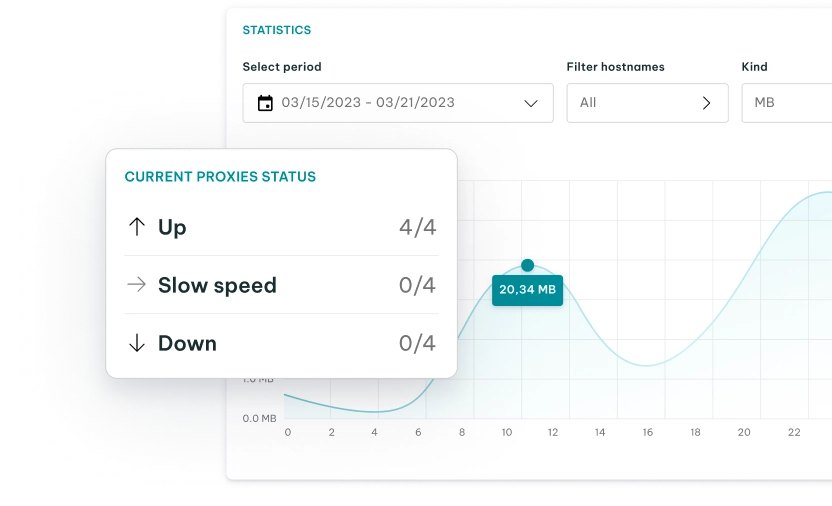
Premium proxy providers continuously monitor the health and performance of their proxy servers in real time. They employ automated monitoring tools to detect slow response times, downtime, or other issues. Automated IP rotation is also employed to change proxy IP addresses at specified intervals, preventing websites from blocking a single IP due to excessive requests.
To maintain the quality of the proxy pool, providers establish policies for retiring old proxies and introducing new ones. They rotate or replace IPs that exhibit performance degradation, connectivity issues, or have a history of abuse.
They also continuously assess the demand for proxy services and scale the pool as needed to accommodate increased traffic. Another thing they pay attention to is regular audits and optimization.
Routine audits are conducted to evaluate the effectiveness of the proxy pool. Based on audit findings, a provider can optimize configuration and practices to enhance overall performance and client satisfaction.
What Types of Proxy Pools Are There?
Proxy pools can be built from one IP address type or from several. The type and IP reputation of the proxies determine the pool’s features and the tasks it’s best for.
| Typical pool size | Best use case | Detectability | Speed | Typical cost | |
|---|---|---|---|---|---|
| Residential proxies | 5M–175M+ IPs | Accessing geo-restricted content, web scraping, automation, price monitoring | Low | Moderate | $1.75–$8/GB |
| Datacenter proxies | 40k–2M IPs | High-volume automation, SEO monitoring, and data collection tasks | High | Fastest | From $1.39/IP |
| ISP proxies | 10k–500k+ IPs | Account management and logged-in sessions that need the same IP for long | Low | Very fast | From $1.80/IP |
| Mobile proxies | 200k+ to millions | Web scraping, automation, and other tasks for mobile targets | Lowest | Moderate | From $5.20/GB or $10.11/day per dedicated proxy |
| Mixed IP pools | Aggregate of the above | Mixed workloads under one endpoint | Varies per proxy usage | Varies by types used | Varies by types used |
| Free | Hundreds to a few thousand, mostly dead or pre-flagged | Nothing production-facing | Highest | Slowest | $0 |
Residential proxies offer a high IP reputation but trade away some speed, while datacenter proxies are the fastest and cheapest type but get blocked more often, since websites can see that their IPs belong to hosting providers rather than consumer ISPs.
ISP pools combine the benefits of both: the IPs are hosted in data centers but registered to consumer internet service providers, which makes them faster and more stable than residential proxies. The trade-off is that they usually cover fewer locations than residential pools.
Mobile proxy pools, while the most expensive, are often best for websites with strict identity tracking or those with mobile-only versions. Free pools are mostly pre-flagged public proxies of unknown origin, so it’s best to avoid them for any serious work.
Rotation Strategies
Some types might be preferable in their rotating versions. Rotating residential proxies might be better at avoiding tracking or accessing localized content than sticky residential proxies. Yet it also depends on the rotation strategy you or your residential proxy provider sets.
| New IP assigned | Use cases | |
|---|---|---|
| Per-request | Every request | Independent request tasks, such as SERP collection, product page, or price monitoring |
| Timed | On an interval you set, typically 1–30 minutes | Paginated crawls and multi-page jobs, such as web scraping JavaScript-heavy sites |
| Sticky | Held until you release it or the session expires | When you need to retain the same online identity for logins, carts, or checkouts |
The data source matters more than preference. Pick a proxy provider that offers all three strategies on the same plan, so you can switch per task without buying a separate product. For some jobs, a single high-quality static residential proxy is all you need.
Proxy Pool or Individual Proxies?
Whether it’s data collection or simple browsing, your proxy usage will likely come down to one of two options. One is a single endpoint that hands you different IPs each time; the other is a list of fixed IPs you assign yourself.
One rarely chooses between them directly. Rather, you pick a product, and it gives you specific access. Rotating residential, mobile, and rotating datacenter proxies give you pool access, while ISP and dedicated datacenter proxies give you a list of fixed IPs.
| Proxy pool | Individual proxies | |
|---|---|---|
| Access | One endpoint. Provider assigns the IP | A list you route to yourself |
| IP per request | Different | Same until you change it |
| Session persistence | Only with sticky sessions | Native |
| Dead IP handling | Provider retires and replaces | You test and replace |
| Geographic spread | Wide, on demand | Fixed at purchase |
| Cost model | Per GB | Per IP, per month |
| Cost predictability | Varies with volume | Fixed |
- Pool access is better when you need coverage in many locations and high request volume. Use cases like large-scale web scraping, price and SEO monitoring are good examples.
- Individual proxies are better when the target needs continuity, and you’re fine with per-IP pricing. Use cases like account management, checkout flows, and others prefer individual access.
- A middle-ground option is to use sticky sessions that allow you to perform tasks like data collection with a pool, but still use the proxy for a login when needed.
What Are the Advantages of Using a Proxy Pool for Web Scraping, Automation, or Anonymity?
Using a proxy pool offers several advantages for various purposes, such as web scraping, automation, and anonymity.
- Web scraping
Proxy pools enable automatic rotation of IP addresses, helping you avoid detection and IP bans by websites that limit requests from a single IP address. Web scraping from a single IP address can lead to being blocked by websites. A proxy pool distributes requests across multiple IPs, reducing the risk of being blocked.
Proxy pools allow you to scale your web scraping efforts by distributing requests across many proxies, enabling faster data collection and IP rotation for scraping . They also provide proxies from various locations, enabling you to scrape data as if you were located in different regions, which is useful for gathering localized information.
- Automation
Proxy pools help distribute automated tasks across multiple proxies, preventing overload on any single server and improving the efficiency of your automated processes.
A proxy pool also helps you stay within the IP-based rate limits of the services you’re automating, so your tasks run more smoothly. In case a proxy server experiences issues, your automation tasks can automatically switch to another proxy in the pool, reducing downtime.
- Anonymity
Proxy pools mask your original IP address, providing an additional layer of privacy when browsing. Because you send requests through a proxy, your real IP address isn’t visible, making you harder to track online.
This anonymity allows you to access content that might be unavailable in your location by connecting through proxies in regions where the content is accessible. Combined with other tools, such as anti-detect browsers, proxy pools help protect your identity and data by hiding your real IP address from malicious actors.
How Can a Proxy Pool Help Distribute Traffic and Improve Performance?
A proxy pool can help distribute traffic and improve performance by intelligently routing incoming requests to different proxy servers. This load-balancing mechanism ensures that no single proxy server becomes overloaded, leading to smoother and more efficient access to websites and online services.
When multiple users or automated processes send requests to access websites or online services, the proxy pool acts as an intermediary. Instead of directing all requests to a single proxy server, the proxy pool distributes incoming requests across the available proxy servers.
By distributing traffic among different proxy servers, the proxy pool prevents any single server from being overwhelmed. This prevents congestion and ensures that each proxy server is used optimally, reducing the risk of performance degradation.
How Many IPs Do You Actually Need?
Providers like to advertise their datacenter, mobile, and residential proxy pools, but what often matters more is the usable IPs. If you can’t get enough concurrency in the locations you need, there’s not much you can do with a large global pool.
There are two ways to estimate the number of IPs you need when web scraping or automating tasks. The more precise method is available when you know a target’s rate limit.
IPs needed = (requests per hour) ÷ (requests per IP per hour the target tolerates)
Note that the reported tolerance varies by site, and you might need to find the limits yourself. Run a trial project with a proxy pool and watch for 429 and similar errors. If they are rising, the pool is too small.
A quicker method is to use known rules of thumb and just test them. A common starting point is to have at least three times as many IPs available as you have concurrent requests.
For example, 50 concurrent requests would call for at least 150 IPs in the target country. This approach can work even when you don’t yet know the target’s tolerance, and you can adjust from there.
Best Practices for Using Proxy Pools
Your project will go much better with the right choice and setup of an IP pool. Wrong rotation periods, a pool too small for your request concurrency, or blocked IPs left in the pool will lower success rates.
- Assess provider reliability and uptime. Premium residential proxy providers tend to have the best numbers for uptime and other data for other types as well. Real-world performance may differ for your use case. Test the IPs for your targets before purchase.
- Configure rotation frequency for the target. Per-request rotation is best for tasks when you don’t need a consistent online identity. Most web scraping tasks fall into this category. Whenever logins, carts, or multi-step forms are involved, you’ll need sticky sessions or static proxies.
- Check IP health and reputation. Track which IPs return blocks or CAPTCHAs on your targets, and check whether any resolve to hosting ASNs when you’re paying for residential IPs. Drop the bad ones, or switch pools, before they drag down the success rate of the rest.
- Match pool size to request volume. As mentioned, you should match available pool size to the request volume and target tolerance. Your budget might lower the headroom, especially when using premium residential proxies.
Are There Any Considerations or Limitations When Utilizing a Proxy Pool?
A proxy pool can benefit both individuals and businesses, but you should be aware of several considerations and limitations.
Considerations
- A proxy pool’s effectiveness largely depends on the quality and diversity of the proxies within it. Use proxies from reputable sources to avoid unreliable or malicious ones.
- Proxies add a layer of privacy, but not all proxies offer the same level. Residential proxies from premium providers offer the strongest privacy.
- Using proxies to access websites or services can violate their terms of use. Review the terms and conditions of the websites you access to avoid legal issues.
- Some websites implement rate-limiting or IP-blocking mechanisms to prevent abuse. When using a proxy pool, you may encounter these limitations if multiple requests originate from the same IP address, which can lead to restricted access.
Limitations
- Proxy pools may not have proxies in all geographic locations. If your use case requires accessing content from specific regions, you should find geographically relevant proxies.
- Proxy pools often rotate IP addresses to distribute traffic and improve anonymity. However, this can also lead to inconsistent experiences when accessing websites that rely on session-based information.
- High-quality proxy services usually come from premium or paid providers, so avoid free proxies as these are less reliable and may carry security risks.
- If not properly managed, proxies could expose sensitive data or serve as an entry point for attackers.
Conclusion
Whether it’s datacenter or residential proxies, buying a pool means gaining access to IPs with shared specifications. It’s crucial to understand the concept of a proxy pool so you can evaluate what proxies you need and what providers actually offer.
FAQ
How can one build or acquire a proxy pool?
Building proxy pools can be done manually by integrating your individual dedicated proxies with proxy rotation software or custom code. However, most proxy pools come ready-made and are actively managed by providers. In such cases, you only need to connect to one endpoint to access the pool.
Are all proxies in a proxy pool of the same quality or reliability?
It depends on the proxy pool type and the provider you use. Some pools are of the same type, while others have mixed proxy types. A request routed through a datacenter proxy IP behaves differently from one routed through a mobile or residential IP. A mixed pool’s performance depends on which IP you draw.
What are some recommended proxy pool management practices to ensure optimal performance?
Some proxy pool management practices for optimal performance include ensuring proxy diversity, monitoring regularly, and implementing intelligent IP rotation algorithms. It’s also crucial to remove non-functional, blocked, or slow proxies and use load balancing to distribute traffic evenly across IPs.
How many proxies should a proxy pool have?
How many your use case needs and what the target tolerates. Divide requests per hour by what one IP can send before the target blocks it. Small-scale jobs can make do with ten to fifty quality residential proxy IPs, while heavy scraping tasks might require thousands of IPs.
How often do IPs in a pool rotate?
It depends on the provider and your settings. With IPRoyal residential proxies, the default is a new IP for every request. For timed rotation, you set a session lifetime anywhere from one second to seven days (for example, 10 or 30 minutes), and the IP changes once that lifetime ends.
What happens when an IP in the pool gets banned?
In a rotating pool, a ban only affects the requests sent through that one IP. With per-request rotation, the next request already goes out through a different address, and with a sticky session, you can start a new session to get a fresh IP.