'/%3e%3cellipse%20opacity='0.34'%20cx='327.5'%20cy='339'%20rx='264.5'%20ry='264'%20fill='url(%23paint1_linear_12724_35442)'/%3e%3cdefs%3e%3clinearGradient%20id='paint0_linear_12724_35442'%20x1='327'%20y1='-2.524e-06'%20x2='327'%20y2='389.286'%20gradientUnits='userSpaceOnUse'%3e%3cstop%20stop-color='%2327D9E5'/%3e%3cstop%20offset='0.927406'%20stop-color='%23004047'%20stop-opacity='0'/%3e%3c/linearGradient%3e%3clinearGradient%20id='paint1_linear_12724_35442'%20x1='328.02'%20y1='74.7771'%20x2='328.02'%20y2='395.312'%20gradientUnits='userSpaceOnUse'%3e%3cstop%20stop-color='%2327D9E5'/%3e%3cstop%20offset='0.927406'%20stop-color='%23004047'%20stop-opacity='0'/%3e%3c/linearGradient%3e%3c/defs%3e%3c/svg%3e)
Web Scraping With Rust – The Ultimate 2026 Guide
Tutorials

Marijus Narbutas
Key Takeaways
-
A basic Rust web scraping project can work with Reqwest, Tokio, Scraper, and Serde dependencies.
-
Real-life targets will require you to use custom headers, session cookies, proxies, and scrape responsibly to avoid blocks.
-
Mastering the basics of Rust scraping is crucial before moving to more complex JavaScript-heavy websites.
Python is the most popular language for web scraping, but you can do basic web scraping tasks with any language. As long as it has basic library support for retrieving and parsing HTML content, web scraping is possible. Despite being known for backend tasks, web scraping with Rust is getting better and easier.
Rust web scraping libraries, such as Reqwest and Scraper follow similar principles to Python ones. Additionally, Rust works well with async apps, and its headless browser support is actively supported. Before you can jump into the complexities of Rust Web scraping, it’s important to master the basics.
How to Scrape Hacker News With Rust
For purposes of practicing Rust web scraping, we’ll scrape the list of top posts and their point counts from Hacker News together with their point counts. We’ll download the front page of Hacker News and also print all the posts together with their scores.
Setup
You’ll need to have the Rust compiler installed on your machine. You can download it from the official website if you don’t have it yet. Then, create a new Rust project by running cargo new web_scraper in the command line.
After that, open the newly created directory in the code editor of your choice. For this project, you’ll need to add three dependencies:
- Reqwest for handling HTTP requests
- Tokio (Rust’s async runtime), which is needed to use Reqwest
- Scraper for parsing the HTML content of pages
- Serde for converting data to JSON
Open the Cargo.toml file and update it with the dependencies:
[package]
name = "scraper-example"
version = "0.1.0"
edition = "2024"

[dependencies]
reqwest = { version = "0.12", features = ["blocking", "gzip", "brotli", "deflate", "cookies"] }
scraper = "0.13.0"
tokio = { version = "1.22.0", features = ["full"] }
serde = { version = "1", features = ["derive"] }
serde_json = "1"
Then, open main.rs file and replace the boilerplate there with the following:
#[tokio::main]
async fn main() -> Result<(), Box<dyn std::error::Error>> {

// code goes here

    Ok(())
}
This is the minimal code you need to use the Tokio runtime, which the Reqwest library uses by default. Once you have it all set up, you can start using Rust web scraping libraries for their intended purpose.
Getting a Page With Reqwest
Reqwest is an HTTP client library that lets you send GET, POST , and other HTTP requests to web servers. It’s Rust’s equivalent to Python’s requests library.
To use it, you first need to create a new client, which the library will use as the contact point with the site.
let client = reqwest::Client::builder().build()?;
After that, you can use this client to send a GET request. The code below will fetch the site's HTML code and store it in a response variable.
let response = client
        .get("https://news.ycombinator.com/")
        .send()
        .await?
        .text()
        .await?;
That’s all you need to do to fetch the contents of a web page with Rust. Here’s the code up to this point.
#[tokio::main]
async fn main() -> Result<(), Box<dyn std::error::Error>> {
    let client = reqwest::Client::builder().build()?;

    let response = client
        .get("https://news.ycombinator.com/")
        .send()
        .await?
        .text()
        .await?;

    println!("{}", response);

    Ok(())
}
Before you can parse the downloaded web page to find the needed information, you might need to deal with headers.
Adding Headers to Avoid Basic Blocking
The Hacker News site is a beginner-friendly target without aggressive anti-bot detection tactics. In a real-world scenario, scraping data will require you to at least adjust your User-Agent header.
The default User-Agent of the Reqwest client, currently reqwest/0.13.2, immediately identifies your script as an automated bot. Sites block such default headers to protect their data and server load. Besides the user agent, other common HTTP headers might also be required to access the data.
#[tokio::main]
async fn main() -> Result<(), Box<dyn std::error::Error>> {
    let client = reqwest::Client::builder().build()?;

    let response = client
        .get("https://news.ycombinator.com/")
        .header("User-Agent", "Mozilla/5.0 (Windows NT 10.0; Win64; x64) AppleWebKit/537.36 (KHTML, like Gecko) Chrome/141.0.0.0 Safari/537.36")
        .header("Accept", "text/html,application/xhtml+xml,application/xml;q=0.9,image/webp,*/*;q=0.8")
        .header("Accept-Language", "en-US,en;q=0.5")
        .header("Accept-Encoding", "gzip, deflate, br")
        .header("Connection", "keep-alive")
        .header("Referer", "https://google.com")
        .send()
        .await?
        .text()
        .await?;

    println!("{}", response);
    Ok(())
}
We included headers about expected language, encoding mode, connection type, and where the request came from. It's enough to bypass basic blocking in many sites, but web scraping Hacker News does not require it at all. For simplicity's sake, we'll omit HTTP headers in further code.
Working With Cookies and Sessions in Reqwest
When a browser visits a site, the server sends cookies, which the browser automatically stores with subsequent requests for identification. Real-world web scraping projects should not ignore cookies, as your script looks suspicious without them. You also run into problems with logins, pagination, consent forms, and other details.
Cookie support does not complicate Rust web scraping. Reqwest has a built-in cookie store you can enable in the client builder. Once enabled, it handles the full cookie lifecycle automatically, just like a browser would. All you need to do is add the code below to your web scraping script.
let client = reqwest::Client::builder()
    .cookie_store(true)
    .build()?;
Persistently maintaining cookies, connection pooling, and headers across multiple requests is considered a Session in Rust web scraping. They are most useful in two situations.
- Login scraping. After a successful login, the site issues a token, which must be carried across future logins. Without sending authenticated requests, you will need to log in anew each time.
- Pagination. Some sites track your position in web pages or lists using session cookies. Without cookie support, you might be redirected back to the first page with every request.
Reqwest cookie store handles cookies for these cases automatically once enabled and will help you deal with additional issues, such as multi-step forms, consent banners, and others. However, more complex sites might require a headless mode to solve such issues.
Parsing a Page With Scraper
Scraper is a Rust library for parsing HTML and querying it with CSS selectors . It’s Rust’s version of Python's BeautifulSoup.
To use it, you first need to parse the entire response body of the HTML.
let document = scraper::Html::parse_document(&response);
Then you can use selectors to query this document for HTML elements you need.
Selectors are created using the scraper::Selector::parse method. It takes a string as an argument with a CSS selector, which is a common way of specifying CSS elements in fine detail.
If you inspect the HTML code of Hacker News, you’ll see that post titles are wrapped in a span element with the class of titleline. To get the title that’s inside that HTML element, you need to select the anchor element inside. This is covered by the following CSS selector: span.titleline>a.
Here’s the function to create that selector in Rust.
let title_selector = scraper::Selector::parse("span.titleline>a").unwrap();
Since not all strings are valid CSS selectors, the parse function returns a Result type. In this case, it’s fine for the program to crash if the CSS selector is not formed correctly, so you’ll just call unwrap() to get the selector.
Afterwards, you can get all post titles by applying the selector to the HTML document and then mapping each matching element to its inner HTML (which is the title text).
let titles = document.select(&title_selector).map(|x| x.inner_html());
Getting the point counts of each title is a bit more difficult. This is largely because a title is not required to have a point count. Some sponsored messages, for example, will only have the posting time.
First, you’ll need to identify an element common to all posts: those with scores and those without them. In this case, it’s a table cell with the subtext class that contains all the information, such as the user who submitted the post, the time posted, and the post’s score.
<td class="subtext">
…
</td>
Using the previously covered selector syntax, you’ll select all of these elements.
let subtext_selector = scraper::Selector::parse("td.subtext").unwrap();
    let subtexts = document.select(&subtext_selector);
After that, you need to go through these elements and check if there is a score in the element. If there isn’t, substitute it with a default.
First, you’ll need a selector for scores.
let score_selector = scraper::Selector::parse("span.score").unwrap();
Then, you’ll need to iterate over the subtext elements and find the scores.
 let scores = subtexts.map(|subtext| {
        subtext
            .select(&score_selector)
            .next()
            .and_then(|score| score.text().nth(0))
            .unwrap_or("0 points")
    });
If the score is not there, the function above will use .unwrap_or() to insert a default of “0 points”.
That’s all you need for a simple web scraping project with Rust! Now, you can print the titles and scores out in the console.
titles.zip(scores).for_each(|pair| println! {"{:?}", pair});
Here’s the full code:
#[tokio::main]
async fn main() -> Result<(), Box<dyn std::error::Error>> {
    let client = reqwest::Client::builder().build()?;

    let response = client
        .get("https://news.ycombinator.com/")
        .send()
        .await?
        .text()
        .await?;

    let document = scraper::Html::parse_document(&response);

    let title_selector = scraper::Selector::parse("span.titleline>a").unwrap();
    let titles = document.select(&title_selector).map(|x| x.inner_html());

    let subtext_selector = scraper::Selector::parse("td.subtext").unwrap();
    let subtexts = document.select(&subtext_selector);

    let score_selector = scraper::Selector::parse("span.score").unwrap();

    let scores = subtexts.map(|subtext| {
        subtext
            .select(&score_selector)
            .next()
            .and_then(|score| score.text().nth(0))
            .unwrap_or("0 points")
    });

    titles.zip(scores).for_each(|pair| println! {"{:?}", pair});
    Ok(())
}
You can run this program by calling cargo run in the command line. It should print out 30 title-and-score pairs like these:
("Apple's reaction to protests: AirDrop is now limited to 10 minutes", "382 points")
("Intentionally Making Close Friends", "410 points")
("Curation and decentralization is better than millions of apps", "163 points")
("Everything I wish I knew when learning C", "470 points")
("How hospice became a for profit hustle", "117 points")
...
Saving Scraped Data in Structured Format
A good web scraping project involves planning for how the data will be stored and structured. At this stage, the collected data is simply printed in the console in separate iterations. A struct allows us to group related data into a single named type, tying the title and its score together.
use serde::Serialize;

#[derive(Serialize)]
struct Story {
    title: String,
    score: String,
}
Serialization is the process of converting an in-memory Rust struct into a different format, such as JSON or CSV. A standard tool for this task is the serde crate, which requires you to annotate the struct and handles the conversion automatically.
One of the simplest and most common starting points is exporting scraped data into a JSON file with the erde_json command. It's human-readable, easy to inspect, and works well with small to medium databases.
let stories: Vec<Story> = titles
    .zip(scores)
    .map(|(title, score)| Story {
        title,
        score: score.to_string(),
    })
    .collect();

let json = serde_json::to_string_pretty(&stories)?;
std::fs::write("stories.json", json)?;
Here’s what a full code snippet would look like:
use serde::Serialize;

#[derive(Serialize)]
struct Story {
    title: String,
    score: String,
}

#[tokio::main]
async fn main() -> Result<(), Box<dyn std::error::Error>> {
    let client = reqwest::Client::builder().build()?;

    let response = client
        .get("https://news.ycombinator.com/")
        .send()
        .await?
        .text()
        .await?;

    let document = scraper::Html::parse_document(&response);

    let title_selector = scraper::Selector::parse("span.titleline>a").unwrap();
    let titles = document.select(&title_selector).map(|x| x.inner_html());

    let subtext_selector = scraper::Selector::parse("td.subtext").unwrap();
    let subtexts = document.select(&subtext_selector);

    let score_selector = scraper::Selector::parse("span.score").unwrap();

    let scores = subtexts.map(|subtext| {
        subtext
            .select(&score_selector)
            .next()
            .and_then(|score| score.text().nth(0))
            .unwrap_or("0 points")
    });

    let stories: Vec<Story> = titles
        .zip(scores)
        .map(|(title, score)| Story {
            title,
            score: score.to_string(),
        })
        .collect();

    let json = serde_json::to_string_pretty(&stories)?;
    std::fs::write("stories.json", json)?;

    println!("Saved {} stories to stories.json", stories.len());
    Ok(())
}
Avoiding Rate Limits When Scraping
A Rust web scraper can send hundreds of requests per second. Much more than any human controlling a browser and, in some cases, even more than a Python web scraper could. Sites detect such patterns and respond with temporary blocks, CAPTCHAs, or IP address bans.
Implementing delays between requests while web scraping is crucial for avoiding such restrictions. For example, you could send no more than one request per second by using a loop.
for url in urls {
    fetch(&client, &url).await?;
    tokio::time::sleep(std::time::Duration::from_secs(1)).await;
}
Another option is to use concurrency-based request delays. A maximum of five concurrent requests is a good starting point.
stream::iter(urls)
    .map(|url| fetch(&client, &url))
    .buffer_unordered(5)
    .collect::<Vec<_>>()
    .await;
Depending on your use case and target, you might need to implement more complex delay rules. However, even the most advanced request delay strategy is just one tool among many.
With most sites, it's equally important to follow well-known, respectful scraping rules. Polite Rust web scraping is definitely possible, but more challenging compared to Python.
- Request delays have built-in settings in Python's Scrapy. With Rust, you need to implement delays manually.
- Respecting robots.txt with Rust is easy to forget since there is no module built for it. You need to use a crate like robotstxt or parse the file manually.
- Avoiding server overload with the Rust scraper can be done using the buffer_unordered(N) function. It's Rust's equivalent of concurrency settings to Python's Scrapy.
Adding a Proxy to Reqwest
By serving as an intermediary and changing your IP address, proxies allow you to access geo-restricted web pages and avoid other types of restrictions. Rotating multiple quality proxies keeps your scraper undetected since each request uses a different IP address.
In this tutorial, we will use IPRoyal residential proxies as an example. They are great for web scraping projects with Rust because they rotate your IP automatically on every request you make. In addition, they are sourced from a diverse set of locations, which makes scrap more difficult to detect.
First, you need the link to your proxy. If you’re using IPRoyal proxies, you should start the proxy setup in your dashboard. After configuration is done, you'll find a link there. All proxy providers may have different menus, but the result should be the same.
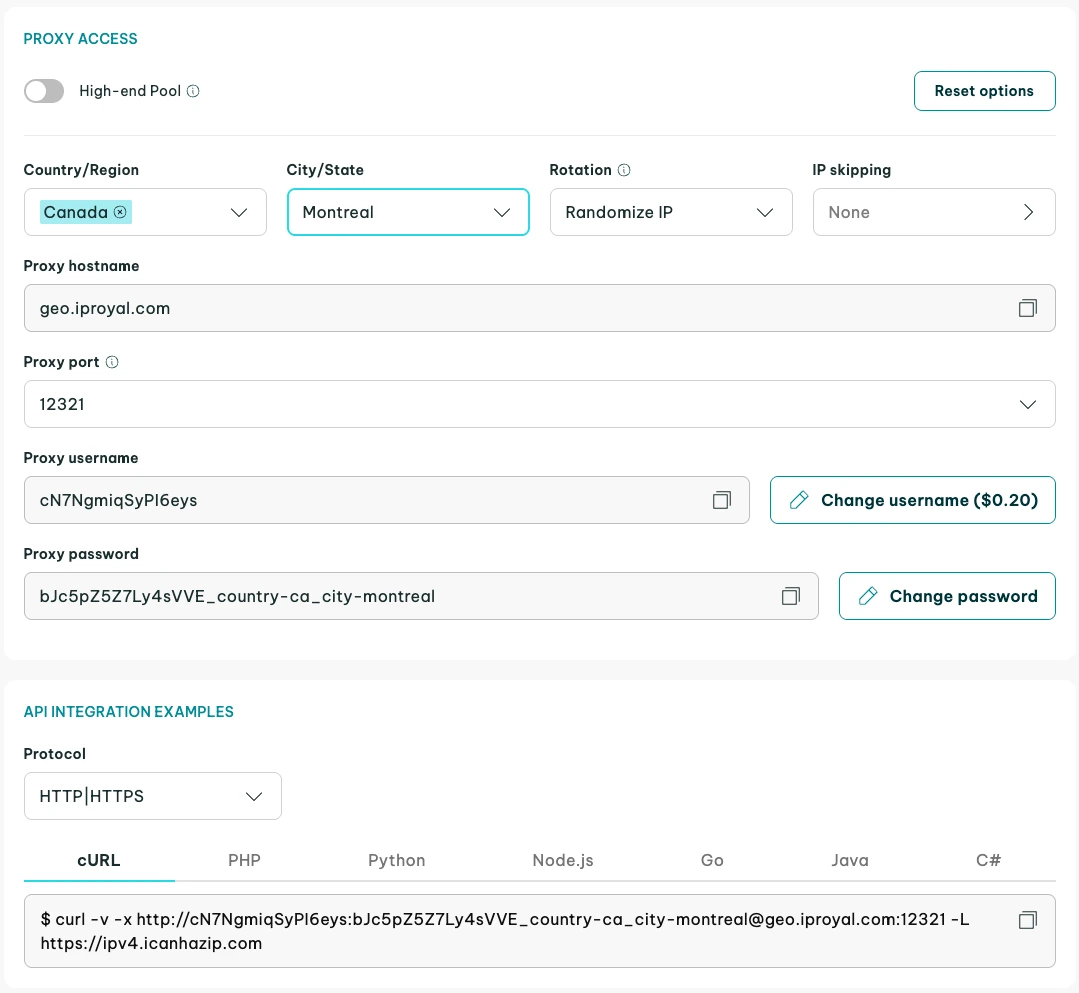
The proxy URL needs to be added to your client as a proxy for HTTP and HTTPS requests. You can do this in the first part of the program, where you define and build your client as shown below. Whitelist your IP address in the dashboard for easier use.
let client = reqwest::Client::builder()
        .proxy(reqwest::Proxy::http(
            "http://link-to-proxy",
        )?)
        .proxy(reqwest::Proxy::https(
            "http://link-to-proxy",
        )?)
        .build()?;
Now, requests you send with this client will pass through the proxy first, which conceals your real IP address.

Final Thoughts
Now that we've covered the basics of web scraping tasks with Rust and how to add headers, proxies, and use cookies, it's important to acquire some practice. Start with our Hacker News example and gradually move to more complex targets.
Eventually, you'll need to scrape pages that use JavaScript. The simple combination of Reqwest and Scraper might not be enough in such cases. Just like Python, Rust also has a library for Selenium bindings called Thirtyfour . It enables you to simulate the actions of a real browser, such as clicking, typing, scrolling, and many more.
FAQ
What is Tokio, and why do you need it for web scraping?
Tokio is Rust's runtime for creating asynchronous applications, useful for web scraping. You'll be making many requests, so Tokio saves time working on multiple tasks simultaneously. Synchronous web scrapers can also work, but are slower. Reqwest uses Tokio by default, but it's possible to use the blocking API for simple tasks.
Why is the unwrap() function used so frequently in example code?
Rust web scraping requires avoiding runtime panics (situations where the code crashes during execution because of an error). Functions that could result in an exception in languages like Python sometimes return a value of the Result type , which is a value that can be either a valid result or an error.
You can either choose to handle the error in some way or just call unwrap(), which will crash the program in case of an error. For errors that cannot be recovered from, like a wrongly constructed selector, this is a good enough option.
Can you use XPath selectors in Scraper?
Unfortunately, Scraper doesn’t support XPath expressions . If you need them for your scraping project, you can use the Thirtyfour library, which provides XPath selectors, among other things. Keep in mind that it’s a Selenium library for browser automation. It comes with some extra complexity, but headless browsers also have some advantages when web scraping.
Can Rust scrape JavaScript-heavy websites?
Yes, you can scrape JavaScript-heavy web pages. You cannot rely on the basic HTTP client alone and need headless browser automation. Rust has libraries like headless_chrome or fantoccini that provide a headless mode, or you can use Selenium bindings in Thirtyfour . However, headless browsers in Python or Node.js are better maintained.
How do you scrape multiple pages in Rust?
There are several Rust web scraping approaches you can take, depending on the structure of web pages. The simplest data extraction cases are when you can use pagination, as the URL changes predictably with a page number. Other approaches include following the next page links, using headless mode, or fetching multiple web pages concurrently.
Is Rust good for web scraping?
Any language that supports GET requests for HTML content can be used for web scraping. Rust is fast, memory-efficient, and has great async compatibility, which makes it a choice for web scraping at scale. Yet, Python is still the default choice as it has a larger scraping community and better headless browser support.