Virtual Private Server (VPS) vs. Proxy Server: The Difference
Proxy fundamentals

Justas Palekas
A VPS is a rented virtual machine for hosting websites, apps, and services, while a proxy server forwards your requests so websites see its IP address instead of yours. You can turn a VPS into a private proxy with software like Squid, Dante, or an SSH tunnel, but it gives you one datacenter IP that websites can trace to a hosting ASN. A VPS is billed by resources (CPU, RAM, storage) and proxies by bandwidth or per IP, so compare the cost of the job rather than the sticker price.
VPS and proxies are often used interchangeably to describe the same remote machine with its own IP address, but they’re not the same. A VPS is a rented virtual machine you can host websites, apps, and services on. Conversely, a proxy server forwards your requests so websites see its IP address instead of yours.
So, in order to help you make a well-informed decision, we’ll dive into the differences between a VPS and a proxy server. We’ll also cover key advantages and disadvantages, as well as key use cases for each one.
What Is a Virtual Private Server?
It’s a virtualized server acting as a dedicated server within a larger physical server, with at least one IP address. A virtual private server (VPS) is created by using virtualization technology to separate a physical server into numerous virtual ones, each operating independently with its own operating system (OS) and resources.
In reality, it’s a software server mimicking a physical one, hosting websites, applications, and files and working at the OS level.
What Is a Proxy Server?
Residential proxies , as well as all other proxy types, function as an intermediary between your device and the internet. It’s like a bridge connecting you to the websites and apps you want to visit and use.
Basically, the proxy server takes your connection requests and sends them to the intended destination on your behalf. Likewise, it relays the data sent from the websites and apps to you, working at the application level.
Global Pool, Precise Targeting, Zero Contracts
Premium Residential Proxies
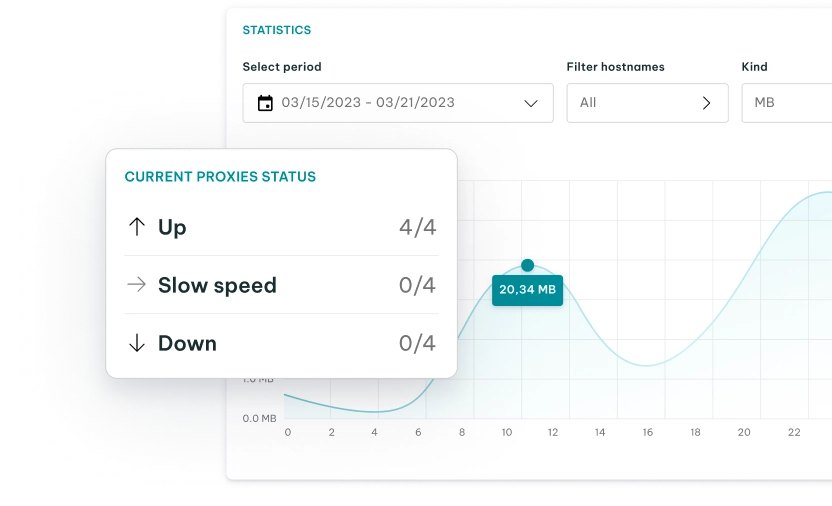
The proxy server carries its own IP address and presents it to the websites and apps as if it were your own. In the meantime, your original IP address and location stay hidden from the intended sites and apps.
Use Cases of a VPS and Proxy Servers
A VPS is an entire server with a fully fledged OS and almost all the options of a standard, physical machine. You can secure what it hosts with SSL/TLS certificates, and it’s best for hosting websites and cloud-based apps and storing files.
Common use cases of VPS include:
- Web hosting
- Hosting game servers
- Hosting email servers
- Developing and testing code and applications
Proxy servers work at the application level. They route traffic for a specified app or browser, and they can also cache data and filter content.
Common use cases of proxy servers include:
- Viewing regional and global content
- Private browsing
- Avoiding IP blocks
- Changing IPs
- Content filtering
Can You Use a VPS as a Proxy?
Yes, you can use a VPS as a proxy. To do that, install proxy software on a VPS to turn it into a private proxy server that will route your traffic through your VPS’s IP address.
This is actually a popular setup for those who want full control, but this also means you’ll have to do more manual work and have tighter limits than with just a proxy service.
Common Software Options
When it comes to software options, most self-hosted proxies run on one of these:
- Squid: A long-standing HTTP/HTTPS forward proxy with caching and detailed access controls.
- Tinyproxy: A lightweight HTTP/HTTPS proxy for small, simple setups.
- Dante: A SOCKS server, often used for SOCKS5 with username and password authentication.
- 3proxy: A compact tool that can serve both HTTP and SOCKS proxies from one config.
- SSH tunnel (ssh -D): No extra software needed. It turns any VPS you can log in to into a SOCKS5 proxy for your own device.
SOCKS5 vs. HTTP Proxies
SOCKS5 and HTTP proxies are two different proxy types. An HTTP proxy analyzes traffic and reads HTTP requests. It can cache pages, filter content, or change headers if needed. It can also tunnel HTTPS traffic with the CONNECT method without reading it, which maintains security. In terms of usability, HTTP proxies are often used for browsers and web scraping tools.
SOCKS5 proxies are different - they work at a lower level. A SOCKS5 proxy sends any TCP or UDP traffic without interpreting it. This makes SOCKS5 proxies great for non-web apps, game clients, and custom tools.
One important thing to note is that HTTP and SOCKS5 proxies don’t encrypt traffic by default. The only exception on this list is an SSH tunnel, which encrypts traffic between your device and the VPS you use.
| • Transmission Control Protocol (TCP) is a connection-oriented protocol that guarantees reliable, ordered delivery of data, acknowledging every packet sent. • User Datagram Protocol (UDP) is a connectionless protocol that prioritizes speed and low latency over reliability, sending data without establishing a connection or confirming receipt. |
|---|
What Setup and Maintenance Involve
When you set up your own proxy servers, you effectively become the administrator. This means that you’ll be responsible for:
- Renting and configuring the VPS
- Installing and configuring your proxy software
- Establishing authentication and firewall rules
- Ensuring your operating system and proxy software are up to date
- Monitoring logs, bandwidth caps, and uptime personally
The Main Limitation of a VPS Proxy: One Datacenter IP
Commonly, a VPS only gives you a single IP address from a datacenter, which usually belongs to a hosting company’s ASN (the network ID that shows who owns an IP range). Most hosts sell additional IPv4 addresses, but all of them will come from the same ASN.
The problem here is that virtually any website can look up that ASN and see that your traffic is coming from a server and not a home connection.
If you want to set up your VPS for personal use only, it’s a good option for allowlisting, reaching your own services, or browsing from the VPS’s country. However, if you want and need IP diversity for web scraping or managing multiple accounts, a single datacenter IP isn’t the best option.
These use cases need IPs that look like regular users, and some sites block datacenter ranges outright. Residential proxies route connection requests through residential IPs, which ISPs assign to genuine household devices, while ISP and mobile proxies use ISP or carrier IPs.
Differences Between a VPS and a Proxy Server
A VPS is a server you rent and run software on. It hosts websites, apps, and files, and it only carries your own traffic if you set it up as a proxy or VPN. A proxy server forwards requests from your device or app to the target website, which sees the proxy’s IP address rather than yours.
So, if you need web hosting, a VPS is the best choice because you can’t host a website with proxies. Besides web servers and web files, you can also host a proxy server on a VPS if needed, which gives you a private gateway with an IP address only you use.
On the other hand, proxy servers are perfect for more private browsing and other online activities that require privacy. Since they can give you access to millions of IPs, you can use them for tasks such as web scraping, multiple account creation/management, reducing IP blocks, and accessing global content .
| VPS | Proxy server | |
|---|---|---|
| Main purpose | Hosting and running applications | Routing internet traffic through another IP |
| IP address | Usually a dedicated server IP | Can provide access to different IPs/locations |
| Control | High: you control the server and software | Limited: the provider controls the proxy infrastructure |
| Setup | More technical | Usually simple |
| Performance | Consistent performance, unless the host is oversold | Depends heavily on proxy type and provider |
| Privacy | Server IP can identify your VPS | Hides your original IP from the destination |
| Best for | Websites, apps, automation, remote desktops | Web scraping, geo-targeting, privacy, IP rotation |
But it’s not a question of which to run - sometimes VPSs and proxies are used together. Many teams run scrapes on VPSs while routing their requests through proxy pools, so the VPS handles computing while the proxies handle IP addresses.
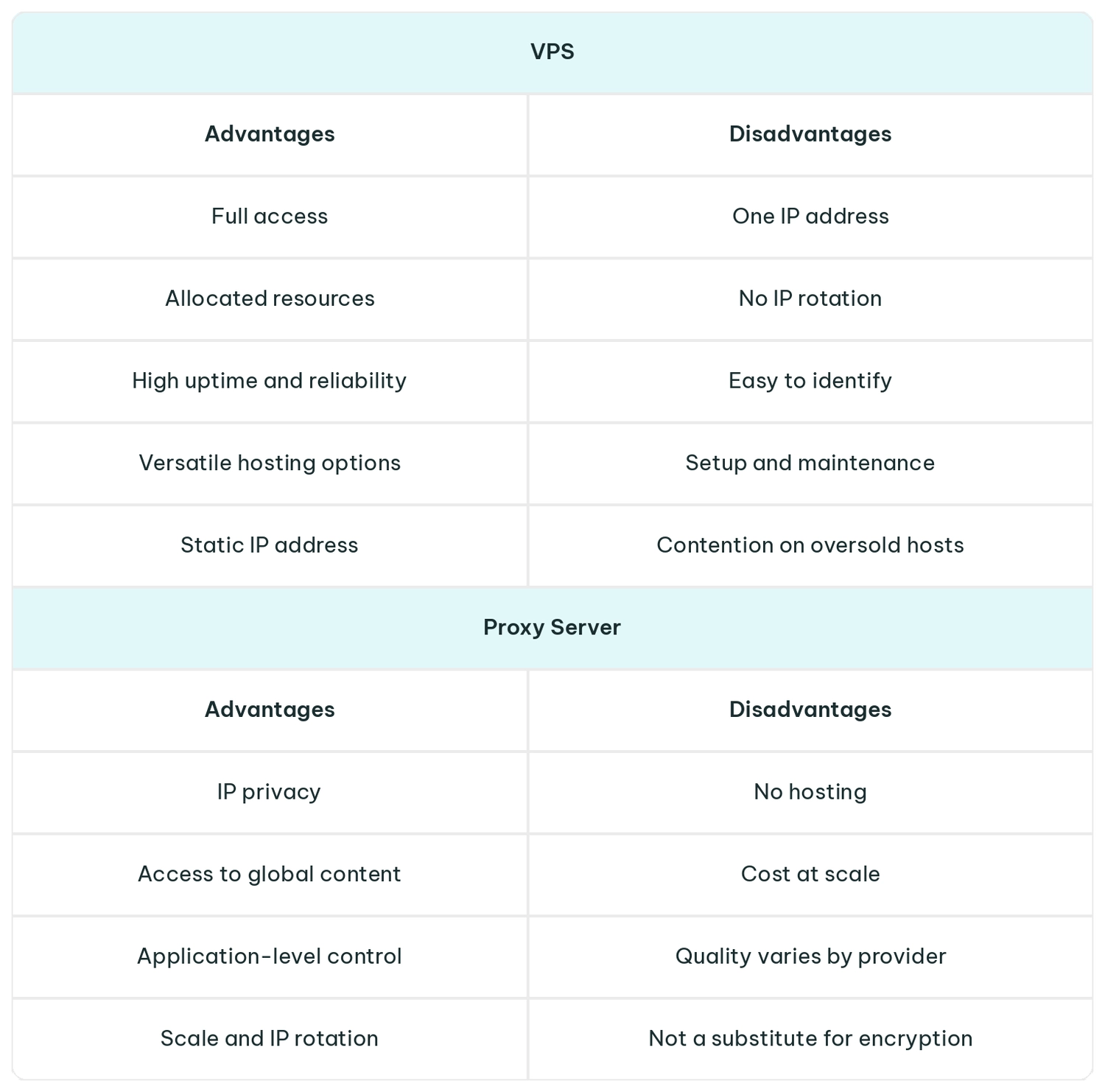
Pros and Cons of a VPS and a Proxy Server
Both VPS and proxy networks have their strengths and weaknesses, which is why every solution caters to different use cases.
How Much Do a VPS and a Proxy Server Cost?
A VPS and a proxy are priced differently, so you can’t compare them like for like. A VPS is typically billed by monthly resource allocation (CPU, RAM, storage, bandwidth). In contrast, proxies are usually billed by bandwidth (per GB) or per IP.
Prices move with what you buy. A VPS gets pricier with more vCPU, RAM, and SSD storage, and some hosts charge extra for an IPv4 address. Proxy prices per GB or per IP drop with volume and longer plans.
VPS Pricing
| Plan size | Typical specs | Examples |
|---|---|---|
| Entry | 1 vCPU, 512 MB-1 GB RAM | Vultr from $2.50 (IPv6-only; $3.50 with IPv4) DigitalOcean from $4 |
| Small | 2 vCPU, 4 GB RAM | Hetzner CX23 at $6.49 per month DigitalOcean $24 per month |
| 16 GB RAM | 6-8 vCPU, 16 GB RAM | 8 vCPU/16 GB at DigitalOcean or Vultr at $96 per month; Vultr’s 6 vCPU/16 GB plan at $80 |
| NOTE: Prices from each provider’s pricing page, collected in October 2026. |
|---|
Proxy Server Pricing
| Proxy type | Billed by | Starting price |
|---|---|---|
| Residential (rotating) | Bandwidth | From $1.75/GB at volume (10 TB+) From $7/GB for a single GB |
| ISP (static residential) | Per IP | From $2.40/IP per month |
| Datacenter | Per IP (100 GB of traffic per IP each month) | From $1.39/IP per month |
| Mobile | Dedicated mobile billed per time period Rotating mobile billed per GB |
Dedicated from $10.11/day or $117/month; rotating from $5.20/GB |
| NOTE: IPRoyal’s pricing , captured in October 2026. |
|---|
To Sum Up
A VPS and a proxy server are both good solutions for improved online privacy. However, they don’t work the same way and have different use cases. The former is well-suited for web hosting, whereas the latter is ideal for tasks demanding more privacy or multiple IPs.
You can run a proxy on a VPS for personal use, but its single datacenter IP won’t cut it for scraping or multi-account work. And since a VPS is priced by resources and a proxy by bandwidth or IP, compare the cost of the job, not the sticker price.
FAQ
Is a VPS better than a proxy?
Not necessarily. VPS and proxy servers solve different problems. A VPS is better when you need to host a website, an app, or multiple services, or want full control over a server. In contrast, a proxy server is better for accessing multiple IPs and using rotating proxies for web scraping, accessing regional content, and managing multiple accounts.
Can you use a VPS as a proxy?
Yes, you can use a VPS as a proxy, often called a proxy VPS. All you need to do is install your proxy software, like Squid, Tinyproxy, or Dante, on a VPS. Alternatively, you can also choose to open an SSH tunnel to work as your private proxy.
Is a VPS just a VM?
In essence, yes. A VPS is a virtual machine (VM) that a hosting provider runs on its own physical server and rents to you with a public IP address. In short, VPS describes the hosting product, while VM is the technology behind it.
Can I host my own VPS?
Yes, you can host your own VPS if you have a machine to run it on. Hypervisors like Proxmox VE, VMware ESXi, or KVM allow you to split a home or rented server into different virtual machines. Additionally, you’ll need to ensure a stable connection, a static IP or a dynamic DNS, and dedicate enough time for security updates.
Are proxies legal?
Yes, proxies are legal to use in most countries. What matters is how you use them. Using proxies to access publicly available data is generally accepted, but you must respect the terms of service of every website and follow the best practices of using proxies. It’s best to consult with legal specialists before using proxies for business operations.
What are the downsides of VPS hosting?
The main cons of using a VPS hosting solution are the limits and manual maintenance. If you choose VPS hosting, you’ll need to manage updates, security, and backups yourself. On top of that, you’ll also get only one IP address from a datacenter with no IP rotation.
How much RAM does a VPS need to run a proxy?
Very little. Tinyproxy’s memory footprint is around 2 MB, so a VPS with 512 MB-1 GB of RAM is enough for a personal proxy. Squid’s memory cache can grow to 256 MB by default, so lower its cache_mem setting on a small VPS. Needs grow with simultaneous connections, so web scraping or market research at scale will need more.