'%20fill-rule='evenodd'%20clip-rule='evenodd'%3e%3cpath%20d='M21.9952%2012.2202c-.0019-.6851-.108-1.3688-.2269-2.0439h-9.6238v3.8768h5.4928c-.1125.6103-.3507%201.1919-.6999%201.7094-.3492.5175-.8022.9601-1.3315%201.3009v2.5105h3.3479c1.005-.9487%201.7951-2.0936%202.3191-3.3605.524-1.2668.7701-2.6273.7223-3.9932Z'%20fill='%234285F4'/%3e%3cpath%20d='M12.1415%2021.9954c2.5027.0755%204.9397-.7912%206.8092-2.4216l-3.3025-2.5105c-1.031.6482-2.2362.9808-3.4613.9553-1.266-.0247-2.49275-.4349-3.50967-1.1735-1.01691-.7385-1.81874-1.8128-2.20993-2.9916l-3.4048.0439v2.5438c.84005%201.6575%202.13352%203.0542%203.73642%204.0348%201.60291.9806%203.45238%201.5066%205.34258%201.5194Z'%20fill='%2334A853'/%3e%3cpath%20d='M6.46884%2013.8531c-.42382-1.2324-.42382-2.4897%200-3.7221V7.55469H3.06422C2.36423%208.93568%202%2010.4564%202%2011.998c0%201.5416.36423%203.0624%201.06422%204.4434l3.40462-2.5883Z'%20fill='%23FBBC05'/%3e%3cpath%20d='M12.1415%206.02167c1.4529-.02643%202.8572.46854%203.9039%201.45519l2.9053-2.87706c-1.8433-1.69203-4.2823-2.62308-6.8092-2.59936-1.8902.01282-3.73967.5388-5.34258%201.5194-1.6029.9806-2.89637%202.37735-3.73642%204.03478l3.40462%202.58828c.39118-1.17886%201.1478-2.20915%202.16472-2.94772%201.01691-.73857%202.24366-1.14874%203.50966-1.17351Z'%20fill='%23EA4335'/%3e%3c/g%3e%3c/svg%3e)
If you prioritize staying anonymous online while managing multiple accounts on various platforms, you'll need Hidemyacc. Integrate proxies with this software and enjoy a greater level of automation, sync, team collaboration, and more.
Why Use Proxies With Hidemyacc?
We use various internet platforms daily, whether for personal or professional purposes. Social media professionals, e-commerce store operators, advertisers, and website testers are among those who recognize the need for an easy way to manage multiple profiles simultaneously. However, it comes with many challenges:
- IP fingerprinting
- Device fingerprinting (browser type, OS, and cookies)
- Manual account switching
- Inefficiency
Managing more than one account with a regular browser quickly becomes a challenge as it raises red flags. Most platforms impose temporary or permanent bans as a result of what they deem suspicious activity.
To prevent this from happening, you'll need Hidemyacc, an antidetect browser that helps you manage multiple accounts on the fly. Pair it with residential proxies, and you've got yourself a powerful tool on your hands.
- A unique IP for each browser profile
- Lower ban risks
- Seamless account switching
- Accurate location targeting
- Improved anonymity and privacy
Choosing the Right Type of Proxies for Hidemyacc
Ready to take advantage of Hidemyacc? Picking the right proxy type depends on your needs.
Residential Proxies
Residential proxies belong to actual home users, making them an excellent choice for most applications, including multi-account management. However, they tend to be pricier than datacenter and ISP proxies. What function does your antidetect browser serve? If you use your browser profile for social media, streaming, ad campaigns, or marketplaces, however, they're well worth the price.
Datacenter Proxies
While datacenter proxies aren't tied to residential users, they're extremely useful for circumventing geo-blocks and tasks requiring speed and scalability. Furthermore, they come at a fraction of the price when compared to other proxy types. As such, if your browser profile is used for for search engines, games, or sneaker copping sites, enter a datacenter IP under your proxy credentials.
ISP Proxies
If you need speed and legitimacy but are hesitant to invest in residential proxies, ISP proxies are an excellent compromise. Dedicated IP addresses are ideal for account management on marketplaces like Amazon, eBay, and Etsy. On the other hand, data scrapers would achieve greater efficiency with rotating proxies.
Mobile Proxies
On the spectrum of IP trustability, mobile proxies sit on the highest end. As these IPs originate from actual mobile operators, they are best suited for tasks requiring undetectability and true anonymity. Mobile proxies won't get you banned when you're performing social media automation and running sneaker and retail bots on your antidetect browser. They're best for ad verification and checking mobile-only content. However, they are more expensive compared to other proxy types.
Static vs. Rotating Proxies
Static proxies are fixed IPs that remain available to you for the duration of the plan you purchased. As such, you should use them for tasks requiring consistency and a fixed browser fingerprint. These include managing social media or e-commerce accounts. However, static IPs are easier for websites to block if flagged, so it’s best not to use them for large-scale web scraping or automation.
Rotating proxies, on the other hand, involve assigning a new IP address after every request, session, or set duration. These dynamic proxies are suitable for web scraping, SEO monitoring or ad verification. As they rotate, they'll help users avoid IP bans and rate limits. With that said, frequent IP changes may trigger suspicion and signal account inconsistencies.
Adjust your proxy settings on Hidemyacc depending on your requirements. If you need stability, static ISP or residential proxies are best. Conversely, if you're performing web scraping or profile testing on your anti detect browser, rotating residential or mobile IPs work well.
Step-by-Step Guide: Proxy Setup in Hidemyacc
With Hidemyacc, you can create multiple browser profiles, each tailored to fulfill a specific requirement. Once you master using the software's powerful proxy integration mechanism, you'll be able to perform various tasks more efficiently and anonymously. Here's how to get started.
1. Click the ‘Download’ (1) button at the top right corner of the website and install Hidemyacc.

2. Launch Hidemyacc and click the ‘Create a new profile’ (2) button.
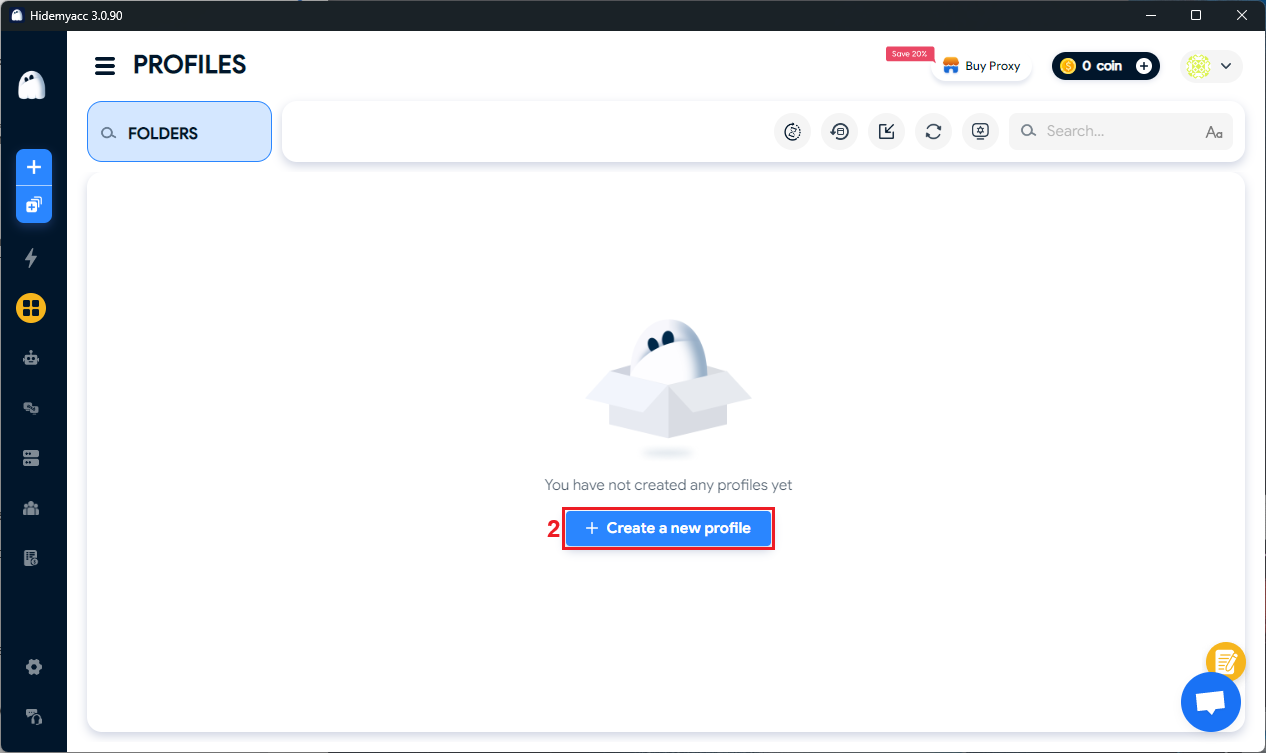
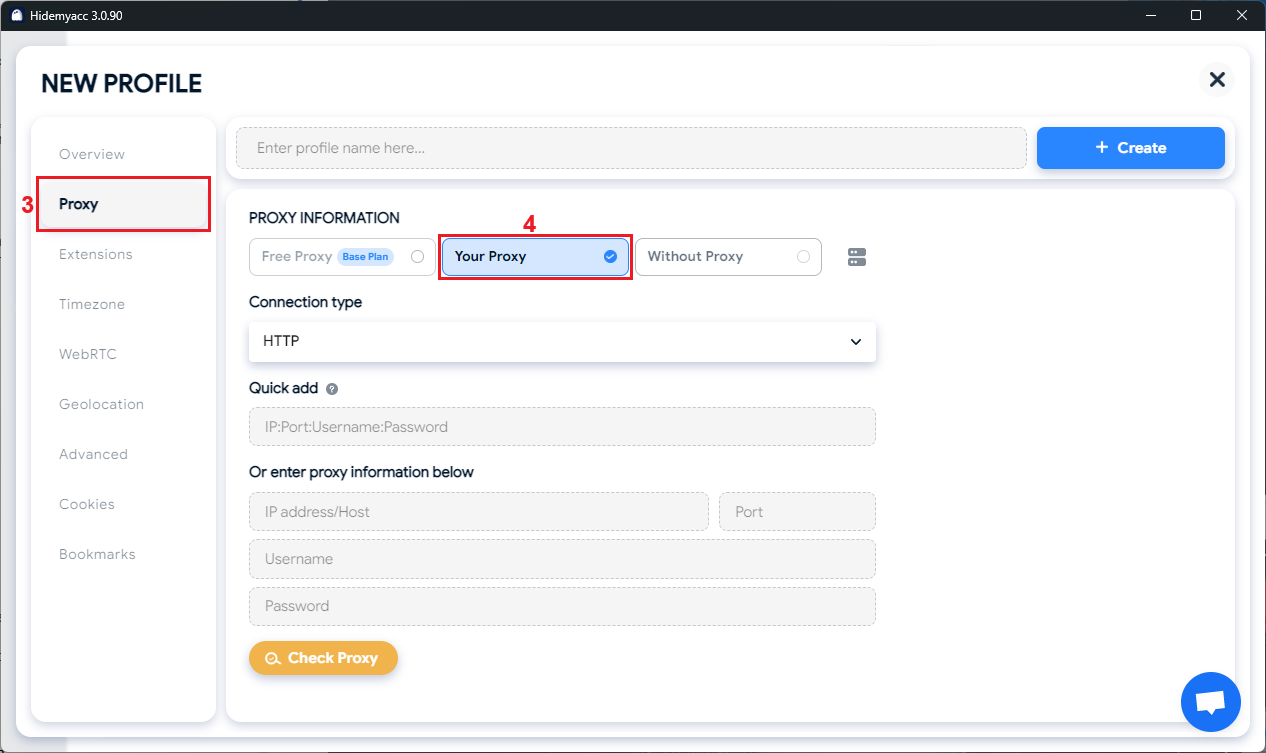
3. Click the ‘Proxy’ (3) button on the left to access Hidemyacc’s proxy manager and select ‘Your Proxy’ (4) option.
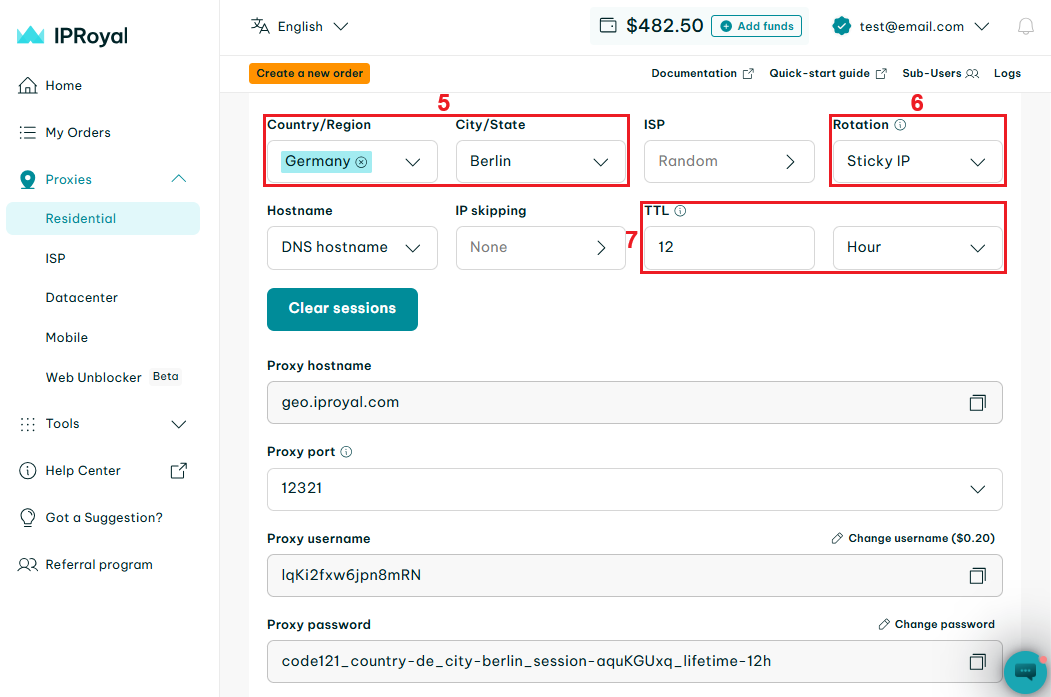
4. Visit the IPRoyal dashboard and configure your proxies. We’ll use IPs from Berlin, Germany (5), with sticky sessions (6) that last 12 hours (7).
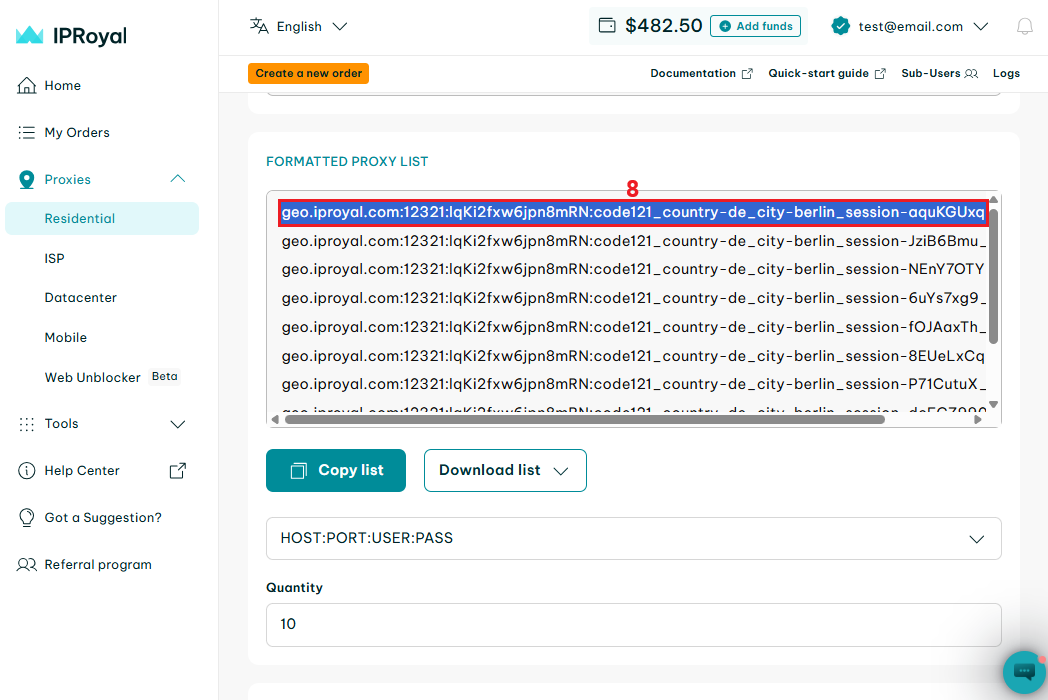
5. Scroll down to the ‘Formatted Proxy List’ section. Each line here is a unique set of credentials in the ip:port:username:password format. Select one line (8) and copy it to your clipboard.
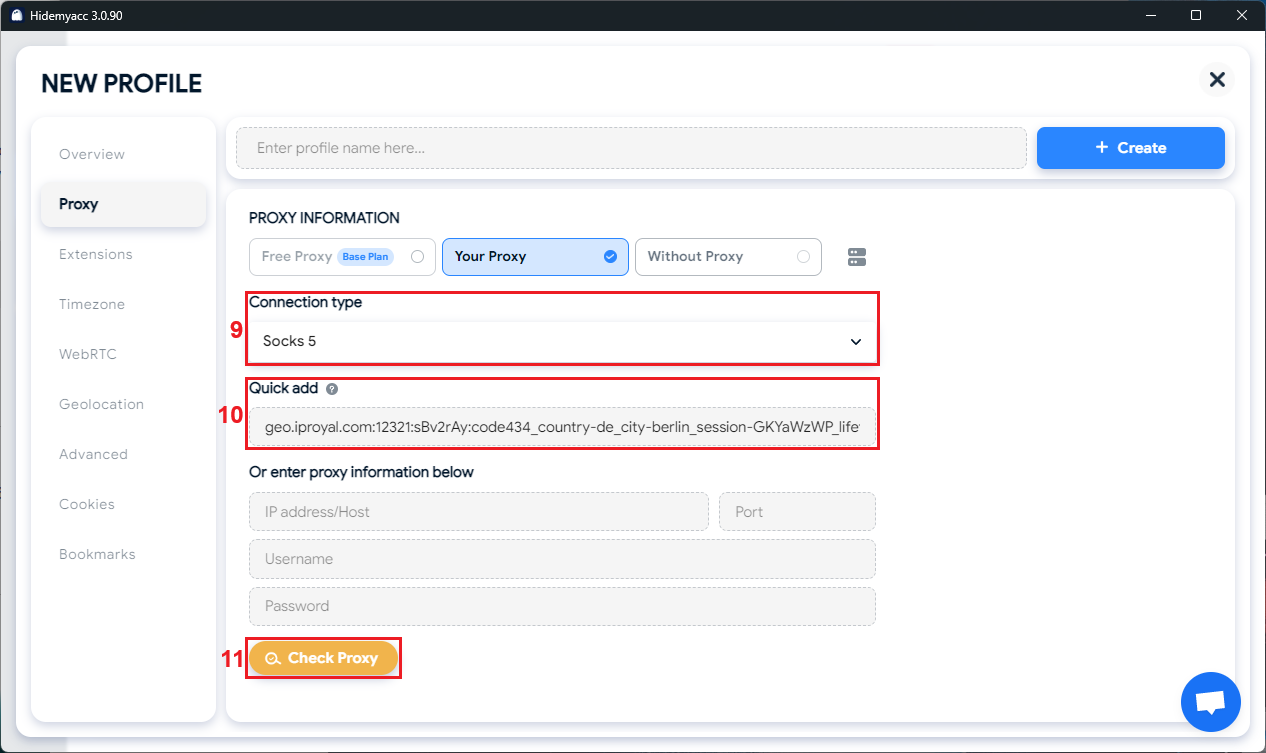
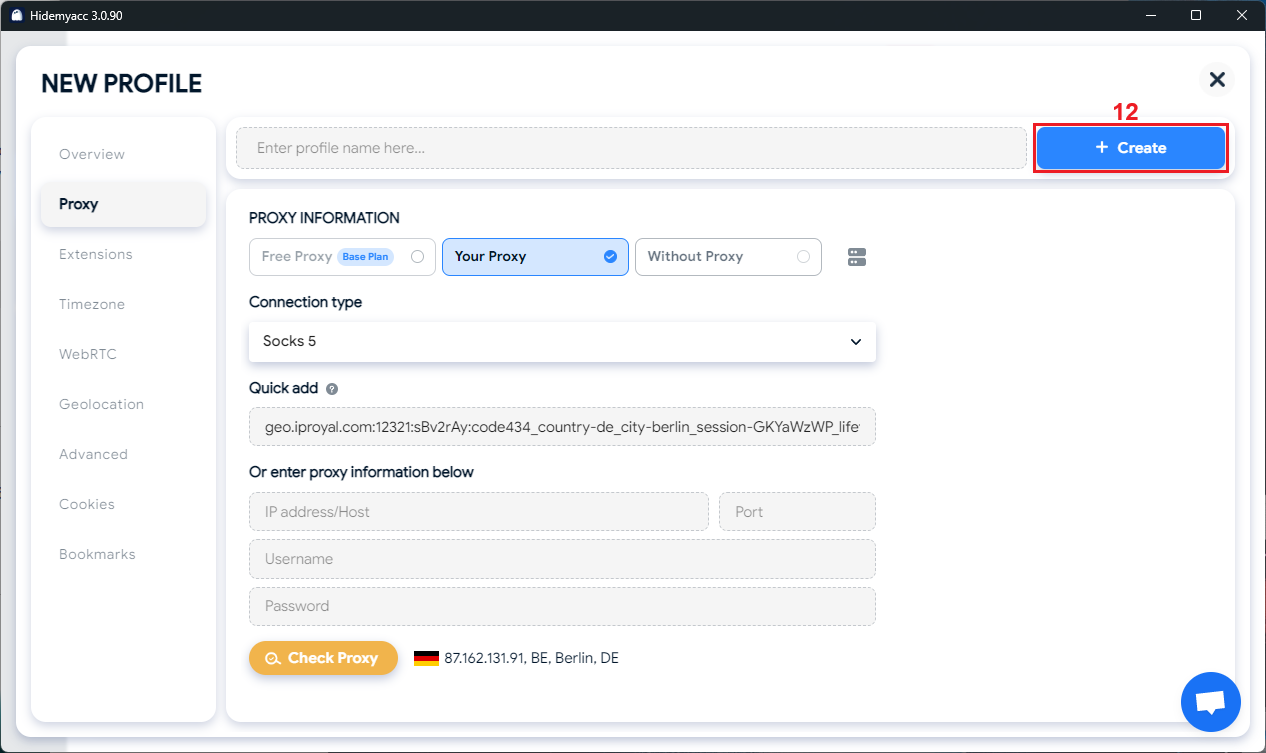
6. Go back to Hidemyacc’s proxy manager. Choose the proxy type (9) you want to use, and paste the credentials in the ‘Quick add’ (10) field. Click the ‘Check Proxy’ (11) button to test your proxy.
7. Once the test is complete, finish your profile configuration and click the ‘Create’ (12) button.
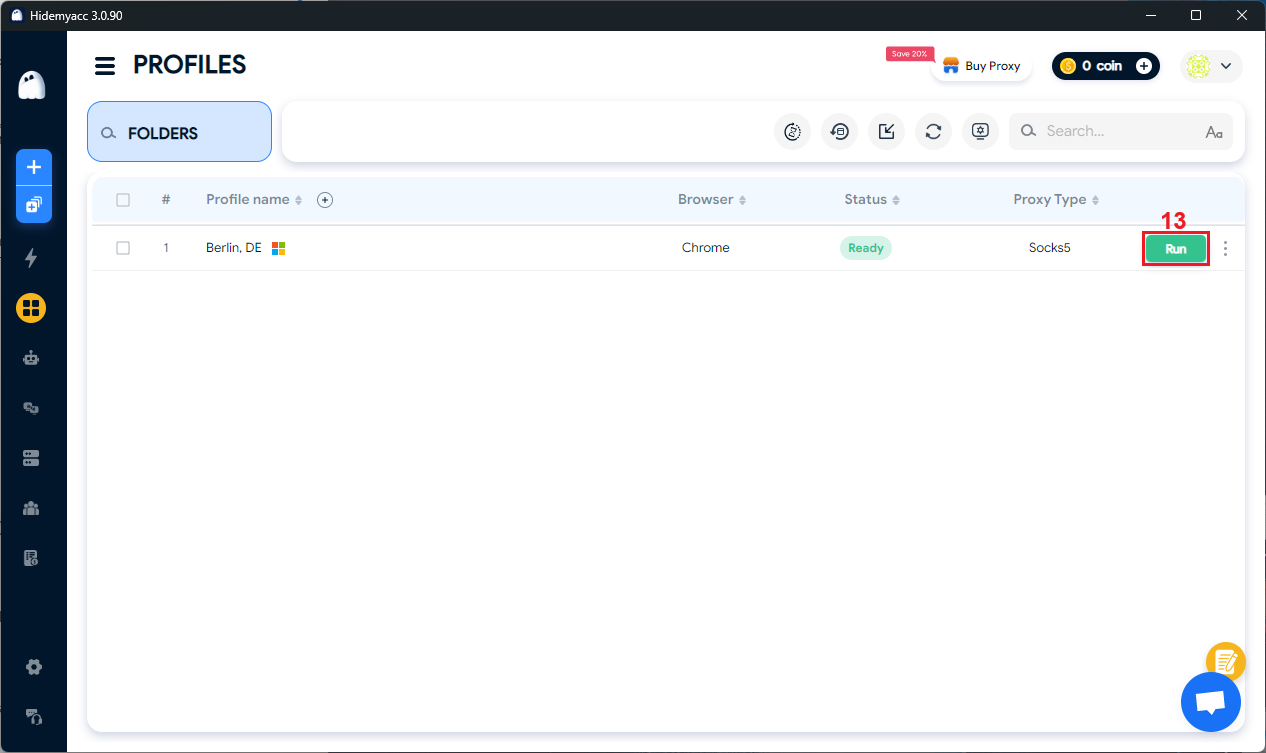
8. Click the ‘Run’ (13) button next to your profile to launch it.
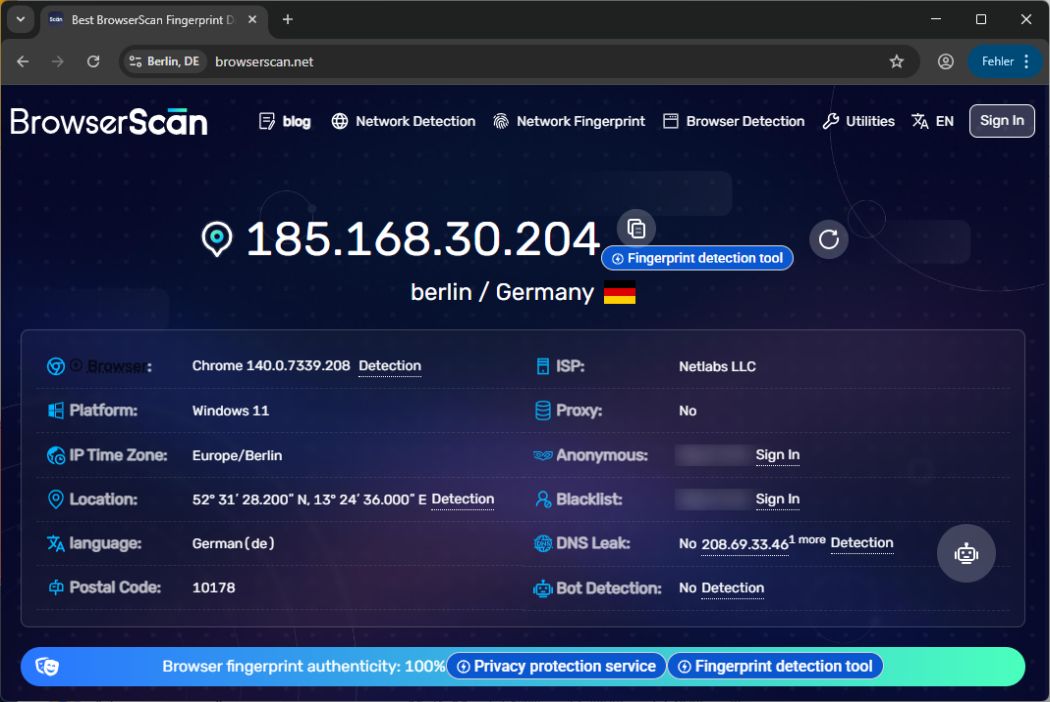
9. To test the authenticity of your browser profile and proxy settings, visit BrowserScan or a similar website. If your profile passes the test at 100%, it’s ready for use.