'%20fill-rule='evenodd'%20clip-rule='evenodd'%3e%3cpath%20d='M21.9952%2012.2202c-.0019-.6851-.108-1.3688-.2269-2.0439h-9.6238v3.8768h5.4928c-.1125.6103-.3507%201.1919-.6999%201.7094-.3492.5175-.8022.9601-1.3315%201.3009v2.5105h3.3479c1.005-.9487%201.7951-2.0936%202.3191-3.3605.524-1.2668.7701-2.6273.7223-3.9932Z'%20fill='%234285F4'/%3e%3cpath%20d='M12.1415%2021.9954c2.5027.0755%204.9397-.7912%206.8092-2.4216l-3.3025-2.5105c-1.031.6482-2.2362.9808-3.4613.9553-1.266-.0247-2.49275-.4349-3.50967-1.1735-1.01691-.7385-1.81874-1.8128-2.20993-2.9916l-3.4048.0439v2.5438c.84005%201.6575%202.13352%203.0542%203.73642%204.0348%201.60291.9806%203.45238%201.5066%205.34258%201.5194Z'%20fill='%2334A853'/%3e%3cpath%20d='M6.46884%2013.8531c-.42382-1.2324-.42382-2.4897%200-3.7221V7.55469H3.06422C2.36423%208.93568%202%2010.4564%202%2011.998c0%201.5416.36423%203.0624%201.06422%204.4434l3.40462-2.5883Z'%20fill='%23FBBC05'/%3e%3cpath%20d='M12.1415%206.02167c1.4529-.02643%202.8572.46854%203.9039%201.45519l2.9053-2.87706c-1.8433-1.69203-4.2823-2.62308-6.8092-2.59936-1.8902.01282-3.73967.5388-5.34258%201.5194-1.6029.9806-2.89637%202.37735-3.73642%204.03478l3.40462%202.58828c.39118-1.17886%201.1478-2.20915%202.16472-2.94772%201.01691-.73857%202.24366-1.14874%203.50966-1.17351Z'%20fill='%23EA4335'/%3e%3c/g%3e%3c/svg%3e)
How do you manage multiple accounts on a website without them being linked together? Learn how to do that on MostLogin with quality proxies from IPRoyal.
Few anti-detect browsers can proudly say that all their features come at absolutely no cost. MostLogin is one of them. It isolates accounts through a smooth and intuitive interface, giving e-commerce sellers, affiliate marketers, social media managers, and other professionals an easy advantage.
In addition to an unbeatable offer of free access, MostLogin ensures a quick setup process, regardless of proxy type or website you need to work on.
Aside from highlighting MostLogin’s features, this article covers how to set it up with IPRoyal proxies.
What Is MostLogin?
MostLogin isn’t a newcomer to the anti-detect browser scene. It’s frequently ranked among the top in the multi-account tools niche. With over 200,000 global users, MostLogin is massively popular for offering free unlocked features, helping marketers, sellers, and social media professionals operate on a low budget.
What makes MostLogin an attractive option?
- Multi-account management
MostLogin spells the end of fussing over cookies, digital footprints, and session data. Isolated browser profiles maintain a clear separation for effortless management of multiple accounts.
- Team collaboration
Work with teammates scattered across the globe? With MostLogin, you can share browser profiles and workspaces, set granular permission settings, and track activities.
- Extension integration
Think about all the password managers, proxy tools, CAPTCHA solvers, and automation mechanisms. With MostLogin’s extension integration, install them once and have them available across browser profiles.
- API automation
MostLogin’s official API enables you to automate tasks such as filling forms, navigating pages, and collecting data. Customized scripts improve efficiency across the board.
Setting Up MostLogin With an IPRoyal Proxy
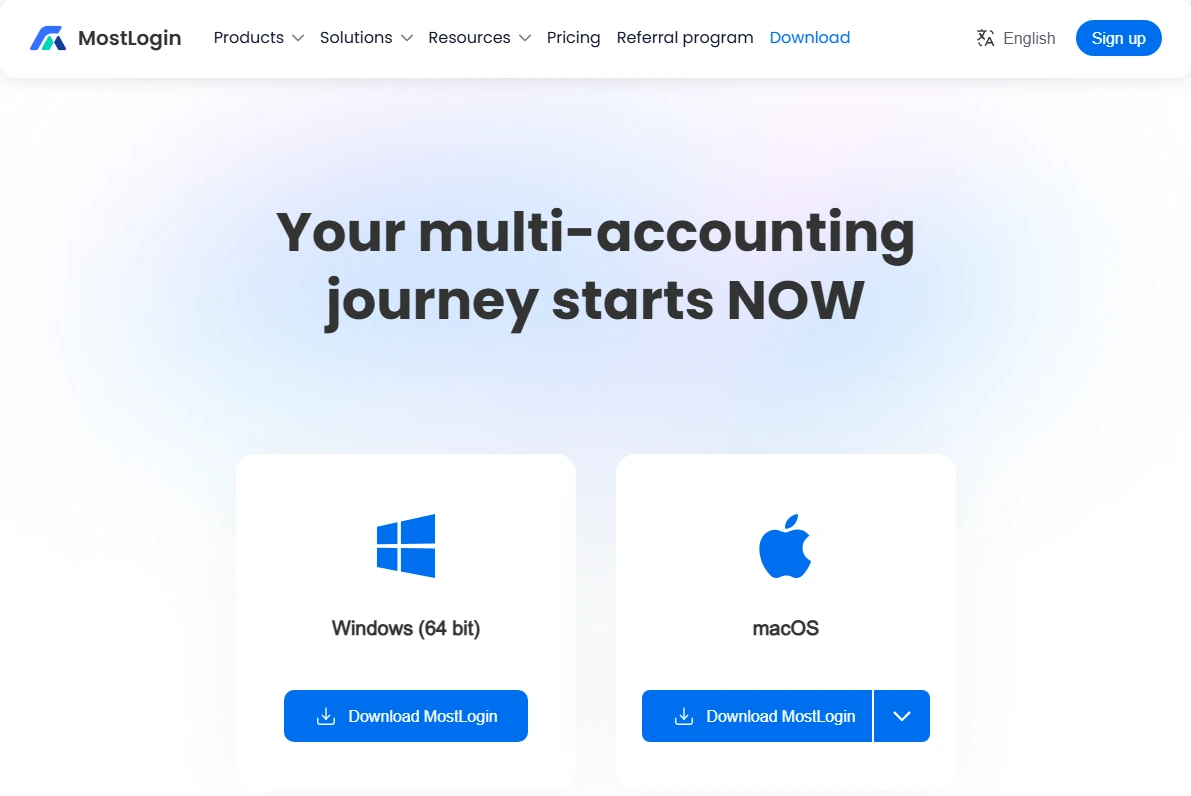
1. Head to the MostLogin website and download the browser setup file for your device (Windows or macOS). Run it and proceed with installation.
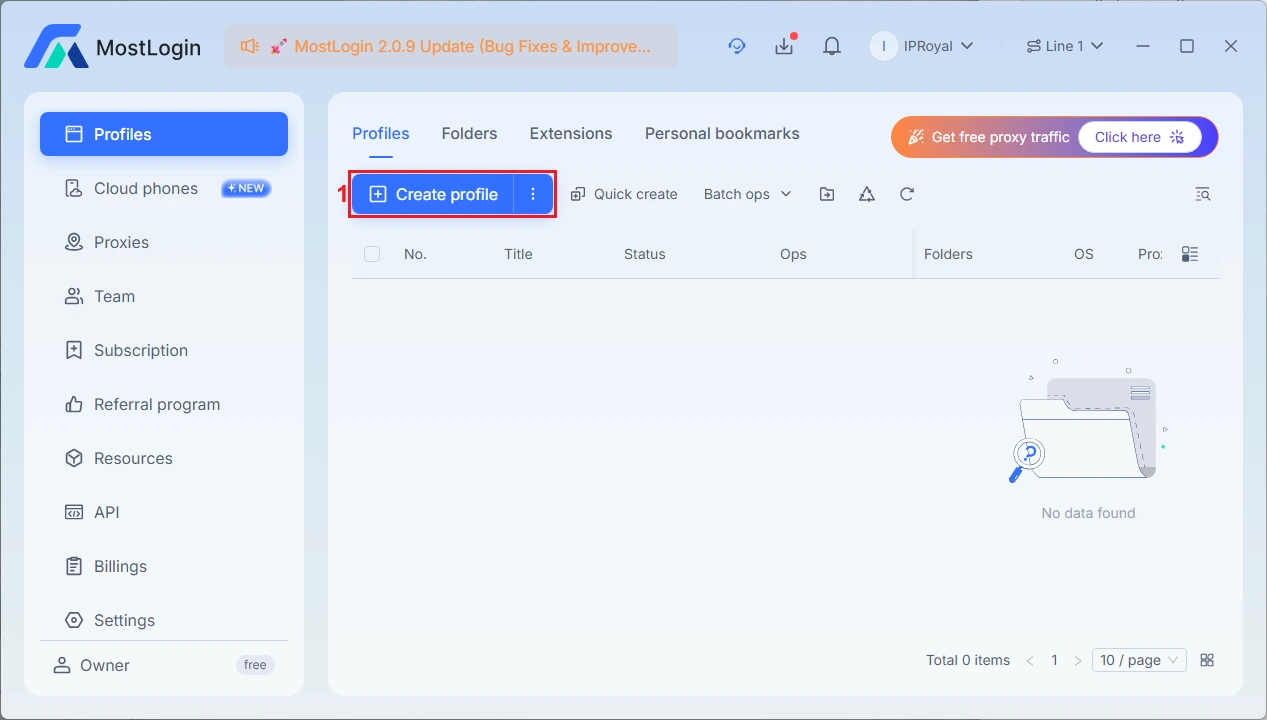
2. Launch the browser and click the ‘Create Profile’ (1) button.
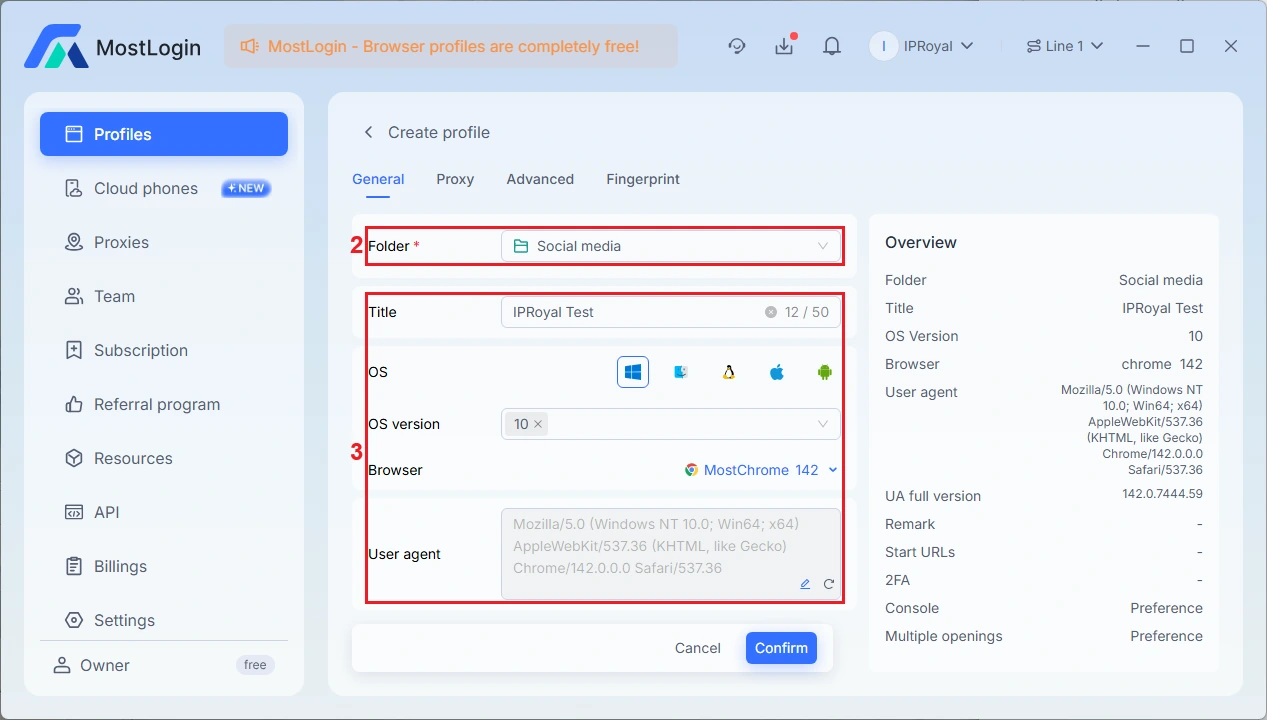
3. The ‘General’ tab contains your new profile’s basic information. Select a folder (2) and enter your title, OS, and other details (3).
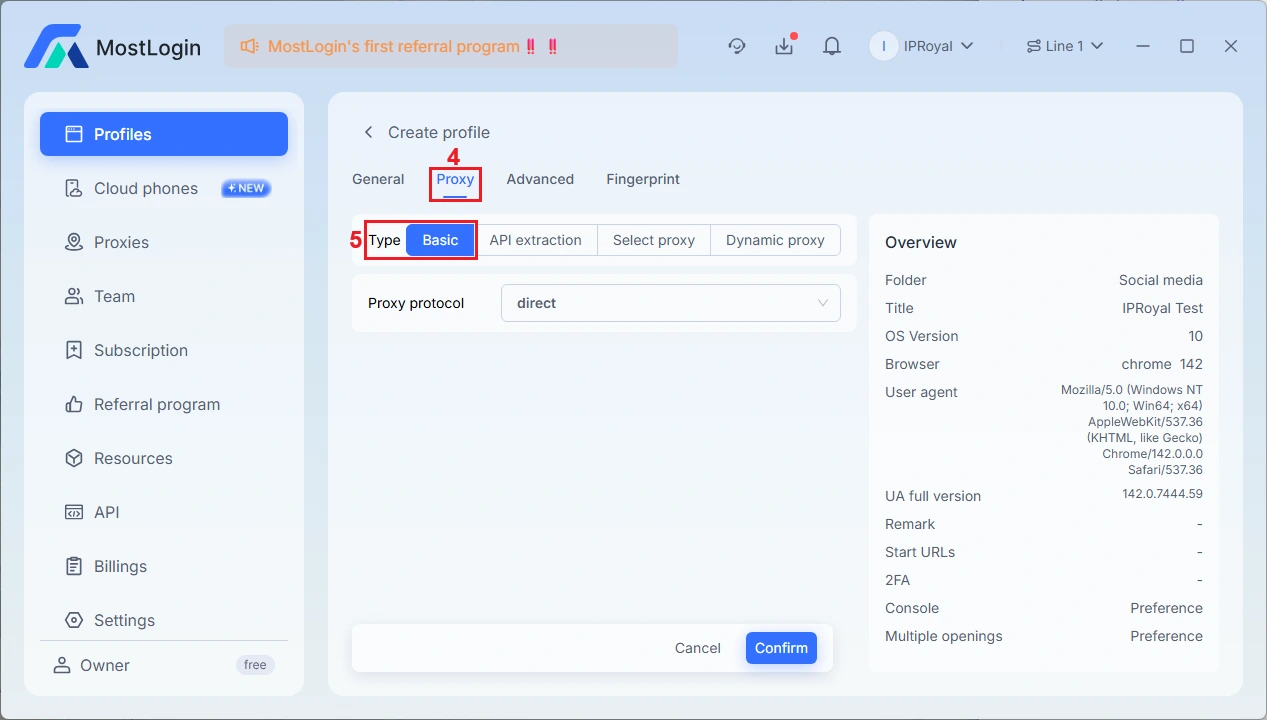
4. Move on to the ‘Proxy’ (4) tab. This is where you’ll define your profile’s internet connectivity method, whether directly or via proxies. Select ‘Basic’ (5) as your proxy type.
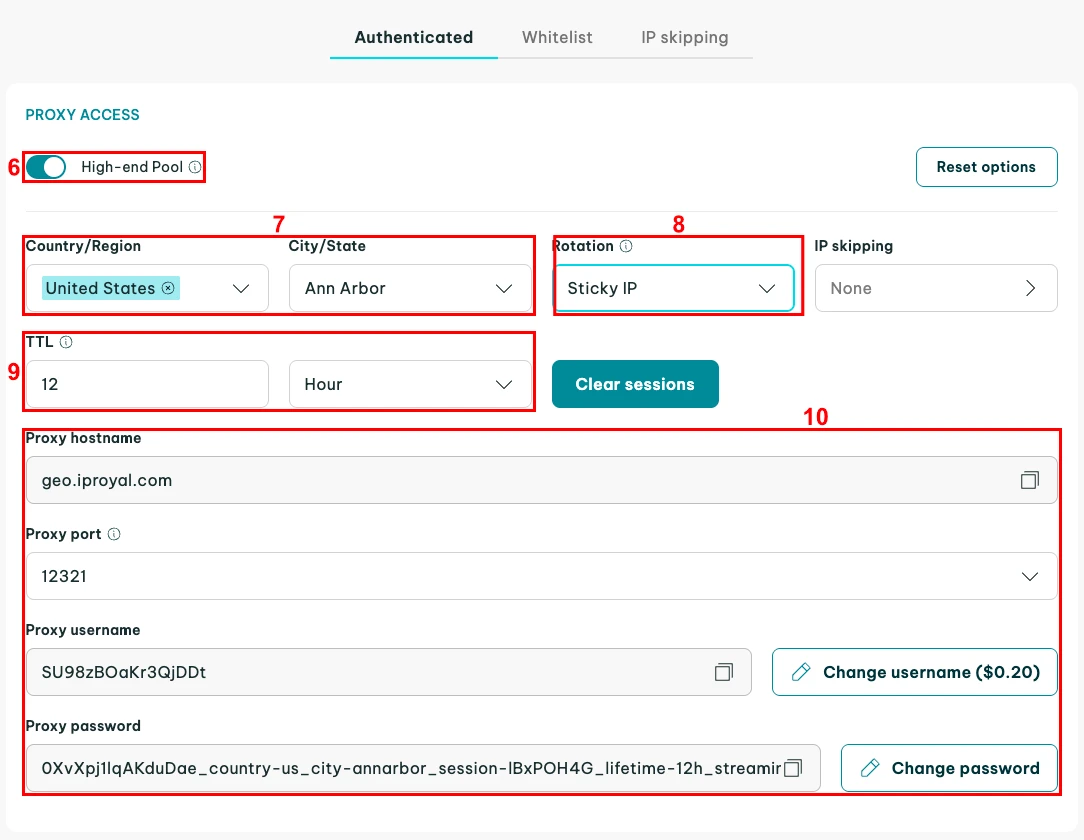
5. Head to IPRoyal for a proxy subscription. We’re using high-end (6) Residential Proxies from Ann Arbor, United States (7), with sticky sessions (8) that last 12 hours (9). After configuring your proxies, note down their credentials (10).
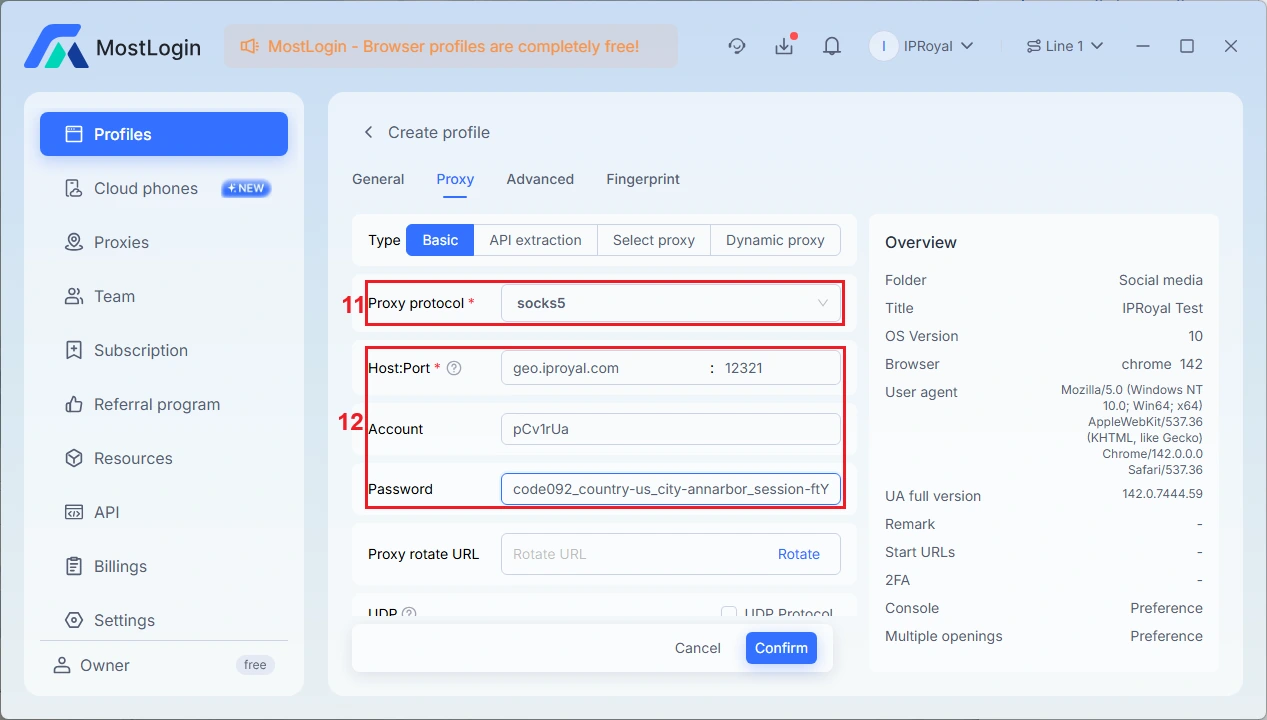
6. Return to MostLogin and select your proxy’s protocol (11) from the dropdown list. IPRoyal proxies support HTTP, HTTPS, and SOCKS5 protocols. Fill out the following fields (12):
- Host:Port: The proxy hostname and proxy port number from IPRoyal’s dashboard.
- Account: Your IPRoyal proxy username.
- Password: Your IPRoyal proxy password.
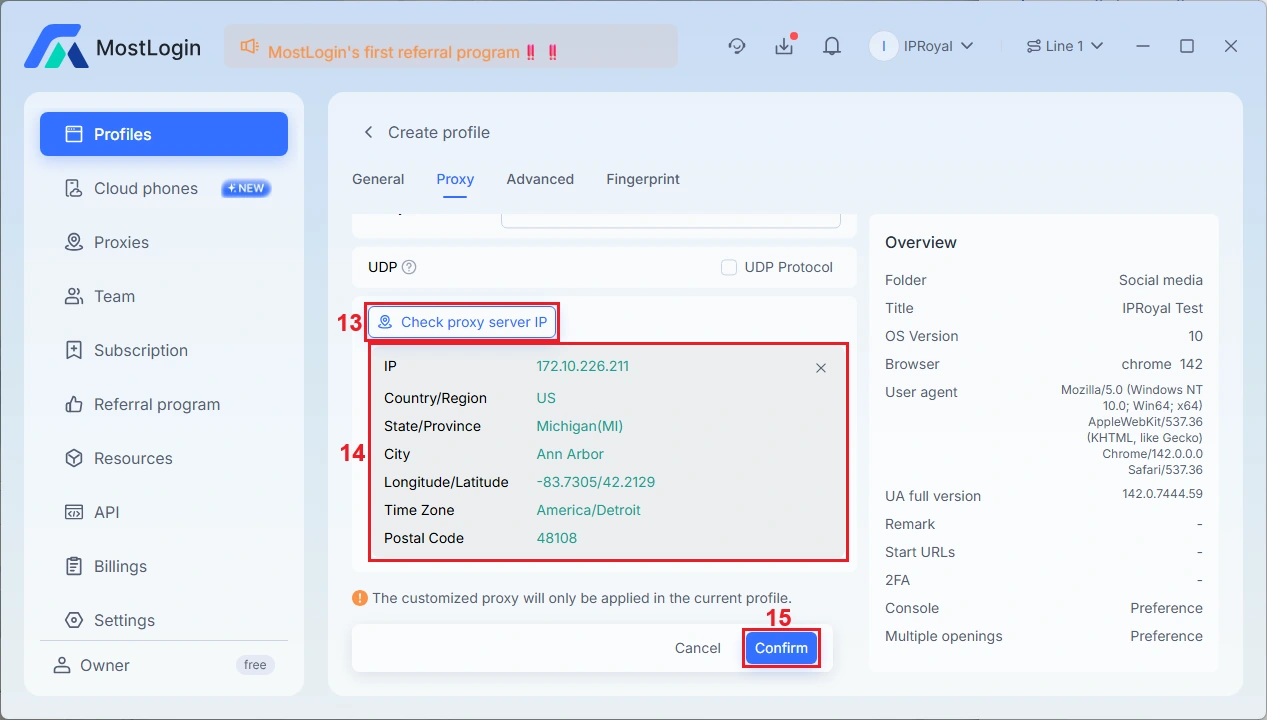
7. Upon defining your proxy settings, click the ‘Check proxy server IP’ (13) button. A valid proxy connection will result in a display of details (14) such as IP, country, state, city, and time zone. Click the ‘Confirm’ (15) button to create your profile.
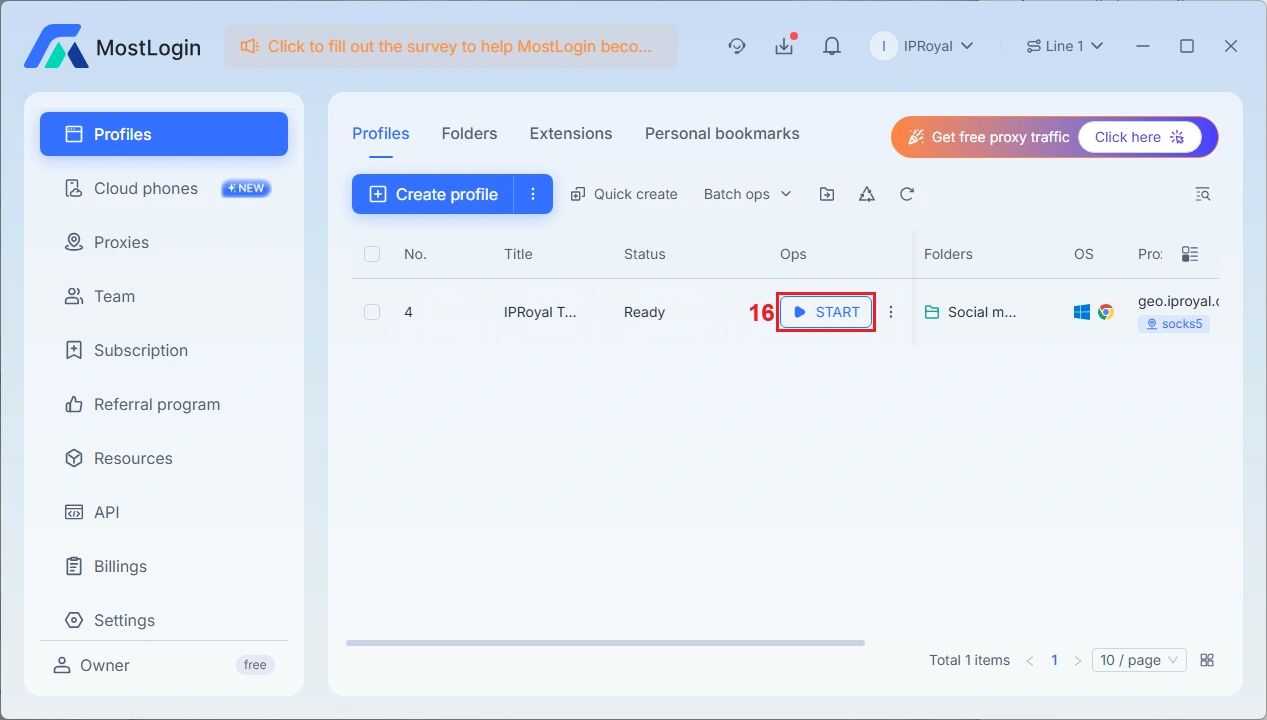
8. To launch your profile, click the ‘Start’ (16) button next to it.
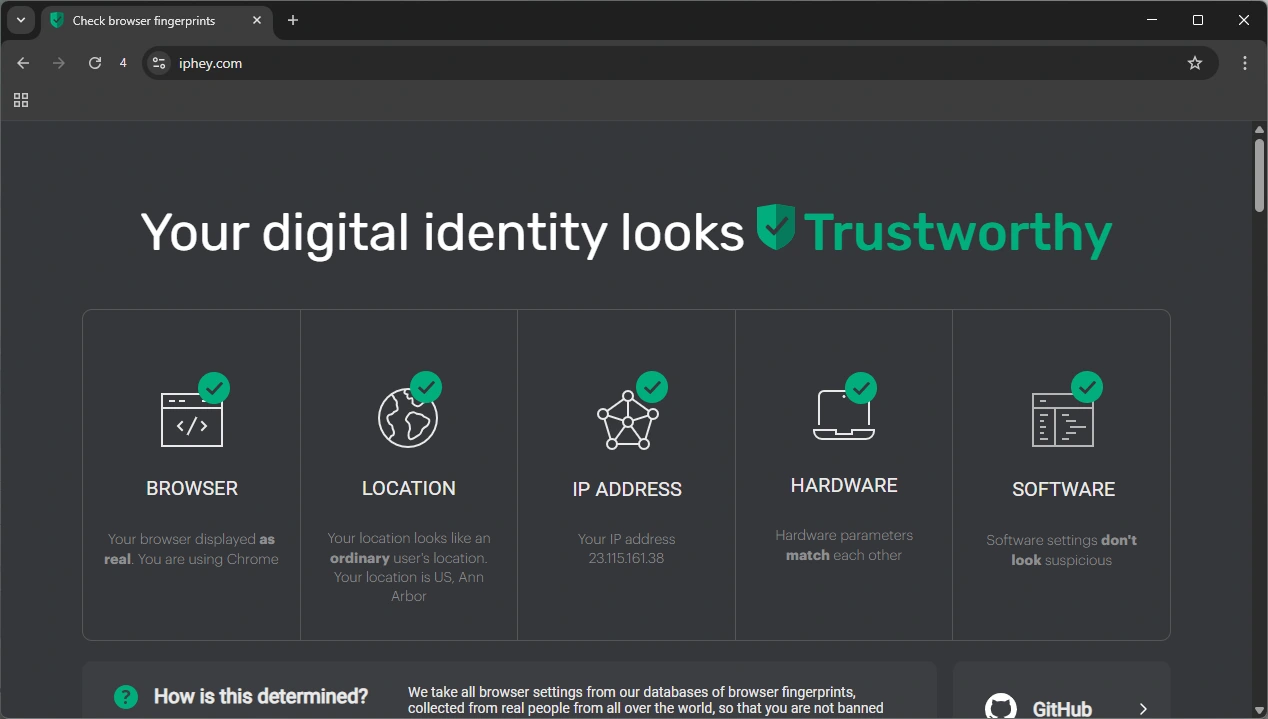
9. A browser window will open, displaying your fingerprint information. Visit IPHey to verify your fingerprint and ensure your proxy is working.
Why Use IPRoyal as Your MostLogin Proxy Provider
MostLogin, like other anti-detect browsers, requires reliable proxies to function properly, especially if you seek high performance and secure operations. Here’s what makes IPRoyal proxies stand out:
- 32+ million trustworthy residential IP addresses from 195 countries
- Non-expiring residential traffic
- No contract obligations
- Geo-targeting options down to the city level
- Multi-protocol support (HTTP(S) and SOCKS5)
- Competitive prices with bulk discounts
- 24/7 support via live chat and email
Final Thoughts
When you know that a reputable anti-detect browser comes with all in-built functions at no cost, the decision-making process is made easy. With MostLogin, you and your teammates, regardless of location, will have an integrated workspace to manage multiple accounts on social media sites, e-commerce platforms, and more.