'%20fill-rule='evenodd'%20clip-rule='evenodd'%3e%3cpath%20d='M21.9952%2012.2202c-.0019-.6851-.108-1.3688-.2269-2.0439h-9.6238v3.8768h5.4928c-.1125.6103-.3507%201.1919-.6999%201.7094-.3492.5175-.8022.9601-1.3315%201.3009v2.5105h3.3479c1.005-.9487%201.7951-2.0936%202.3191-3.3605.524-1.2668.7701-2.6273.7223-3.9932Z'%20fill='%234285F4'/%3e%3cpath%20d='M12.1415%2021.9954c2.5027.0755%204.9397-.7912%206.8092-2.4216l-3.3025-2.5105c-1.031.6482-2.2362.9808-3.4613.9553-1.266-.0247-2.49275-.4349-3.50967-1.1735-1.01691-.7385-1.81874-1.8128-2.20993-2.9916l-3.4048.0439v2.5438c.84005%201.6575%202.13352%203.0542%203.73642%204.0348%201.60291.9806%203.45238%201.5066%205.34258%201.5194Z'%20fill='%2334A853'/%3e%3cpath%20d='M6.46884%2013.8531c-.42382-1.2324-.42382-2.4897%200-3.7221V7.55469H3.06422C2.36423%208.93568%202%2010.4564%202%2011.998c0%201.5416.36423%203.0624%201.06422%204.4434l3.40462-2.5883Z'%20fill='%23FBBC05'/%3e%3cpath%20d='M12.1415%206.02167c1.4529-.02643%202.8572.46854%203.9039%201.45519l2.9053-2.87706c-1.8433-1.69203-4.2823-2.62308-6.8092-2.59936-1.8902.01282-3.73967.5388-5.34258%201.5194-1.6029.9806-2.89637%202.37735-3.73642%204.03478l3.40462%202.58828c.39118-1.17886%201.1478-2.20915%202.16472-2.94772%201.01691-.73857%202.24366-1.14874%203.50966-1.17351Z'%20fill='%23EA4335'/%3e%3c/g%3e%3c/svg%3e)
SEO automation tools are designed to speed up your production process and automate repetitive tasks, helping you improve efficiency. One of them is SEO Neo, an AI-powered software that can help you boost your website’s visibility and rankings through smart automation.
However, if you want to keep your automation running smoothly and avoid issues like geo-restrictions or blocks, you need to pair it with reliable proxies.
In this guide, we’ll show you how to integrate your IPRoyal proxies with this popular AI-powered software.
What Is SEO Neo?
This SEO automation tool is built to streamline your workflow. It uses advanced AI technology to automate SEO tasks and create the perfect strategy that will help you boost your rankings.
With this AI-driven SEO tool, you can automate various operations, including:
- Content generation - creating articles and posts using OpenAI
- Cloud blogging - producing and managing blogs across twelve cloud services to expand your online presence
- Backlink creation - generating quality backlinks from high-authority websites to boost SEO rankings
- Multi-account management - managing multiple accounts or campaigns across different platforms
How to Set Up Proxies in SEO Neo
Proxies ensure your automation runs seamlessly, assigning a different IP address to each request and account. Here’s a step-by-step SEONeo proxy integration tutorial to help you use this SEO tool without interruptions or restrictions.
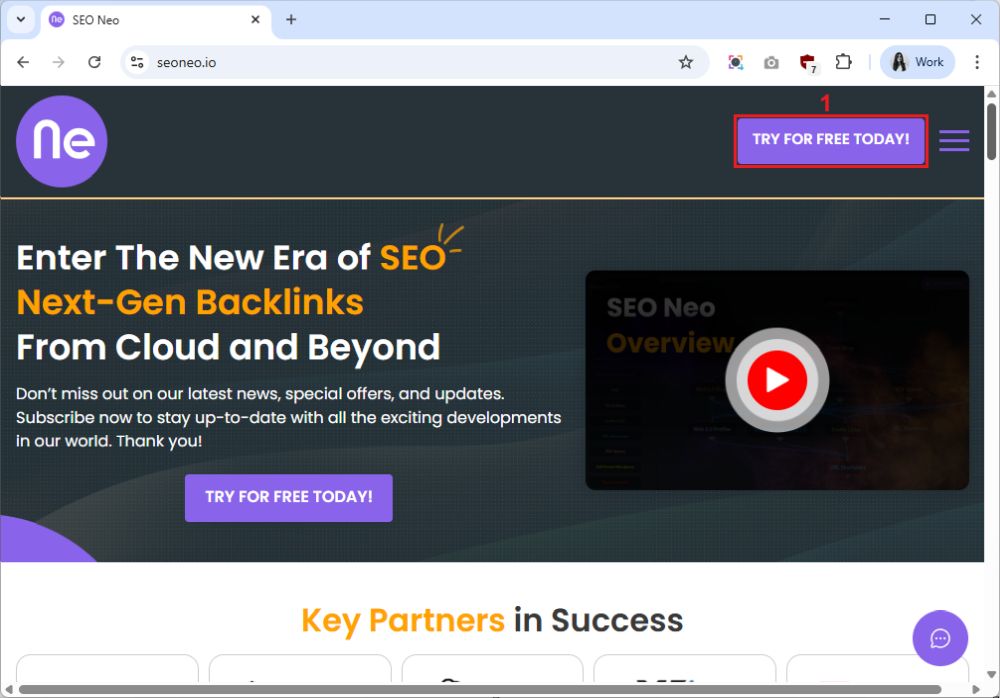
1. Visit the tool’s official website and click the ‘Try for Free Today’ (1) button to test the tool at no cost.
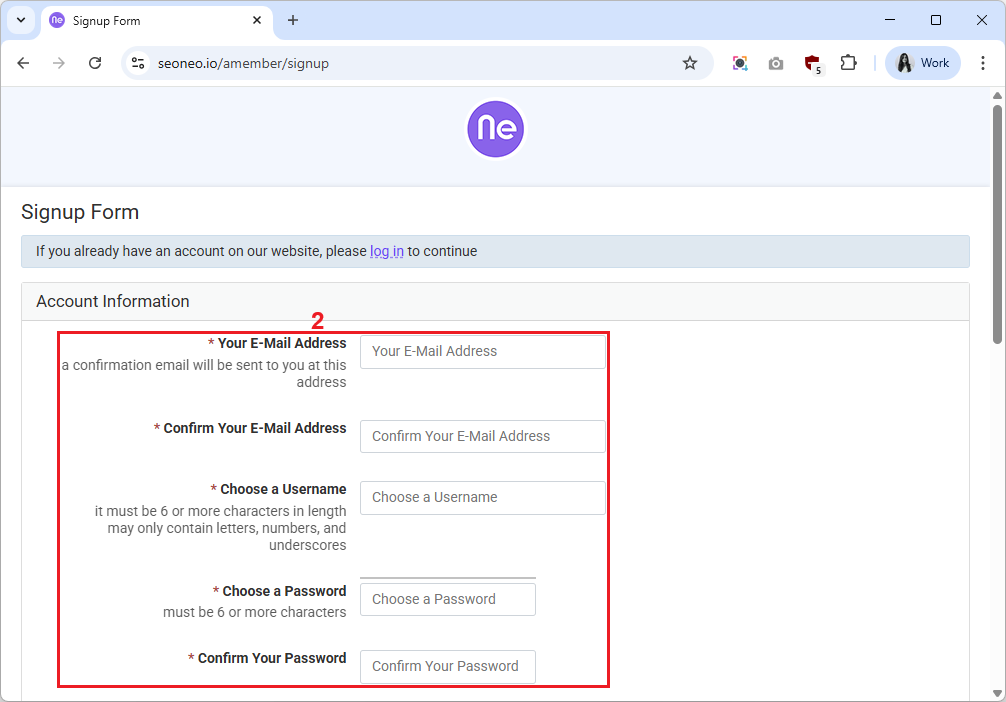
2. Create an account by entering the required information (2).
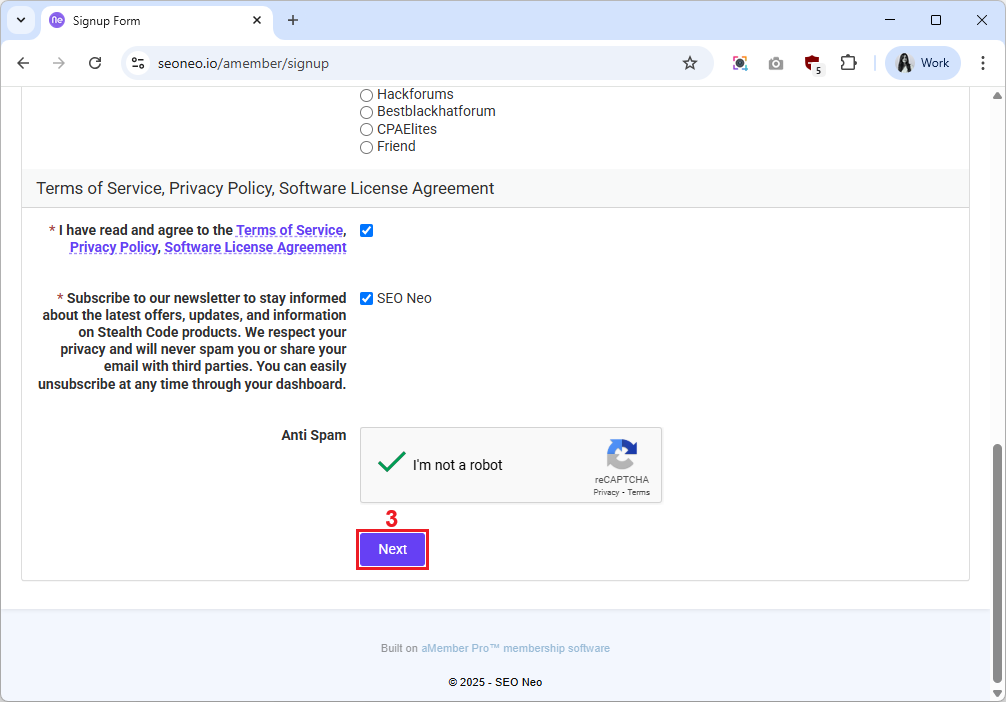
3. Click the ‘Next’ (3) button.
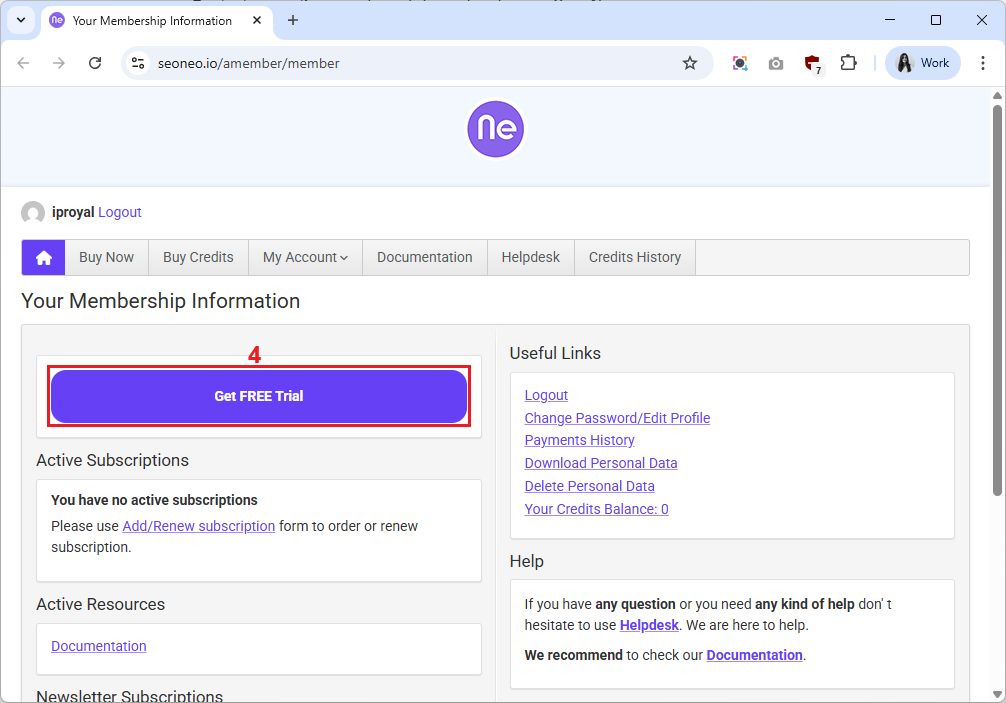
4. A confirmation link will be sent to your email. Once you verify it, you’ll be taken directly to your account. Click the ‘Get FREE Trial’ (4) button. Keep in mind that payment details are required even for the free trial.
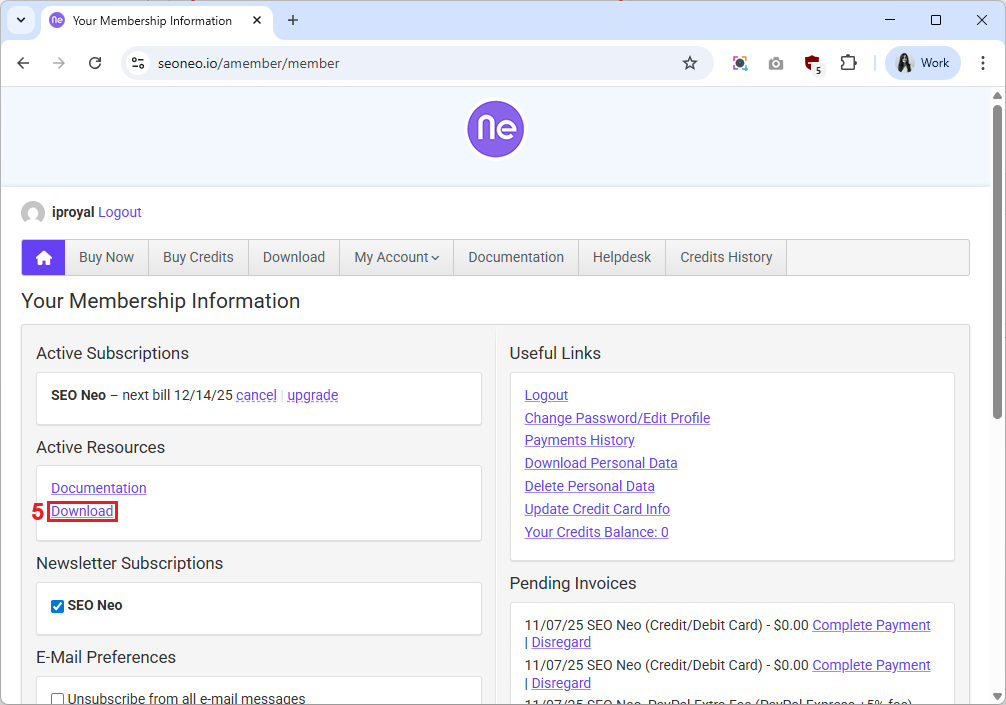
5. Once you activate your free trial or purchase a package, click the ‘Download’ (5) link to get the app.
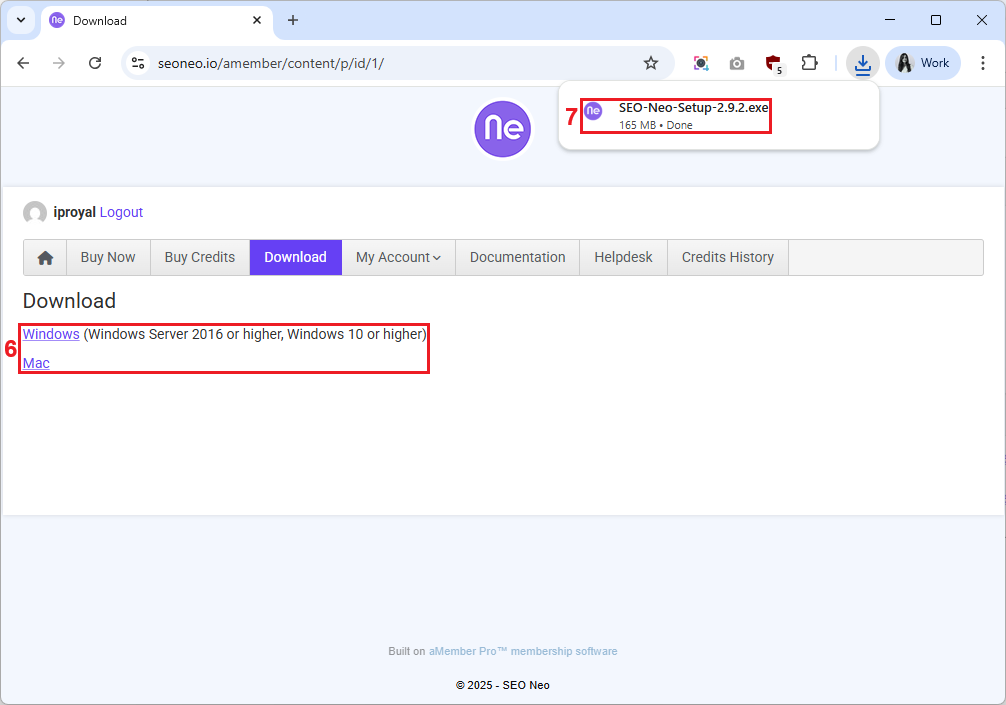
6. Then, select an operating system (6) to download the version you need and click the .exe or .dmg file (7) to install it on your device.
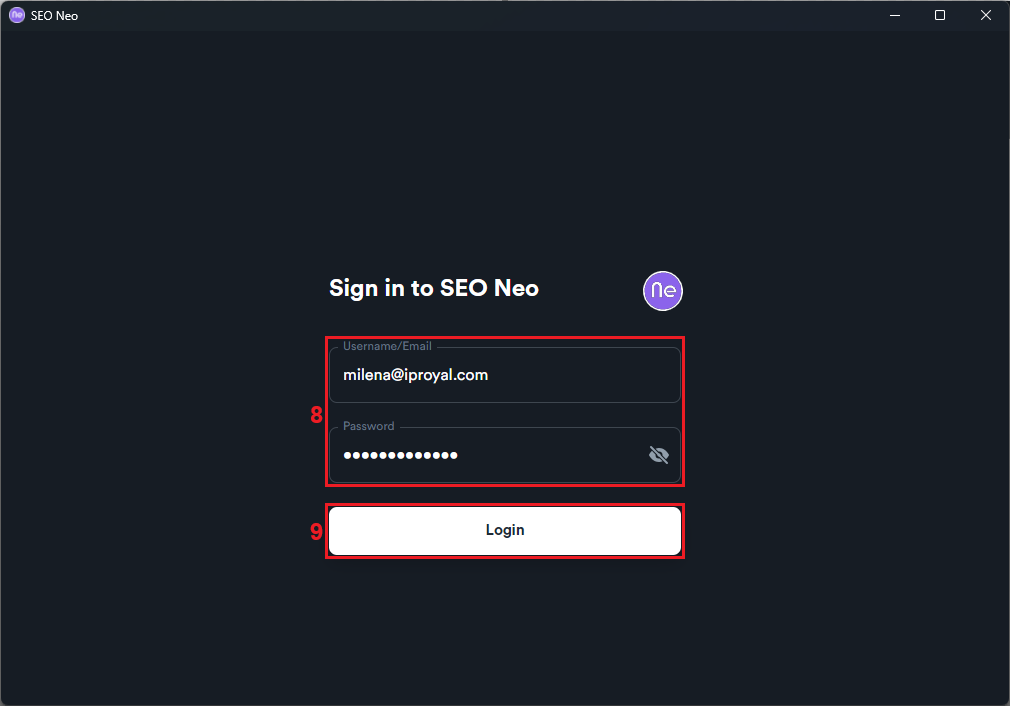
7. Once the installation is complete, the tool will launch, asking you to log in. Enter your username or email address and password (8) and click the ‘Login’ (9) button.
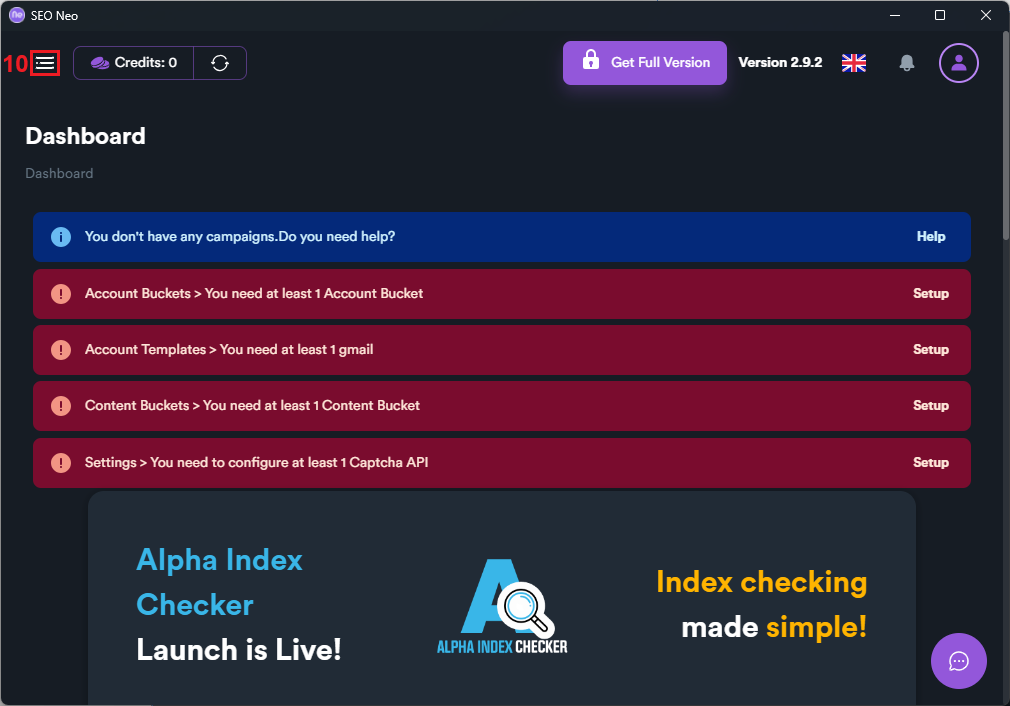
8. Once you’re in, click the three-line menu icon (10) in the top left corner.
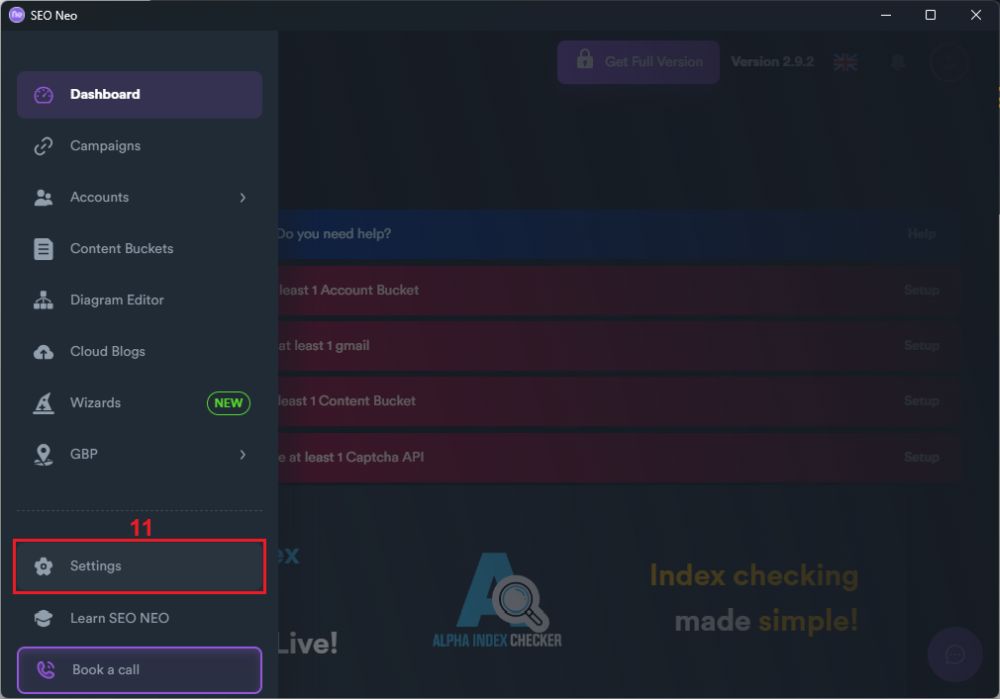
9. Select ‘Settings’ (11) from the menu on the left.
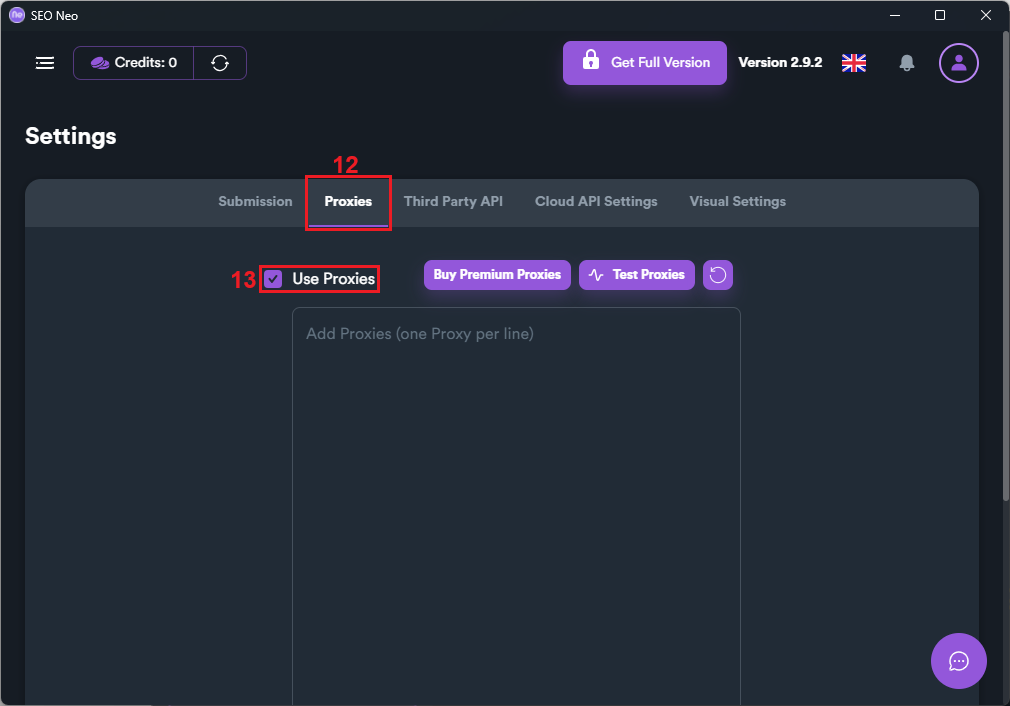
10. Navigate to the ‘Proxies’ (12) tab and check the ‘Use Proxies’ (13) box to enable proxies.
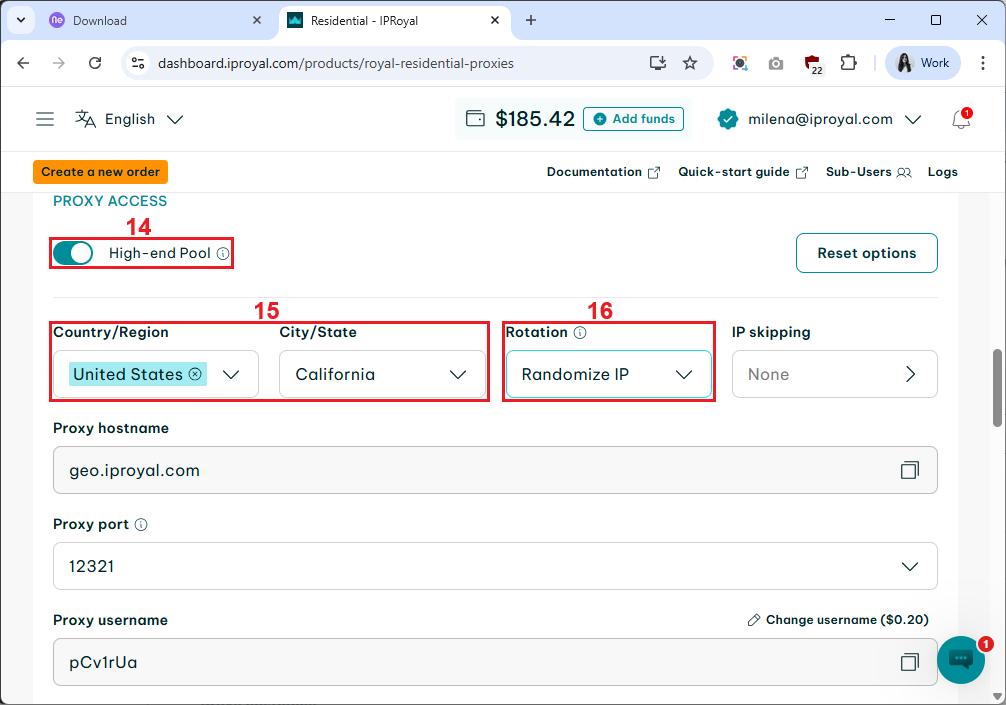
11. Go to your IPRoyal dashboard to get your proxy credentials. We’ll use high-end (14) Residential Proxies from California, the US (15), with rotating IPs (16), but you can configure your proxy settings according to your project needs.
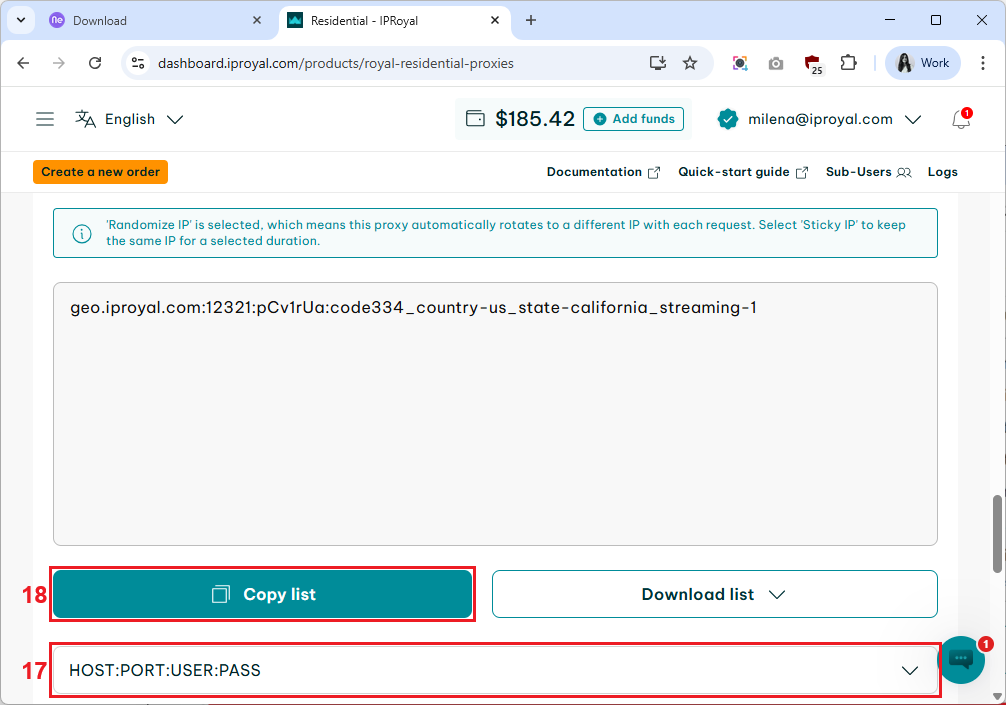
12. Scroll down to find the ‘Formatted Proxy List’ section. Choose a proxy format (17) and click the ‘Copy list’ (18) button to copy the proxy credentials to your clipboard.
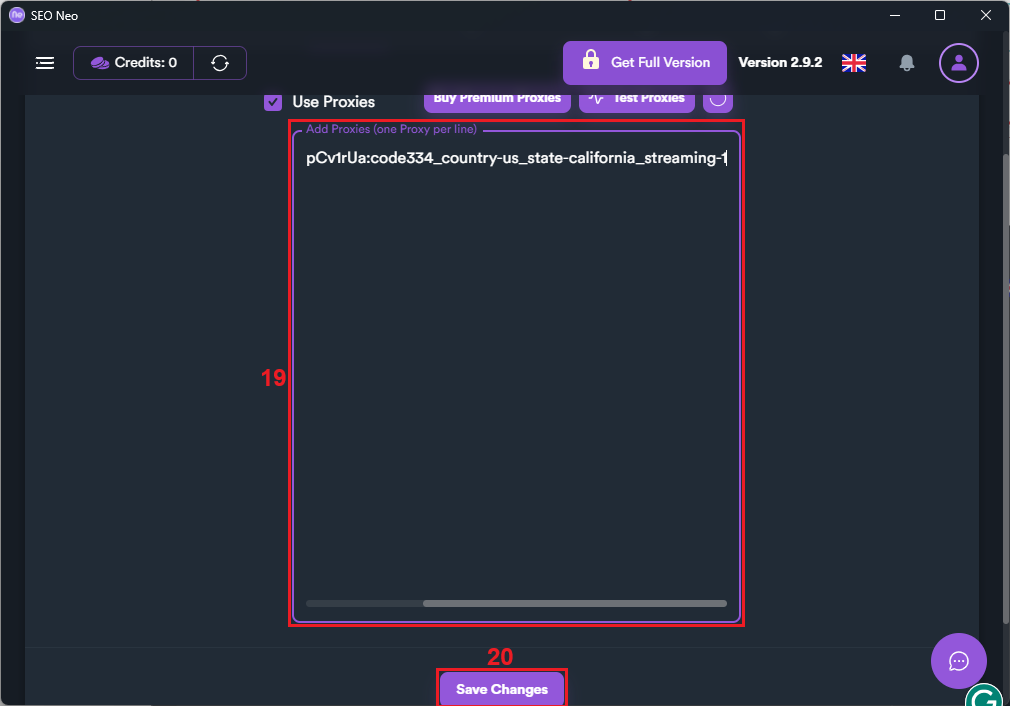
13. Paste your proxy credentials into the empty box (19) in SEO Neo and click the ‘Save Changes’ (20) button.
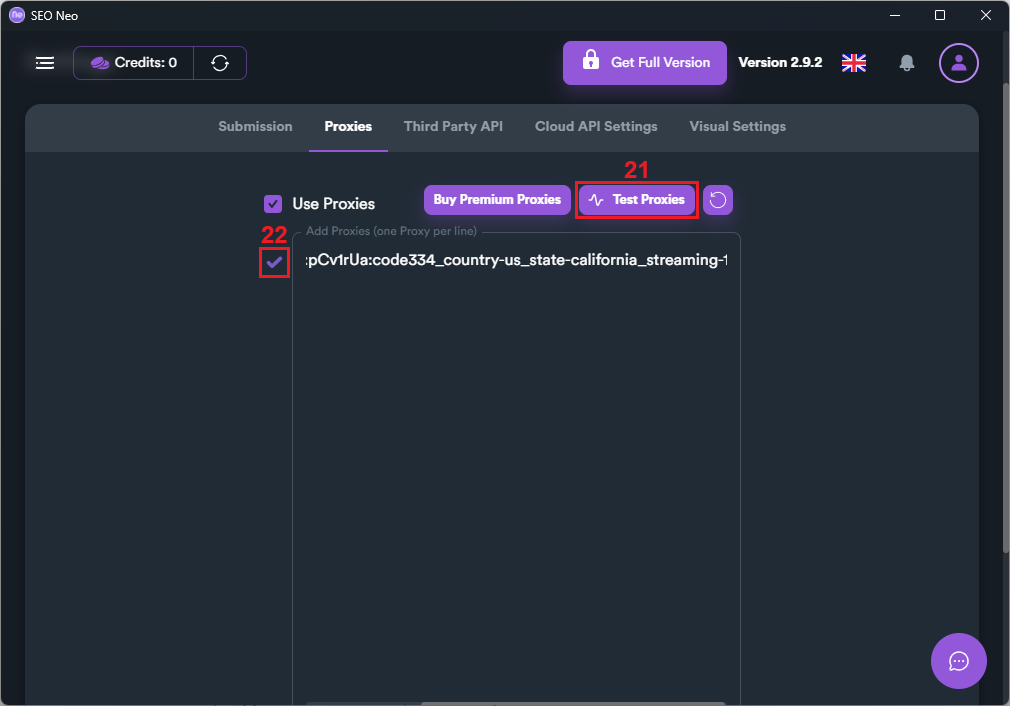
14. Now it’s time to test your proxy. Click the ‘Test Proxies’ (21) button, and the tool will automatically start checking the proxy connection. The check mark (22) next to the proxy indicates successful configuration.
Best Proxies for SEO Neo in 2025
The best proxy type for your SEO operations depends on your specific use case. Here’s more about each type so you can decide which one is right for you.
- Residential proxies
Residential proxy servers use dynamic IPs from genuine users and ISPs around the world. This makes them highly trustworthy and ideal for accessing geo-restricted sites and content. Since they automatically change your IP after each request, your automation tasks will run without interruptions or blocks.
However, they are slightly slower than other proxies as they rely on real user connections. They can also be more expensive due to the high authenticity they provide.
- Datacenter proxies
Datacenter proxies are hosted on high-speed data centers or cloud services. Since they don’t depend on real-user connections, they are high-performing and also more affordable than other proxies. As a result, they are perfect for automation that requires multiple requests at high speed.
However, the fact that datacenter IPs are not linked to real users also makes them easier to detect and block, especially if they are shared.
- ISP proxies
ISP proxy servers use IPs from real ISPs but are hosted on servers in data centers. They combine the authenticity of residential IPs and the high-performance of datacenter ones. As long as they are static and dedicated, they provide ultimate stability and reliability.
This can be very useful when managing multiple accounts, ensuring each one uses a specific IP address to prevent detection and blocks on platforms. However, they are usually more expensive, so they are best suited for tasks that require maximum stability and performance.
Conclusion
SEO automation tools can be extremely useful for your team and workflow, but only if you use them correctly. This includes pairing them with the right proxies and configuring the setup properly.
By combining SEO Neo with IPRoyal proxies and following this integration guide, you can start making the most of your tools and achieve faster and better results.