Best SEO APIs to Improve Rankings and SEO Workflows
Software comparisonsCompare the top SEO API tools to pull accurate search data and learn the best path to take for your needs.

Milena Popova
Key Takeaways
-
Use a dedicated SERP API if you just need to extract real-time search results, but choose an all-in-one data provider if your tool also requires historical metrics, such as backlink data.
-
Check the documentation and test the sandbox early. Clear error codes and a reliable testing environment will save your developers hours of frustration during integration.
-
A managed SERP API handles rotating proxies, bypassing CAPTCHA, and parsing Google's frequent layout changes.
The term SEO API encompasses several distinct types of tools, ranging from real-time SERP scrapers to large-scale databases of historical keyword metrics. Finding the right one depends entirely on what you’re building, your budget, and your data volume.
A developer building a custom rank tracker needs a very different tool than an agency generating client reports. Understanding these differences will keep you from overpaying for data you don’t need.
What Is an SEO API?
An SEO API allows your application to request structured SEO data programmatically so your software can automatically pull the exact metrics it needs. These tools aggregate data from search engines, proprietary databases, and site crawls to deliver metrics like keyword volumes, backlink profiles, and technical SEO health directly to your application.
Developers use these APIs to fetch live rankings, pull historical keyword trends, or track local visibility without having to build and maintain their own scraping infrastructure.
SEO API vs. SERP API vs. Scraping API
Knowing the difference between these three API types will help you choose the right tool for your specific use case.
An SEO API provides processed historical marketing metrics such as keyword difficulty and search volume.
A specialized SERP API scrapes a live search engine results page and parses that specific structure into clean JSON.
A raw scraping API gives you the flexibility to extract data from any website on the internet. The provider handles the proxy rotation and headless browsers, but your team still has to write and maintain the code that parses the HTML into usable data.
Best SEO APIs by Category
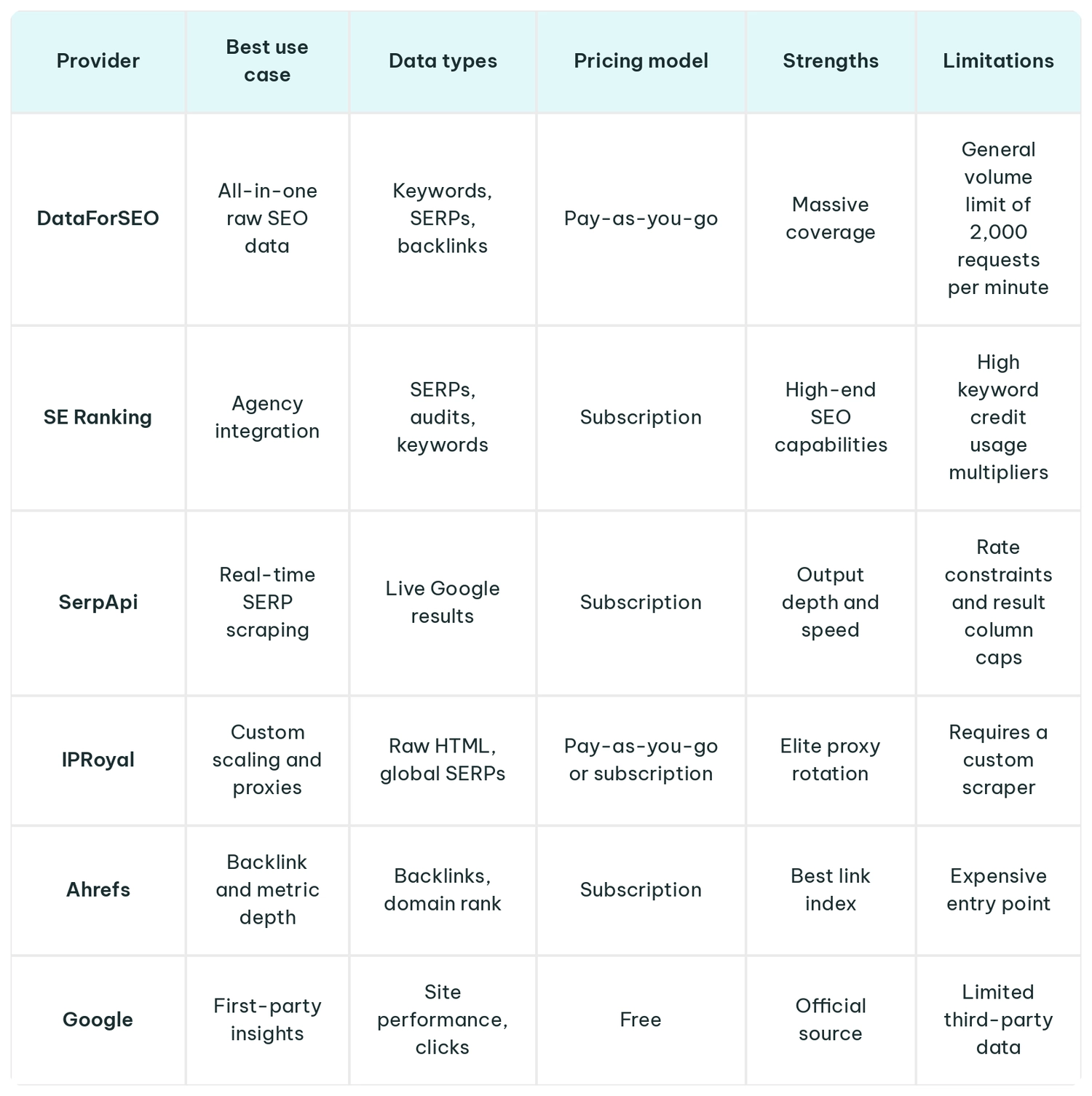
Here is a quick breakdown of the top SEO APIs based on their primary strengths and use cases.
Best All-In-One SEO Data API
DataForSEO is the best choice if you want to build a comprehensive tool without having to manage multiple vendors. It bundles keyword data, SERP results, and site audits into a single API, making it incredibly easy to scale when processing millions of queries a month.
Best Agency SEO API
Agencies usually need both raw data access and a clean dashboard they can show to clients. SE Ranking fits that exact niche. Agencies can use it to automate reporting while still pulling custom ranking data into their internal infrastructure.
Best SERP APIs
If you only need Google search results, using a SERP API that handles CAPTCHA and layout changes is recommended. In this case, SerpApi might be the optimal choice. It allows you to focus on ranking data rather than constantly fixing broken HTML selectors.
Best Scraping and Proxy Infrastructure
If you’re building custom data pipelines, raw proxy networks, and scraping APIs give you total control. IPRoyal provides residential proxies for localized crawling, and you’ll need to combine them with other tools that handle headless browsers and fingerprinting to help prevent your scrapers from getting blocked.
Best Backlink and SEO Metrics APIs
Building backlink analysis tools requires massive link graphs. The Ahrefs API gives you access to trillions of backlinks and billions of crawled pages and is considered the industry standard for fresh link data.
Best Free SEO APIs
If you don’t yet want to spend money on SEO tools, use Google’s official APIs. The Google Search Console API lets you pull impressions and clicks directly from the source, while the PageSpeed Insights API lets you automate technical speed audits across thousands of URLs.
How to Choose the Best SEO API
Choosing the right SEO API comes down to understanding your specific data needs, evaluating the developer documentation, and calculating the true cost of scaling.
Start by mapping out exactly what data your application needs. A tool built for historical keyword research will not help if you need real-time rank tracking. If you are building a local SEO tool, prioritize APIs that parse local map packs rather than tools offering massive backlink databases.
If your tool relies on keyword data collection, find out how often they update their databases. If you need live ranking data, make sure the API scrapes results in real time. You also need to verify their geographic coverage, as some providers excel in North America but have poor data for other markets.
Look for providers with clear JSON schemas, official SDKs, and a sandbox environment for testing. Good APIs return standard HTTP status codes like 429 for rate limits, which makes it much easier for your developers to build reliable retry logic.
API costs can spiral out of control if you don’t understand the pricing model and rate limits. Some providers charge a flat fee per successful request, while others have credit usage multipliers in place that inflate your total bill. Pay attention to concurrent request limits and batch processing features, as sending bulk tasks asynchronously can often save you money.
Example SEO API Workflows
Here is a quick look at how developers actually use these APIs in everyday SEO workflows.
import requests


def fetch_rankings(
    keyword: str,
    location: str,
    api_key: str,
    endpoint: str = "https://api.your-serp-provider.com/v1/search",
    timeout: int = 30,
) -> dict:
    """Fetch mobile SERP data for a keyword in a given location.

    Args:
        keyword: The search query to rank-check.
        location: Geographic location for the search (e.g. "London,United Kingdom").
        api_key: Bearer token for the SERP API.
        endpoint: The provider's search endpoint.
        timeout: Seconds to wait before abandoning the request.

    Returns:
        The parsed JSON response as a dictionary.

    Raises:
        requests.HTTPError: If the API returns a non-2xx status code.
        requests.RequestException: For network errors or timeouts.
    """
    headers = {"Authorization": f"Bearer {api_key}"}
    params = {"q": keyword, "location": location, "device": "mobile"}

    response = requests.get(endpoint, headers=headers, params=params, timeout=timeout)
    response.raise_for_status()
    return response.json()
To automate rank tracking, a developer schedules a daily script to pull search results for specific locations and feeds that parsed data into a database. For competitor monitoring, the script simply monitors the top ten listings to alert you if a competitor launches a new page or steals a featured snippet.
Finally, developers can automate keyword research by writing a script that takes a single seed keyword, fetches hundreds of related variations, and filters them based on historical monthly search volume and seasonal trends.
Build vs. Buy: Should You Use an SEO API or Build Your Own Scraper?
Choosing between building your own scraper or buying an SEO API comes down to how your engineers should be spending their time. An API delivers clean, pre-parsed data instantly and handles proxy rotation for you.
If your application needs historical metrics like keyword search volume or backlink profiles, you have to buy an API, because you cannot scrape that data directly from a standard search engine results page.
Building a custom scraper makes sense if you need to store raw HTML or extract highly specific search elements that commercial APIs do not parse. If you go this route for rank tracking or SERP analysis, you will need premium proxies or a headless browser API to handle localized queries and prevent IP bans.
Using a managed SEO API frees your team to build your product instead of constantly fixing broken HTML parsers and fighting search engine anti-bot measures.
Common SEO API Mistakes to Avoid
A common mistake is buying an expensive monthly subscription to an all-in-one platform when a cheap, pay-as-you-go SERP API would have handled the job perfectly.
Teams often underestimate scaling costs. For example, local rank tracking consumes credits incredibly fast if you start pulling daily SERPs across hundreds of different zip codes. You have to model these costs accurately upfront so you do not hit your API limits and break your application. Finally, developers often fail to build resilient code.
If you do not implement exponential backoff for API retries, temporary rate limits or brief server network hiccups will crash your data pipelines instead of gracefully pausing and trying again.
Final Verdict
There is no single best tool. The right API depends entirely on what your application needs to do and how much infrastructure you want to maintain yourself. If you need a ready-made dashboard to manage clients, subscribe to an agency-focused platform.
For developers building custom rank trackers, combining a raw scraping setup with a proxy network like IPRoyal provides total control over live search data. However, if your application focuses on historical keyword metrics, skip the proxies entirely and subscribe to a managed data provider.
FAQ
Can SEO APIs replace tools like Ahrefs or Semrush?
For developers, an API bypasses the need to pay for expensive per-user seats because it delivers raw data straight to your custom dashboards. However, your marketing team might still want a traditional UI subscription for their day-to-day work.
Why do SEO API results differ from what I see in Google?
Google personalizes search results based on your browsing history and exact location. Since an API pulls data from a clean, non-personalized proxy, the rankings it returns will naturally look slightly different from what you see in your personal browser. If you are building a live rank tracker, you have to account for these discrepancies.
Should you use real-time or cached SERP data?
If you’re building a rank tracker, you need real-time SERP queries to get live positions. If your tool does keyword research, you must use a provider's cached database, because historical metrics like monthly search volume cannot be scraped from a live search results page.
How much does an SEO API usually cost?
Pricing ranges from a few dollars per thousand requests for basic SERP scrapers to thousands of dollars a month for premium access to massive backlink databases.
Can SEO APIs connect to Google Sheets, Looker Studio, or BI dashboards?
Yes. Most providers offer native connectors or webhooks that stream structured data straight into your BI tools, so you can build automated reports without writing complex backend code.