What Is a Proxy Port? Meaning and Common Ports
Proxy fundamentalsLearn what proxy ports are, how they differ from proxy addresses, and how to choose and configure different ports for your use case scenarios.


Kazys Toleikis
Key Takeaways
-
A proxy port is a crucial part of your proxy server credentials, helping guide your traffic towards intended services.
-
Common proxy port numbers include 8080 and 80 for HTTP, 443 for HTTPS, and 1080 for SOCKS4/SOCKS5 proxies.
-
If you're unsure about proxy ports or face some errors, it's often best to double-check ports in your provider's dashboard.
Anyone who’s ever used proxy servers is familiar with the hostname and port number in their proxy settings. Sort of like a house-and-flat number, the host:port combination is a unique proxy server address. The IP address marks the house, and the proxy port number signals the flat.
While that’s a simplification, the analogy helps understand the importance of knowing what proxy ports are. Without knowledge about common ports, how to find and configure them, you won’t be able to leverage proxy servers in your projects.
What Is a Proxy Port?
A proxy port is a numbered communications endpoint on a server acting as a gateway for your traffic. Proxy port number represents each port, which the proxy server listens to, so without the specific port number, such as 8080 or 1080, your connection requests won’t reach the intended service.
Configuring apps, browsers, or devices to use your proxy server requires not only your proxy IP or domain address (proxy host), but also your proxy port number. A proxy host only identifies the machine on a network, while the proxy port tells which specific service or process should receive the incoming traffic.
Proxy Port vs Proxy Address
In a standard proxy server setup, you’ll see a proxy host, such as geo.iproyal.com, and a proxy port, such as 8080. Often, this is expressed in a host:port format.
geo.iproyal.com:8080
Many tools that rely on proxy servers, especially CLI tools, will require you to use the host:port format.
The proxy server address or proxy host tells you where the proxy server is located on a wider network, such as the Internet. Typically, it's an IP address, such as 192.168.1.10, or a domain name, such as geo.iproyal.com .
Proxy port, on the other hand, shows which service on that particular server is used for the proxy server connection. A single server can run many services and even many proxy servers. The proxy port number notes the proxy service running on that machine.
The distinction between proxy host and port might seem confusing at first, but it's much easier if you remember that the host:port format always requires both. Providing only one of them in the proxy settings will create an error.
- Enter only the proxy address, and the system won't know which service to reach.
- Type in only the port, and it won't know which server to contact.
Common Proxy Port Numbers
Proxy ports vary by proxy protocol. HTTP proxies operate at the application layer and are designed to handle web traffic, while SOCKS5 proxies operate at the session layer (Layer 5) and can handle any traffic.
As such, HTTP proxies use port numbers such as 80, 443, or 8080, which are standard for unencrypted HTTP traffic. SOCKS proxies were assigned 1080 as the standard port number by the Internet Assigned Numbers Authority (IANA) to avoid conflicts with other major services.
Proxy protocols have traditional port assignments to help clients and servers identify the service without much additional processing. Here are the most common proxy server ports.
| Port | Typical Use |
|---|---|
| 80 | HTTP proxy (unencrypted, rare) |
| 443 | HTTPS proxy (encrypted traffic) |
| 8080 | Common alternate HTTP/HTTPS proxy |
| 3128 | Popular for Squid and generic HTTP proxies |
| 1080 | Standard SOCKS4/SOCKS5 proxy |
Technically, a proxy server can work on any 16-bit long port number (1-65535). The actual configuration can depend on your proxy server provider's configuration, proxy type, and sometimes even the specific product plan.
Which Proxy Port Should You Use?
Always use the port number in your proxy server credentials, usually found in the dashboard , first. While there are standard port numbers for each proxy server type, your provider might use unique ones. If you adjust the proxy port yourself, match it to the common ones for the specific proxy protocol.
Entering the wrong port is one of the most common reasons for proxy connection failures. For example, sending HTTP traffic to a SOCKS port can cause protocol mismatches or handshake errors.
Even if the proxy server address is correct, the server will reject a connection to the wrong port. In the end, your providers' assigned port number, as well as other proxy settings, are the most important for a successful connection.
How to Find Your Proxy Port
In Your Provider Dashboard
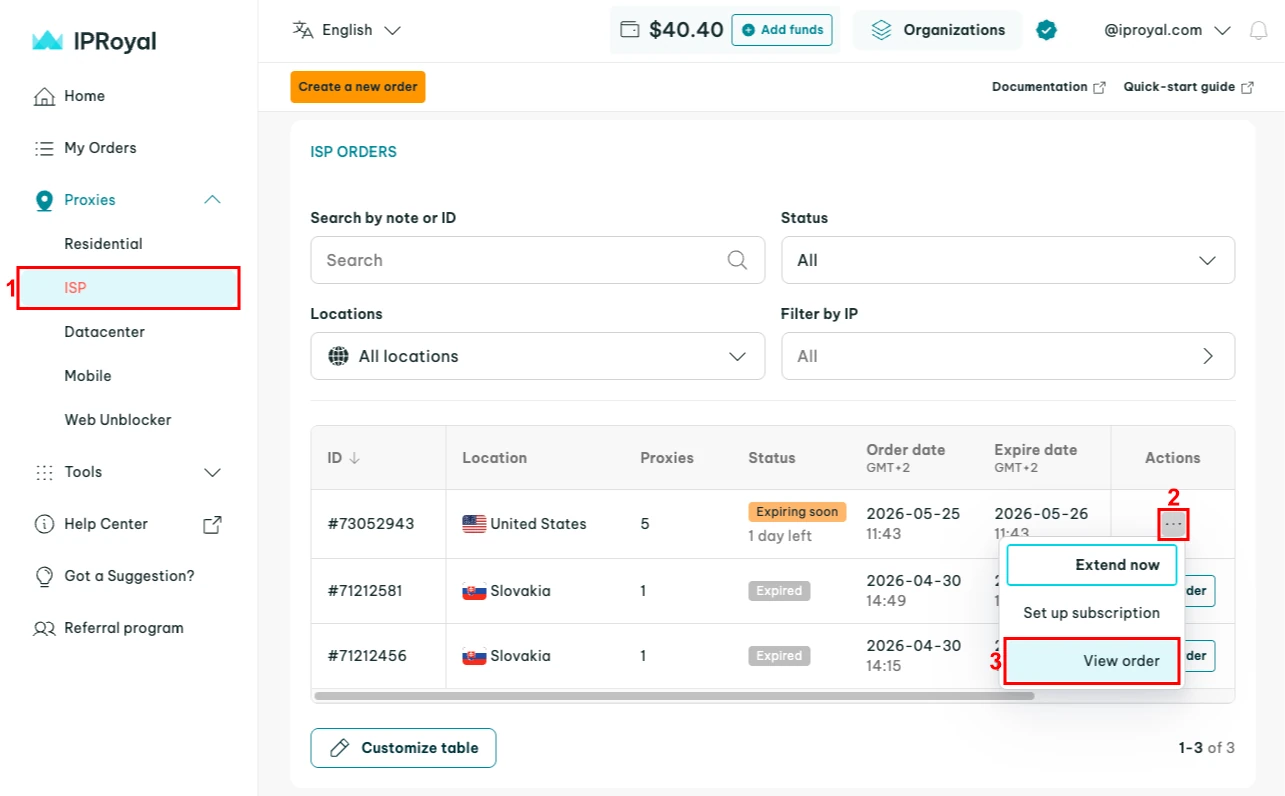
Finding your proxy port on the IPRoyal's dashboard is as easy as logging in and navigating to your active orders. Select the product (1), click the three-dot icon (2) next to an active order, and select the ‘View order’ (3) option.
You'll find your proxy port numbers (4) in the ‘Formatted proxy list’ tab.
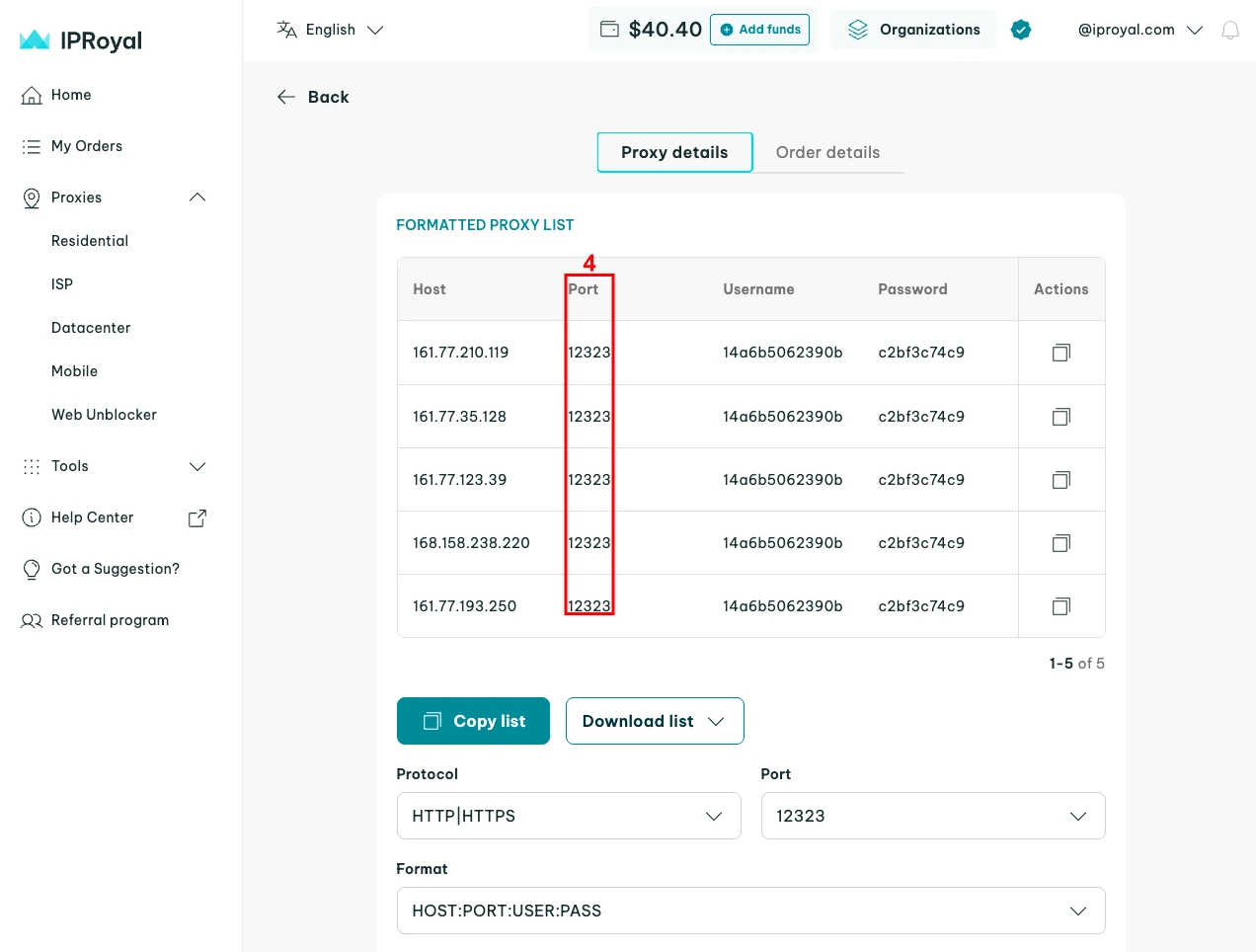
Note that providers often show a formatted proxy list with host, port, username, and password together. All four are required to authenticate and connect to a proxy server, so such a format is common in network settings or when integrating proxies in various tools.
In Settings Menus
If a proxy server is already set up, your app or device settings will show it along with the proxy host. Most apps ask not just for the proxy port and host, but also the protocol type, username, and password for authentication.
While Chromium-based browsers usually rely on operating system (OS) proxy settings, other types, like Firefox, include their own manual proxy configuration, where you can find the proxy port. Various OS versions, including the latest Windows and macOS, store proxy credentials under network settings.
More specialized software might offer options to either rely on OS proxy settings by default or choose custom ones. In Postman, for example, you can find such configuration options on a dedicated proxy tab in Settings.
In Scripts or Environment Variables
In server environments or automation projects, proxy configuration is often stored in environment variables like HTTP_PROXY, HTTPS_PROXY, or ALL_PROXY (often used for SOCKS). To find the proxy port, use the following commands in your terminal.
- Linux/macOS: echo $HTTP_PROXY
- Windows (Command Prompt): echo %HTTP_PROXY%
- Windows (PowerShell): Get-ChildItem Env:HTTP_PROXY
If you're writing a script, you'll typically define the proxy server host and port in a dictionary or a string variable. Here's how it might look using Python's Requests library.
proxies = {
    'http': 'http://geo.iproyal.com:8080',
    'https': 'http://geo.iproyal.com:8080',
}
The proxy URL string clearly shows the port after the colon. In authenticated URL formats, such as USER:PASS@HOST:PORT, username and password might also be included, but the port still comes after the colon.
http://username:password@geo.iproyal.com:8080
How to Configure a Proxy Port
In OS or Browser Settings
For Windows devices:
- Open 'Settings' (Windows button + I).
- Go to 'Network & Internet' and select 'Proxy.'
- Click 'Set up,' under 'Manual proxy setup.'
- You'll find all proxy server settings, including port and host, there.
- Click 'Save.'
For macOS devices:
- Click the Apple menu and go to 'System Settings' > 'Network.'
- Select your active connection (Wi-Fi or Ethernet) and click 'Details.'
- Go to the 'Proxies' tab.
- You'll find your proxy host and port settings there.
- Click 'OK' to save changes.
For Firefox browser:
- Click the menu button (three horizontal lines) in the top-right corner.
- Select 'Settings.'
- Scroll down to the 'Network settings' and press 'Settings.'
- You'll find your proxy server address and port under manual proxy configuration.
- Press 'OK' to save changes.
In cURL or Python
In both cURL and Python, the proxy port is identified by its position following the colon in the proxy URL string. Such a structure is almost universal across programming languages and command-line tools.
In cURL, you can use -x or --proxy flags followed by host:port, and the port will be displayed after the colon, which you can simply change.
curl -x geo.iproyal.com:8080 https://iproyal.com/ip-lookup
In the Python Requests library, you can pass a proxies dictionary with http/https keys. Here's what it might look like:
import requests
proxies = {"http": "http://geo.iproyal.com:8080"}
requests.get("http://geo.iproyal.com", proxies=proxies)
In Proxy Tools and Extensions
Using dedicated tools for proxy management is often much more effective than configuring proxy servers in your operating system's settings. Browser extensions are the most accessible tools that can save your proxy credentials to avoid re-entering the host:port each time.
- Provider-specific proxy extensions, such as IPRoyal's Chrome and Firefox proxy managers, offer a way to configure proxy ports conveniently. Set different proxy profiles and switch between them seamlessly. The best part is that these extensions are completely free, and you can use them with proxies from any provider.
- FoxyProxy is an open-source browser extension for Chrome and Firefox that allows you to easily add proxy servers by entering IP addresses and proxy ports. You can color-code different proxies, define URL patterns, set individual proxies per tab, and use other useful functions.
- System-wide proxy software, such as Proxifier , can force all or some desktop apps to use proxies even if they don't support them natively. Simply add proxy configurations (Host, port, and protocol), and you can use the various functions with desktop apps, games, or even legacy software.
Common Proxy Port Errors and Fixes
Even with the right IP address, a single-digit mistake in your proxy port can cause various connection issues. Mistakes in proxy credentials cause many proxy server errors and can be resolved by double-checking them.
- A wrong port number most likely indicates an error in the numbers you entered. Ensure that you enter the port digits displayed in your provider's dashboard, which must match the ones you entered in your proxy settings.
- Proxy type mismatch signals that you entered a SOCKS5 port into an HTTP field or vice versa. Ensure you're using the correct protocol, as specified by your provider.
- Authentication errors are commonly caused by the connection being rejected due to mistakes in username and password, or, if you're using IP whitelisting , a lack of IP address authorization. Double-check your authentication settings.
- Connection refused errors occur when your device reaches the server, but it rejects your connection. Confirm that the proxy server is online, and the port you're entering is open.
- Timeout or blocked port issues won't send you any errors, while the connection hangs and eventually fails. Your internet provider or local firewall might be blocking the connection, so try to use common ports like 443, 8080, or 1080.
- Proxy works in one app, but not another. Such scenarios often happen because an app requires a specific proxy credentials format or lacks support for the proxy protocol used. Consider changing relevant proxy configurations and trying again.
Final Thoughts
Sort of like a flat door in an apartment building, a proxy port is an endpoint that directs your traffic towards intended services. Together with other proxy credentials from your provider (host, port, and protocol), they enable proxy services. Be sure to follow your provider's dashboard, and your request will travel successfully in most cases.
FAQ
Is a proxy port the same as a proxy address?
No, the proxy server address (host) is the location of the server within a broader network, such as the Internet, typically signified by an IP address or domain name. A proxy port is a numbered gateway, such as 8080 or 1080, redirecting traffic to a specific service, such as a proxy connection, on that server.
What is the default proxy port?
There is no single default proxy port applicable to all proxy servers. The port number varies based on the proxy protocol and sometimes the proxy provider. Common defaults for HTTP and HTTPS proxies are 80, 443, and 8080 or 1080 for SOCKS proxy servers.
Is port 8080 always a proxy port?
No. While 8080 is a popular default proxy port for HTTP proxies, it's a general-purpose port number. Besides proxy connections, it's used to host local websites, run application servers, caching services, and other use cases. Any port number can be used for non-proxy purposes, including 8080.
What port does SOCKS5 use?
The default port number for SOCKS proxy servers, both SOCKS4 and SOCKS5, is 1080. However, in some cases, a proxy service might configure it to use other custom port numbers as well.
Where do I find my proxy host and port?
The primary way to find your proxy host and port number is in your provider's dashboard. If you're checking an active connection and can't access it, check your browser or operating system proxy settings, where the proxy server is set up. Windows, for example, provides them under Network & Internet > Proxy.