Why Spotify Detects Residential Proxies and How to Avoid It
WebsitesSpotify flags a residential proxy when the account, IP address, location, and app setup look inconsistent. Here’s how to reduce that risk.


Arevika Ambarcumian
Spotify blocks residential proxies when they appear to conflict with its location, account, or anti-abuse rules. When that happens, you might see a proxy warning, even when the deeper issue is a mismatch between your account, IP address, and how your Spotify app routes traffic.
This article explains why Spotify detects and blocks residential proxies, and what you can do to reduce the chances of running into these blocks when using a Spotify proxy.
How Proxies Work With Spotify
A proxy is a tool that sits between your device and the internet. Instead of sending your request directly from your real IP address, it routes it through a different IP address first.
When you use a Spotify proxy , your Spotify traffic first goes from your device to the proxy server, which then sends the request to Spotify’s servers. Once Spotify sends a response, the proxy receives it and relays it back to your device.
The proxy protocol determines how that relay connection works. Here are the different proxy protocols available:
- HTTP proxies are best suited for regular web traffic through the Hypertext Transfer Protocol, the language browsers and websites use to communicate.
- HTTPS proxies are designed for encrypted web traffic, especially when you access websites through secure connections.
- SOCKS5 proxies are more flexible than HTTP or HTTPS proxies because they work at a lower network level and can support browser traffic, streaming apps, torrenting, and other app-level connections.
For Spotify, SOCKS5 is the natural choice because the Spotify app needs a stable proxy connection for account access, playback requests, and Spotify streaming.
Why Use a Spotify Proxy?
Common reasons include:
- Changing your account’s location
When you travel abroad and want to keep your account tied to your home country, a proxy server with a home-country IP can keep the connection aligned.
- Bypass geo restrictions
Your network may automatically filter or block Spotify traffic due to geographic restrictions. A proxy helps by rerouting that traffic through a different network path.
- Avoid ISP throttling
Some ISPs slow down streaming traffic. Routing Spotify through a proxy server reduces those slowdowns, although a proxy mismatch can still affect streaming quality.
- Professional market research
Regional charts, recommendations, availability, and Spotify content can vary by market, so a researcher looking at Brazil, Japan, or Germany may need a connection that reflects the target location.
How Spotify Proxy Detection Actually Works
Spotify uses several techniques to determine whether connections to its platform are directed or routed through proxy servers.
IP Intelligence Databases
Spotify may run your address through IP intelligence databases. These are large, regularly updated datasets that help platforms understand where a connection appears to originate and whether it looks normal for that account.
IP intelligence databases can give Spotify information such as:
- Your location
- The connection type
- Proxy association
- Autonomous system number (ASN) and internet service provider (ISP)
- Risk score
Spotify uses this information to decide whether your proxy connection is trustworthy.
Behavioral Analysis
Spotify can also look at how an account behaves during streaming. Certain patterns may trigger error codes, including:
- Account behavior that does not match a normal user
The same song being played in unnatural patterns or streams that stop right after the minimum countable listening time can increase an account’s risk profile.
- Too many accounts using the same residential IP
If Spotify sees a large number of accounts logging in, signing up, or streaming from the same IP, the connection may no longer look like a typical household connection.
- Rapid location changes
Rotating proxies can create problems when the same account appears in different countries within a short period.
A Spotify proxy can use a real residential IP, but the account can still trigger an error message if the activity looks automated, overused, or inconsistent with the account’s expected location.
Geolocation Triangulation
Spotify also compares the location signals connected to your account.
- Account creation country: Where you created or registered the Spotify account
- Current IP address: Where your IP address shows you are connecting from
- Payment method country: Where your card issuer, bank, mobile wallet provider, or payment account is based
- Plan or address details: The address details connected to a Family or Duo plan
For example, if your Spotify account was registered in South Africa, but your current IP points to the United States, Spotify will treat that as a mismatch. The problem becomes even clearer if your payment method or plan address still points to South Africa.
Common Spotify Proxy Error Codes and Messages
Use the table below to diagnose the error on your screen and decide what to check first.
| Error Code or Message | What It Usually Means | What to Check First |
|---|---|---|
| “VPN or proxy detected” | Spotify does not trust the proxy connection, or the IP has been associated with proxy use. | Check the proxy IP reputation, the account country, and whether too many users are accessing Spotify from the same IP. |
| “You can only use Spotify abroad for 14 days” | The account country and current IP do not match. | Check whether the Spotify account country matches the country shown by the proxy server. |
| “For your protection, we’re unable to process your request” | Spotify considers the action risky. This can happen during login, signup, or account changes, especially when rotating proxies creates sudden changes in location. | Check for repeated attempts, rapid IP address changes, or a proxy connection that does not match the account’s normal location. |
| “A firewall may be blocking Spotify” | The Spotify app cannot connect via the current network path. | Check your firewall rules, antivirus settings, local proxy settings, and whether the proxy server supports Spotify app traffic. |
| Error code 17 | Spotify is having trouble connecting due to the current network setup. | Check your Spotify proxy settings, proxy type, port, authentication details, and firewall access. |
| Error code 30 | Spotify may be running into a proxy configuration issue or a system-level network setting that blocks access. | Start by checking for another active proxy configuration. Then confirm the proxy details and test Spotify on your real IP address without the proxy. |
| auth:16, auth:3, auth:22, or auth:74 | Spotify cannot complete authentication with the current setup. | Check firewall access, VPN interference, proxy settings, and whether the app works when using your real IP. |
Some Spotify problems look like general network outages at first, but the issue is often more specific. If other websites and apps still work while the Spotify app fails, the problem may sit in your proxy settings, proxy configuration, network limitations, or the proxy connection itself.
Proxy Types and Their Detection Risk on Spotify
Now that you know how Spotify detects proxies, it is worth looking at the proxy type itself. A working proxy connection does not always mean a safe or stable Spotify setup.
Datacenter vs Residential Proxies
The first choice is usually between datacenter and residential proxies . Both can route Spotify traffic, but they do not carry the same level of risk.
- Datacenter proxies
These use IPs from cloud providers and datacenters. Their main advantage is speed, which helps with basic connection performance. The tradeoff is detection risk. Datacenter IPs are easier to identify because they come from server infrastructure rather than normal home internet connections.
- Residential proxies
Because residential proxies use IPs from real home connections, they look more like regular users accessing Spotify through regular internet providers. As such, residential proxies are usually the better fit for Spotify streaming, account access, and location-based Spotify content checks.
Rotating, Static, and Mobile IP Options
The IP source is crucial, but equally so is its behavior on Spotify. A proxy connection that keeps changing creates a different risk profile from one that stays tied to the same location.
Here are the main options:
- Rotating proxies
A rotating proxy will change your IP after a set time or after a certain number of requests. This can be useful in some proxy setups, but it’s usually the wrong choice for Spotify account use. Frequent IP changes can create the same inconsistencies that originally led to your Spotify account being blocked.
- Static proxies
A static proxy uses a single IP address instead of changing it frequently. This is usually the safer option because your account always connects from the same place.
- Mobile proxies
A mobile proxy can be useful if you need your Spotify session to appear to come from a mobile network. Mobile carriers put many users on shared carrier infrastructure, so a mobile IP might not look out of place in the same way a datacenter IP would.
Static residential proxies are the most ideal for Spotify. They keep your account tied to a single IP address while still using a real residential connection. Mobile proxies can also work well when you’re testing the Spotify app on mobile networks.
Spotify Proxy Settings - Configuration and Common Mistakes
If Spotify shows error codes after you’ve set up a proxy, don’t automatically assume your IP has been blocked. Check that Spotify is actually using the proxy settings you set.
Remember, the setup process varies depending on whether you’re on a desktop or a mobile device. For desktop users, Spotify offers in-app proxy settings you can configure.
Here’s how:
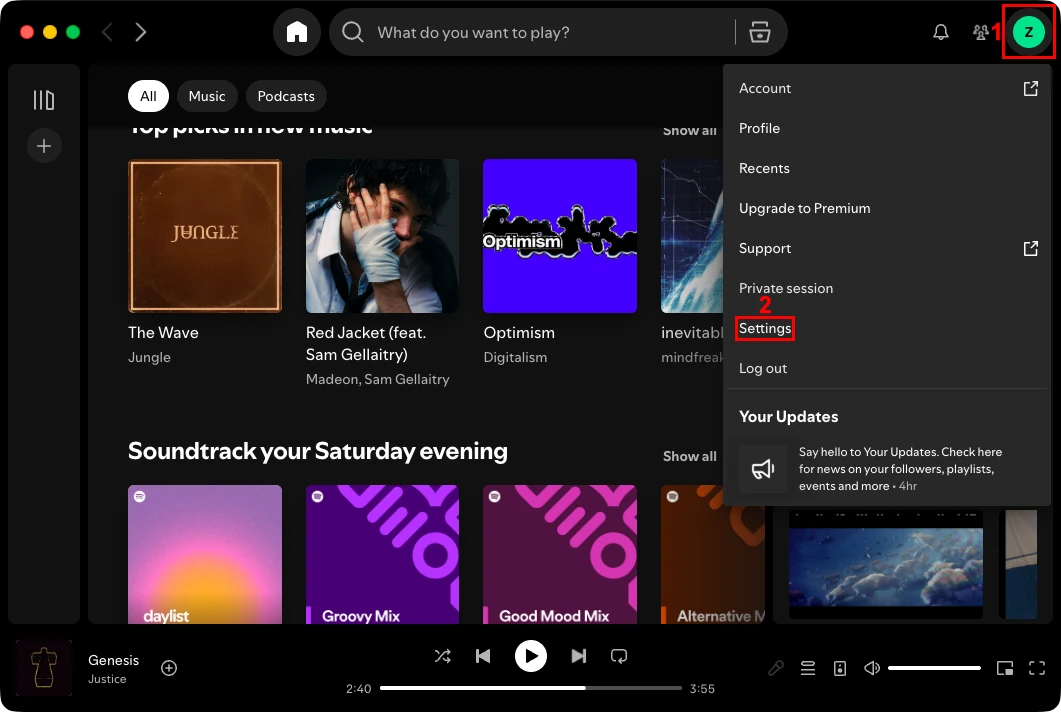
1. Click your profile icon (1) in the top-right corner of the Spotify app and select ‘Settings’ (2).
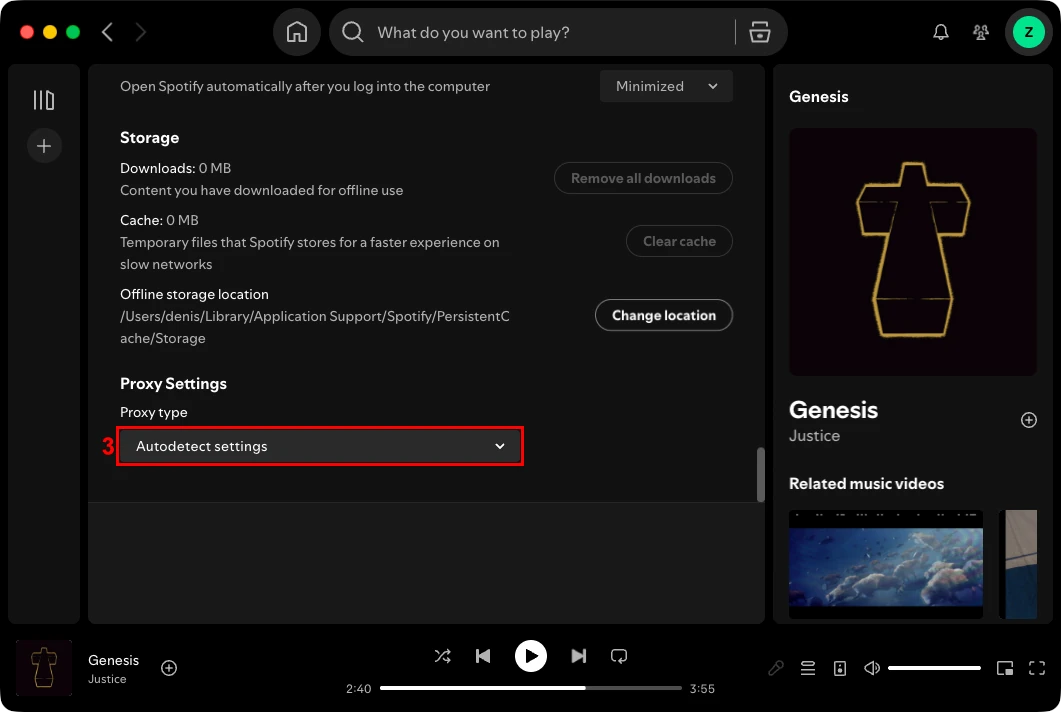
2. Scroll down to ‘Proxy settings’ and open the proxy type dropdown (3).
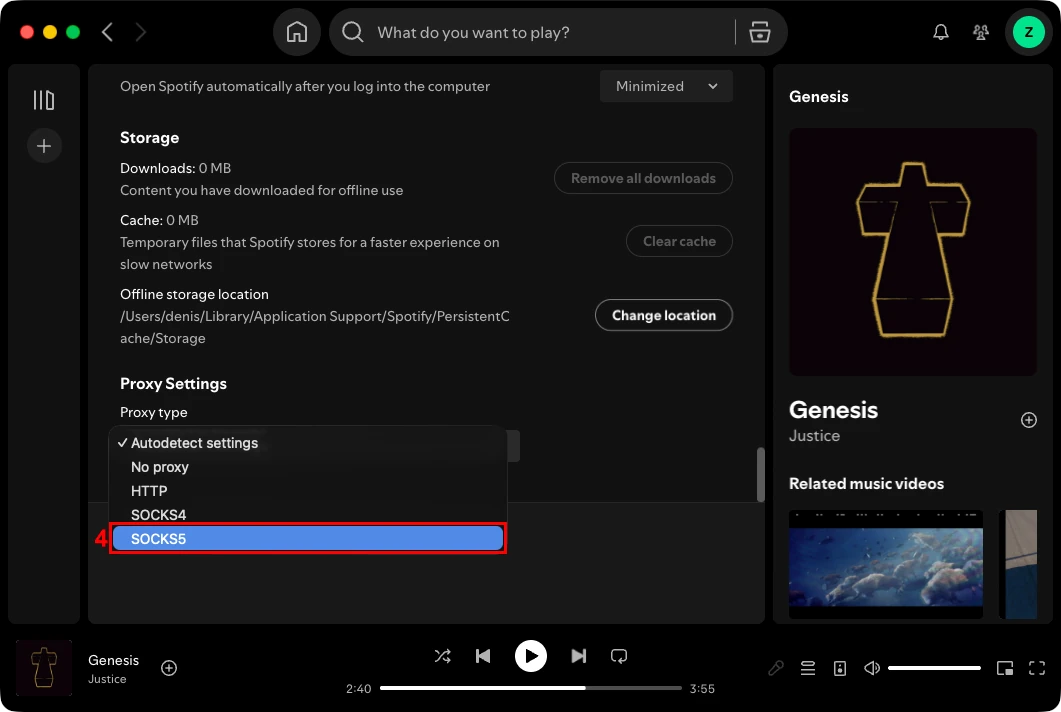
3. Select ‘Autodetect’ if you want Spotify to match your device proxy settings, ‘No proxy’ if you want to disconnect a proxy, or ‘SOCKS5’ (4) if you want to set up a Spotify proxy manually.
4. Enter the proxy host, port, username, and password (5) in the correct fields.
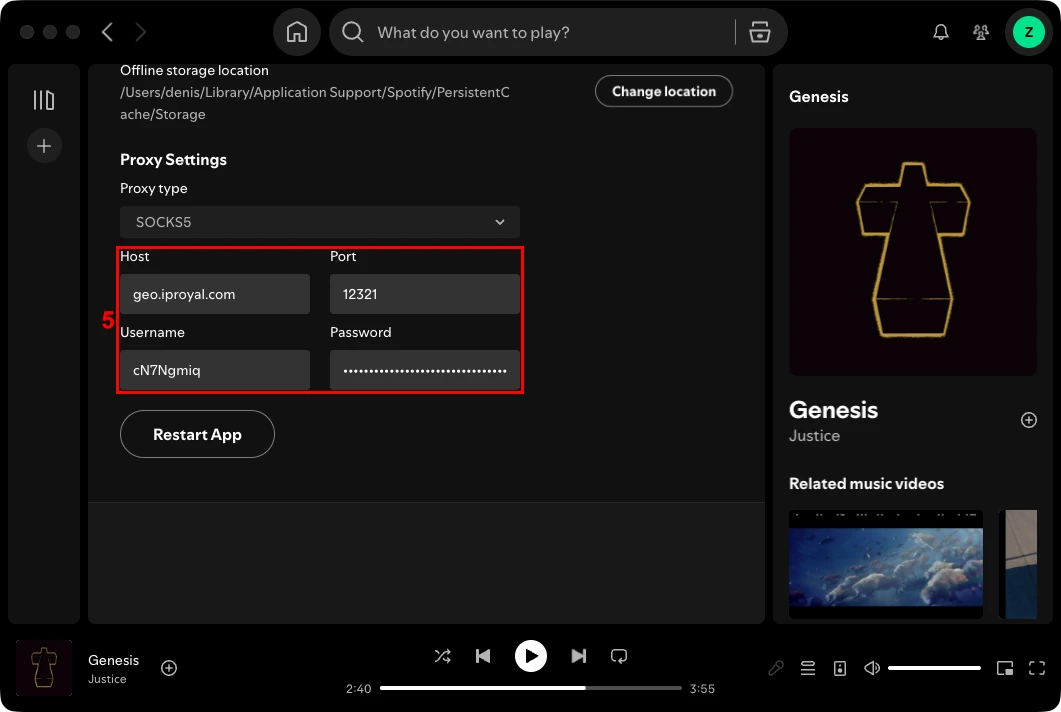
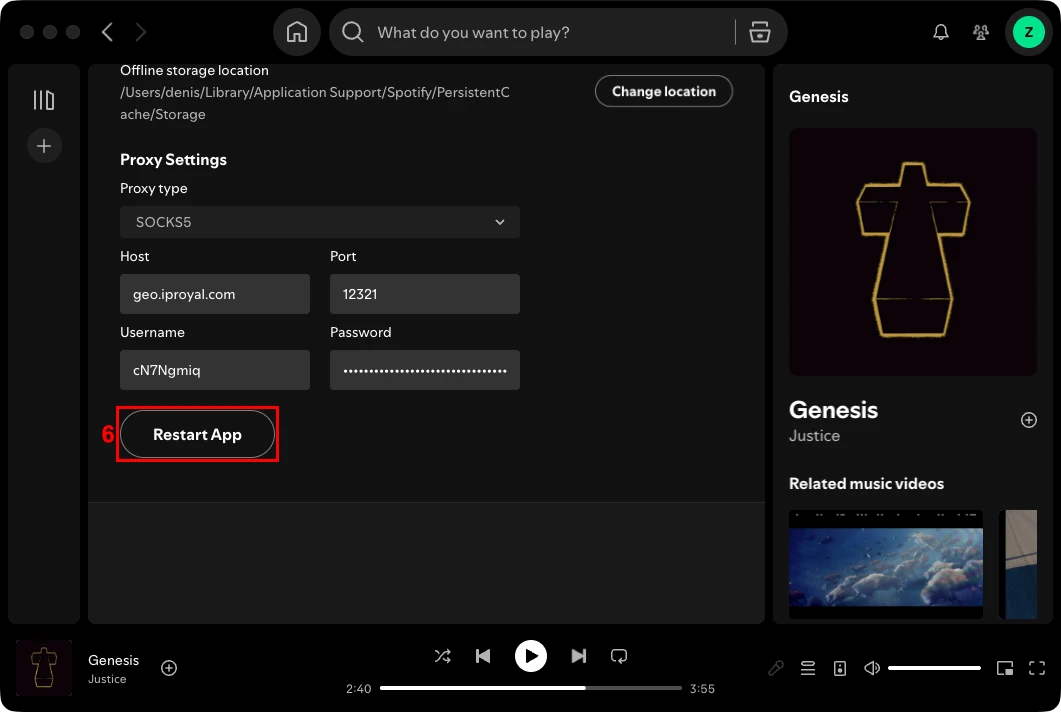
5. Click the ‘Restart App’ (6) button to apply the new Spotify proxy settings.
For mobile users, Spotify does not provide in-app proxy settings in the same way the desktop app does. If you want the Spotify app to use a proxy server on your phone, the proxy usually has to be set at the device level instead. That means your Android or iOS proxy settings need to route the app’s traffic before Spotify can use the proxy connection.
Read our guides on how to set up proxies on Android and iOS .
Why Spotify Flags “You Seem to Be Using a Proxy Service”
Here are common Spotify proxy error code triggers:
- Streaming from an unregistered country
- Rapid IP changes across distant countries
- Known unblocker services
- Shared free proxies
- Multiple accounts on one IP
It is important to note that even a clean, reputable residential proxy can trigger error codes when it does not match the payment and address location. The key to avoiding Spotify error codes is consistency: your IP, payment details, country of registration, and plan address must match.
Premium vs Free Proxies for Spotify
A premium proxy from a reputable provider is usually the better choice for Spotify because the connection is easier to trust and control.
Here is how free proxies and premium proxies compare:
| Feature | Free Proxies | Premium Proxies |
|---|---|---|
| Detection risk | High. Free proxy IPs are abused, reused, or already listed in proxy databases, so Spotify may flag them quickly. | Lower when the IP is clean, stable, and matched to the Spotify account region. |
| Speed | Unstable. Spotify streaming may lag, buffer, or fail because too many people are using the same proxy server. | More reliable. High-performance premium proxies can maintain speeds that support high-definition streaming without buffering, enhancing the overall music listening experience. |
| IP sharing | Heavy. Many users may access Spotify through the same IP address, which can make the connection look suspicious. | Lower and better managed. Premium proxies are less likely to have uncontrolled sharing across many users. |
| Security | Risky. Free proxies may log traffic, expose data, or route the connection through unknown infrastructure. | Safer when sourced from a trusted provider with clear policies, authentication, and controlled access. |
For Spotify, you are better off with static residential proxies from a premium provider. They give you a stable proxy connection tied to a real residential IP, which creates a lower risk profile than a shared free proxy.
Best Practices to Reduce Spotify Proxy Detection
To avoid Spotify errors, make your proxy look stable, consistent, and believable for the account you are using.
- Keep your primary proxy country the same as the Spotify account region
- Don’t use too many devices or accounts on the same IP address
- Maintain natural Spotify listening habits instead of repetitive activity
- Review IP reputation if you start seeing error codes
- Replace flagged residential IPs instead of forcing the same proxy
- Use a proxy checker to confirm your proxy is working
Proxy quality matters, but it’s not the only thing Spotify looks at. Even premium proxies can trigger an error message if the account keeps changing locations, shares one IP with too many accounts, or behaves in a way that doesn’t look like normal Spotify streaming.
Legal and Ethical Considerations
Keep these legal and ethical considerations in mind when using proxies with Spotify:
- Geo-spoofing: Changing your visible country may breach Spotify’s location regional restrictions policies.
- Family and Duo plans: Members should share the same plan address.
- Artificial streaming: Automated or repetitive listening can trigger abuse detection.
- Large-scale circumvention: Proxies are privacy and network tools, not mass regional bypassing tools.
Spotify proxy detection is all about consistency. A stable IP address, a matching account region, accurate payment and plan details, and natural streaming behavior all reduce the risk of triggering proxy-related errors.
FAQ
Can Spotify always detect when I use a proxy?
No. Spotify may detect a proxy when the IP, account region, or usage pattern looks suspicious. Detection depends on multiple factors, not just whether you use a proxy.
Will using a proxy get my Spotify account banned?
Not always, but risky proxy use can trigger warnings, access issues, or account review under Spotify’s rules. Following Spotify’s Terms of Service and maintaining consistent account activity helps reduce risks.
Is a VPN better than a proxy for avoiding Spotify detection?
Not necessarily. Spotify can flag both VPNs and proxies when the IP or location pattern looks suspicious. Connection quality and account activity consistency often matter more than the tool itself.
Why does Spotify say my account is at risk even when I am not using a proxy?
Spotify may react to repeated login attempts, unusual location changes, suspicious behavior, or network settings that look unusual. In some cases, temporary security alerts are triggered automatically to protect accounts from unauthorized access.
Can I use one proxy IP for multiple Spotify accounts at the same time?
Yes, but this approach is not recommended. Too many accounts using the same IP address can look suspicious and lead to issues we covered above. Using unique IPs for each account is generally a safer approach.