Web Scraping With XPath: A Practical Guide for 2026
TutorialsLearn how to do web scraping using XPath syntax, and understand which queries to use to adapt to layout changes.


Marijus Narbutas
Key Takeaways
-
Using strong XPath expressions anchored to semantic attributes makes your scraper more resilient to frontend redesigns.
-
While CSS selectors are fast for simple queries, XPath lets you traverse backward up the DOM tree and filter nodes by their text.
-
Dedicated parsing libraries let you quickly test and validate your queries on raw HTML code before taking your scraper live.
XPath is a query language that allows you to pinpoint and reliably extract what you need from any HTML or XML document. XPath offers a level of precision that basic scraping methods lack, especially when navigating deeply nested tags.
We’ll cover everything from fundamental XPath syntax and browser testing to integrating with Python tools like lxml and Scrapy . It will help you avoid the common traps that break scripts when page structures change.
Why Use XPath in Web Scraping?
XPath uses a path-based approach to navigate the Document Object Model (DOM). It provides precise instructions to your scraper for grabbing specific text, links, or images, which makes complex parent-child traversals simple.
You’ll typically deploy these XPath web scraping techniques across several common scenarios:
- Pulling real-time prices from ecommerce sites to monitor competitors and adjust your own pricing strategy accordingly.
- Aggregating headlines, author names, and publication dates from various news portals to build industry dashboards.
- Extracting raw text, metadata, and headers from competitors’ pages to perform SEO audits.
- Gathering and structuring raw HTML code into clean datasets for machine learning pipelines.
XPath plugs directly into the tools you probably already use, and it works seamlessly with heavyweights like Selenium , Scrapy, lxml, Playwright, and standard browser DevTools. Since XPath is a standardized query language, writing clean XPath expressions ensures your scraper will transfer smoothly across almost any of these frameworks.
DOM Crash Course for XPath
Before writing your first XPath selector, you need a basic mental model of the Document Object Model (DOM), which is the hierarchical tree structure that browsers use to represent an HTML or XML document.
Consider this basic snippet of HTML code to see how these relationships stack up:
<div class="product">
  <h2>Wireless Mouse</h2>
  <span class="price">$29.99</span>
</div>
In this tree, the div is the parent holding the h2 and span child elements. The HTML tags are element nodes, while the actual words inside them are separate text nodes that XPath can target directly.
XPath lets you travel from a starting point, like a product container, down to a child node holding the price, or even backward up the tree to grab related data from a different branch.
Core XPath Syntax and Expressions
When setting up your scraper, always favor relative paths because they adapt easily to layout updates. Absolute paths, on the other hand, will break the moment a developer adds a single new container to the HTML.
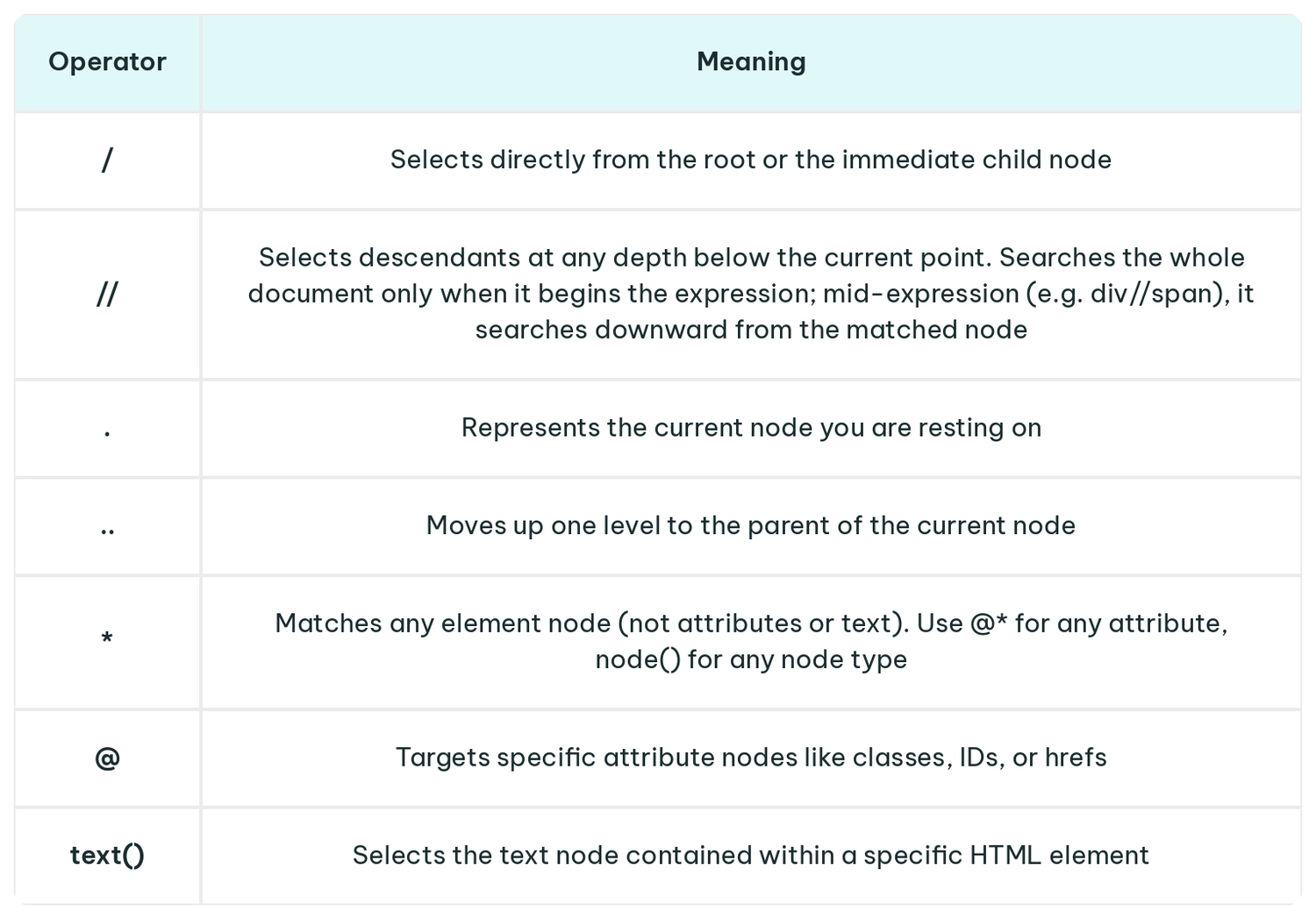
Combine these operators to build practical XPath expressions, like:
- //h1/text() to grab the main heading.
- //span[@class='price']/text() to isolate a price.
- //a[contains(@href,'product')]/@href to pull a URL.
Relying on an absolute path like /html/body/div[3]/main/div/ul/li[2]/a makes your scraper incredibly fragile, and it will likely break the moment site owners add a banner or tweak the navigation.
XPath Predicates and Advanced Filters
Square brackets [] act as predicates, filtering your matched nodes down to your exact specifications. These predicates handle the heavy lifting for filtering specific elements:
- Target exact attributes using [@id='main-content'] or [@data-type='sku'] to zero in on specific containers.
- Match partial strings using [contains(@class, 'button')] or [starts-with(@href, '/category/')], which is an essential tactic for handling dynamically generated classes .
- Clean up messy formatting using [normalize-space(.)='In Stock'], which collapses stray tabs and line breaks and flattens text spread across nested tags into a single normalized string before matching.
While positional filters like [1] or [last()] grab the first or last match, relying on visual order makes your scraper fragile. Instead, combine conditions using logical operators (and/or) to enforce strict rules, like requiring an element to have both a specific class and exact text.
XPath vs CSS Selectors
When it comes to XPath and CSS selectors, developers often prefer CSS selectors for simple data extraction because they are fast and instantly familiar to anyone who has built a website.
However, in complex cases, such as matching elements based on their text content or navigating upward to a parent or previous sibling, XPath is the better option. The choice between XPath and CSS selectors largely depends on the complexity of the DOM structure and whether you need bidirectional traversal capabilities.
A simple side-by-side comparison shows how both languages handle finding specific classes. While CSS is more concise, XPath sacrifices brevity for power:
- CSS: div.product-card > a.title
- XPath (exact match): //div[@class='product-card']/a[@class='title']
- XPath (partial match): //div[contains(@class, 'product-card')]/a[contains(@class, 'title')]
For framework-specific tips, check out our guide on searching by class in Beautiful Soup , or see how XPath vs CSS selectors compare in more detail.
Finding and Testing XPath in the Browser
Before writing your Python script , open Chrome or Firefox DevTools to inspect your target element and test your paths directly in the Elements panel. Avoid right-clicking an element to select “Copy XPath”, since browsers usually generate heavily nested, rigid paths that easily break during the next site update.
To quickly validate your XPath expressions, open the browser console and type $x("//your-xpath-here"). This instantly returns an array of matching nodes, which allows you to verify your logic against the live page.
A structured testing workflow saves hours of debugging:
- Inspect the element to understand its position within the HTML hierarchy.
- Draft your initial XPath using the most prominent attribute available.
- Anchor to stable attributes like data-testid or unique IDs, which developers rarely change.
- Test your final path across several page variations to ensure consistency.
This workflow keeps your XPath web scraping scripts robust from day one.
Using XPath With Python
Integrating XPath into your Python scripts requires choosing the right library. lxml excels at parsing static pages quickly, Selenium executes JavaScript for dynamic content, and Scrapy provides the architecture for massive, concurrent crawls.
The best part is that your XPath knowledge transfers seamlessly across all of them.
lxml for Static Pages
For standard static pages, parsing raw HTML elements with lxml offers lightning-fast XPath evaluation.
import requests
from lxml import html

response = requests.get('https://books.toscrape.com/')
tree = html.fromstring(response.content)
prices = tree.xpath("//p[@class='price_color']/text()")

print(prices)
Selenium for Dynamic Pages
Modern JavaScript frameworks build the DOM dynamically on the client side. You'll need a browser automation tool like Selenium to execute the JavaScript code and wait for the page to render before your XPath can locate the elements fully.
from selenium import webdriver
from selenium.webdriver.common.by import By

driver = webdriver.Chrome()
driver.get("https://quotes.toscrape.com/js/")

quotes = driver.find_elements(By.XPATH, "//span[@class='text']")
for q in quotes:
    print(q.text)

driver.quit()
Scrapy for Production Systems
Scrapy builds selectors directly into its response objects, letting you write XPath straight into your parsing methods while the framework handles the concurrency in the background.
import scrapy

class ProductSpider(scrapy.Spider):
    name = "products"
    start_urls = ["https://books.toscrape.com/"]

    def parse(self, response):
        links = response.xpath("//h3/a[contains(@href, 'catalogue')]/@href").getall()
        yield {"links": links}
Real-World XPath Examples
Theory only takes you so far. Reviewing practical patterns for common page structures will quickly speed up your development.
Product Pages
Ecommerce sites generally wrap their items in consistent grid layouts, making it straightforward to build reliable XPath expressions that target the internal details of each card.
- Extracting the product title: //div[@class='product-card']//h2/text()
- Grabbing the price tag: //div[@class='product-card']//span[contains(@class, 'price')]/text()
- Pulling the detail page URL: //div[@class='product-card']//a/@href
Articles
News aggregators and blogs follow predictable semantic structures, which allows you to use XPath for web scraping to pull article metadata with minimal effort.
- Isolating the main headline: //article//h1/text()
- Finding the publication date: //time[@datetime]/@datetime
- Extracting the author's name: //span[@rel='author']/text()
Tables
Financial dashboards and sports stats often use dense tables. When iterating through rows in your script, you must start your XPath with a dot (.) to represent the current element node, ensuring you only search inside that specific row.
- Selecting all data rows: //table[@id='stats']//tbody/tr
- Pulling the first column cell from a specific row: ./td[1]/text()
- Grabbing a cell with a specific class inside the row: ./td[@class='metric']/text()
Pagination
Crawling multi-page catalogs requires finding the “Next” button. Using normalize-space() is much safer than matching the text exactly, as it ignores the invisible whitespace and line breaks that frequently break standard text queries.
next_page_link = response.xpath("//a[normalize-space(text())='Next']/@href").get()
Common XPath Mistakes and How to Avoid Them
Small missteps in your XPath construction can lead to silent web scraping failures that break downstream data pipelines.
Watch out for these frequent pitfalls that trap developers:
- Hardcoding absolute paths that break the moment a site admin changes the HTML code.
- Relying on unstable, auto-generated CSS classes and IDs created by frontend frameworks like React or Vue, which change upon every new deployment.
- Casting overly broad queries like //a or //* pulls in massive amounts of irrelevant garbage from the HTML document.
- Blaming your XPath when the real issue is that you haven't waited for the JavaScript to render the DOM fully.
- Failing to normalize whitespace and formatting causes your script to miss strings padded with extra tabs.
- Neglecting to implement error handling or fallback XPath expressions for when your primary query inevitably fails.
Here is how a fragile approach compares to a highly resilient one when extracting a user profile link:
- Fragile: /html/body/div[2]/div/div[3]/ul/li[4]/a
- Resilient: //a[starts-with(@href, '/profile/') and @data-role='user']
Always comment the intent of your XPath in your code (e.g., “Grabs the user profile link”) so teammates can easily rewrite the logic when the site layout changes.
Finally, remember that even the perfect XPath won't save you from getting blocked, so ensure you know how to handle proxy error codes during extensive extraction runs.
FAQ
Is XPath always better than CSS selectors for web scraping?
Neither tool universally outclasses the other, as CSS selectors operate slightly faster and feature a simpler syntax for basic class-based lookups. Use XPath when you need complex logic that CSS cannot support, such as text-based matching or crawling backward to parent containers.
How do I choose stable attributes for XPath expressions?
When writing XPath expressions for your spiders, always look for semantic attributes like data-testid, name, or descriptive aria-labels that developers explicitly add for testing and accessibility purposes. Relying on these markers makes your scraper vastly more durable than anchoring to utility classes, which often change dynamically with every site build.
Can I use XPath to scrape sites that heavily rely on JavaScript?
Yes, but you must pair your XPath expressions with a browser automation tool like Selenium or Playwright that actually executes the scripts and builds the complete DOM before you attempt to pull data. If you try to run XPath against the initial server response using a standard HTTP library, you will just hit empty containers because the target elements don't exist yet.
Is using XPath for web scraping legal?
XPath simply dictates how your code navigates an XML or HTML document; the legality of web scraping depends entirely on the site's Terms of Service, local regulations, and the nature of the data you extract. Always respect the rules outlined in a site's robots.txt file and implement proper rate limiting to avoid degrading server performance.