Best Android Proxies for 2026: Top Mobile-Friendly Providers
Software comparisonsLearn about the best proxies for Android devices, types of Android proxies, and why you should use Android proxy servers on your phone.


Karolis Toleikis
Key Takeaways
-
Android proxies hide your IP address and route your internet traffic, making them essential for secure app testing, bypassing geo-restrictions, and social media management.
-
Choosing the right proxy type depends on your specific needs, with mobile and residential proxies offering the best legitimacy and datacenter proxies providing faster speeds.
-
You should always use reputable, paid proxy providers instead of free alternatives to guarantee data security, reliable performance, and access to large IP pools.
Just like an ordinary proxy server, an Android proxy is an intermediary between your device and the internet, routing traffic and changing your IP address. It’s one of the best ways to maintain privacy and anonymity on mobile devices, and setting up a proxy on Android is surprisingly easy.
Most Android devices have proxy settings, and there are proxy server apps to enable additional features. The only thing that might stop you is the overwhelming number of providers claiming to have the best proxies for Android. We’ve got this list down to the top five.
Why Use a Proxy on Android?
Proxy servers are commonly associated with business use cases, such as web scraping, ad verification, price monitoring, and others. While Android proxies can achieve all of it as well, proxies for Android are also used to gain more control over your network traffic and enhance your online privacy.
Android is the most widely used mobile OS, and setting up an Android proxy server gives some unique advantages. Android proxies enable app testing, social media management, and other IP address-sensitive tasks. Expect these benefits from all the best proxies for Android.
- Privacy and anonymity are ensured by concealing your Android device’s IP address, making it harder to track.
- Bypassing restrictions becomes possible since your internet traffic is routed through servers with IP addresses in other countries.
- Testing apps and websites often require proxy servers because they allow simulating traffic from different IP addresses in various locations.
- Improved performance comes from optimizing traffic, as a proxy server might be closer to the target server and have fewer restrictions.
Proxies for Android devices are often compared to VPNs, as both are well-suited for everyday tasks like changing your IP address. Unlike a VPN, however, a standard proxy is a lighter solution that simply masks your IP address without always inherently encrypting your traffic.
Unless, of course, you want additional features, such as encryption or a proxy manager for multiple IP addresses. Such proxy server apps are often needed with proxy servers since there are many different types of proxies for Android to choose from.
Types of Proxies That Work With Android
All proxy types can work as Android proxies, but several specific ones work especially well. Which is the best proxy for Android for you depends on your use case, but it’s important to understand the most popular ones before choosing.
- Mobile proxies, just like your Android device, use IP addresses assigned by mobile carriers over 3G, 4G, 5G, or LTE networks. They are difficult to detect and provide excellent access to services reserved for mobile devices.
- Residential proxy servers are hosted on physical devices that use residential internet service providers and their IP addresses. When used as proxies for Android, it allows for accurate targeting of geo-locations while blending in with the traffic.
- Datacenter proxies for Androids provide the best speed and lowest costs since they are run on virtual devices using powerful data center servers. Yet, these proxy servers are less reliable when you need to avoid restrictions and stay anonymous.
- ISP proxies combine residential and datacenter proxy servers by using IP addresses assigned by internet service providers while running in data centers. ISP proxies on Android are beneficial for use cases needing a balance between trustworthiness and performance.
Proxy servers can also be categorized based on the protocol they use. HTTP proxies are incredibly common, and while Android lets you enter them directly into your Wi-Fi proxy settings without additional apps, this native setup is typically only reliable for browser traffic.
To force native apps (like social media) to use any proxy, you will generally need a dedicated proxy manager app. SOCKS5 proxy servers will also need an additional Android proxy app, such as SocksDroid .
The best proxy for Android providers will also give you rotating, anonymous, transparent, and various other categorizations of proxies for Android. The above ones, however, are the main ones to know.
| Proxy type | Advantages | Disadvantages | Best for |
|---|---|---|---|
| Mobile proxies | Hard to detect and highly legitimate | Typically, one of the most expensive options | Social media management and app testing |
| Residential proxies | Blends in perfectly with regular user traffic | Can be slower depending on the host connection | Accurate geo-targeting and web scraping |
| Datacenter proxies | Offers the highest speeds and lowest costs | Higher chance of detection and blocking | Traffic-intensive tasks and speed requirements |
| ISP proxies | Excellent balance of high trust and fast speeds | Limited location diversity compared to other types | Reliable everyday tasks requiring stable connections |
Top Proxy Providers for Android in 2026
IPRoyal
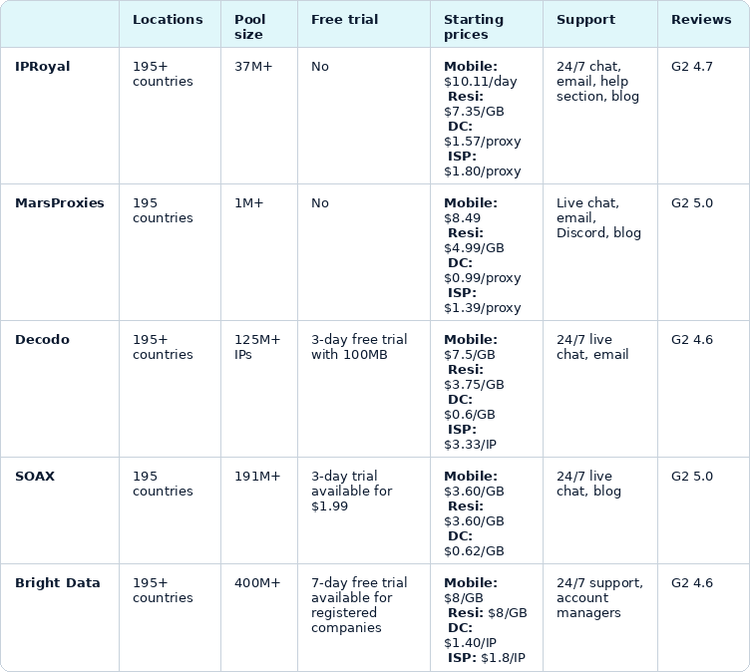
- Proxy locations: 195+ countries
- Pricing: Pay-as-you-go, subscription-based plans for IPs or bandwidth used
- Mobile proxies: Start from $10.11/day
- Residential proxies: Start from $7.35/GB
- Datacenter proxies: Start from $1.57/proxy
- ISP proxies: Start from $1.80/proxy
- Pool size: 37M+ IPs (total)
- Mobile proxies: 4.5M+ IPs
- Residential proxies: 64M+ IPs
- Datacenter proxies: Unspecified
- ISP proxies: 500K+ IPs
- Free trial: No
- Support: 24/7 support through chat or email, extensive help section, and blog
- Reviews: G2 4.7 (262 reviews)
IPRoyal is known for a 37+ million pool of residential, datacenter, ISP, and mobile proxies , fit for Android devices. Our Android proxies will seamlessly work on your device without additional proxy apps. You can start protecting your Android for under two dollars per proxy or even less, depending on your Android proxy type and needs.
Pros:
- Affordable proxies for Android
- Broad range of Android proxy types and plans
- Consistent uptime and speed
Cons:
- Fewer unique IPs, making the service less ideal for extremely demanding enterprise tasks
MarsProxies
- Proxy Locations: 190+ countries
- Pricing: Customizable subscriptions
- Mobile proxies: Start from $8.49
- Residential proxies: Start from $4.99/GB
- Datacenter proxies: Start from $0.99/proxy
- ISP proxies: Start from $1.39/proxy
- Pool size: 1M+ IPs (total)
- Mobile proxies: Unspecified
- Residential proxies: 1M+ IPs
- Datacenter proxies: Unspecified
- ISP proxies: Unspecified
- Free trial: No
- Support: Live chat, email, Discord, decent blog
- Reviews: G2 5 (7 reviews)
While less known and with a modest pool size of 1M+ IPs, MarsProxies positions itself well as one of the most affordable Android proxy providers in the market. Their mobile, residential, and ISP proxies remain affordable even if you need them for small tasks and don’t want to commit to subscriptions.
Pros:
- Flexible pricing plans
- Great uptime
Cons:
- Limited IP diversity in certain locations
Decodo
- Proxy Locations: 195+ countries
- Pricing: Pay-as-you-go, subscriptions, help articles
- Mobile proxies: Start from $7.5/GB
- Residential proxies: Start from $3.75/GB
- Datacenter proxies: Start from $0.6/GB (min $6 + VAT/month) or $0.035/IP (min $3.5 + VAT/month)
- ISP proxies: Start from $3.33/IP ($9.99 + VAT billed monthly)
- Pool size: 125M+ IPs (total)
- Mobile proxies: 10M+ IPs
- Residential proxies: 115M+ IPs
- Datacenter proxies: 100K+ IPs
- ISP proxies: Unspecified
- Free trial: 3-day free trial with 100MB
- Support: Live chat and emails 24/7
- Reviews: G2 4.6 (348 reviews)
Formerly known as Smartproxy, Decodo is known for aiming to provide decent residential, datacenter, mobile, and ISP proxies with a combined pool of over 125 million IPs. While the provider focuses more on scraping solutions, most of their servers can be used as Android proxies without additional proxy apps.
If you want to see how IPRoyal compares to Decodo, read our comparison here .
Pros:
- Mobile and residential Android proxies
- Sizeable proxy network
Cons:
- Pricing could be more flexible
SOAX
- Proxy Locations: 195 countries
- Pricing: Three plans are priced based on bandwidth, and a pay-as-you-go option
- Mobile proxies: Start from $3.60/GB ($90/month minimum)
- Residential proxies: Start from $3.60/GB ($90/month minimum)
- Datacenter proxies: Start from $0.62/GB ($90/month minimum)
- Pool size: 191M+ IPs (total)
- Mobile proxies: 33M+ IPs
- Residential proxies: 155M+ IPs
- Datacenter proxies: 300k+ IPs
- Free trial: 3-day trial available for $1.99.
- Support: 24/7 via live chat, blog
- Reviews: G2 5 (62 reviews)
Aimed more at business and enterprise users, SOAX offers some decent residential, datacenter, and ISP proxies. Although their proxies might not be the most affordable on the market, they will work well for almost any smaller task and even more demanding ones.
Pros:
- Large and diverse proxy network
- Enterprise-level support
Cons:
- Pricing tends to be on the higher side
Bright Data
- Proxy Locations: 195+ countries
- Pricing: Pay-as-you-go option and three plans based on bandwidth
- Mobile proxies: Start from $8/GB
- Residential proxies: Start from $8/GB
- Datacenter proxies: Start from $1.40/IP ($14/month minimum)
- ISP proxies: Start from $1.8/IP ($18/month minimum)
- Pool size: 400M+ (total)
- Mobile proxies: 7M+ IPs
- Residential proxies: 400M+ IPs
- Datacenter proxies: 1.3M+ IPs
- ISP proxies: 1.3M+ IPs
- Free trial: A 7-day free trial is available for registered companies.
- Support: 24/7, account managers, documentation
- Reviews: G2 4.6 (256 reviews)
Bright Data proxies are best for large data gathering projects, but some, such as mobile, residential, and ISP proxies, can be used as Android proxies as well. Whether paying as if you’re web scraping on a large scale with your phone is worth it depends on your budget and use.
Pros:
- One of the largest proxy networks
- Proxy manager tools
Cons:
- Might be too expensive for usage as Android proxies
How to Choose the Right Android Proxy
Your decision for proxy type and provider depends on your budget and use cases. Android proxies are most commonly used for tasks like social media management, anonymity, or bypassing geo-restrictions. For such scenarios, several factors should be considered.
- Proxy types. Make sure that your Android proxy provider has the main types of proxies. Mobile proxies are crucial for tasks like social media management, datacenter proxies for traffic-intensive tasks, while residential and ISP proxies can give you the best IP legitimacy.
- IP pool size. Check whether the provider has a larger pool of IPs available, not just in total, but for each proxy type. In case you need some specific countries, look at how many proxy servers are in the needed region.
- Location coverage. Bypassing geo-restricted content is much easier when your Android proxy provider has a wide choice of locations with dozens of IP addresses to choose from.
- Speed and reliability. The best proxy for Android providers is transparent with their proxy server status updates. Check the logs for any known issues and test Android proxies for your use cases. Avoid free proxies as they can cause more issues than save money.
- Reviews and support. Platforms like Trustpilot and G2 are your best bet to figure out whether proxies for Android really deliver what is advertised.
Conclusion
As long as you stick to the known industry names and avoid any free proxy offers, you can hardly miss with proxies. Some providers offer trials or refunds, and while you will likely need a simple third-party proxy manager app to route your traffic properly, the overall setup is highly accessible.
FAQ
How do I set up a proxy on Android?
Configuring an Android proxy involves navigating your device settings and manually entering the server details provided by your proxy service. You’ll need to enter the IP address and port number directly into your Wi-Fi network configuration menu to start routing your browser traffic through your new IP address.
How to use a SOCKS5 proxy on Android?
Since Android doesn’t natively support SOCKS5 protocols out of the box, you’ll need to download a third-party app like SOCKSdroid from the Google Play Store. These apps route your network traffic through the SOCKS5 server you specify. It works perfectly whether you’re using residential proxies or dedicated datacenter proxies.
What is the best free proxy for Android?
Relying on free proxies usually introduces significant privacy risks and drastically reduced browsing speeds. Instead of looking for a free option, you’re better off investing in premium solutions from specialized proxy companies.