10 Best Python HTTP Clients in 2026 (Compared & Tested)
Software comparisonsDiscover the 10 best Python HTTP clients in 2026, tested and compared for performance, async support, and use cases like web scraping and HTTP requests.


Kazys Toleikis
Key Takeaways
-
Choose a popular Python HTTP Client based on your use case: async, performance, or simplicity.
-
The Requests library is perfect for simple tasks, but async tools scale better for multiple HTTP requests.
-
For extensive web scraping or API workloads, tools with strong async support work best.
When building apps, automation scripts, or tools that interact with the internet, you need a way to talk to web servers. HTTP clients help Python developers send and receive data over the web using HTTP requests. Python HTTP clients are essential tools when you’re making HTTP requests to APIs, doing web scraping, or syncing data between systems.
Having the best Python HTTP clients on hand makes a big difference when handling web scraping tasks, sending asynchronous requests, or calling APIs.
What Is a Python HTTP Client?
While Python offers basic network capabilities in its standard library, a dedicated Python HTTP client lets your code send HTTP requests like GET or POST and receive responses, allowing your application to interact with external servers. Developers use these tools to pull live data from APIs, scrape websites, or synchronize databases across different systems.
Synchronous and Asynchronous Clients
HTTP clients fall into two categories based on how they handle execution flow: synchronous and asynchronous.
Synchronous clients process one request at a time and block the rest of the program.
Asynchronous clients let your code handle multiple concurrent connections while waiting for server responses. It’s best to use a synchronous client for straightforward automation scripts and switch to an asynchronous client when you need to fetch data from multiple endpoints concurrently.
Selection Criteria
HTTP clients have different design philosophies: some optimize for speed, some focus on simple syntax, and others work on different benefits. We evaluated these Python HTTP libraries based on many different features:
- Performance metrics assess whether the client maintains fast and reliable response times under heavy traffic.
- Async support shows whether the library handles asynchronous operations and concurrent connections to prevent network bottlenecks.
- Clear documentation helps teams troubleshoot network errors quickly.
- Connection pooling maintains open connections across multiple requests to minimize latency and preserve system resources.
- Modern protocol support speeds up data transfer through native HTTP/2 implementations and stream multiplexing.
- Active maintenance and community involvement ensure the package is likely to receive timely security patches.
- Proxy integration helps route traffic, manage access limits, and maintain reliable connections during data extraction.
Tools that score well across these criteria represent the best Python HTTP clients available. Note that HTTPbin, which is used for testing, sometimes crashes and returns a 503 error. JSON returns raise an exception – the examples will still work when HTTPbin comes back online.
Top 10 Python HTTP Clients
1. Requests
The Requests library is the gold standard for synchronous HTTP requests, serving as a much friendlier alternative to built-in modules in the standard library. Requests are ideal for quick scripts, simple API interactions, and any general-purpose synchronous tasks where developer productivity is most important.
Pros:
- Its API is exceptionally intuitive, readable, and beginner-friendly
- It’s robust, tried-and-tested, and supported by a massive community and ecosystem
Cons:
- It’s purely synchronous, making it inefficient for high-concurrency tasks
- It lacks native support for modern protocols like HTTP/2
Installation:
pip install requests
Example:
import requests

# GET request
response = requests.get('https://httpbin.org/get')
print(response.json())

# POST request
response = requests.post('https://httpbin.org/post', json={'key': 'value'})
print(response.json())
2. HTTPX
A modern client that offers a requests-compatible API with support for both synchronous and asynchronous operations. It’s a great choice for new general-purpose applications, as it allows projects to start synchronously and adopt async patterns later without changing libraries.
Pros:
- Its dual sync/async API provides maximum flexibility for evolving project requirements
- It natively supports modern features like HTTP/2 and is fully type-annotated
Cons:
- Its ecosystem of third-party plugins is less mature than the one for requests
- It can be marginally slower than fully async libraries in extremely high-concurrency benchmarks
Installation:
pip install httpx
Example:
import httpx
import asyncio

async def main():
    # Recent httpx versions take a single proxy argument
    async with httpx.AsyncClient(
        proxy="http://username:password@proxy-server:port"
    ) as client:
        response = await client.get('https://httpbin.org/ip')
        print(response.json())

asyncio.run(main())
3. aiohttp
A high-performance, async-native library built for asynchronous programming, providing both an HTTP client and a web server framework for the asyncio ecosystem. It’s the top choice for building high-concurrency, asyncio-based apps like web scrapers, API gateways, and real-time services using WebSockets.
Pros:
- Delivers top-tier performance for I/O-bound workloads under high concurrency
- Offers first-class, integrated support for both client and server WebSockets
Cons:
- It has a steep learning curve and requires a good understanding of asyncio
- The API is verbose for simple, single requests compared to synchronous libraries
Installation:
pip install aiohttp
Example:
import aiohttp
import asyncio

async def main():
    async with aiohttp.ClientSession() as session:
        # GET request
        async with session.get('https://httpbin.org/get') as response:
            print(await response.json())

        # POST request
        async with session.post('https://httpbin.org/post', json={'key': 'value'}) as response:
            print(await response.json())

asyncio.run(main())
4. Urllib3
It’s a high-performance library that powers Requests and offers better connection pooling and reliability than Python's standard library tools. It’s best for library developers or apps that require fine-grained control over network connections and retry logic.
Pros:
- Offers excellent performance and efficiency due to advanced connection pooling
- Provides a highly configurable and powerful retry mechanism for resilience against network failures
Cons:
- The API is significantly more verbose and less intuitive compared to higher-level libraries
- Requires manual handling for common tasks, such as encoding and decoding JSON responses
Installation:
pip install urllib3
Example:
import urllib3
import json

http = urllib3.PoolManager()

# GET request
response = http.request('GET', 'https://httpbin.org/get')
print(json.loads(response.data.decode('utf-8')))

# POST request
response = http.request(
    'POST',
    'https://httpbin.org/post',
    json={'key': 'value'}
)
print(json.loads(response.data.decode('utf-8')))
5. PyCurl
PyCurl is a high-speed Python interface for libcurl, which offers maximum performance, multi-protocol support, and low-level control. It’s essential for specialized applications where performance, multi-protocol support (FTP, SMTP, etc.), or fine-grained control over the network stack is needed.
Pros:
- It’s generally the fastest HTTP client available due to its thin C-based wrapper
- Inherits the vast feature set of libcurl, including extensive protocol support and deep configuration options
Cons:
- The API is notoriously complex, verbose, and considered un-Pythonic
- Installation can be complex, often requiring manual installation of system-level dependencies
Installation:
pip install pycurl
Example:
import pycurl
import json
from io import BytesIO

buffer = BytesIO()
c = pycurl.Curl()

# GET request
c.setopt(c.URL, 'https://httpbin.org/get')
c.setopt(c.WRITEDATA, buffer)
c.perform()
c.close()

print(json.loads(buffer.getvalue().decode('utf-8')))
6. Uplink
A unique, declarative client that turns REST API definitions into clean, reusable Python classes. It’s perfect for building clean, maintainable, and reusable client wrappers for well-defined RESTful APIs, abstracting away HTTP boilerplate.
Pros:
- Significantly reduces boilerplate code while automatically handling JSON responses, which makes API interaction cleaner and more readable
- It’s flexible, allowing requests or aiohttp to be used as the backend for sync or async operations
Cons:
- It’s highly specialized for structured REST APIs and not suited for general web scraping
- The layer of abstraction reduces direct, low-level control over the request-response cycle
Installation:
pip install uplink
Example:
from uplink import Consumer, get, post, Body, returns

class HttpBinApi(Consumer):
    @returns.json
    @get("/get")
    def get_data(self):
        pass

    @returns.json
    @post("/post")
    def post_data(self, payload: Body):
        pass

api = HttpBinApi(base_url="https://httpbin.org")

# GET request
print(api.get_data())

# POST request
print(api.post_data({"key": "value"}))
7. httplib2
A mature synchronous client distinguished by its powerful, built-in support for HTTP caching. It’s the perfect choice for applications that repeatedly request the same resources and can benefit from an intelligent, specification-compliant caching mechanism.
Pros:
- Its primary strength is a superior, built-in caching system that respects server headers
- It’s a feature-complete library covering a wide range of HTTP specifications
Cons:
- Its API is lower-level and more complex than modern alternatives like the requests library
- It’s an older library that has been largely superseded in popularity for new projects
Installation:
pip install httplib2
Example:
import httplib2
import json

# Initiates httplib2 with a local .cache directory
h = httplib2.Http(".cache")

# GET request
headers, content = h.request("https://httpbin.org/get", "GET")
print(json.loads(content.decode('utf-8')))

# POST request
headers, content = h.request(
    "https://httpbin.org/post",
    "POST",
    body=json.dumps({'key': 'value'}),
    headers={'Content-Type': 'application/json'}
)
print(json.loads(content.decode('utf-8')))
8. GRequests
A library that combines the simple API of requests with the gevent concurrency model for asynchronous requests. It’s a potential option for adding simple concurrency to existing request-based scripts, but it should be used with caution due to its age and lack of maintenance.
Pros:
- Provides a very familiar API for developers already proficient with requests
- Achieves concurrency across multiple URLs with a simple map() function call
Cons:
- It relies on gevent and monkey-patching, which is an outdated paradigm in the modern asyncio ecosystem
- The library is not actively maintained, and its own developers recommend alternatives
Installation:
pip install grequests
Example:
import grequests

# Setting up multiple GET requests
urls = [
    'https://httpbin.org/get',
    'https://httpbin.org/get?item=2'
]

# Create a generator of unsent requests
rs = (grequests.get(u) for u in urls)

# Send them all concurrently
responses = grequests.map(rs)

for response in responses:
    print(response.json())
9. Tornado
The integrated asynchronous HTTP client is designed to work seamlessly within the Tornado web framework. It’s the most natural choice for making outbound HTTP requests from within an application already built on the Tornado framework.
Pros:
- Offers seamless integration with the Tornado IOLoop and concurrency model
- It’s a mature, battle-tested, and performant client for high-concurrency environments
Cons:
- It’s tightly coupled to the Tornado framework and not designed as a general-purpose client
- Its design originally predates async/await, and while it now supports those features, some legacy patterns remain
Installation:
pip install tornado
Example:
import tornado.ioloop
from tornado.httpclient import AsyncHTTPClient
import json

async def main():
    http_client = AsyncHTTPClient()

    # GET request
    response = await http_client.fetch("https://httpbin.org/get")
    print(json.loads(response.body))

    # POST request
    response = await http_client.fetch(
        "https://httpbin.org/post",
        method="POST",
        body=json.dumps({'key': 'value'}),
        headers={'Content-Type': 'application/json'}
    )
    print(json.loads(response.body))

if __name__ == "__main__":
    tornado.ioloop.IOLoop.current().run_sync(main)
10. Treq
A requests-like client library explicitly built for the Twisted event-driven networking engine. It’s the definitive high-level client for making HTTP requests in any project built on the Twisted framework, simplifying its complex networking APIs.
Pros:
- Provides a familiar, requests-inspired API within the complex Twisted ecosystem
- It’s the idiomatic choice for Twisted projects, integrating perfectly with its Deferreds
Cons:
- Its use is entirely coupled to the Twisted framework, making it unsuitable for any other context
- Its ecosystem and documentation are far smaller than those of mainstream clients, which makes troubleshooting harder
Installation:
pip install treq
Example:
from twisted.internet import task
import treq

async def main(reactor):
    # GET request
    response = await treq.get('https://httpbin.org/get')
    content = await treq.json_content(response)
    print(content)

    # POST request
    response = await treq.post('https://httpbin.org/post', json={'key': 'value'})
    content = await treq.json_content(response)
    print(content)

# Run the Twisted reactor
task.react(lambda reactor: task.deferLater(reactor, 0, main, reactor))
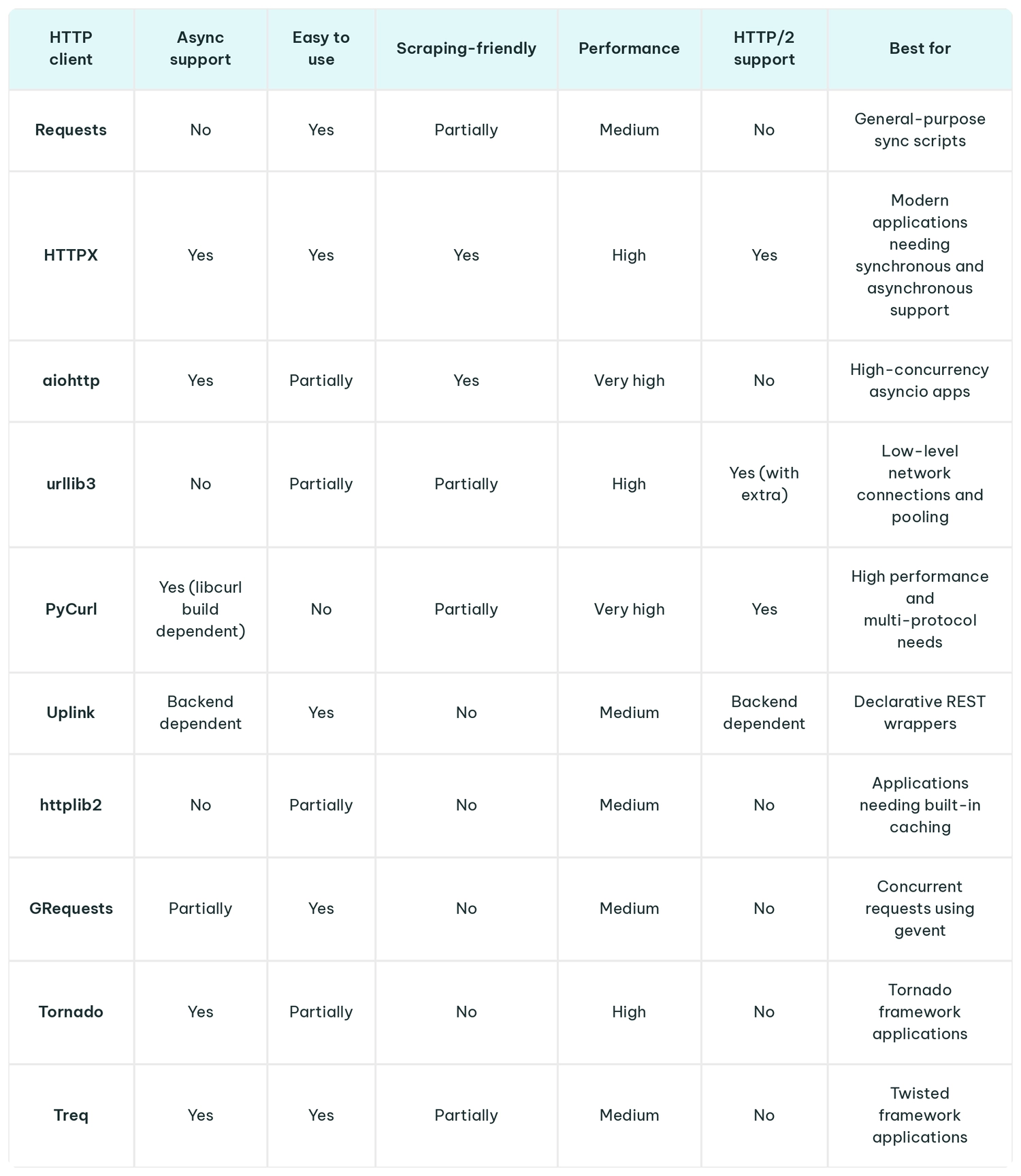
Comparison Table
Using Python HTTP Clients With Proxies
When scraping at scale, an HTTP client relies heavily on the IPs it uses, and since modern websites use rate limits, IP blocks, and geo-restrictions, they can easily stop scrapers running from datacenter IPs. Routing requests through proxy networks helps distribute traffic, which lets you manage rate limits and improve extraction success rates.
Most Python HTTP clients simplify proxy configuration. Requests accepts a proxies dictionary, while recent versions of HTTPX use a single proxy parameter to route traffic.
Example with Requests:
import requests

# Set up your proxy dictionary
proxies = {
    "http": "http://username:password@proxy-server:port",
    "https": "http://username:password@proxy-server:port"
}

# Pass it to your request
response = requests.get('https://httpbin.org/ip', proxies=proxies)
print(response.json())
Example with HTTPX (Async):
import httpx
import asyncio

async def main():
    # Note the slightly different dictionary keys for httpx
    proxies = {
        "http://": "http://username:password@proxy-server:port",
        "https://": "http://username:password@proxy-server:port"
    }

    async with httpx.AsyncClient(proxies=proxies) as client:
        response = await client.get('https://httpbin.org/ip')
        print(response.json())

asyncio.run(main())
While the client configuration is simple, it’s important to choose the right proxy type as it will define your success rates. Datacenter IPs often get flagged quickly by targets, so it’s not smart to use them for highly protected targets.
IPRoyal's residential proxies route requests through real home internet connections, so each request carries a residential IP instead of a datacenter one. Mobile proxies sit at the top end for the hardest targets, but residential IPs already deliver far higher success rates than datacenter IPs for scraping and similar workloads.
How to Choose the Right HTTP Client
Choosing a tool comes down to your project requirements. There’s no single best client for every situation, but you can narrow your options by matching your needs to the scenarios below:
- If you want simplicity, use Requests. For simple and straightforward tasks where no advanced interactions are needed, Requests is the most popular choice as it minimizes boilerplate and remains highly readable.
- If you need async performance, use aiohttp or HTTPX. When handling concurrent workloads or building asynchronous applications, you need non-blocking clients. HTTPX provides a combined synchronous and asynchronous API, and aiohttp is great when it comes to dedicated asyncio performance.
- If you want low-level control, use urllib3. If you’re managing connection pools or customizing retry strategies, urllib3 gives you the necessary core mechanics.
- If you want maximum speed, use PyCurl. When high performance and minimal overhead are required, or if you need multi-protocol support beyond HTTP, PyCurl offers a fast C-based wrapper around libcurl.
- If you're scraping dynamic or protected sites, use Proxies and Rendering. You need to pair your client with residential proxies to manage rate limits and geo-restrictions. If you’re going for targets that are rendered with JavaScript, you’ll need to combine your client with a headless browser.
- If you like structured, class-based API wrappers, use Uplink. If you’re consuming a RESTful API and want to maintain declarative code without repetitive boilerplate, Uplink can be a good choice.
Conclusion
As mentioned before, to find the best Python HTTP clients for your projects, you need to define what you’re trying to achieve. If you only need to send a few HTTP requests, there’s no need for an advanced tool, and you can stick with the basics like the Requests library.
But if you’re handling multiple requests or doing advanced web scraping, choose a client that comes with async support or other performance perks you need.
Some tools offer modern features and flexibility, while others give comfort and simplicity. The right balance depends on your goals, team, and codebase.
FAQ
What is the best Python HTTP client for beginners?
Requests is the standard choice for beginners since its API is highly readable and the setup required is minimal. You can easily make GET and POST requests using only a few lines of code.
What is the best async HTTP client for Python?
It all depends on the project you’re running:
- HTTPX is best if you need a requests-compatible API with both synchronous and asynchronous support, HTTP/2, and type annotations
- aiohttp suits high-concurrency asyncio applications like web scrapers or microservices that need integrated WebSocket support
What's the difference between Requests and HTTPX?
HTTPX models its API after Requests but has three major differences:
- Async support. Requests is synchronous. HTTPX offers both synchronous and asynchronous APIs.
- HTTP/2 support. HTTPX natively supports HTTP/2, while Requests supports HTTP/1.1.
- Type annotations. HTTPX includes type annotations for better IDE autocompletion and checking.
What is the fastest Python HTTP library?
PyCurl is generally the fastest Python HTTP client because it’s a C extension wrapping libcurl. For pure-Python or async workflows where C dependencies are difficult to manage, aiohttp offers high throughput for async tasks, while urllib3 provides fast synchronous performance using connection pooling.
Do I need proxies with a Python HTTP client for web scraping?
Yes. If you scrape websites at scale or target protected platforms, you’ll need to get yourself a pool of rotating residential proxies, like the ones we provide at IPRoyal. If you don’t, you will likely trigger rate limits, CAPTCHAs, and IP bans.
Can Python HTTP clients handle HTTPS requests securely?
Yes. Major Python HTTP clients like Requests, HTTPX, urllib3, and aiohttp handle SSL/TLS certificate verification by default using system trust stores or CA bundles like certifi. They enforce encryption and domain verification to protect against man-in-the-middle (MITM) attacks unless explicitly configured otherwise.