How to Crawl a Website Without Getting Blocked in 2026
TutorialsLearn how proxies, headless browsers, and other tools help you scrape websites without getting blocked.


Eugenijus Denisov
Key Takeaways
-
Rotating high-quality proxies and matching your TLS fingerprints to your User-Agent helps prevent detection when you scrape websites.
-
Headless browsers require significant computing power, so use them only when you need to render dynamic content or solve complex JavaScript challenges.
-
Targeting backend APIs and hidden JSON endpoints is usually faster and cleaner, though you'll still need to work around their specific rate limits and token requirements.
Modern anti-bot systems analyze every connection to prevent bots from overloading their servers or stealing their information. All of it happens long before the page even loads up on your screen. To leverage scraping without getting blocked, sophisticated web scrapers need to mimic natural user behavior, strictly adhere to site policies, and minimize the patterns that typically trigger security alerts.
This guide explains how modern anti-bot systems operate and how to plan your web scraping approach. We’ll cover rotating IPs , spoofing browser fingerprints, mimicking human behavior, and deciding when to skip HTML parsing entirely in favor of a web scraping API.
How Websites Detect and Block Web Crawlers
Multi-layered anti-bot systems from vendors like Cloudflare, Akamai, DataDome , and HUMAN Security instantly analyze dozens of variables the moment you connect:
- Checking your IP address history and the reputation of your hosting provider or ASN.
- Tracking the exact volume of requests hitting the server from your subnet.
- Flagging geographical anomalies, like an IP address originating from a location that makes no logical sense for the site’s audience.
- Analyzing your TLS handshake to ensure your connection matches the cryptographic profile of an actual web browser.
- Running deep browser fingerprint checks, from canvas rendering to installed fonts, to catch mismatches with your declared User-Agent string.
- Scoring behavioral patterns, like cursor movements and click rates, as you navigate the site.
Understanding these layers helps you recognize the indicators that security platforms send when your web scraper triggers an alarm. Common block signals often show up immediately upon requesting a URL, such as receiving a hard 403 Forbidden, a 429 Too Many Requests, or a Cloudflare 1020 WAF block. Similarly, you might hit DataDome “Access Denied” pages that completely stop your web scraping progress.
Beyond immediate blocks, security systems also use other tactics. You may face legacy CAPTCHAs or modern invisible challenges, like Turnstile, that prevent the target content from loading entirely. Alternatively, your scraper might get redirected to intermediate verification pages that trap your script and burn your IP address, or you could stumble into hidden honeypot links designed specifically to catch automated bots.
Finally, block signals aren’t always obvious errors. A popular deceptive tactic is sending an HTTP 200 success code that delivers a page completely stripped of the structured data you need, which is also known as shadow-banning.
Plan Before You Crawl
Jumping straight into web scraping will most likely result in failure. You need to take your time to map out the approach, which will ensure your web scraper scales smoothly while dealing with browser fingerprinting, managing JavaScript execution, and using different IP addresses to bypass anti-bot systems.
- Reviewing the robots.txt file for Disallow and Crawl-delay directives to understand the site’s baseline rules.
- Checking the Terms of Service to understand the platform’s legal and operational boundaries.
- Deciding whether to parse raw HTML or intercept backend APIs for your specific data collection needs.
- Running a small-scale web scraping test to validate your logic and discover unexpected roadblocks.
- Only maintain session continuity when explicitly required (like for logged-in states), as long-lived web scraping sessions making quick requests are massive red flags.
Before you scrape websites, define exactly what data you need and how often you need it rescraped. If you go in aimlessly, your web scraping operation will likely be caught quickly.
Rotate IP Addresses and Manage Proxies
Routing thousands of requests through a single IP address is the fastest way to trigger rate limits, connection errors, and earn a permanent ban . Most popular options to choose from are datacenter, residential, and mobile proxies.
Datacenter proxies are fast and cheap, but because they originate from known cloud providers, modern security systems often block them by default on your very first request.
Residential proxies route your traffic through real household connections, blending your web scraper into the background noise of everyday internet users.
Global Pool, Precise Targeting, Zero Contracts
Premium Residential Proxies
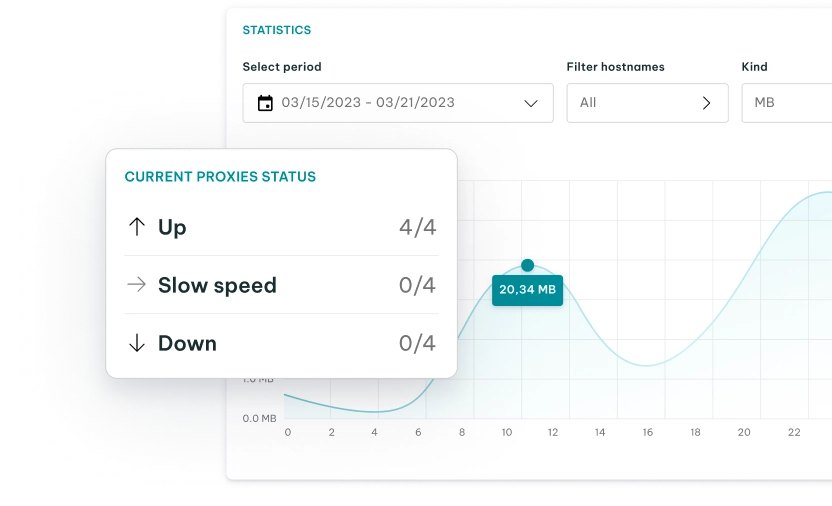
Mobile proxies leverage cellular networks where carriers use CGNAT to assign the same IP address to hundreds of smartphones simultaneously. This makes it incredibly difficult for platforms to ban the IP address from mobile proxies without locking out legitimate customers.
For effective proxy management and data collection, you’ll need to continuously monitor your pools for 403 Forbidden errors, 429 Rate Limits, challenge loops, and unusual latency spikes.
Make sure you always route your traffic through IP addresses that match your target audience from a geographic standpoint, and ensure your Accept-Language header and JavaScript timezone browser fingerprints perfectly match that location.
Use Realistic Headers and Browser Fingerprints
Your request metadata tells a lot about your software. Blindly rotating a popular User-Agent while keeping the same browser fingerprint is a massive red flag that will instantly give you away, as modern WAFs can detect a single device masquerading as dozens of different browsers.
- Include realistic Accept, Referer, and Sec-Fetch headers, and ensure your HTTP/2 pseudo-headers (like :method and :authority) are ordered exactly as a typical web browser would send them.
- Modern tracking scripts deploy sophisticated browser fingerprinting to identify headless automation. They will check the navigator.webdriver flag, enumerate your installed fonts, and test your Canvas or WebGL rendering capabilities.
- Security systems also deeply analyze your TLS fingerprint. They will instantly flag handshakes from standard Python libraries or curl commands because they lack the specific cryptographic signatures of a commercial browser.
To scrape without getting blocked, your User-Agent, TLS profile, system timezone, hardware fingerprint, and screen resolution must flawlessly describe the exact same physical device.
Craft Human-Like Request Patterns
You need to make sure your web scraping bot mimics human behavior. Otherwise, you can expect anti-bot systems to catch you quickly.
- Implement randomized delays between actions to prevent your web scraper from falling into an easily identifiable, bot-like cadence.
- Calculate sleep intervals using a Gaussian distribution to provide a more organic variance than fixed, static sleep commands.
- Ensure your navigation path creates a logical breadcrumb trail through the site architecture, rather than teleporting directly to deep-linked URLs.
- Avoid manually requesting CSS or images to look human; real browsers fetch these concurrently via HTTP/2 multiplexing, so faking it sequentially is a massive red flag. (If you need asset-level fidelity, use a headless browser).
- Avoid strict, sequential URL progressions, like iterating straight from /page/1 to /page/2, to keep your network requests looking unpredictable.
Advanced anti-bot systems continuously evaluate timing patterns and navigation depth. If you are executing JavaScript, they are also mathematically scoring your cursor trajectories and scroll events to ensure they look human.
Implement a dynamic backoff strategy: voluntarily slow down your operations the moment you notice server latency beginning to spike.
When to Use Headless Browsers
Single-page applications built on React, Vue, or Angular often rely on client-side rendering, forcing you to use a headless browser when data only materializes in the DOM after JavaScript executes.
- Logging into secured portals to access specialized dashboards often requires a full browser environment to handle complex authentication flows.
- Rendering content that depends entirely on continuous JavaScript execution is impossible for standard HTTP clients.
- Solving complex visual challenges or slider CAPTCHAs demands the programmatic cursor movements that a stealth-patched headless browser provides.
- If data is loaded via an asynchronous API call, skip the browser entirely and replicate the underlying HTTP request instead.
Be aware that spinning up a basic headless browser with default settings instantly flags you to competent WAFs. Furthermore, these rendering engines consume enormous amounts of CPU and memory, so use them sparingly.
Handle CAPTCHAs, Honeypots, and Other Traps
Hitting a sudden CAPTCHA or block usually means an underlying issue, like a burned IP, erratic navigation, or a mismatched fingerprint, has tipped off the server. When this happens, you may encounter traditional defenses like reCAPTCHA v2 and v3, which require generating valid cryptographic tokens to prove your humanity.
Similarly, hCaptcha relies on complex visual puzzles and strict behavioral scoring that frequently stall automated extraction pipelines.
Other modern defenses, such as Cloudflare Turnstile, take a different approach by relying almost entirely on invisible, hardware-based cryptographic proofs that execute seamlessly behind the scenes.
On the other end of the spectrum, you might still encounter legacy image and audio CAPTCHAs that force you to parse distorted text or use speech-to-text APIs, though these are becoming increasingly rare.
Beyond CAPTCHAs, administrators often employ passive traps. They embed hidden honeypot links in their HTML, styling them with zero-pixel dimensions or transparent CSS, ensuring that only an automated bot parsing the raw DOM would attempt to click them.
When and How to Use CAPTCHA Solving
Third-party solver APIs (like CapSolver or AntiCAPTCHA) are necessary fallbacks, but relying on them as your primary strategy creates terrible bottlenecks and skyrocketing costs.
Generating a high volume of CAPTCHAs means your web scraper is failing fundamentally: you likely have misconfigured proxies, burned IPs, or a completely robotic fingerprint.
Optimize Request Patterns and Error Handling
Building a resilient architecture demands operational discipline and a willingness to adapt as target websites update their bot defenses.
- Randomizing your crawl paths prevents your scripts from carving deep, predictable grooves into the server logs.
- Implementing strict global and per-domain rate limits ensures you never accidentally DDoS the target infrastructure.
- Using adaptive backoff, adjusting your request speed based on the HTTP response codes you receive, protects your proxy pools from sudden bans.
- Logging the full HTML payloads of unexpected responses (including deceptive 200 OKs) gives you the forensic data needed to debug shadow-bans and stealth challenges.
- Tracking your overall success rate and verifying data completeness saves you from silent blocks, where a page loads normally but critical data fields are stripped, preventing you from archiving millions of empty records.
- Run automated regression tests against a list of stable URLs to verify your core extraction logic and detect early site architecture changes.
Treat data quality monitoring as an essential part of your unblocking strategy. Quietly ingesting bad HTML or stale responses ultimately causes far more damage to your database than encountering a hard block.
Favor APIs and Cached Sources When Possible
The easiest way to avoid getting blocked is to sidestep the frontend completely and find alternative data channels.
- Official public APIs offer a sanctioned, structured path that eliminates the need to scrape HTML altogether.
- The DevTools Network tab frequently reveals hidden XHR/Fetch requests returning clean JSON. However, you must still perfectly replicate the frontend’s headers, TLS fingerprint, and dynamic auth tokens to avoid API blocks.
- Intercepting mobile app APIs (using a Man-in-the-Middle proxy) often yields cleaner, less-protected JSON endpoints than the website’s browser-based frontend.
For non-real-time research, pulling historic records from the Wayback Machine or Common Crawl lets you bypass security platforms entirely, provided you can accept slightly stale data.
FAQ
Is it legal to crawl any website if the data is public?
While scraping public data is generally legal in many jurisdictions, it’s not a “get out of jail free” card. You should avoid bypassing security controls (like CAPTCHAs) and always review local laws, such as the CFAA in the US, and the site’s Terms of Service before starting.
How many requests per second can I send without getting blocked?
There is no magic number. Modern rate limiting is based on request density and behavior. Sending more than one request every few seconds from a single IP address is a common trigger for rate-limit blocks, but your priority should be scaling your proxy pool rather than just pushing for more speed.
Can a website always tell I’m scraping, even if I use a headless browser?
Yes. Modern security tools run active telemetry to check your hardware concurrency, WebGL rendering, and cursor trajectories. A standard headless browser with default settings is immediately identifiable as automated.
What signals show that my web crawler is starting to get blocked?
Watch for increased latency, frequent CAPTCHA prompts, redirects to verification pages, or shadow-banned responses where the HTML is stripped of actual content. These are all clear precursors to a full network block.