What Is a UDP Proxy? How It Works, Uses, and Limitations
Proxy fundamentalsLearn what a UDP proxy is, how it works, its common use cases and limitations, and how it compares with TCP, SOCKS5, HTTP proxies, and VPNs.


Kazys Toleikis
Key Takeaways
-
UDP proxies forward real-time traffic, making them ideal for activities that require speed.
-
UDP proxies hide your IP address but, unlike VPNs, don't encrypt your traffic.
-
The UDP protocol prioritizes speed over reliability, so some data can be lost and sent incomplete.
-
To choose the right UDP proxy provider, consider UDP support, server locations, latency and jitter, bandwidth, and security policies.
A UDP proxy is a proxy server that forwards User Datagram Protocol (UDP) packets between a client and a destination server. It receives datagrams from your application, rewrites the source IP address to its own, and passes them on without the handshakes and delivery checks a TCP connection requires.
That makes a UDP proxy server useful for real-time workloads like live streaming, VoIP calls, and online gaming, where low latency matters more than guaranteed delivery.
This guide covers everything you need to know about UDP proxies. We’ll explain how they work and go over the main benefits and limitations to help you get a better idea of UDP proxies and how they can support your online activities.
What Is UDP?
User Datagram Protocol (UDP) is a transport layer connectionless protocol that’s included in the Internet Protocol Suite. In simpler words, unlike Transmission Control Protocol (TCP), UDP transmits data packets, also called datagrams, directly to the end destination without requiring an active three-way handshake for faster data movement.
| Transmission Control Protocol (TCP) is a transport-layer protocol that offers reliable and fully checked data delivery between devices. |
|---|
UDP has no retransmission mechanism at all. If a datagram is lost or corrupted in transit, it’s simply gone as the protocol never asks for it again. That’s a deliberate trade-off: as a connectionless protocol, UDP keeps overhead low so data keeps flowing in real time, which suits use cases that need immediate delivery more than they need a complete data set.
What Is a UDP Proxy?
A UDP proxy is an intermediary server that sends UDP packets from client applications to destination endpoints. When a user sends a UDP-based request, a UDP proxy receives the request, replaces the packet header with the proxy’s IP address, and forwards the request to the intended destination.
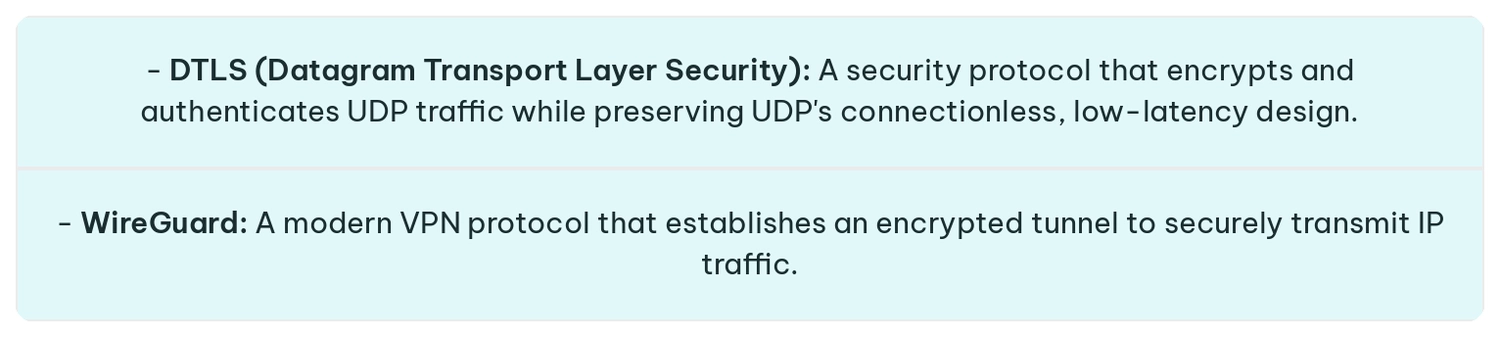
Overall, a standard UDP proxy works at the transport or application layer to send data to end destinations as soon as possible, which means that the data packets aren’t encrypted by default. If users want their data encrypted, they need to add an additional security layer like DTLS or WireGuard.
How Does a UDP Proxy Work?
A UDP proxy forwards UDP packets from a client, possibly altering them along the way, and then sends them to their destination. Unlike a TCP proxy, a UDP proxy doesn’t set up the actual connection, so it can forward data packets quickly and with minimal overhead.
When the destination replies, it sends the response to the connecting UDP proxy server, which processes the response and finally sends it to the client.
UDP Proxy vs. TCP Proxy, SOCKS5, HTTP Proxy, and VPN
There are different proxy types and protocols, so understanding where UDP proxies fit and what use cases they benefit is crucial for identifying the right proxy for you.
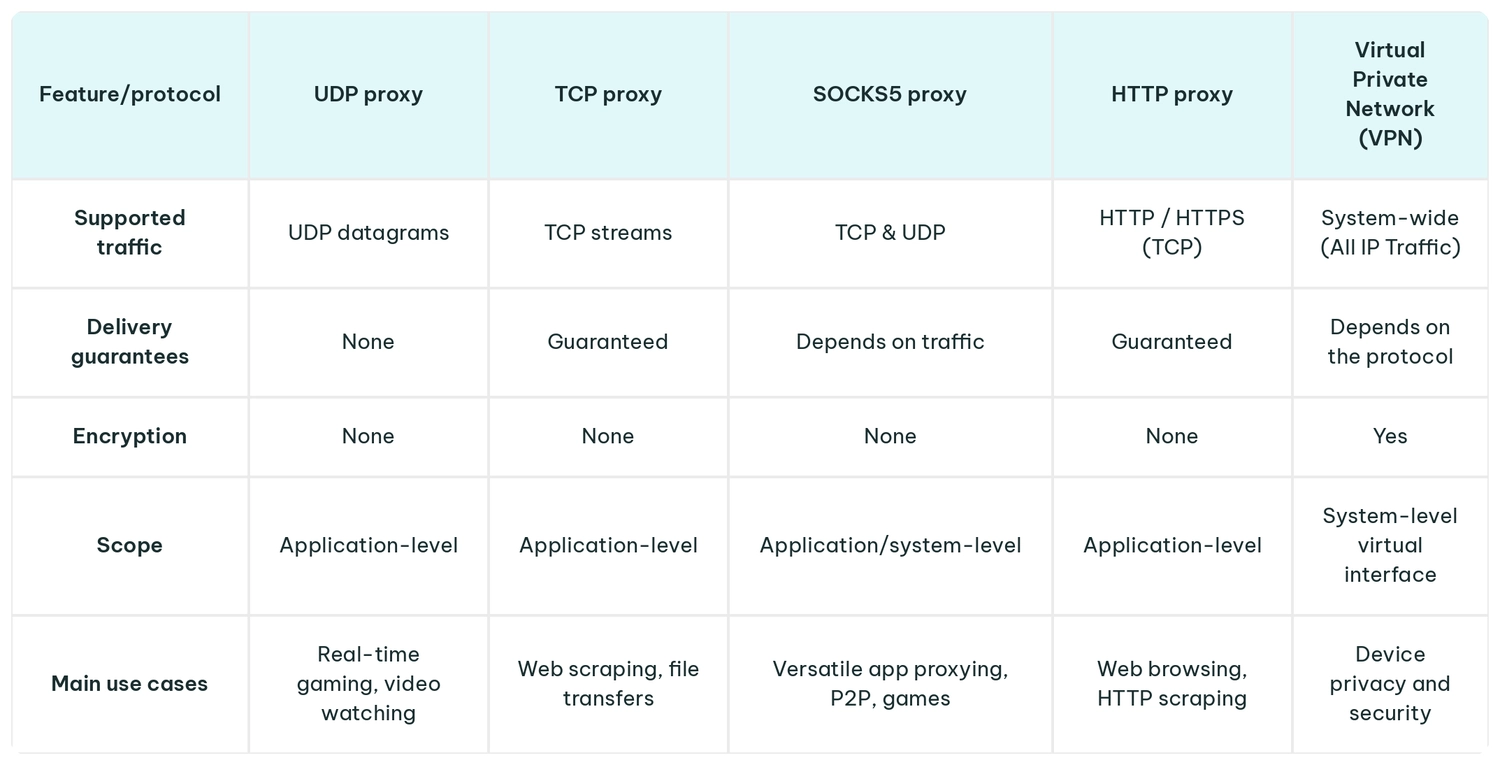
The quickest way to read this table: if your traffic is web-based, an HTTP proxy is usually the right proxy server for the job. HTTP proxies are widely used for web-related activities as they understand HTTP and HTTPS requests, can cache and filter content, and offer content-filtering and access-control features that a transport-layer relay can’t.
What an HTTP proxy can’t do is carry UDP, since it only handles TCP connections. A SOCKS5 proxy sits in between, relaying both TCP and UDP without inspecting the payload, while a UDP proxy server is the specialist option for datagram traffic alone.
Benefits of Using a UDP Proxy
UDP proxies are fast and seamless, allowing users to integrate them with their current workflows with little setup. Besides that, UDP proxies also offer:
- Minimal overhead: UDP skips the handshakes to speed up the entire connection process.
- Support for real-time traffic: Since UDP proxies don’t include data encryption or retries, they support activities that rely on fast connections.
- IP address substitution: UDP proxies rewrite source addresses of outgoing data packets to secure clients’ real IP addresses.
- Routing flexibility and geo-routing: UDP proxies control where every datagram is forwarded to direct traffic to different paths for better load balancing and geo-routing.
Note that UDP proxies don’t inherently make your connections faster. While it’s true that they send data packets without the additional steps of a TCP proxy, adding server processing to your connection request increases the data travel distance, even if it’s minimal.
Limitations and Security Considerations
As beneficial as UDP proxies can be, they also come with certain trade-offs that can impact your operations. The most important ones to be aware of are:
- Packet loss: UDP doesn’t have a retransmission mechanism, so any datagrams dropped by the network become lost.
- Lack of built-in encryption: UDP and basic proxies don’t encrypt data during transmission beyond changing your IP address.
- Added latency: UDP proxy, no matter how lightweight, still adds a hop to the delivery path, which can increase latency, even if only slightly.
- Firewall restrictions: Many corporate and ISP firewalls treat UDP more cautiously than TCP because it’s connectionless and harder to track statefully. UDP traffic on non-standard ports is often blocked, rate-limited, or dropped outright.
- Application compatibility: Some applications don’t support UDP because it’s unordered and connectionless.
Common UDP Proxy Use Cases
Online Gaming
Online games, particularly multiplayer, rely heavily on UDP protocols to send real-time game data back and forth to game servers. Players and network administrators use UDP proxies to route traffic to secure their IP addresses during competitive matches, protect against DDoS attacks, and connect to regional game servers.
VoIP and Video Calls
Voice over Internet Protocol (VoIP) and video calls require a steady stream of data to sound and look right. Losing one or two data packets may result in minimal delays during calls, but they’re better than risking major lags, delays, or disconnections that can come with TCP, which is why operations prefer UDP streams.
DNS Requests
Typical DNS queries are very small, which is why they are typically sent as UDP packets. Generally, UDP proxies forward DNS queries to provide customized routing, content filtering, or privacy-focused DNS resolution.
Live Streaming and IPTV
For live streaming and Internet Protocol Television (IPTV) services, which often use UDP-based protocols for real-time media delivery, a UDP proxy can distribute traffic across different servers and regions. So when traffic goes through a UDP proxy, viewers can continue to view live streams without network interruptions.
QUIC and HTTP/3 Traffic
QUIC (originally, Quick UDP Internet Connections) is a transport protocol for HTTP/3. Unlike UDP, QUIC includes encryption on top of the standard UDP speed. QUIC sessions are encrypted and identified by connection IDs instead of using IP:port pairs (as with HTTP), so a UDP proxy needs QUIC and HTTP/3 support for forwarding.
When Should You Use a UDP Proxy?
UDP proxies can offer great advantages, but not for every use case. In addition to that, you also need to consider your needs and existing workflow. Generally, though, you should consider UDP proxies when:
- Your application relies exclusively on UDP traffic
- You require low latency and want to avoid TCP’s management overhead
- You need to isolate proxy routing to a single application
- You want to route around congested or inefficient ISP paths
When to use other solutions:
- VPN for privacy and data encryption
- HTTP proxies or standard TCP proxies for web scraping or general browsing
How to Choose a UDP Proxy Provider
Choosing any tool depends on your individual setup, budget, and use case, and this is especially true for UDP proxies. There are many high-quality proxy service providers, but not everyone offers UDP proxies or UDP support.
This table details the main highlights that can help you select the right UDP proxy for you:
| UDP support verification | Confirm whether your chosen provider enables UDP ASSOCIATE on their servers |
|---|---|
| Server network locations | Make sure your provider has proxy locations in the areas and regions relevant to you |
| Bandwidth | Verify that the proxy provider offers high-throughput connections for a lower chance of packet loss |
| Security policies | Research how proxy providers handle customer data to ensure it doesn’t fall into the hands of unauthorized third parties |
| Usage restrictions | Check whether the provider limits high-volume UDP traffic, peer-to-peer (P2P) transfers, or restricts specific UDP ports |
Conclusion
UDP proxies are lightweight and can forward real-time stateless datagrams like online gaming, voice communication, live streaming, or HTTP/3 traffic without much delay. At the same time, while these proxies help conceal your IP address, they don’t encrypt the data you send through the proxy, which can present some data privacy leaks.
The rule of thumb here is to decide whether you need speed or data quality and security. If it’s speed, go with UDP proxies, but if you want to secure your data – consider a VPN.
FAQ
Does SOCKS5 support UDP traffic?
Yes, IPRoyal’s SOCKS5 does support UDP traffic via the UDP ASSOCIATE command. However, you shouldn’t assume that every SOCKS5 protocol immediately comes with this support enabled, and many low-tier or free SOCKS5 proxies restrict connections to TCP traffic only.
Does a UDP proxy encrypt traffic?
No, standard UDP proxies don’t encrypt datagrams while forwarding them to the connecting end servers. If you need data protection, you’ll either need to add an encrypted application protocol like DTLS or HTTP/3 or use a VPN service.
Can a UDP proxy reduce ping?
By itself, no, UDP proxies can’t reduce ping because even if these proxies are light, they’re still intermediary servers your data needs to go through to reach the destination you’re directing it to. However, if your internet service provider uses congested routing, a UDP proxy can potentially optimize your direct routing to lower ping.
Does a UDP proxy hide your IP address?
Yes, just like any other proxy, UDP proxies conceal users’ IP addresses with the proxy’s IP address. When you connect to a UDP proxy and start sending datagrams through that server, the destination server will see the proxy’s IP rather than your own.
How do I know whether a proxy supports UDP?
The easiest way to confirm if your chosen proxy service provider supports UDP is to check the products page or go straight to the technical documentation. Another way is to test the connection yourself: Netcat can send raw UDP datagrams, ProxyChains can force an application through the proxy, and Wireshark lets you inspect whether UDP packets are actually flowing. If the UDP ASSOCIATE request fails, the proxy only supports TCP.