ZoomInfo Scraping: How to Extract Company Data Safely and at Scale
TutorialsLearn how to scrape ZoomInfo company data at scale using JSON parsing, residential proxies, and anti-bot bypass techniques.


Nerijus Kriaučiūnas
Key Takeaways
-
Instead of parsing complex HTML, focus on the site's embedded JSON payloads to extract structured company data more efficiently.
-
To scrape ZoomInfo at scale without getting blocked, your architecture must rely on high-quality residential proxies.
-
While ZoomInfo scraping yields valuable B2B data, you must moderate your request rates to avoid overloading their servers.
ZoomInfo is a massive B2B database containing millions of company profiles. By using a reliable ZoomInfo scraper, you can turn these public company pages into structured datasets that you can use to enrich CRMs, feed lead-generation tools, and market research models.
This guide covers the complete extraction workflow: parsing JSON payloads, bypassing anti-bot defenses , understanding the legal risks, and building an efficient company data pipeline.
##Why Scrape ZoomInfo? Main Use Cases
Manual company data entry works for ad hoc research, but extracting information across thousands of organizations requires automation.
Business Intelligence and Market Sizing
ZoomInfo catalogs revenue estimates and employee counts across most sectors, providing teams with the valuable data needed to map total addressable markets and spot industry trends.
Lead Generation
To be successful in sales, you need your data to be as fresh as possible. ZoomInfo scraping automates the creation of targeted account lists, which allows SDRs to identify key decision-makers and launch outreach campaigns quickly.
Competitive Analysis
You can easily monitor competitor profiles for structural updates, such as key leadership changes, headcount growth, or newly adopted technology stacks.
Data Enrichment
Marketing teams use aggregated company data to enrich CRM records, automatically appending accurate firmographics using just a target’s domain. This automated enrichment ensures Account-Based Marketing (ABM) campaigns remain highly targeted and up-to-date.
How ZoomInfo Stores Its Information
Modern frontend frameworks often embed company details inside JSON script tags (such as Next.js data objects) rather than rendering the company data directly as visual HTML elements.
Why JSON Parsing Beats HTML Scraping
Extracting the structured JSON payload is far more resilient to UI redesigns than parsing HTML. It also eliminates the need to write and maintain fragile CSS selectors for constantly changing web elements.
| Data category | Example JSON fields |
|---|---|
| Identity | Name, domain, operating status |
| Financials | Estimated revenue, funding rounds |
| Size | Employee count, headquarters location |
| Industry | Primary category, NAICS codes |
| Technology | Tech stack, web providers |
| Relationships | Parent company, subsidiaries |
To locate these embedded JSON objects, simply view the page’s source code or open the Elements tab in your browser’s developer tools and search for data-rich <script> tags.
Finding ZoomInfo Company Pages and Search URLs
Before extracting public company data, your ZoomInfo scraper needs a reliable mechanism to discover the correct company profile URLs.
- Navigating public company directory pages using geographic or industry filters.
- Using native search features to filter companies by size or revenue.
- Running site:zoominfo.com queries on Google to bypass internal search limits entirely.
ZoomInfo profile URLs follow a predictable pattern, typically the company name paired with a unique ID, making it easy to generate links programmatically.
A standard workflow involves scraping search result pages to build a seed list of URLs, then programming the scraper to visit each individual profile for more comprehensive company data extraction.
Scraping ZoomInfo Directories and Search Results
Like most large databases, ZoomInfo paginates its directory results and caps the visible rows to prevent bulk company data dumping. Parsing these high-level search results allows your script to grab a solid baseline of public data before it makes separate requests to individual company profiles.
- Company name
- Company profile URL
- Headquarters location
- Short description
- Estimated employee range
This surface-level company data provides enough context to filter out irrelevant businesses early in the pipeline.
Handling Pagination via Query Parameters
Your ZoomInfo scraper must systematically iterate through the platform’s pagination cursors or offset parameters until it exhausts the results or hits a hard display limit.
Expanding Coverage Through Related Companies
Robust pipelines expand their seed lists by extracting URLs from the “related companies” widgets, allowing the ZoomInfo scraper to discover company profiles outside your initial search constraints organically.
Scraping ZoomInfo Company Pages Step by Step
Use a headless mode browser like Playwright or Puppeteer with stealth plugins and a rotating pool of residential proxies to bypass anti-bot detections.
- Send a request via a headless browser or a dedicated ZoomInfo scraping API.
- Verify the HTTP status code to ensure you aren’t being blocked by the CDN or WAF.
- Cache the HTML response locally to avoid redundant network calls during parsing.
- Extract the company data by parsing the embedded JSON objects within the cached HTML.
Locating JSON Payloads
Once you have the HTML, look for the <script> tag containing the site’s state object (often labeled NEXT_DATA or similar) and parse it into a JSON object or dictionary.
| Field | Description |
|---|---|
| Domain | The official web address |
| Description | The corporate summary |
| Revenue | Estimated annual earnings |
| Employees | Total headcount bracket |
| Address | The registered corporate headquarters |
| Industry | The primary operating sector |
| Stock symbol | Ticker for publicly traded firms |
| Executives | Key leadership figures |
With a solid proxy rotation and a streamlined parsing script, you can process thousands of records per hour without triggering rate limits.
Capturing FAQs and Additional Sections
You can also extract some supplementary data, such as the “About” summary, technographics, and competitors, which can provide additional context to improve the potential lead profile.
- Locate the supplementary data nodes within the primary JSON payload.
- Extract the raw text strings for the corporate description and industry tags.
- Parse the embedded arrays to retrieve lists of related companies or installed technologies.
By pulling this supplementary data directly from the JSON payload instead of the DOM, you bypass the need for costly browser interactions and scrolling.
When parsing this supplementary data, focus on extracting the core company description, key industry categorizations, and competitor URLs. This extra step rounds out the company data you pull from standard company pages.
Implementing this extraction logic ensures you capture a comprehensive profile, which enriches your CRM with valuable context well beyond basic contact details.
Handling ZoomInfo Scraping Defenses
ZoomInfo employs advanced anti-bot defenses, including Cloudflare JS challenges, IP reputation checks, and CAPTCHAs , designed to stop basic ZoomInfo scrapers immediately.
These systems continuously analyze browser fingerprints and traffic patterns; without a stealth configuration, your script will likely be blocked after just a few requests.
| Challenge | Solution |
|---|---|
| IP blocking | Rotating residential proxies |
| Fingerprinting | Stealth browser plugins |
| Rate limiting | Randomized, human-like delays |
| JS challenges | Stealth-hardened browser frameworks |
| Session detection | Intelligent cookie persistence |
Implement retry logic with exponential backoff and actively log blocked requests to adjust your ZoomInfo scraping strategy in real-time.
Scaling this operation requires high-quality residential proxies to bypass IP-based rate limits. Long-term success, however, depends equally on how well your architecture manages browser fingerprinting and automated JS challenges.
Legal, Ethical, and Compliance Considerations
This guide is not legal advice, and we encourage you to consult with a legal professional before committing to ZoomInfo scraping.
Terms of Service
ZoomInfo’s Terms of Service explicitly prohibit automated extraction. By creating an account to scrape, you establish a binding contract and take on significant civil liability risk for breach of terms.
Computer Fraud and Abuse Act
While scraping public company data is generally protected under the CFAA, bypassing authentication walls to access gated ZoomInfo profiles is a direct violation.
Privacy Regulations
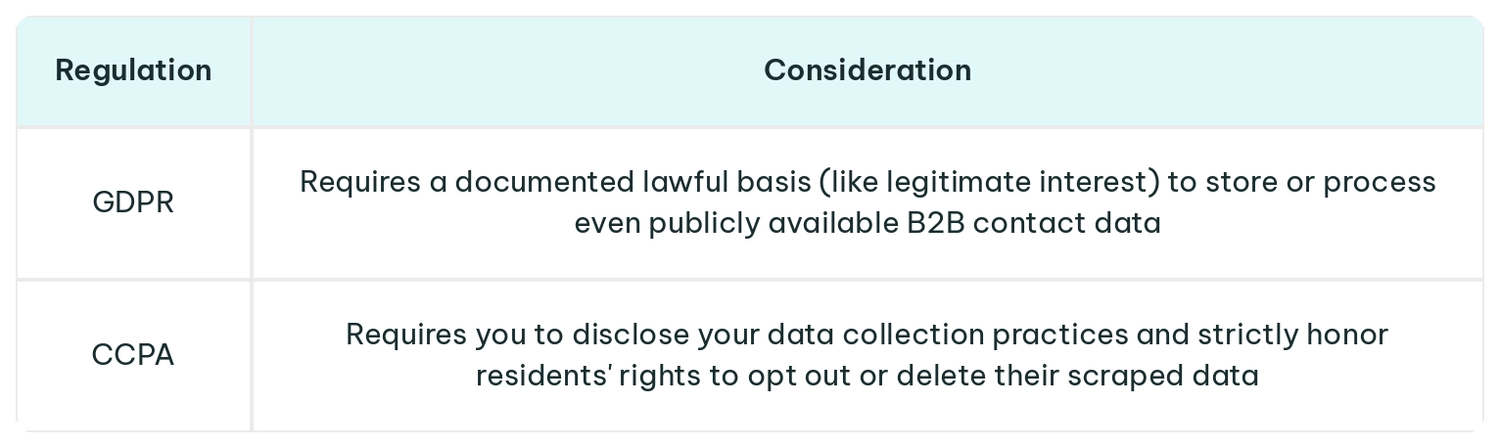
Make sure you conduct ethical web scraping, respect server rate limits, and protect the data you acquire. Never use scraped databases to spam the list or participate in any other shady activities.
Building a Practical ZoomInfo Scraping Workflow
A durable pipeline must manage four key stages: URL discovery, raw data extraction, object parsing, and database storage.
- Queue: Load your seed URLs into a discovery service.
- Extract: Fetch the raw HTML/JSON from the target profiles.
- Normalize: Parse the JSON blocks into structured data objects.
- Load: Commit the cleaned records to your database.
Archive the raw HTML and JSON payloads alongside your normalized records. This allows you to re-parse data if your logic changes without needing to re-crawl the live site.
| Use case | Refresh cadence |
|---|---|
| Business intelligence | Quarterly |
| Lead generation | Weekly |
| Competitive analysis | Bi-weekly |
These pipelines can feed CRM enrichment tools, populate ABM lists, and provide data for internal analytics dashboards. Start with a small sample of profiles to validate your parser’s accuracy before scaling the infrastructure to handle millions of records.
FAQ
Is it legal to scrape ZoomInfo if I only collect public company data?
While scraping public web data carries less risk than bypassing logins, it still violates ZoomInfo’s Terms of Service and exposes you to risks.
Can I scrape ZoomInfo without a developer background?
You can use no-code tools for basic, low-volume extraction, but building a resilient, scalable pipeline requires programming knowledge to navigate complex bot-detection systems.
What’s the difference between scraping ZoomInfo and buying B2B data from a vendor?
Buying API access from a B2B vendor provides reliable, legally compliant data at a premium cost. Scraping reduces upfront data costs and allows for custom extraction, but requires significant ongoing engineering resources to maintain the pipeline and bypass evolving anti-bot defenses.
How many data points can I realistically extract from a ZoomInfo company page?
By parsing the embedded JSON payloads, you can reliably extract dozens of firmographic data points, from revenue estimates to technology stack lists.
How often should I refresh my scraped ZoomInfo data?
The ideal frequency depends on your use case, though you may want to refresh your company data bi-weekly to capture recent executive movements, headcount changes, and structural company updates.